Viro: Unable to resolve module `./res/emoji_smile/emoji_smile.vrx`
Developing an sample app by following this (https://docs.viromedia.com/docs/tutorial-ar) tutorial and its working fine only if this Viro3DObject piece of code is not included
        <Viro3DObject
            source={require('./res/emoji_smile/emoji_smile.vrx')}
            position={[-.5, .5, -1]}
            scale={[.2, .2, .2]}
            type="VRX" />
and if this code is included then its throwing this error
  Loading dependency graph, done.
  error: bundling failed: Error: Unable to resolve module `./res/emoji_smile/emoji_smile.vrx` from     `C:\Path\Projects\ARSample\js\HelloWorldSceneAR.js`: The module `./res/emoji_smile/emoji_smile.vrx` could not be found from `C:\Path\Projects\ARSample\js\HelloWorldSceneAR.js`. Indeed, none of these files exist:
    `C:\Path\Projects\ARSample\js\res\emoji_smile\emoji_smile.vrx(.native||.android.js|.native.js|.js|.android.json|.native.json|.json)`
 `C:\Path\Projects\ARSample\js\res\emoji_smile\emoji_smile.vrx\index(.native||.android.js|.native.js|.js|.android.json|.native.json|.json)`
at ModuleResolver.resolveDependency (C:\Path\Projects\ARSample\node_modules\metro\src\node-haste\DependencyGraph\ModuleResolution.js:161:851)
at ResolutionRequest.resolveDependency (C:\Path\Projects\ARSample\node_modules\metro\src\node-haste\DependencyGraph\ResolutionRequest.js:91:16)
at DependencyGraph.resolveDependency (C:\Path\Projects\ARSample\node_modules\metro\src\node-haste\DependencyGraph.js:272:4579)
at dependencies.map.relativePath (C:\Path\Projects\ARSample\node_modules\metro\src\DeltaBundler\traverseDependencies.js:376:19)
at Array.map (<anonymous>)
at resolveDependencies (C:\Path\Projects\ARSample\node_modules\metro\src\DeltaBundler\traverseDependencies.js:374:16)    at C:\Path\Projects\ARSample\node_modules\metro\src\DeltaBundler\traverseDependencies.js:212:33
at Generator.next (<anonymous>)
at step (C:\Path\Projects\ARSample\node_modules\metro\src\DeltaBundler\traverseDependencies.js:297:313)
at C:\Path\Projects\ARSample\node_modules\metro\src\DeltaBundler\traverseDependencies.js:297:473
Please help since i have tried a lot to solve this. Thanks in advace
 saad-ansari
All 11 comments
Hi @saad-ansari, it the emoji_smile.vrx file places in the file path -> [Your Workspace Folder]/res/emoji_smile/emoji_smile.vrx
It looks like the asset might not be in the correct file path. You can either move the asset to that path or rename the path
 dam00n
on 7 Jun 2018
dam00n
on 7 Jun 2018
Yes i forgot to mention that the file path is correct with correct name. Issue is only with VRX or OBJ objects like if i'm using any image from the same path it works
 <ViroARScene onTrackingUpdated={this._onInitialized} >
    <ViroText text={this.state.text} scale={[.5, .5, .5]} position={[0, 0, -1]} style={styles.helloWorldTextStyle} />
    <ViroBox position={[0, -.5, -1]} scale={[.3, .3, .1]} materials={["grid"]} animation={{name: "rotate", run: true, loop: true}}/>
    <ViroAmbientLight color={"#aaaaaa"} />
    <ViroSpotLight innerAngle={5} outerAngle={90} direction={[0,-1,-.2]}
      position={[0, 3, 1]} color="#ffffff" castsShadow={true} />
    <ViroNode position={[0,-1,0]} dragType="FixedToWorld" onDrag={()=>{}} >
      <Viro3DObject
        source={require('./res/emoji_smile/emoji_smile.vrx')}
        position={[-.5, .5, -1]}
        scale={[.2, .2, .2]}
        type="VRX" />
    </ViroNode>
  </ViroARScene>
and here is my attached project structure where 'red arrow' indicate that file from where this 3dObject is called.
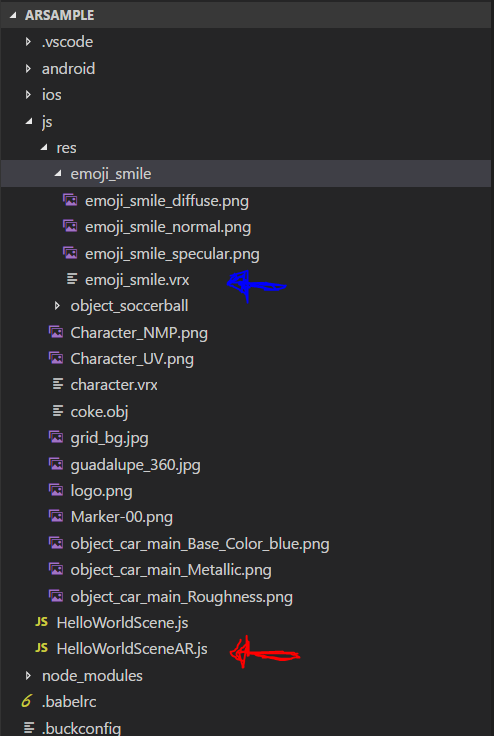
For more info please download this attached project's rar file and help me out :D
Download Link : https://www.dropbox.com/s/u8kgeg3sqqpi5js/ARSample.zip?dl=0
By the way testing by running directly on android device not through Viro Media App.
saad-ansari
on 10 Jun 2018
@dam00n i have tried to move res folder to root of the project but still the same error. Please check and save my time since i have been stuck to this issue from last week. Thanks in advance
saad-ansari
on 10 Jun 2018
Can you make sure your rn-cli.config.js has all the correct extensions.
getAssetExts() {
return ["obj", "mtl", "JPG", "vrx", "fbx", "hdr"];
},
You should have something like this depending on the files you use.
https://docs.viromedia.com/docs/importing-assets#adding-asset-types
dam00n
on 10 Jun 2018
Thank you @dam00n it works now actually the file was missing :/
saad-ansari
on 11 Jun 2018
@dam00n RN 0.57.0 is using a new version of metro bundler which relies on a new config format (see here).
Any idea how to make this work with RN 0.57.0?
 davidruisinger
on 18 Sep 2018
davidruisinger
on 18 Sep 2018
Okay, fixed it by using a rn-cli.config.js like this:
/**
 * Copyright (c) 2015-present, Facebook, Inc.
 * All rights reserved.
 *
 * This source code is licensed under the BSD-style license found in the
 * LICENSE file in the root directory of this source tree. An additional grant
 * of patent rights can be found in the PATENTS file in the same directory.
 *
 * React Native CLI configuration file
 */
'use strict'

const { getDefaultConfig } = require('metro-config')

module.exports = (async () => {
  const {
    resolver: { sourceExts },
  } = await getDefaultConfig()

  return {
    resolver: {
      sourceExts: [...sourceExts, 'obj', 'mtl', 'JPG', 'vrx', 'fbx', 'hdr'],
    },
  }
})()
Unfortunately I still get errors with RN 0.57.0 but those errors are not related to this topic anymore ;-) (see)
davidruisinger
on 18 Sep 2018
I've used @flavordaaave's solution, but the extensions were added in the assetExts entry instead of the sourceExts:
const { getDefaultConfig } = require('metro-config')

module.exports = (async () => {
  const {
    resolver: { assetExts },
  } = await getDefaultConfig()

  return {
    resolver: {
      assetExts: [...assetExts, 'obj', 'mtl', 'JPG', 'vrx', 'fbx', 'hdr'],
    },
  }
})();
 JulioC
on 24 Oct 2018
JulioC
on 24 Oct 2018
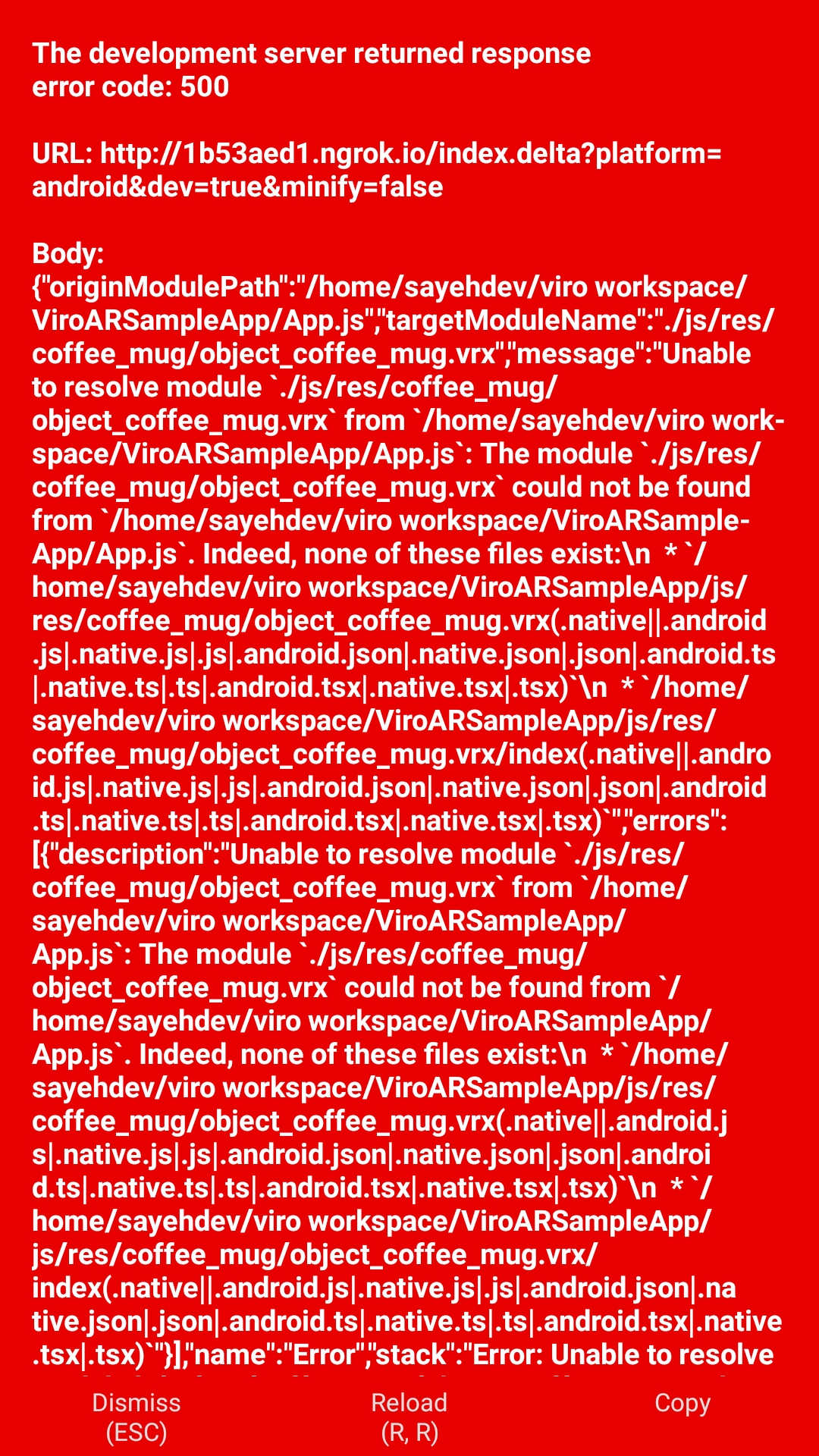
Dears,
I have same problem.
i do all "https://github.com/viromedia/ViroARSampleApp"
and recheck all of above. but problem stay.
what is my fault?
thanks
 omidtecnikcm
on 14 Dec 2018
omidtecnikcm
on 14 Dec 2018
Hi!! I have the same issue, but i'm using RN 0.59 / Viro 2.17, I don't have rn-cli.config.js file
Im trying to solve using metro.config.js file
If I put in this way:
module.exports = {
  transformer: {
    getAssetExts() { return ["obj", "mtl", "JPG", "vrx", "hdr", "gltf", "glb", "bin", "arobject", "gif"];
    },

    getTransformOptions: async () => ({
      transform: { experimentalImportSupport: false, inlineRequires: false,
      },
    }),
  },
};
Show me this error:
error: bundling failed: Error: Unable to resolve module./res/emoji_smile/emoji_smile.vrx
If I put this other way:
module.exports = {
  resolver: {
    assetExts: [ 'obj', 'mtl','jpg','vrx','hdr','gltf','glb','bin', 'arobject','png', ],
  },
  transformer: {
    getTransformOptions: async () => ({
      transform: { experimentalImportSupport: false,
        inlineRequires: false, },
    }),
  },
};
Show me this error:
error: bundling failed: Error: Unable to resolve moduleosfromC:UsersXXXTest1node_modulesmetro-configsrcdefaultsindex.js: Moduleosdoes not exist in the Haste module map
 DianaCruz16
on 6 Mar 2020
DianaCruz16
on 6 Mar 2020
Hi!! I have the same issue, but i'm using RN 0.59 / Viro 2.17, I don't have
rn-cli.config.jsfile
Im trying to solve usingmetro.config.jsfileIf I put in this way:
module.exports = {
  transformer: {
    getAssetExts() { return ["obj", "mtl", "JPG", "vrx", "hdr", "gltf", "glb", "bin", "arobject", "gif"];
    },

    getTransformOptions: async () => ({
      transform: { experimentalImportSupport: false, inlineRequires: false,
      },
    }),
  },
};
Show me this error:
error: bundling failed: Error: Unable to resolve module./res/emoji_smile/emoji_smile.vrxIf I put this other way:
module.exports = {
  resolver: {
    assetExts: [ 'obj', 'mtl','jpg','vrx','hdr','gltf','glb','bin', 'arobject','png', ],
  },
  transformer: {
    getTransformOptions: async () => ({
      transform: { experimentalImportSupport: false,
        inlineRequires: false, },
    }),
  },
};
Show me this error:
error: bundling failed: Error: Unable to resolve moduleosfromC:UsersXXXTest1node_modulesmetro-configsrcdefaultsindex.js: Moduleosdoes not exist in the Haste module map
Using the resolved worked for me, I was able to load the .vrx file on RN 0.64.2
 andrewasfa
on 24 Jul 2021
andrewasfa
on 24 Jul 2021
Related issues
 SathishSaminathan
·
4Comments
SathishSaminathan
·
4Comments
 Thomas101
·
3Comments
Thomas101
·
3Comments
 krishanjangir
·
4Comments
krishanjangir
·
4Comments
 WillGeller
·
3Comments
WillGeller
·
3Comments
 vuthanhtrung0504
·
5Comments
vuthanhtrung0504
·
5Comments
Most helpful comment
Dears,
I have same problem.
i do all "https://github.com/viromedia/ViroARSampleApp"
and recheck all of above. but problem stay.
what is my fault?
thanks