Hi!
I would like to use viro in the project I am working on. I am able to build and run project on actual iPhone, however running project in simulator does not seems possible due to different CPU architecture and no symbols included. I am aware that Viro does not support simulator, but my question is:
Is there a way I can dynamically disable Viro when building for simulator, so I can keep working on and testing other features of my app?
So far I've tried to do conditional import:
#if !TARGET_OS_SIMULATOR
#import <ViroReact/VRTBundleURLProvider.h>
#endif
But in that case I get a different error:
ld: framework not found ViroKit
clang: error: linker command failed with exit code 1 (use -v to see invocation)
Thank you,
Vitalii
 VitaliiK91
All 7 comments
Hi @VitaliiK91 ,
Is your project a hybrid app (Native iOS + Viro React) or React Native + Viro React app? In the case it is React Native + Viro React, the easiest way I can think of (Not fully knowing how your app structure is, so may be completely wrong) is to do this check in your AppDelegate where the RCTRootView is initialized, as you would do in a regular iOS app; and then pass this info to the react root-view as initialProperties. Something on the lines of
BOOL isSimulatorTarget = NO;
#if TARGET_OS_SIMULATOR
  isSimulatorTarget = YES;
#endif
And then passing this as initial property where RCTRootView is initialized, as follows:
RCTRootView *rootView = [[RCTRootView alloc] initWithBundleURL:jsCodeLocation
                                                      moduleName:@"YourApp"
                                               initialProperties:@{@"isSimulatorTarget": @(isSimulatorTarget)}
                                                   launchOptions:launchOptions];
And then in the react-native code, rely on value of this.props.isSimulatorTarget to conditionally render Viro components based on whether the app is running on simulator or a device. There are multiple ways to do conditional rendering, but an easy solution we have relied in some of our projects - is to write a conditional rendering module:
export default function renderIf(condition, content) {
    if (condition) {
        return content;
    } else {
        return null;
    }
}
And then using the above module to selectively render Viro components -
{renderIf(!this.props.isSimulatorTarget,
            <View style={localStyles.viroContainer}>
              <ViroARSceneNavigator
                {...this.state.sharedProps}
                initialScene={{scene: InitialARScene}}
                ... />
            </View>
         )}
Hope this helps! Let us know if you have more questions.
Thanks,
 manbod
on 9 Mar 2018
manbod
on 9 Mar 2018
And additionally for the ld: framework not found ViroKit error you could try opening up the Build Phases for your app Target and toggling the Required option for libViroReact.a to Optional.
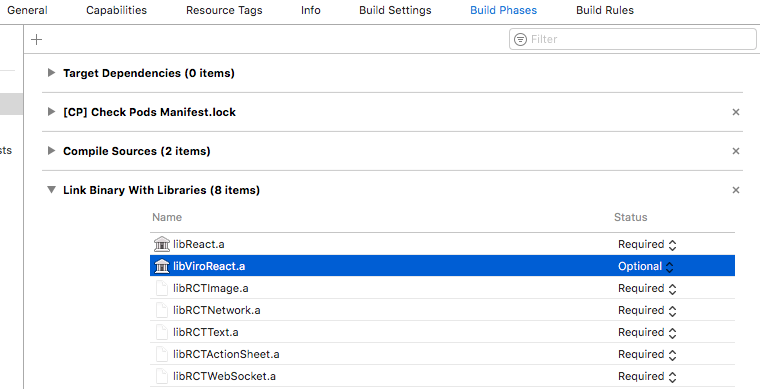
Hope this does the trick for you. Good luck!
manbod
on 9 Mar 2018
@manbod Thanks for reply. It is React Native project.
I don't have issues identifying device is simulator in JS code, however my issue is I can not build and run project. In AppDelegate.m when I
#import <ViroReact/VRTBundleURLProvider.h>
I get build error saying that required symbols are not included.
When I tried to:
#if !TARGET_OS_SIMULATOR
#import <ViroReact/VRTBundleURLProvider.h>
#endif
I got the error:
fatal error: lipo: -remove's specified would result in an empty fat file
I tried to change the Build Phase -> Link Binary to optional but still get the error.
Any suggestions?
Thanks
VitaliiK91
on 9 Mar 2018
Hi @VitaliiK91,
This might be an issue with your CocoaPods version, see this issue with the same error:
https://github.com/Instabug/Instabug-iOS/issues/208
Thanks,
 achuvm
on 12 Mar 2018
achuvm
on 12 Mar 2018
@achuvm Hi, thanks for the reply. Seems it was the issue with cocoapods. After upgrading to version 1.4.0 issue is gone. Thanks
VitaliiK91
on 19 Mar 2018
@VitaliiK91,
Good to hear! So can you confirm that you got it working with the iOS Simulator?
Thanks!
achuvm
on 19 Mar 2018
@achuvm Yes I confirm, was able to run in simulator.
#if !(TARGET_IPHONE_SIMULATOR)
#import <ViroReact/VRTBundleURLProvider.h>
#endif
is how I imported library to be able to build and run on simulator
VitaliiK91
on 19 Mar 2018
Related issues
 Thomas101
·
3Comments
Thomas101
·
3Comments
 slycoder
·
4Comments
slycoder
·
4Comments
 peacemind
·
5Comments
peacemind
·
5Comments
 dimegusew
·
3Comments
dimegusew
·
3Comments
 JStein92
·
5Comments
JStein92
·
5Comments
Most helpful comment
Hi @VitaliiK91 ,
Is your project a hybrid app (Native iOS + Viro React) or React Native + Viro React app? In the case it is React Native + Viro React, the easiest way I can think of (Not fully knowing how your app structure is, so may be completely wrong) is to do this check in your AppDelegate where the RCTRootView is initialized, as you would do in a regular iOS app; and then pass this info to the react root-view as
initialProperties. Something on the lines ofAnd then passing this as initial property where
RCTRootViewis initialized, as follows:And then in the react-native code, rely on value of
this.props.isSimulatorTargetto conditionally render Viro components based on whether the app is running on simulator or a device. There are multiple ways to do conditional rendering, but an easy solution we have relied in some of our projects - is to write a conditional rendering module:And then using the above module to selectively render Viro components -
Hope this helps! Let us know if you have more questions.
Thanks,