Vimtex: XeLaTeX ans SumatraPDF live update
I have the same issue as described here: https://github.com/lervag/vimtex/issues/1122
For example (minimal LaTeX document):
\documentclass[12pt,a4paper]{article}

\begin{document}
    test
\end{document
Compiling that with \ll opens the pdf in SumatraPDF. Then I edit some of the text and save it with :w after which vimtex automatically recompiles it and SumatraPDF automatically updates. Everything works as advertised.
However, if I have the following LaTeX code:
%! TEX program = xelatex
\documentclass[12pt,a4paper]{article}

\begin{document}
    test
\end{document}
and compile it with \ll, the document will open just as fine as in the first scenario but if I edit the document and save with :w, vimtex will automatically recompile it but SumatraPDF won't update i.e. it will display the original version (the one created with \ll). Note that the recompilation was successful i.e. the folder contains the new edited pdf but SumatraPDF displays the original version.
_vimrc:
" Vim with all enhancements
source $VIMRUNTIME/vimrc_example.vim

" Mouse behavior (the Windows way)
behave mswin

filetype plugin indent on
syntax on

set encoding=utf-8
set fileencoding=utf-8
set gfn=Iosevka:h16:cEASTEUROPE:qDRAFT

call plug#begin()
Plug 'lervag/vimtex'
call plug#end()

let g:tex_flavor='latex'
let g:vimtex_view_general_viewer='SumatraPDF'
let g:vimtex_quickfix_mode=0
set conceallevel=1
let g:tex_conceal='abdmg'

hi clear Conceal
I don't have a .latexmkrc file and once again, everything compiles and works, it's just that editing + xelatex doesn't update SumatraPDF.
- OS: Windows 10 v1903 x64
- SumatraPDF v3.1.2 x64
- Vim 8.1 x64 (Included patches: 1-1568)
It says here that:
xelatexis exactly equivalent toxelatex -no-pdf+xdvipdfmx
and it seems (\lo output) that this how vimtex handles xelatex; first xelatex -no-pdf and then xdvipdfmx so is it possible that when updating the document (via :w), SumatraPDF reopens the pdf before xdvipdfmx finishes the job?
\lo for pdflatex:
======= Need to update make_preview_continuous for target files
Latexmk: applying rule 'pdflatex'...
Latexmk: This is Latexmk, John Collins, 21 May 2019, version: 4.64a.
Viewing pdf
Rule 'pdflatex': The following rules & subrules became out-of-date:
      'pdflatex'
------------
Run number 1 of rule 'pdflatex'
------------
------------
Running 'pdflatex  -file-line-error -synctex=1 -interaction=nonstopmode -recorder  "test.tex"'
------------
This is pdfTeX, Version 3.14159265-2.6-1.40.20 (TeX Live 2019/W32TeX) (preloaded format=pdflatex)
 restricted \write18 enabled.
entering extended mode
(./test.tex
LaTeX2e <2018-12-01>
(c:/texlive/2019/texmf-dist/tex/latex/base/article.cls
Document Class: article 2018/09/03 v1.4i Standard LaTeX document class
(c:/texlive/2019/texmf-dist/tex/latex/base/size12.clo)) (./test.aux) [1{c:/texlive/2019/texmf-var/fonts/map/pdftex/updmap/pdftex.map}] (./test.aux) )<c:/texlive/2019/texmf-dist/fonts/type1/public/amsfonts/cm/cmr12.pfb>
Output written on test.pdf (1 page, 8815 bytes).
SyncTeX written on test.synctex.gz.

Transcript written on test.log.
=== TeX engine is 'pdfTeX'
Latexmk: applying rule 'pdflatex'...
Latexmk: Log file says output to 'test.pdf'
Rule 'pdflatex': File changes, etc:
   Changed files, or newly in use since previous run(s):
      'test.aux'
------------
Run number 2 of rule 'pdflatex'
------------
------------
Running 'pdflatex  -file-line-error -synctex=1 -interaction=nonstopmode -recorder  "test.tex"'
------------
This is pdfTeX, Version 3.14159265-2.6-1.40.20 (TeX Live 2019/W32TeX) (preloaded format=pdflatex)
 restricted \write18 enabled.
entering extended mode
(./test.tex
LaTeX2e <2018-12-01>
(c:/texlive/2019/texmf-dist/tex/latex/base/article.cls
Document Class: article 2018/09/03 v1.4i Standard LaTeX document class
(c:/texlive/2019/texmf-dist/tex/latex/base/size12.clo)) (./test.aux) [1{c:/texlive/2019/texmf-var/fonts/map/pdftex/updmap/pdftex.map}] (./test.aux) )<c:/texlive/2019/texmf-dist/fonts/type1/public/amsfonts/cm/cmr12.pfb>
Output written on test.pdf (1 page, 8815 bytes).
SyncTeX written on test.synctex.gz.

Transcript written on test.log.
=== TeX engine is 'pdfTeX'
Latexmk: All targets () are up-to-date
For rule 'view', running '&if_source(  )' ...
Latexmk: Log file says output to 'test.pdf'
Latexmk: I have not found a previewer that is already running.
   So I will start it for 'test.pdf'
------------
------------
Running 'start SumatraPDF  "test.pdf"'
------------
vimtex_compiler_callback_success
------------
Running 'echo vimtex_compiler_callback_success'
------------

=== Watching for updated files. Use ctrl/C to stop ...
Latexmk: applying rule 'pdflatex'...
User changed files
  test.tex
Latexmk: Need to remake files.
  File changes, etc:
   Changed files, or newly in use since previous run(s):
      'test.tex'
Rule 'pdflatex': File changes, etc:
   Changed files, or newly in use since previous run(s):
      'test.tex'
------------
Run number 1 of rule 'pdflatex'
------------
------------
Running 'pdflatex  -file-line-error -synctex=1 -interaction=nonstopmode -recorder  "test.tex"'
------------
This is pdfTeX, Version 3.14159265-2.6-1.40.20 (TeX Live 2019/W32TeX) (preloaded format=pdflatex)
 restricted \write18 enabled.
entering extended mode
(./test.tex
LaTeX2e <2018-12-01>
(c:/texlive/2019/texmf-dist/tex/latex/base/article.cls
Document Class: article 2018/09/03 v1.4i Standard LaTeX document class
(c:/texlive/2019/texmf-dist/tex/latex/base/size12.clo)) (./test.aux) [1{c:/texlive/2019/texmf-var/fonts/map/pdftex/updmap/pdftex.map}] (./test.aux) )<c:/texlive/2019/texmf-dist/fonts/type1/public/amsfonts/cm/cmr12.pfb>
Output written on test.pdf (1 page, 8806 bytes).
SyncTeX written on test.synctex.gz.

Transcript written on test.log.
=== TeX engine is 'pdfTeX'
Latexmk: All targets () are up-to-date
For rule 'update_view', running '&do_update_view( 3 undef 0 1 )' ...
Latexmk: Log file says output to 'test.pdf'
------------
Running 'echo vimtex_compiler_callback_success'
------------
vimtex_compiler_callback_success
\lo for xelatex:
======= Need to update make_preview_continuous for target files
Latexmk: applying rule 'xelatex'...
Latexmk: This is Latexmk, John Collins, 21 May 2019, version: 4.64a.
Viewing pdf
Rule 'xelatex': The following rules & subrules became out-of-date:
      'xelatex'
------------
Run number 1 of rule 'xelatex'
------------
------------
Running 'xelatex -no-pdf -file-line-error -synctex=1 -interaction=nonstopmode -recorder  "test.tex"'
------------
This is XeTeX, Version 3.14159265-2.6-0.999991 (TeX Live 2019/W32TeX) (preloaded format=xelatex)
 restricted \write18 enabled.
entering extended mode
(./test.tex
LaTeX2e <2018-12-01>
(c:/texlive/2019/texmf-dist/tex/latex/base/article.cls
Document Class: article 2018/09/03 v1.4i Standard LaTeX document class
(c:/texlive/2019/texmf-dist/tex/latex/base/size12.clo)) (./test.aux) [1] (./test.aux) )
Output written on test.xdv (1 page, 536 bytes).
SyncTeX written on test.synctex.gz.

Transcript written on test.log.
Latexmk: Log file says output to 'test.xdv'
=== TeX engine is 'XeTeX'
Latexmk: applying rule 'xelatex'...
Rule 'xelatex': File changes, etc:
   Changed files, or newly in use since previous run(s):
      'test.aux'
------------
Run number 2 of rule 'xelatex'
------------
------------
Running 'xelatex -no-pdf -file-line-error -synctex=1 -interaction=nonstopmode -recorder  "test.tex"'
------------
This is XeTeX, Version 3.14159265-2.6-0.999991 (TeX Live 2019/W32TeX) (preloaded format=xelatex)
 restricted \write18 enabled.
entering extended mode
(./test.tex
LaTeX2e <2018-12-01>
(c:/texlive/2019/texmf-dist/tex/latex/base/article.cls
Document Class: article 2018/09/03 v1.4i Standard LaTeX document class
(c:/texlive/2019/texmf-dist/tex/latex/base/size12.clo)) (./test.aux) [1] (./test.aux) )
Output written on test.xdv (1 page, 536 bytes).
SyncTeX written on test.synctex.gz.

Transcript written on test.log.
=== TeX engine is 'XeTeX'
Latexmk: applying rule 'xdvipdfmx'...
For rule 'xdvipdfmx', running '&do_viewfile(  )' ...
Latexmk: Log file says output to 'test.xdv'
Rule 'xdvipdfmx': File changes, etc:
   Changed files, or newly in use since previous run(s):
      'test.xdv'
   Rule(s) that have been run and require run of dependent rule:
      'xelatex' which requires run of 'xdvipdfmx'
------------
Run number 1 of rule 'xdvipdfmx'
------------
Latexmk: Making 'test.pdf' via temporary 'C:\Users\Altair\AppData\Local\Temp/test_tmp1.pdf'...
------------
Running 'xdvipdfmx -o "C:\Users\Altair\AppData\Local\Temp\test_tmp1.pdf"  "test.xdv"'
------------
test.xdv -> test.pdf
[1]
2527 bytes written
Latexmk: All targets () are up-to-date
For rule 'view', running '&if_source(  )' ...
Latexmk: I have not found a previewer that is already running.
   So I will start it for 'test.pdf'
------------
------------
Running 'start SumatraPDF  "test.pdf"'
------------
------------
Running 'echo vimtex_compiler_callback_success'
------------
vimtex_compiler_callback_success

=== Watching for updated files. Use ctrl/C to stop ...
Latexmk: applying rule 'xelatex'...
User changed files
  test.tex
Latexmk: Need to remake files.
  File changes, etc:
   Changed files, or newly in use since previous run(s):
      'test.tex'
Rule 'xelatex': File changes, etc:
   Changed files, or newly in use since previous run(s):
      'test.tex'
------------
Run number 1 of rule 'xelatex'
------------
------------
Running 'xelatex -no-pdf -file-line-error -synctex=1 -interaction=nonstopmode -recorder  "test.tex"'
------------
This is XeTeX, Version 3.14159265-2.6-0.999991 (TeX Live 2019/W32TeX) (preloaded format=xelatex)
 restricted \write18 enabled.
entering extended mode
(./test.tex
LaTeX2e <2018-12-01>
(c:/texlive/2019/texmf-dist/tex/latex/base/article.cls
Document Class: article 2018/09/03 v1.4i Standard LaTeX document class
(c:/texlive/2019/texmf-dist/tex/latex/base/size12.clo)) (./test.aux) [1] (./test.aux) )
Output written on test.xdv (1 page, 436 bytes).
SyncTeX written on test.synctex.gz.

Transcript written on test.log.
=== TeX engine is 'XeTeX'
Latexmk: applying rule 'xdvipdfmx'...
For rule 'xdvipdfmx', running '&do_viewfile(  )' ...
Latexmk: Log file says output to 'test.xdv'
Rule 'xdvipdfmx': File changes, etc:
   Changed files, or newly in use since previous run(s):
      'test.xdv'
   Rule(s) that have been run and require run of dependent rule:
      'xelatex' which requires run of 'xdvipdfmx'
------------
Run number 1 of rule 'xdvipdfmx'
------------
Latexmk: Making 'test.pdf' via temporary 'C:\Users\Altair\AppData\Local\Temp/test_tmp1.pdf'...
------------
Running 'xdvipdfmx -o "C:\Users\Altair\AppData\Local\Temp\test_tmp1.pdf"  "test.xdv"'
------------
test.xdv -> test.pdf
[1]
2517 bytes written
Latexmk: All targets () are up-to-date
For rule 'update_view', running '&do_update_view( 3 undef 0 1 )' ...
------------
Running 'echo vimtex_compiler_callback_success'
------------
vimtex_compiler_callback_success
 Whitebeard0
All 10 comments
Interesting question. I don't think this is really related to vimtex, but instead to how latexmk works, because it is latexmk that should be updating the viewer after compilation. But I am not sure. In any case, you are right that this seems to be identical to #1122, and so if we can fix it we will also resolve that issue (which is closed, but not resolved).
Could you try the following? In an appropriately placed latexmkrc file, experiment with the $pdf_update_method, which is set to 3 by default on Windows. You could try to set it to 4, and to specify an update command in your latexmkrc file, e.g. something like sumatrapdf -reuse-instance .... See the manual for more information, here.
I have a minor idea why the update does not work, though. I think it could be because with xelatex, the pdf file is updated after compilation by moving the .xdv file into the .pdf file. Perhaps this operation is somehow not detected by SumatraPDF as a real update, for some reason. Perhaps there might be a relevant option for this within the SumatraPDF preferences as well?
 lervag
on 23 Jun 2019
lervag
on 23 Jun 2019
It's kinda weird that \ll "knows" that it has to wait for xdvipdf but :w doesn't. After I save the edited .tex file with :w and run \ll, I get the updated pdf file but I have to run \ll twice, first time to stop the compiler (which runs in continuous mode) and the second time to restart the compiler which opens the pdf file. The interesting thing is that when I restart the compiler, it seems to recognize that everything is up to date and it will just open the updated pdf file but still, I have to run 3 commands (:w,\ll,\ll) instead of one (:w) to get the updated pdf file.
I went through the manual of latexmk and managed to come up with a solution. I made a .latexmkrc file in C:\Users\My_Username\ (note the dot at the beginning, it's not latexmkrc but .latexmkrc , source: https://tex.stackexchange.com/questions/39781/where-should-i-put-a-latexmkrc-file-using-texlive-2011-and-windows-7-so-that-i).
I added a single line:
$xelatex = "xelatex -file-line-error -synctex=1 -interaction=nonstopmode -recorder %S"
and now everything works.
The default command is the same as above but with an added -no-pdf option. Actually, if I am correct, the default is:
$xelatex = "xelatex %O %S"
where
%O = "-no-pdf -file-line-error -synctex=1 -interaction=nonstopmode -recorder"
By doing that, I lost some performance as explained in the manual (page 16) :
... [Note: Note that the method of implementation of this option, but not its intended primary effect,differ from some earlier versions of latexmk. Latexmk first uses xelatex to make an .xdv file, anddoes all the extra runs needed (including those of bibtex, etc). Only after that does it make the pdffile from the .xdv file, using xdvipdfmx. This procedure can result in considerable savings in runtime, since the xdv-to-pdf conversion is quite time-consuming when large graphics files are usedin the document.]
Also (page 42) :
Note about xelatex: Now latexmk uses xelatex to make an .xdv rather than .pdf file, with the .pdffile being created in a separate step. This is enforced by the use of the -no-pdf option. If %O ispart of the command for invoking xelatex, then latexmk will insert the -no-pdf option automati-cally, otherwise you must provide the option yourself
\lo for xelatex
```Latexmk: This is Latexmk, John Collins, 21 May 2019, version: 4.64a.
Latexmk: In reading rule 'xelatex' in 'test.fdb_latexmk',
destination has different name than configured...
===== CHANGING output type from '.xdv' to '.pdf' in 'xelatex'
Viewing pdf
======= Need to update make_preview_continuous for target files
Latexmk: applying rule 'xelatex'...
Rule 'xelatex': File changes, etc:
Changed files, or newly in use since previous run(s):
'test.tex'
Run number 1 of rule 'xelatex'
Running 'xelatex -file-line-error -synctex=1 -interaction=nonstopmode -recorder "test.tex"'
This is XeTeX, Version 3.14159265-2.6-0.999991 (TeX Live 2019/W32TeX) (preloaded format=xelatex)
restricted \write18 enabled.
entering extended mode
(./test.tex
LaTeX2e <2018-12-01>
(c:/texlive/2019/texmf-dist/tex/latex/base/article.cls
Document Class: article 2018/09/03 v1.4i Standard LaTeX document class
(c:/texlive/2019/texmf-dist/tex/latex/base/size12.clo)) (./test.aux) [1] (./test.aux) )
Output written on test.pdf (1 page).
SyncTeX written on test.synctex.gz.
Transcript written on test.log.
Latexmk: Log file says output to 'test.pdf'
=== TeX engine is 'XeTeX'
Latexmk: All targets () are up-to-date
For rule 'view', running '&if_source( )' ...
Latexmk: I have not found a previewer that is already running.
So I will start it for 'test.pdf'
Running 'start SumatraPDF "test.pdf"'
Running 'echo vimtex_compiler_callback_success'
vimtex_compiler_callback_success
=== Watching for updated files. Use ctrl/C to stop ...
Latexmk: applying rule 'xelatex'...
User changed files
test.tex
Latexmk: Need to remake files.
File changes, etc:
Changed files, or newly in use since previous run(s):
'test.tex'
Rule 'xelatex': File changes, etc:
Changed files, or newly in use since previous run(s):
'test.tex'
Run number 1 of rule 'xelatex'
Running 'xelatex -file-line-error -synctex=1 -interaction=nonstopmode -recorder "test.tex"'
This is XeTeX, Version 3.14159265-2.6-0.999991 (TeX Live 2019/W32TeX) (preloaded format=xelatex)
restricted \write18 enabled.
entering extended mode
(./test.tex
LaTeX2e <2018-12-01>
(c:/texlive/2019/texmf-dist/tex/latex/base/article.cls
Document Class: article 2018/09/03 v1.4i Standard LaTeX document class
(c:/texlive/2019/texmf-dist/tex/latex/base/size12.clo)) (./test.aux) [1] (./test.aux) )
Output written on test.pdf (1 page).
SyncTeX written on test.synctex.gz.
Transcript written on test.log.
=== TeX engine is 'XeTeX'
Latexmk: All targets () are up-to-date
For rule 'update_view', running '&do_update_view( 3 undef 0 1 )' ...
Latexmk: Log file says output to 'test.pdf'
Running 'echo vimtex_compiler_callback_success'
vimtex_compiler_callback_success```
Whitebeard0
on 27 Jun 2019
It's kinda weird that \ll "knows" that it has to wait for xdvipdf but :w doesn't. After I save the edited .tex file with :w and run \ll, I get the updated pdf file but I have to run \ll twice, first time to stop the compiler (which runs in continuous mode) and the second time to restart the compiler which opens the pdf file. The interesting thing is that when I restart the compiler, it seems to recognize that everything is up to date and it will just open the updated pdf file but still, I have to run 3 commands (:w,\ll,\ll) instead of one (:w) to get the updated pdf file.
\ll simply starts latexmk in the background. There is not very much magic going on. I expect that you will have the exact same issues with latexmk run in a terminal. My point is, this is not directly an issue with vimtex.
I'm very happy to hear that you found a solution, though. I'm not sure if I should add it to the docs. But I'll consider it. Do you by chance have any opinion about this, and if so, a suggestion about where it would feel natural to find information about this?
lervag
on 27 Jun 2019
\llsimply starts latexmk in the background. There is not very much magic going on. I expect that you will have the exact same issues with latexmk run in a terminal. My point is, this is not directly an issue with vimtex.I'm very happy to hear that you found a solution, though. I'm not sure if I should add it to the docs. But I'll consider it. Do you by chance have any opinion about this, and if so, a suggestion about where it would feel natural to find information about this?
I apologize! I phrased it poorly. I understand that it's not an issue with vimtex but latexmk i.e. the compiler running in continuous mode.
Regarding the documentation. I am not sure if this particular combination is popular enough that it would warrant a new entry in the documentation but if you think so, maybe put it in the section vimtex_viewer_sumatrapdf as a "Note". For example, that section already has the following note:
Note: It is possible to set up inverse search for SumatraPDF through
the command line. This can be utilized to set the correct
|servername| for inverse search: >
The reason I think that it should go there is that SumatraPDF is the only serious option for Windows users who use vimtex. I am fairly certain that the vast majority of people who will use this particular combination (Windows + Vim + vimtex + XeLaTeX) will also use SumatraPDF.
Whitebeard0
on 27 Jun 2019
Thanks, I've added a comment with a link to this thread.
lervag
on 28 Jun 2019
I have some good news.
I still don't know the source of the problem (is it SumatraPDF, is it latexmk, some combination of the two, something else, ...) but every now and then, I update everything and test it. Today, with the lastest vimtex plugin, latexmk 4.69a and SumatraPDF 3.2 everything works perfectly!
Whitebeard0
on 28 Apr 2020
I'm very glad to hear it!
lervag
on 28 Apr 2020
@Whitebeard0 I have the same problem as you. Now my latexmk is 4.67 but I don't know how to update it. Could you pls tell me? Thx.
 CofeCup
on 22 Sep 2020
CofeCup
on 22 Sep 2020
@Whitebeard0 I have the same problem as you. Now my latexmk is 4.67 but I don't know how to update it. Could you pls tell me? Thx.
I use TeX Live. If you have an older version of TeX Live, you will have to uninstall it and install the newest (2020) version.
Incremental updates for TeX Live are available via TeX Live Manager. On Windows 10 you would click Start -> TeX Live 2020 -> TeX Live Manager.
Step 1: Select "Updatable".
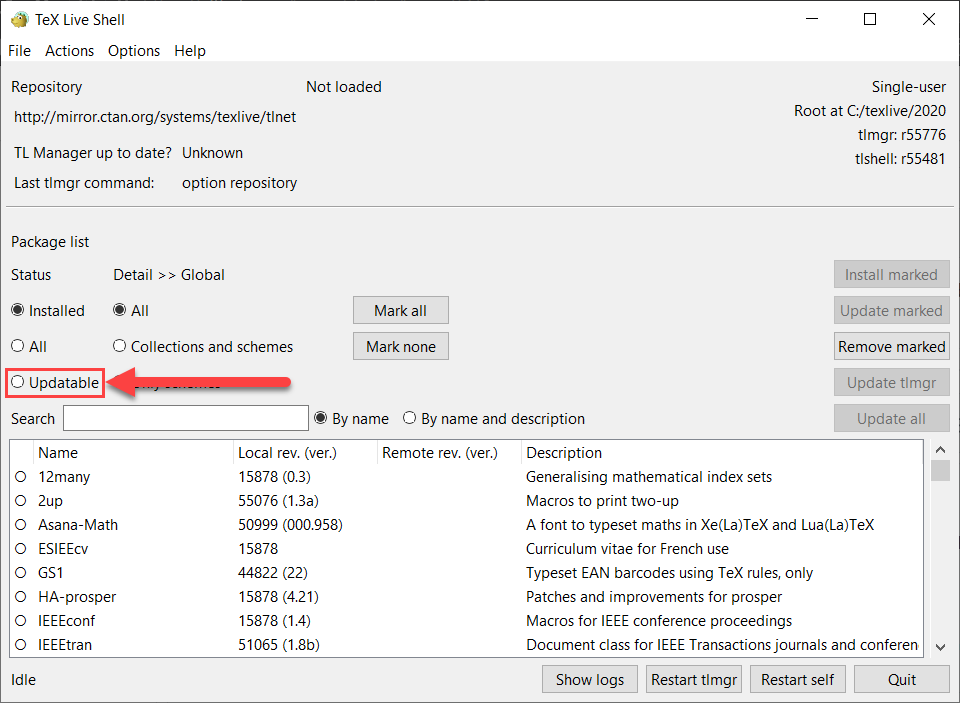
Step 2: Wait until the repository loads and click close.

Step 3: Click "Update all"
Note: If the button "Update tlmgr" (above the button "Update All") is not grayed out i.e. you can click it, you should do that first and then reopen "TeX Live Manager" and do steps 1, 2 and 3.
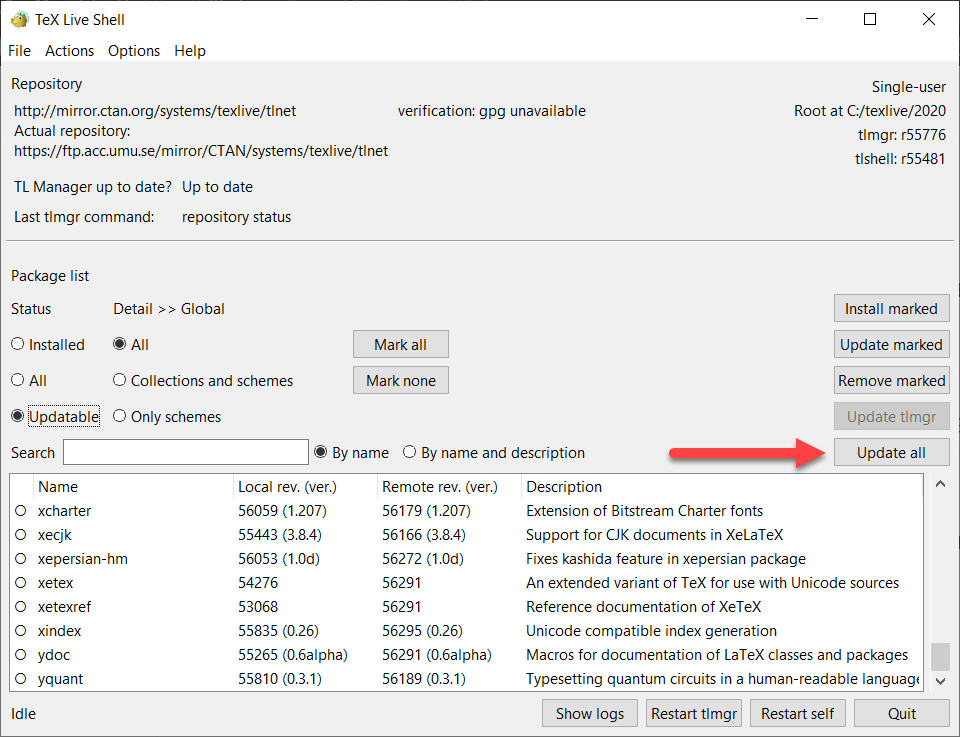
Step 4: Wait (a long time) and click the "Close" button. Note that you will eventually be able to click the "Close" button but it takes a really long time.

If you use MikTeX, maybe try this: https://docs.miktex.org/manual/updating.html
If you use Linux or MacOSX, the TeX Live solution should be more or less the same, otherwise, please post additional info about your setup.
Whitebeard0
on 22 Sep 2020
@Whitebeard0 I have the same problem as you. Now my latexmk is 4.67 but I don't know how to update it. Could you pls tell me? Thx.
I use TeX Live. If you have an older version of TeX Live, you will have to uninstall it and install the newest (2020) version.
...
Problem solved! Thank you very much. It's very kind of you!
CofeCup
on 22 Sep 2020
Related issues
 adimanea
·
5Comments
adimanea
·
5Comments
 thomasahle
·
4Comments
thomasahle
·
4Comments
 sharethewisdom
·
3Comments
sharethewisdom
·
3Comments
 benutzer193
·
4Comments
lervag
·
5Comments
benutzer193
·
4Comments
lervag
·
5Comments