Vimtex: Backward searching in skim [MAC]
It seems that the default setting in the new version of skim [1.4.35] not work properly, I mean if you choose the default setting of MacVim, the default value is given by
--remote-silent +"%line" "%file"
in such case, CMD+Shift+click will always open a new macvim window, which cause an warning since the swp file are created...
To fix it, I tried to change it by use a custom setting:
vim --remote-silent +"%line" "%file"
which works, although I don't know why...
I hope @lervag could update this setting in the manual.
 vanabel
All 12 comments
I do not understand. --remote-silent +"%line" "%file" seems to not be a valid setting, as it lacks the command.
 lervag
on 18 Jun 2018
lervag
on 18 Jun 2018
mvim vim --remote-silent +"%line" "%file"
indeed solves the problem that backward search would open a new macvim window and cause a warning about swp, though I do not know what it means
 Jue-Xu
on 31 Aug 2018
Jue-Xu
on 31 Aug 2018
If anyone wants to open a small PR to add docs for how to set backward search with Skim, that would be appreciated.
lervag
on 2 Sep 2018
I know several points about setting backward and forward search with Skim:
- Make sure there is no conflict plugin in vim, like Latex-Suite, which invalidates the forward search shortcut in vimtex. If you have latex-suite in your vim,
\llwill open the Preview on Mac instead of Skim. Now, my forward search works well with the one-line configuration
$pdflatex = 'pdflatex -synctex=1 -interaction=nonstopmode --shell-escape %O %S';
in .latexmkrc and one line
let g:vimtex_view_method = 'skim'
in .vimrc. - Make sure that
mvimcommand works in bash, because many people use zsh on mac. Ifmvim: command not foundin bash, they have to link mvim in bash or make a alias in .bash_profile file (.bash_profile is a little bit different from .bashrc in linux). - Be careful when there are different versions of vim, I mean, the default vim with macos, macvim installed by homebrew and macvim downloaded from the official websit. Use
which mvimto check which mvim you are using. I recommend that you keep the macvim downloaded from the official website which seems more compatible than the homebrew version and uninstall the homebrew one. If you are using two versions of macvim simultaneously, backward search may open a macvim that is different from the currently opened one, which will cause a swp warning.
I recommend use this setting in Skim instead of the default one.
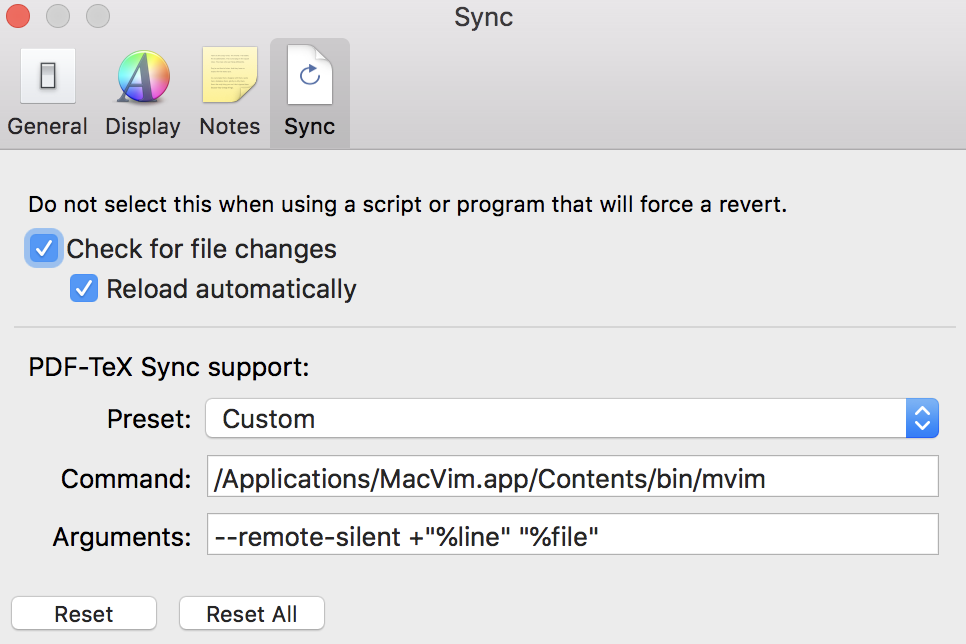
The command/Applications/MacVim.app/Contents/bin/mvimforce to use the macvim binary file in the macvim application downloaded from the official website (make sure that command/Applications/MacVim.app/Contents/bin/mvimin your bash opens a gui macvim), so this command also solve the second point. Now, useshift + command + double clickin Skim, it will jump to the macvim that is already opened. - Make sure that *.synctex.gz file exists in the folder. Without this file, both backward search and forward search cannot work.
Jue-Xu
on 2 Sep 2018
Thanks! I've updated the docs accordingly.
lervag
on 2 Sep 2018
Thanks! Here is one question: My Vim is the system edition, not macvim. And I try to set the backward search in Skim.
First, I trired to set the parameters in Skim like:
Command: result by which vim in command line
Args:--remote-silent +"line" "file"
This solution didn't work.
Second, I refer to the vim document:
https://sourceforge.net/p/skim-app/wiki/TeX_and_PDF_Synchronization/#choosing-an-editor-command-for-backward-search
follow the link served by document, and make an executable bash file, set the parameters as recommended. But the solution still didn't work.
It seems that I have tried all solutions of vim document, quite sadly. Could you offer some suggestions about how to make skim backward run?
Thanks in advance!
 invisiblecloak-slw
on 17 Oct 2019
invisiblecloak-slw
on 17 Oct 2019
What is the command result by “which vim”? What does this command produce, a view window in shell or a GUI vim? I guess you may need a vim with GUI.
Jue-Xu
on 17 Oct 2019
Thanks for sending e-mail, I have read your solution for mvim. My vim is not mvim, it's just the vim provided by mac OS. I open the zsh shell and input which vim to find the content to fill in Skim-sync-command
so, there exits any solution for realizing backward search in Skim with system vim?
Thanks you
invisiblecloak-slw
on 17 Oct 2019
I am not sure about the workaround for system vim. Maybe you can try macvim.
Jue-Xu
on 17 Oct 2019
@invisiblecloak-slw I assume you have read :help vimtex-faq-skimviewer and followed the suggestions there? What is the output of running vim --version in your shell?
Note, you should use --remote-silent +"%line" "%file", including the percents % (in your post, these are missing).
I do not know which versions will work and not. The output of vim --version should show you which features are supported. Look for +clientserver; this needs to be there. If it is instead -clientserver, then it won't work.
lervag
on 17 Oct 2019
Thanks! I have found that the system vim (normal version without GUI) doesn't provide the clientserver feature. So I decide to try macvim.
invisiblecloak-slw
on 18 Oct 2019
Good. If you have problems with MacVim, could you please open a new issue? I think it is better than to add more noise to old issues.
lervag
on 18 Oct 2019
Related issues
 carloabelli
·
3Comments
carloabelli
·
3Comments
 David-Fu
·
5Comments
David-Fu
·
5Comments
 adimanea
·
5Comments
adimanea
·
5Comments
 andregpss
·
5Comments
andregpss
·
5Comments
 sharethewisdom
·
3Comments
sharethewisdom
·
3Comments
Most helpful comment
I know several points about setting backward and forward search with Skim:
\llwill open the Preview on Mac instead of Skim. Now, my forward search works well with the one-line configuration$pdflatex = 'pdflatex -synctex=1 -interaction=nonstopmode --shell-escape %O %S';in .latexmkrc and one line
let g:vimtex_view_method = 'skim'in .vimrc.
mvimcommand works in bash, because many people use zsh on mac. Ifmvim: command not foundin bash, they have to link mvim in bash or make a alias in .bash_profile file (.bash_profile is a little bit different from .bashrc in linux).which mvimto check which mvim you are using. I recommend that you keep the macvim downloaded from the official website which seems more compatible than the homebrew version and uninstall the homebrew one. If you are using two versions of macvim simultaneously, backward search may open a macvim that is different from the currently opened one, which will cause a swp warning.I recommend use this setting in Skim instead of the default one.
The command
/Applications/MacVim.app/Contents/bin/mvimforce to use the macvim binary file in the macvim application downloaded from the official website (make sure that command/Applications/MacVim.app/Contents/bin/mvimin your bash opens a gui macvim), so this command also solve the second point. Now, useshift + command + double clickin Skim, it will jump to the macvim that is already opened.