Vimr: Choosing certain fonts has no effect on VimR's appearence
Version 0.34.0 (355), macOS 10.15
I just bought Comic Code Ligatures and wanted to use it in VimR.
However, if I choose it from the font selector, nothing changes in the actual editor windows, even though the preview renders properly.
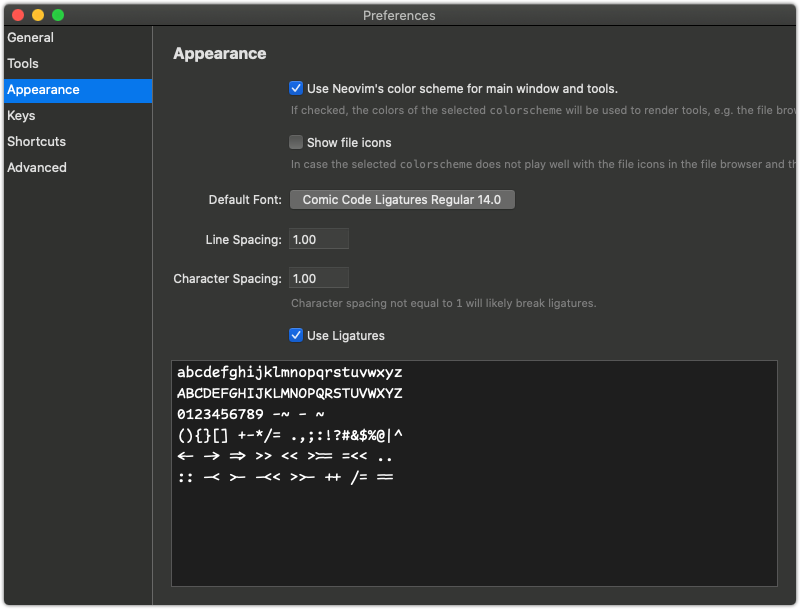
Same thing happens if I choose a bunch of other fonts like Arial or Georgia. Choosing fonts like Monaco or Fira Code updates the editor though.
I tried restarting VimR, but that didn't help.
 ravicious
All 14 comments
I've noticed something similar with a patched (non-ligature) font, but only with the last snapshot or two. I suspect these are fonts that do not correctly report themselves as being fixed width.
 clason
on 22 Aug 2020
clason
on 22 Aug 2020
Oh, maybe it's something else: do the settings take if you open a new window (cmd-N) _while the Preferences window is open_? (You can close everything afterwards, but some options only seem to get applied -- and then saved -- on opening a new window.)
clason
on 22 Aug 2020
do the settings take if you open a new window (cmd-N) while the Preferences window is open?
Unfortunately no. If I choose Menlo or Monaco as a font or change the size, the settings are applied immediately to existing windows.
I guess it has to do with what you said previously about the font not reporting itself as fixed with and VimR refusing to use it for some reason.
ravicious
on 23 Aug 2020
Has anyone found a solution to this? I'm trying to use a patched version of SF Mono (with powerline symbols), but I can't seem to make it work. I've also noticed that the font doesn't appear under "Fixed Width" collection. Maybe a problem with the font itself not reporting as being fixed width? Any pointers or suggestions welcome!
 muxcmux
on 15 Nov 2020
muxcmux
on 15 Nov 2020
I switched to neovim-qt. It has its own share of rendering problems, but it doesn’t have this particular problem.
ravicious
on 15 Nov 2020
I found that it only works if the font you selected is in the Fixed Width collection.
 numbcoder
on 18 Nov 2020
numbcoder
on 18 Nov 2020
ping @qvacua
numbcoder
on 18 Nov 2020
I think this is related to https://github.com/qvacua/vimr/issues/819 and https://github.com/qvacua/vimr/issues/526 and I think I've seen a few other issues related to this
muxcmux
on 18 Nov 2020
Sorry for the late reply. I tried to focus on the universal binary front. Yes, we check whether the font has the fixed width property, as reported by macOS. The problem is, as you mention
- Some fixed width fonts are not reported as fixed width.
- The macOS font panel does not allow to filter fonts, i.e. I don't know how to show only fixed width font.
I'll probably just allow all fonts and think about how to approach this issue... I'll build a snapshot in this weekend.
 qvacua
on 18 Nov 2020
qvacua
on 18 Nov 2020
Sorry for the late reply. I tried to focus on the universal binary front. Yes, we check whether the font has the fixed width property, as reported by macOS. The problem is, as you mention
- Some fixed width fonts are not reported as fixed width.
- The macOS font panel does not allow to filter fonts, i.e. I don't know how to show only fixed width font.
I'll probably just allow all fonts and think about how to approach this issue... I'll build a snapshot in this weekend.
Thank you!
numbcoder
on 19 Nov 2020
qvacua
on 21 Nov 2020
Please try https://github.com/qvacua/vimr/releases/tag/snapshot%2F20201121.103800
It works well for me!
Thanks.
numbcoder
on 21 Nov 2020
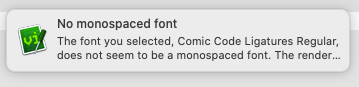
Works great, thanks! The notification message is a bit clipped and I don't know how I can read it in full, but otherwise it works just fine. ;)
ravicious
on 21 Nov 2020
If you open the notification center, the whole text will be there.
qvacua
on 22 Nov 2020
Related issues
 hakamadare
·
4Comments
hakamadare
·
4Comments
 crisidev
·
7Comments
crisidev
·
7Comments
 risentveber
·
4Comments
risentveber
·
4Comments
 mikl
·
3Comments
mikl
·
3Comments
 TravisDart
·
7Comments
TravisDart
·
7Comments
Most helpful comment
Sorry for the late reply. I tried to focus on the universal binary front. Yes, we check whether the font has the fixed width property, as reported by macOS. The problem is, as you mention
I'll probably just allow all fonts and think about how to approach this issue... I'll build a snapshot in this weekend.