I wanted to migrate from the terminal to a proper GUI for NeoVim and love your GUI, however I saw that LSP for Dart is not working although it works correctly in nvim on terminal:
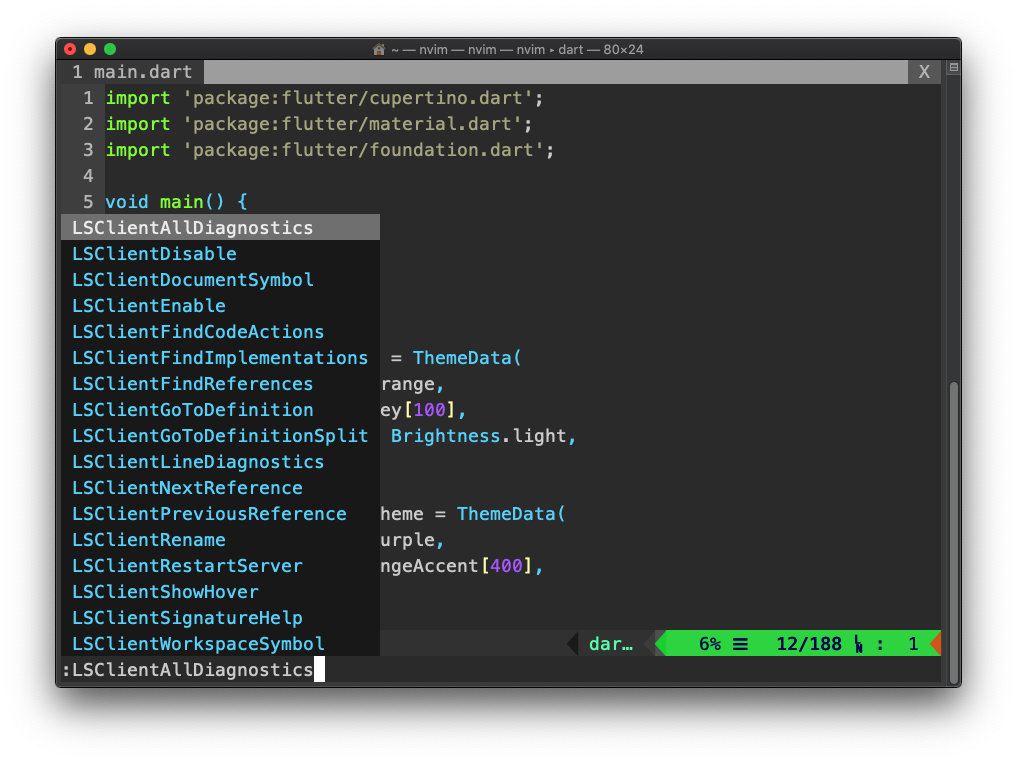
Getting a failed to initialize server on your end. ALL other settings are working correctly

Is LSP functionality not implemented yet?
Thanks!
 sollymay
All 13 comments
VimR does not implement anything extra other than some GUI stuff, like the file browser or some previews. All other functionalities are added by (Neo-) Vim plugins. Can you please post a minimal init.vim I can try out (and debug with)?
 qvacua
on 5 Jul 2020
qvacua
on 5 Jul 2020
The lsp functionality is only on neovim master (what will be released -- eventually -- as 0.5); VimR bundles the latest released version (0.4.3) of neovim as a library. (Note that this is different from how most if not all other neovim GUIs operate, which communicate with a separately installed neovim instance -- so even if you have neovim master installed for your console, VimR will still only use the bundled release.)
You can try the recent VimR snapshot built from master, though: https://github.com/qvacua/vimr/releases/tag/neovim-0.5
There is a valid point here, though: neovim master has moved so far ahead of the 0.4 branch in terms of functionality (and is in my experience stable enough to be considered "early access") that most people will want to use that. I personally have stopped using VimR because I came to rely on 0.5 functionality.
So, TL;DR: I think it would make sense to build at least the snapshots from neovim HEAD rather than the latest release.
 clason
on 5 Jul 2020
clason
on 5 Jul 2020
I did not know that Neovim 0.5 supports LSP natively. @clason: it sounds reasonable to build snapshots with the HEAD of Neovim. I'll do that from the next snapshot on.
qvacua
on 5 Jul 2020
Neovim made (and is working on further) _massive_ improvements with 0.5 -- better lua integration, LSP integration, treesitter integration, autoread support ... It's going to be a big one!
clason
on 5 Jul 2020
Please try the new snapshot: https://github.com/qvacua/vimr/releases/tag/snapshot%2F355
qvacua
on 5 Jul 2020
Works nicely (including LSP), thank you very much!
clason
on 5 Jul 2020
Hi Guys, I updated to snapshot 355, however I am still experiencing the same issue. If I open nvim on a terminal window, the Dart Analysis Server works no problem. If I do it on VimR, I get the Failed to Initialize server: Dart Analysis Server error
Here's my init.vim
set undofile
set encoding=utf-8

if has('clipboard')
  if has('unnamedplus')  " When possible use + register for copy-paste
    set clipboard=unnamed,unnamedplus
  else         " On mac and Windows, use * register for copy-paste
    set clipboard=unnamed
  endif
endif

set ignorecase
set number
set conceallevel=1
set background=dark

set expandtab
set smartindent
set autoindent
set softtabstop=4
set shiftwidth=2
set tabstop=4

set history=1000

" Visual shifting (does not exit Visual mode)
vnoremap < <gv
vnoremap > >gv

" Allow using the repeat operator with a visual selection (!)
" http://stackoverflow.com/a/8064607/127816
vnoremap . :normal .<CR>
syntax on
colorscheme molokai
autocmd BufEnter * lcd %:p:h

filetype plugin indent on

set undodir=~/.config/nvim/undodir

call plug#begin()

Plug 'vim-scripts/Vimball'
Plug 'godlygeek/tabular'
Plug 'scrooloose/nerdtree'
Plug 'tpope/vim-fugitive'
Plug 'itchyny/lightline.vim'
Plug 'junegunn/goyo.vim'
Plug 'ctrlpvim/ctrlp.vim'
Plug 'groenewege/vim-less'
Plug 'tpope/vim-markdown'
Plug 'michaeljsmith/vim-indent-object'
Plug 'Shougo/neocomplcache.vim'
Plug 'tpope/vim-surround'
Plug 'airblade/vim-gitgutter'
Plug 'Raimondi/delimitMate'
Plug 'Vimjas/vim-python-pep8-indent'
Plug 'mhinz/vim-startify'
Plug 'Quramy/tsuquyomi'
Plug 'Shougo/vimproc.vim'
Plug 'Xuyuanp/nerdtree-git-plugin'
Plug 'vim-airline/vim-airline'
Plug 'vim-airline/vim-airline-themes'
Plug 'dart-lang/dart-vim-plugin'
Plug 'natebosch/vim-lsc'
Plug 'natebosch/vim-lsc-dart'
Plug 'luochen1990/rainbow'
call plug#end()

"Dart Stuff
let g:lsc_server_commands = {'dart': 'dart_language_server'}
let g:dart_format_on_save = 1
autocmd CompleteDone * silent! pclose
"
let g:lsc_auto_map = v:true

let g:syntastic_check_on_open=1

map <C-E> :NERDTreeToggle<CR>
let NERDTreeQuitOnOpen=1
let NERDTreeShowHidden=1
let NERDTreeIgnore = ['\.pyc$']


set mouse=a                 " Automatically enable mouse usage
set mousehide               " Hide the mouse cursor while typing

let g:NERDTreeIndicatorMapCustom = {
    \ "Modified"  : "✹",
    \ "Staged"    : "✚",
    \ "Untracked" : "✭",
    \ "Renamed"   : "➜",
    \ "Unmerged"  : "═",
    \ "Deleted"   : "✖",
    \ "Dirty"     : "✗",
    \ "Clean"     : "✔︎",
    \ 'Ignored'   : '☒',
    \ "Unknown"   : "?"
    \ }

" Theme for airline:
let g:airline#extensions#tabline#enabled = 1
let g:airline_theme='dark'
let g:airline_powerline_fonts = 1
let g:airline#extensions#tabline#left_sep = ' '
let g:airline#extensions#tabline#left_alt_sep = '|'

" Put these lines at the very end of your vimrc file.
" Rainbow brackets
let g:rainbow_active = 1 "set to 0 if you want to enable it later via :RainbowToggle
" Load all plugins now.
" Plugins need to be added to runtimepath before helptags can be generated.
packloadall
" Load all of the helptags now, after plugins have been loaded.
" All messages and errors will be ignored.
silent! helptags ALL

autocmd filetype crontab setlocal nobackup nowritebackup
the plugins I'm using for dart completion are:
Plug 'dart-lang/dart-vim-plugin'
Plug 'natebosch/vim-lsc'
Plug 'natebosch/vim-lsc-dart'
Thank you for troubleshooting with me. I would really love to use a dedicated GUI like yours!
sollymay
on 5 Jul 2020
Oh, you're using LanguageServerClient, not the built-in LSP. That's a different issue then. It might be an issue with your shell or profile (paths are set up for the terminal, but not picked up by VimR). Does it make a difference if you start vimr from a terminal rather than via Finder?
clason
on 5 Jul 2020
hey @clason, nope. it does not work either way. interestingly enough, it seems to work by opening nvim directly from terminal
sollymay
on 5 Jul 2020
Sorry, can't help then -- I don't use vim-lsc (or dart), and I have no idea what that error message means. You might get more help at the vim-lsc repo, maybe they know what might be the cause of this error or how to track down what's causing this.
(I still think it's a path or environment issue.)
clason
on 5 Jul 2020
@qvacua I just noticed a problem that I think might be related: Homebrew has recently switched the python3 to Python 3.8. Since then, python stopped working in VimR (snapshort 356, but I don't think it's relevant here); it's working fine in terminal neovim. Tellingly, checkhealth in VimR reports:
## Python 3 provider (optional)
  - WARNING: No Python executable found that can `import neovim`. Using the first available executable for diagnostics.
  - ERROR: Python provider error:
    - ADVICE:
      - provider/pythonx: Could not load Python 3:
          Checking /usr/local/bin/python3 caused an unknown error. (1, output: Fatal Python error: config_get_locale_encoding: failed to get the locale encoding: nl_langinfo(CODESET) failed
          Python runtime state: preinitialized

          ) Report this at https://github.com/neovim/neovim
          python3.9 not found in search path or not executable.
          Checking /usr/local/bin/python3.8 caused an unknown error. (1, output: Fatal Python error: config_get_locale_encoding: failed to get the locale encoding: nl_langinfo(CODESET) failed
          Python runtime state: preinitialized

          ) Report this at https://github.com/neovim/neovim
          python3.7 not found in search path or not executable.
          python3.6 not found in search path or not executable.
          python3.5 not found in search path or not executable.
          python3.4 not found in search path or not executable.
          python3.3 not found in search path or not executable.
          /usr/bin/python is Python 2.7 and cannot provide Python 3.
  - INFO: Executable: Not found
Note the locale encoding: For some reason, VimR when launched from the Finder doesn't seem to set this correctly. Opening vimr from the terminal reports python3 working correctly.
EDIT: I get the same error when I invoke python3 from the neovim terminal. It seems that VimR sets some locale information differently. In neovim:
LANG=en_US
LANGUAGE=
LC_ALL=
LC_MESSAGES=en_US
In iTerm:
LC_CTYPE=en_US.UTF-8
I was able to solve the issue by removing the brew installed Dart and using the flutter installed dart. Once that was done, the LSC server started working on VimR!
sollymay
on 9 Jul 2020
Glad you fixed it! But that's interesting, it points to a problem specifically with software installed via homebrew.
clason
on 9 Jul 2020
Related issues
 laur1s
·
5Comments
qvacua
·
7Comments
laur1s
·
5Comments
qvacua
·
7Comments
 robertgzr
·
7Comments
robertgzr
·
7Comments
 selaselah
·
7Comments
selaselah
·
7Comments
 crisidev
·
7Comments
crisidev
·
7Comments
Most helpful comment
Please try the new snapshot: https://github.com/qvacua/vimr/releases/tag/snapshot%2F355