Vim: Cursor location doesn't update on VSCode search / click on line
Describe the bug
VSCodeVim doesn't always update cursor location when user changes it using VSCode (by clicking on a line / cycling through VSCode search results).
NOTE 1: This started with v1.17.0, I tested v1.16.0 and it works fine.
NOTE 2: This happens to me about 60% of the time, a few times I tried it worked fine, still really easy to reproduce
To Reproduce
Steps to reproduce the behavior:
- Go to a file
- Search something using VSCode search (⌘ + F), cycle results to a result found in a different part of the file than the current cursor line
- Move cursor using VSCodeVim (J/K/L/M/e/any other motion really)
- Cursor jumps back to the previous cursor location (before search)
Or:
- Go to a file
- Place cursor on some line
- Click on another line (put cursor there)
- Move cursor using VSCodeVim (J/K/L/M/e/any other motion really)
- Cursor jumps back to the previous cursor location (before clicking on a line)
Expected behavior
Cursor location representation in VSCodeVim should be updated when it's moved to a different location using VSCode tools
Environment (please complete the following information):
- Extension (VsCodeVim) version: 1.17.0
- VSCode version: 1.49.1
- OS: macOS Catalina 10.15.5
Additional context
As mentioned above, this started with 1.17.0 (1.16.0 is fine). Something appears to be wrong with this version
 EdenGottlieb
All 15 comments
Experiencing same issue.
hjkl movements seem to use the cursor-selected position.
But commands like x or dd will use the prior position.
 nemosmithasf
on 23 Sep 2020
nemosmithasf
on 23 Sep 2020
Also reported in #5212
 patrickeibl
on 23 Sep 2020
patrickeibl
on 23 Sep 2020
Experiencing same issue to :confused:
 matvey-b
on 24 Sep 2020
matvey-b
on 24 Sep 2020
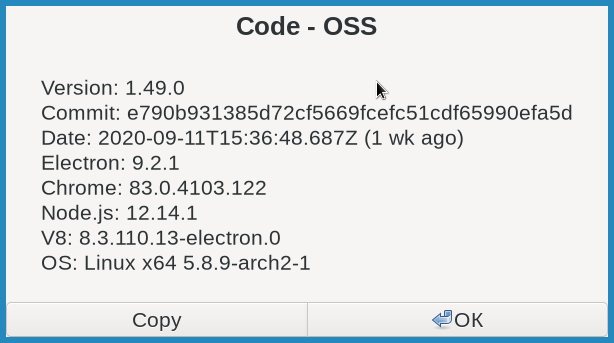
hjklwebf{} commands do not use cursor-selected position. Looks for me like noting uses cursor-selected position
 belkka
on 24 Sep 2020
belkka
on 24 Sep 2020
Can any of you post your logs here like explained here?
 berknam
on 25 Sep 2020
berknam
on 25 Sep 2020
I'm having this same issue. This borderline breaks the extension, making it nearly unusable.
 DM-Berger
on 25 Sep 2020
DM-Berger
on 25 Sep 2020
I'm pretty sure this is happening because of an issue of multicursor selections that might happen when using snippets, that makes it so that all selection changes are ignored, and the only way to fix it is either close and reopen the file or reloading the window.
If someone can post their logs I might be able to confirm that. I have a fix for the issue I mentioned that I will try to push soon.
berknam
on 26 Sep 2020
Can anyone here test PR #5250 to see if it fixes this issue and report back?
berknam
on 28 Sep 2020
It's not even only on "mouse click". It's a more serious issue, as it breaks serious features of VSCode itself like "Ctrl+Shift+O" (Search by symbol/functions/variables), which move Code's cursor. Now it's almost a useless feature, and it's one I'm using a lot.
Steps to reproduce
Ctrl+Shift+O- Select one option (arrow keys, mouse click or your chosen way)
- Hit any of the keys
jklh - See yourself go back to the previous line
Versions

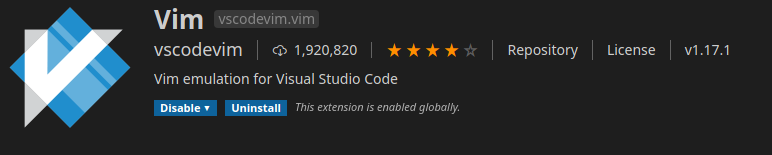
 exapsy
on 28 Sep 2020
exapsy
on 28 Sep 2020
@exapsy If you close and reopen vscode or if you run the "Reload Window" from command palette can you still reproduce that? Or does it only start happening after some use?
Because I can't reproduce that. I know there is at least a situation that can leave VSCodeVim in a status that makes it behave like explained here. And that is what I tried to fix with PR #5250, if you can, test it out and give some feedback.
berknam
on 29 Sep 2020
@berknam No you're right. If you reload the window it doesn't happen. But now, I'm not sure how to reproduce it consistently to test your PR. I just know that it will happen again very soon, but not sure why. Any ideas on how to reproduce it?
exapsy
on 29 Sep 2020
It might happen when using snippets but I know for sure that if you create two or more multicursors in visual mode and then move them until they combine together it would create that situation. Like this:
line |1
line |2
line 3
line 4
Where | are the cursors. If you then do viw to select 1 and 2 and then press j it would get you in that situation.
berknam
on 29 Sep 2020
Possibly related to this: using Ctrl + Left or Right Arrow key to move cursor over words does not update the vim cursor. Using v1.17.1 (which fixes a bunch of the other issues such as mouse clicks not updating the vim cursor).
 chrisjaquet
on 5 Oct 2020
chrisjaquet
on 5 Oct 2020
Possibly related to this: using Ctrl + Left or Right Arrow key to move cursor over words does not update the vim cursor. Using v1.17.1 (which fixes a bunch of the other issues such as mouse clicks not updating the vim cursor).
Yes. If you are in the state where this is happening then any change of selection/cursor that is not made directly through Vim will not be recognized. For now until #5250 is released the only way to fix it is reloading the window or restarting vscode (actually closing the affected documents and reopening them might work as well, haven't tested it yet)
berknam
on 6 Oct 2020
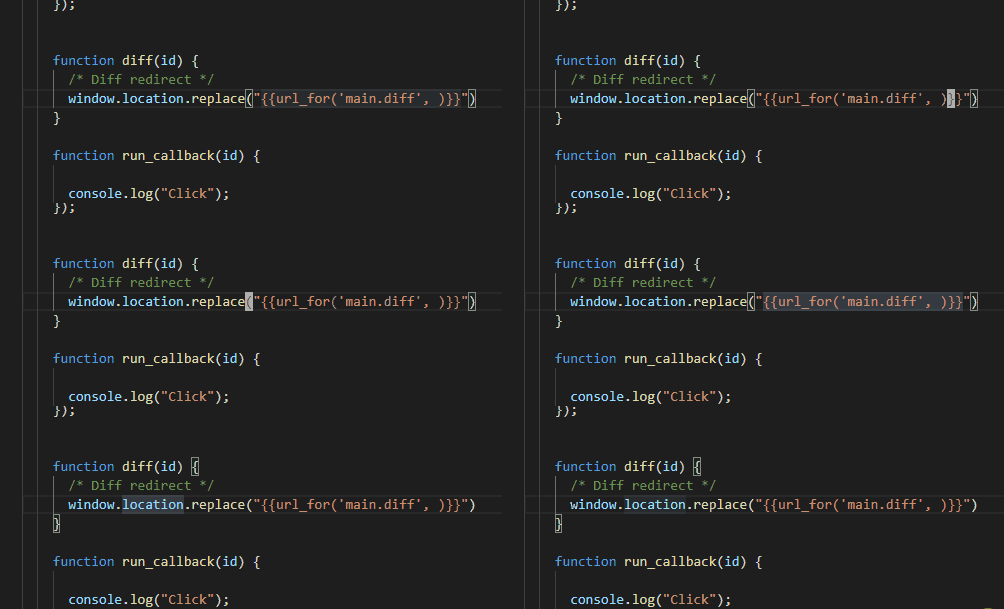
Same for me using Ctrl+Arrow keys to move around, then when I press I, the insert will be at the location I was when I first started moving using Ctrl keys. Attaching a gif of the issue.
 christoffertoft
on 8 Oct 2020
christoffertoft
on 8 Oct 2020
Related issues
 waltiam
·
3Comments
waltiam
·
3Comments
 rajinder-yadav
·
3Comments
rajinder-yadav
·
3Comments
 orn688
·
3Comments
orn688
·
3Comments
 lucastheisen
·
3Comments
lucastheisen
·
3Comments
 WangRongda
·
3Comments
WangRongda
·
3Comments