the vscodevim of version 1.12.0 is not working!
 xtzt
xtzt
All 14 comments
4340
 samsiu
on 9 Dec 2019
samsiu
on 9 Dec 2019
+1. the version 1.12.0 for me doesn't work either. Going back to 1.11.3 could repair it.
 LebranceBW
on 9 Dec 2019
LebranceBW
on 9 Dec 2019
me too
 galois-advertising
on 9 Dec 2019
galois-advertising
on 9 Dec 2019
- 1
 victorvarenic
on 9 Dec 2019
victorvarenic
on 9 Dec 2019
Duplicate of #4340. Please do not add "me too" comments there - click the "Thumbs up" on the original issue.
 Vinnl
on 9 Dec 2019
Vinnl
on 9 Dec 2019
+1. the version 1.12.0 for me doesn't work either. Going back to 1.11.3 could repair it.
Does someone know how to rollback temporally while current version is broken?
 armoucar
on 9 Dec 2019
armoucar
on 9 Dec 2019
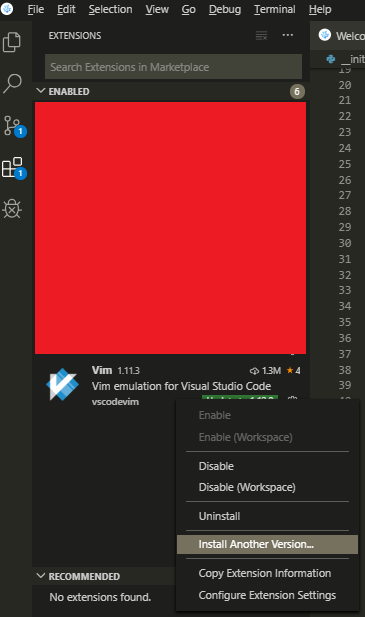
@armoucar click the gear next to the Vim extension, and select "Install another version"
 tcfunk
on 9 Dec 2019
tcfunk
on 9 Dec 2019
@armoucar
Go to extensions tab, right click the Vim plugin and select "Installl another version"
 anonoh
on 9 Dec 2019
anonoh
on 9 Dec 2019
not working +1, and roll back...
 jesHrz
on 9 Dec 2019
jesHrz
on 9 Dec 2019
It does not work for me either.
When I started the vscode, it did not even start the vim
so reinstall the extension after I removed the extension from vscode and as well as from the "$HOME/.vscode/extensions"
Then It starts vim but the key mappings are mess
 yoonjuh
on 9 Dec 2019
yoonjuh
on 9 Dec 2019
It's not working for me and the rest of my team on macos, code 1.40.2. (vim 1.12.0)
 dcolthorp
on 9 Dec 2019
dcolthorp
on 9 Dec 2019
I think we can stop commenting here. If someone can, please close this issue.
Link to duplicate issue: https://github.com/VSCodeVim/Vim/issues/4340
Current workaround: Install version 1.11.3
Steps to execute workaround: https://github.com/VSCodeVim/Vim/issues/4346#issuecomment-563233380
 pvinis
on 9 Dec 2019
pvinis
on 9 Dec 2019
Fixed in 1.12.1, sorry for the trouble.
 rebornix
on 9 Dec 2019
rebornix
on 9 Dec 2019
There are still some issues ppl are seeing now, let's track it in https://github.com/VSCodeVim/Vim/issues/4342#issuecomment-563338094.
rebornix
on 9 Dec 2019
Related issues
 ghost
·
3Comments
ghost
·
3Comments
 cckowin
·
3Comments
cckowin
·
3Comments
 triztian
·
3Comments
triztian
·
3Comments
 orn688
·
3Comments
orn688
·
3Comments
 rajinder-yadav
·
3Comments
rajinder-yadav
·
3Comments
Most helpful comment
@armoucar
Go to extensions tab, right click the Vim plugin and select "Installl another version"