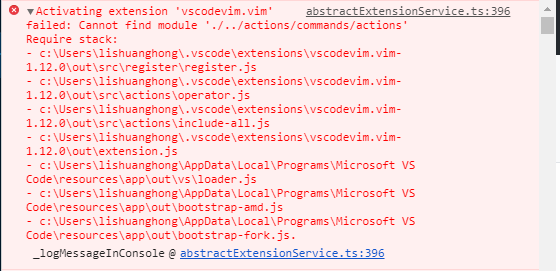
Vim: vim extentions does not work, "Cannot find module './../actions/commands/actions'"
Describe the bug
The vscodevim extention can not work in vs code 1.40.2 version
To Reproduce
Steps to reproduce the behavior:
- Update vs code to version: 1.40.2
- Install the vscodevim extension, version: 1.12.0
Screenshots
Environment (please complete the following information):
Version: 1.40.2 (user setup)
Commit: f359dd69833dd8800b54d458f6d37ab7c78df520
Date: 2019-11-25T14:54:45.096Z
Electron: 6.1.5
Chrome: 76.0.3809.146
Node.js: 12.4.0
V8: 7.6.303.31-electron.0
OS: Windows_NT x64 6.1.7601
 FrankKirin
All 11 comments
I have the same issue on a Mac but only with Vim plugin version 1.12.0 older versions work fine.
VSCode info:
Version: 1.40.2
Commit: f359dd69833dd8800b54d458f6d37ab7c78df520
Date: 2019-11-25T14:52:45.129Z
Electron: 6.1.5
Chrome: 76.0.3809.146
Node.js: 12.4.0
V8: 7.6.303.31-electron.0
OS: Darwin x64 19.0.0
 philippmayrth
on 9 Dec 2019
philippmayrth
on 9 Dec 2019
1.12.0 Seems to be broken, Older versions would work fine.
 sb-junhyeong
on 9 Dec 2019
sb-junhyeong
on 9 Dec 2019
Is there a way to downgrade temporarily? I feel like having my hands hacked off without the vim keybindings :)
EDIT: Never mind - found the downgrade button.
 dkms-its
on 9 Dec 2019
dkms-its
on 9 Dec 2019
Same issue for me, using the previous version works.
 tephe
on 9 Dec 2019
tephe
on 9 Dec 2019
I have the same issue with 1.12.0 on ubuntu 19.04, older versions work fine.
 BasBuller
on 9 Dec 2019
BasBuller
on 9 Dec 2019
Same issue Ubuntu 18.10 VSCode 1.40.2
 cd1m0
on 9 Dec 2019
cd1m0
on 9 Dec 2019
Guys, subscribing to this issue is enough, there's no point "me too"-ing.
dkms-its
on 9 Dec 2019
https://github.com/VSCodeVim/Vim/releases/tag/v1.12.0
This page's exntesion includes actions/commands/actions.js, so it works.
But extension page's extension not includes actions/commands/actions.js.
 cakecatz
on 9 Dec 2019
cakecatz
on 9 Dec 2019
Fixed in 1.12.1, sorry for the trouble.
 rebornix
on 9 Dec 2019
rebornix
on 9 Dec 2019
Thank you so much for the quick turn around. 🏅
 pho3nixf1re
on 9 Dec 2019
pho3nixf1re
on 9 Dec 2019
There are still some issues ppl are seeing now, let's track it in https://github.com/VSCodeVim/Vim/issues/4342#issuecomment-563338094.
rebornix
on 9 Dec 2019
Related issues
 cckowin
·
3Comments
cckowin
·
3Comments
 gerardmrk
·
3Comments
gerardmrk
·
3Comments
 stefanoio
·
3Comments
stefanoio
·
3Comments
 waltiam
·
3Comments
waltiam
·
3Comments
 ACollectionOfAtoms
·
3Comments
ACollectionOfAtoms
·
3Comments
Most helpful comment
1.12.0 Seems to be broken, Older versions would work fine.