Vim: Scrolling with <C-e> and <C-y> is very laggy
Describe the bug
When holding down (or quickly tapping) <C-e> or <C-y>, scrolling soon becomes very laggy and the editor only scrolls at a rate of about two lines per second. The keystrokes get queued up and after letting go of the keys the editor continues to scroll slowly and try to catch up.
<C-u> and <C-d> don't suffer from this problem. I noticed in the source that they don't use vimState.postponedCodeViewChanges.push() and instead call vscode.commands.executeCommand() directly. Maybe this has something to do with it?
Similar to #1943 and #1985
To Reproduce
Steps to reproduce the behavior:
- Using the latest stable (or insider) version of VS Code on Mac, run
/Applications/Visual Studio Code.app/Contents/Resources/app/bin/code --user-data-dir /tmp/something. - Ensure only the latest VS Code Vim extension is installed.
- Open a file and try <C-e> or <C-y>
Expected behavior
Performant scrolling
Screenshots
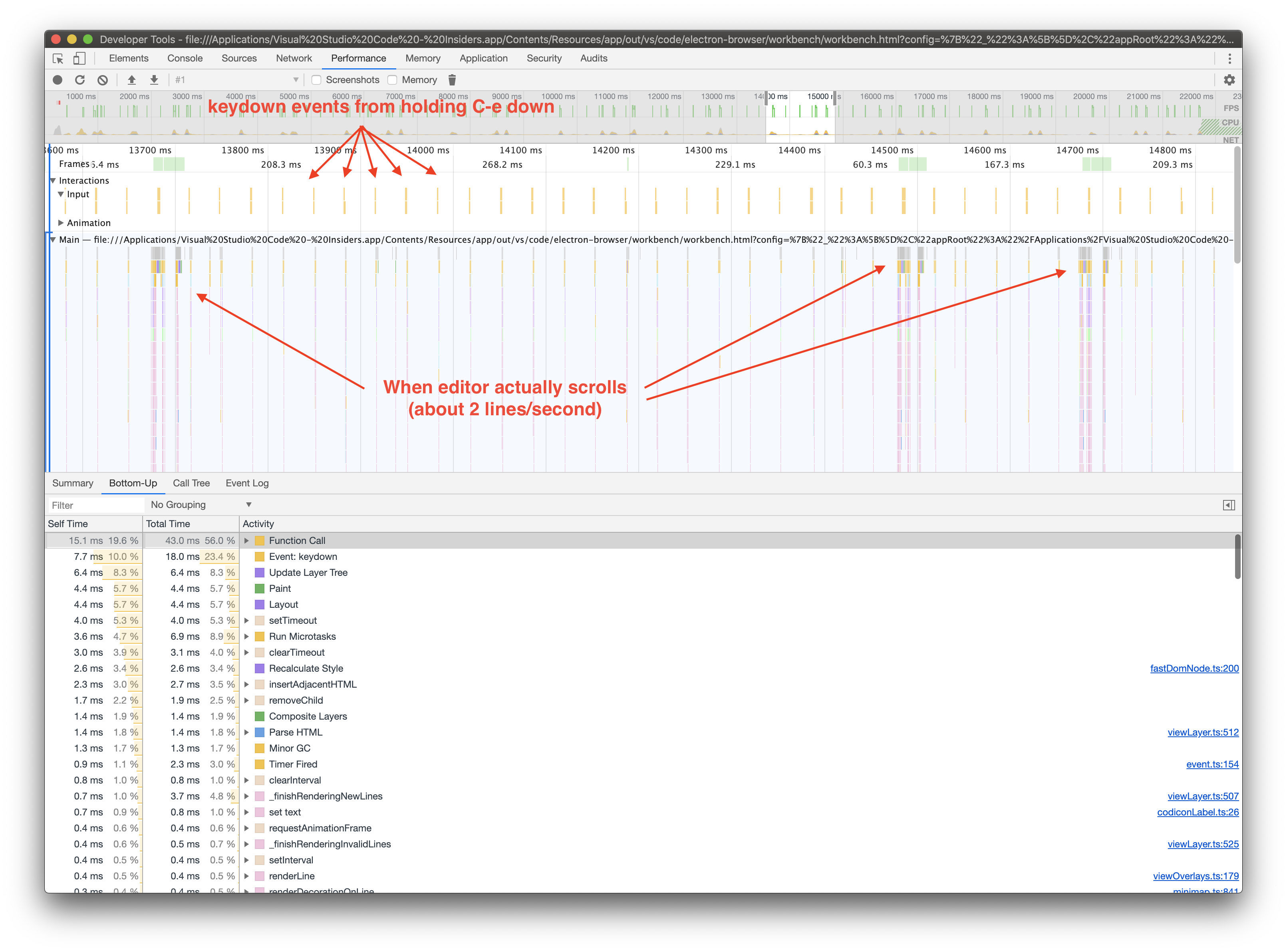
Environment (please complete the following information):
- Extension (VsCodeVim) version: 1.11.3
- VSCode version: 1.40.2 (or 1.41.0-insider)
- OS: macOS Catalina 10.15.1 (19B88)
 raiskila
All 7 comments
FYI: I fixed this for myself like this, however I don't know the ramifications of that change.
raiskila
on 30 Nov 2019
I hadn't noticed this before, but you're absolutely right. @raiskila would you mind submitting a PR? I'll need to dig into the code to see whether calling editorScroll immediately would cause issues, but it's at least a start. I really appreciate you investigating!
 J-Fields
on 30 Nov 2019
J-Fields
on 30 Nov 2019
I am now getting a problem with my "fix" where if the cursor is at the bottom of the screen, moving up with <C-y> doesn't work anymore. It seems like that may not be the correct way to fix the issue. Would you like me to create a PR anyway?
raiskila
on 30 Nov 2019
Yup, just mark it as "WIP" please. Thanks!
J-Fields
on 30 Nov 2019
For your info, maybe this helps:
...removed this was problably wrong
 sql-koala
on 13 Dec 2019
sql-koala
on 13 Dec 2019
No progress?
 listenerri
on 3 Jan 2020
listenerri
on 3 Jan 2020
This is fixed in master, will be in a release soon.
J-Fields
on 3 Jan 2020
Related issues
 ghost
·
3Comments
ghost
·
3Comments
 rajinder-yadav
·
3Comments
rajinder-yadav
·
3Comments
 orn688
·
3Comments
orn688
·
3Comments
 waltiam
·
3Comments
waltiam
·
3Comments
 ACollectionOfAtoms
·
3Comments
ACollectionOfAtoms
·
3Comments
Most helpful comment
This is fixed in master, will be in a release soon.