Describe the bug
All Vim shortcuts and keybindings grind to a halt when inside of a very large file.
However, normal editing mode (turning off the Bim plugin to restore all normal editing features of VS Code), works fine, and I can navigate around large files just fine.
To Reproduce
Open a huge code file, for example with 280,000 lines of code.
Expected behavior
Editing with Vim plugin turned on should be as fast as non-Vim regular mode (plugin turned off).
Screenshots
If applicable, add screenshots to help explain your problem.
If remapping-related, please attach log output: https://github.com/VSCodeVim/Vim#debugging-remappings.
Environment (please complete the following information):
- Extension (VsCodeVim) version: 1.8.2
- VSCode version: 1.36.1
- OS: macOS
Additional context
Is plugin integration in Atom more flexible? In Atom, the vim-mode-plus plugin seems to integrate very well: it scripts all of Atom's features, rather than writing new parallel features.
For example, when I undo in Atom vim mode, the dot in the tab of the file (the dot that tells you when the file is modified) goes away when we undo back to the saved state. But in VS Code Vim mode, the dot never goes away, even if we undo to the state we know is save.
That, along with https://github.com/VSCodeVim/Vim/issues/3871, indicates that VS Code Vim implements features in parallel rather than scripting existing features.
My general impression about VS Code is that writing plugins is a bit more difficult in VS Code because plugin API is more limited (which makes sense, and this allows VS Code's Live Share feature to be much more advanced than Atom's equivalent, because VS Code can enforce a higher level of consistency across editor features due to a more restricted plugin API).
Is VS Code's more restricted plugin API a reason why some features seem implemented in parallel, because otherwise they aren't possible to script?
 trusktr
All 13 comments
I'm having this issue, too. My files aren't quite as big as 280k, but more like 10k. Working with large files used to not be noticeable with the plugin until sometime in the past 2-3 months.
Environment (please complete the following information):
- Extension (VsCodeVim) version: 1.9.0
- VSCode version: 1.36.1
- OS: macOS
 bdwiel
on 2 Aug 2019
bdwiel
on 2 Aug 2019
I forgot to mention, the performance hit is there even if I am working on a <1k line file but have a large file open in another workspace and window.
bdwiel
on 2 Aug 2019
Seems related to #2216
 vlad2135
on 10 Jan 2020
vlad2135
on 10 Jan 2020
Version 1.13.0 introduces the vim.experimentalOptimizations setting, which significantly improves the performance in large files.
 J-Fields
on 27 Feb 2020
J-Fields
on 27 Feb 2020
Version 1.13.0 introduces the
vim.experimentalOptimizationssetting, which significantly improves the performance in large files.
works for me with 5k lines file( maybe I should refactory my code now )
 goodloop
on 1 Mar 2020
goodloop
on 1 Mar 2020
Version 1.14.0 will also improve on this front. The problem is mainly caused by our history tracking for undo/redo, which requires #1490 to resolve completely.
J-Fields
on 27 Mar 2020
@J-Fields Why did you close this one? I was about to open an issue on this
 guledali
on 4 May 2020
guledali
on 4 May 2020
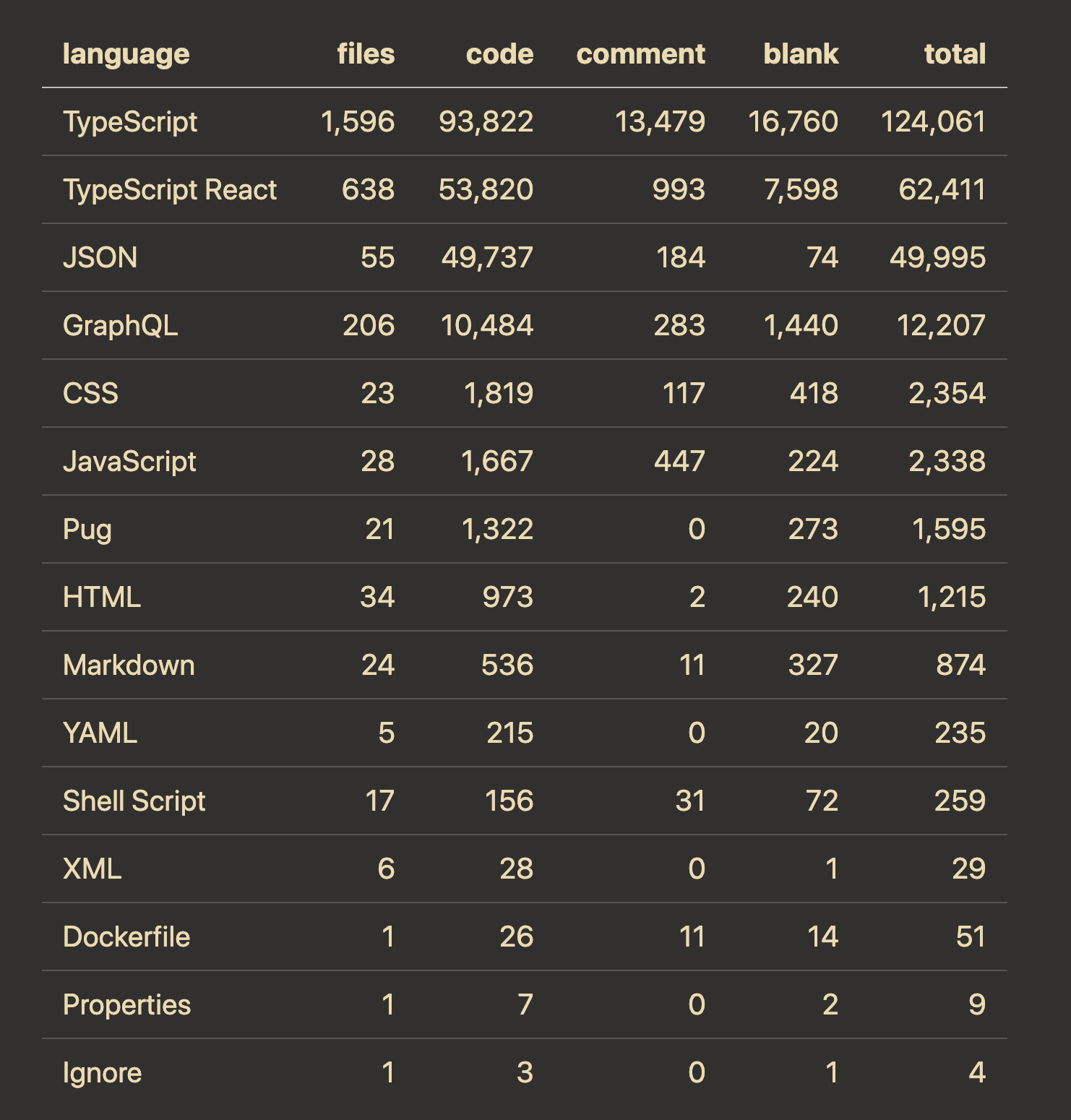
@guledali How large is the file you're working in, what language (I assume it's code), and what other extensions do you have installed?
J-Fields
on 4 May 2020
Quite large it's a TypeScript codebase should that matter though? Other extensions installed is,
Create Files & Folders : On The Go
Gruvbox theme & material icons
Machine) Macbook Pro 2016 non touch bar 8GB 256
guledali
on 4 May 2020
Can you give me a rough line count?
J-Fields
on 4 May 2020
It's laggy takes couple second for example dd does not delete a line directly.
i I have to press it couple times in order to get to insert mode.
Undo u is the slowest of all, I don't know how to explain but it's laggy as hell it seems not to register anything. Smaller projects is fine but the big ones is painful to use which is annoying because I gon used to using Vim it's hard at this point to go back to whatever I was using before.
guledali
on 4 May 2020
@J-Fields Do you have fix for this?
guledali
on 5 May 2020
@guledali The short answer is no, not really. You're welcome to open a new issue and we can continue digging into this, but unless another extension is acting up (the ones you listed don't seem problematic to me), there's probably not much that can be done in the short term. I'm a bit surprised you're having drastic issues on files that are big but not HUGE, though we'll never compete with native Vim in speed.
J-Fields
on 5 May 2020
Related issues
 orn688
·
3Comments
orn688
·
3Comments
 edwintorok
·
3Comments
edwintorok
·
3Comments
 gerardmrk
·
3Comments
gerardmrk
·
3Comments
 elithrar
·
3Comments
elithrar
·
3Comments
 liamdawson
·
3Comments
liamdawson
·
3Comments