What happened:
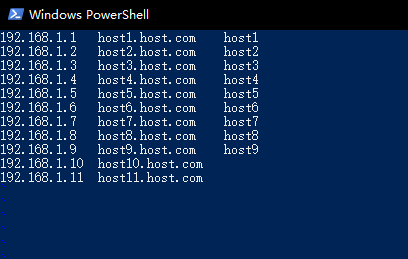
It works in Vim that I can paste the paragraph as a block to the right side,
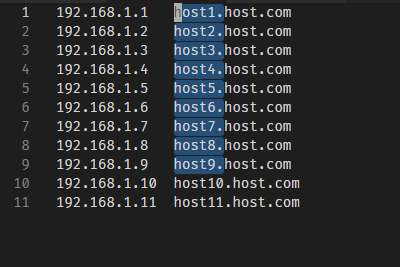
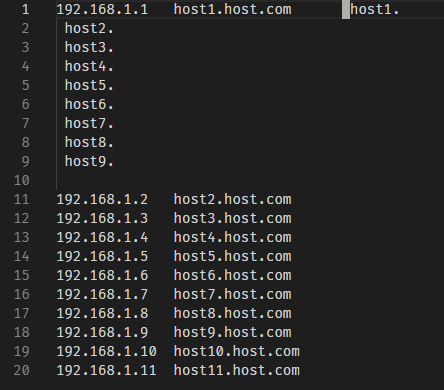
but it doesn't work in VScode,it inserts the block after that line.
What did you expect to happen:
thanks!
 abramyangCN
All 12 comments
Confirmed the same behavior happened for VSCodeVim on Ubuntu 16.04.
 drNoob13
on 4 May 2019
drNoob13
on 4 May 2019
Ace does this perfectly (as far as I can see at least) and might provide hints as to how to go about fixing/implementing this.
 yuppity
on 8 May 2019
yuppity
on 8 May 2019
me too.
 dothan009
on 12 Jul 2019
dothan009
on 12 Jul 2019
Same for me, both Linux Debian and Mac.
CTRL+v -> select with arrow -> y -> p
the block is pasted in-line, not as a block like in vim.
 ejfhp
on 17 Jul 2019
ejfhp
on 17 Jul 2019
Same here on Version 1.36.1 (1.36.1) on macOS 10.14.5 (18F132)
 mplanchard
on 21 Jul 2019
mplanchard
on 21 Jul 2019
Same here on version 1.36.1 rhel74. Often times I will select a block and paste it over a separately selected block in vim.
 sarkig
on 7 Aug 2019
sarkig
on 7 Aug 2019
A temporary workaround is to visual block copy in VSCodeVim, then make a selection with the same number of lines in visual block mode (the standard CTRL+v default) and use CTRL+SHIFT+v to paste it as a block while in visual block mode.
 dcervenkov
on 16 Oct 2019
dcervenkov
on 16 Oct 2019
A temporary workaround is to visual block copy in VSCodeVim, then make a selection with the same number of lines in visual block mode (the standard
CTRL+vdefault) and useCTRL+SHIFT+vto paste it as a block while in visual block mode.
This works well for me, thanks for the tips!
 flashhack
on 13 Mar 2020
flashhack
on 13 Mar 2020
@J-Fields any idea when this will be fixed? This seems like a basic vim functionality... :disappointed:
 dimitry-ishenko
on 13 May 2020
dimitry-ishenko
on 13 May 2020
Soon (™)
 J-Fields
on 13 May 2020
J-Fields
on 13 May 2020
Closing as duplicate of #1796. This is mostly working on a local branch, I'm just fixing some edge cases and writing tests. Expect it to be included in the next release.
J-Fields
on 18 May 2020
If I yank two three and then I cannot paste it over four selected in Visual block
one four eight
two three five
 pangteypiyush
on 28 Nov 2020
pangteypiyush
on 28 Nov 2020
Related issues
 cckowin
·
3Comments
cckowin
·
3Comments
 triztian
·
3Comments
triztian
·
3Comments
 elithrar
·
3Comments
elithrar
·
3Comments
 jaredly
·
3Comments
jaredly
·
3Comments
 typeoneerror
·
3Comments
typeoneerror
·
3Comments
Most helpful comment
Soon (™)