Vim: List keyboard navigation broken in VS Code 1.31.0
Describe the bug
The new list navigation support (#3432 ?) appears to be broken for me. I'm trying to narrow down exactly what the behavior is, and it seems to be timing related.
When I first focus into the file explorer tree (whether via mouse click or a keyboard shortcut), pressing j does _not_ navigate down one list item, but instead jumps to the first file that starts with the letter "j".
If immediately hit j again, it behaves as expected: the focus moves down one item in the list.
However, if I wait and allow a couple seconds to elapse between the keypresses, it reverts to the broken behavior: it jumps back to the first file starting with j. This is true of k as well.
I've also noticed that l has a similar pattern: subsequent immediate keypresses behave as expected (toggling a directory or opening the file selected). But the first keypress after a short delay jumps to the first list item that begins with "l" (regardless of where it appears - it will jump _up_ directory levels to find it).
To Reproduce
Steps to reproduce the behavior:
- Focus into file explorer
- Type
j
Focus jumps to first list item beginning with "j".
Expected behavior
Focus moves down one item in the list
Screenshots
Focusing into the file explorer and hitting j:

Environment (please complete the following information):
- Extension (VsCodeVim) version: 1.0.8
- VSCode version: 1.31.0
- OS: macOS Mojave
All other extensions disabled. No custom single letter keyboard shortcuts bound in the file explorer context. workbench.list.keyboardNavigation set to simple
 davewasmer
All 14 comments
Yep, this is really annoying as a VIM user who is used to using j or k to move up/down. Is there any way to disable this new filtering feature for now until there is a way to handle this?
 zaynv
on 8 Feb 2019
zaynv
on 8 Feb 2019
The same behavior happens also on previous versions of VsCodeVim too :(
 jon301
on 8 Feb 2019
jon301
on 8 Feb 2019
@zaynv I couldn't find a simple workaround, so I've simply downgraded my VS Code version for now. You can download the previous release here
davewasmer
on 8 Feb 2019
@jon301 the behavior is due to a new feature in vscode itself, so this is expected - you've got to downgrade.
I already reverted, but my behavior was differently buggy. At some point in a session, the explorer would get stuck in "non-vim" filtering mode, and I wouldn't be able to escape.
Anyone reverting as @davewasmer suggested should probably disable automatic updates until this is resolved
 micimize
on 11 Feb 2019
micimize
on 11 Feb 2019
Dupe of https://github.com/VSCodeVim/Vim/issues/3466. See https://github.com/VSCodeVim/Vim/issues/3466#issuecomment-461716148 for resolution.
 jpoon
on 12 Feb 2019
jpoon
on 12 Feb 2019
@jpoon perhaps I'm misreading, but I don't think this is a dup, and I don't see how the linked comment provides resolution.
The comment seems to indicate that the default behavior of the list view should be to respond to traditional vim movement keys (hjkl) and only enter filtering mode with / is typed.
But as you can see in the gif above in my original post, the default behavior of the list view seems to be neither vim movement or the new filtering functionality in VS Code 1.31. Instead it jumps down the list to the closest matching list item. Plus there's the timing aspect - immediately repeated j keystrokes for example revert to vim movement, but delayed repeated keystrokes continue with the jumping behavior.
Would you mind expanding a bit on that linked comment if I've misunderstood it?
davewasmer
on 12 Feb 2019
@jpoon The linked issue is the converse. Their issue is "vim keybindings interfere with filtering", and ours is "filtering interferes with vim keybindings"
micimize
on 12 Feb 2019
@jpoon This issue returns after extended usage with Vim v1.1.0 and vscode 1.31.1, breaks the plugin entirely on vscode v1.30
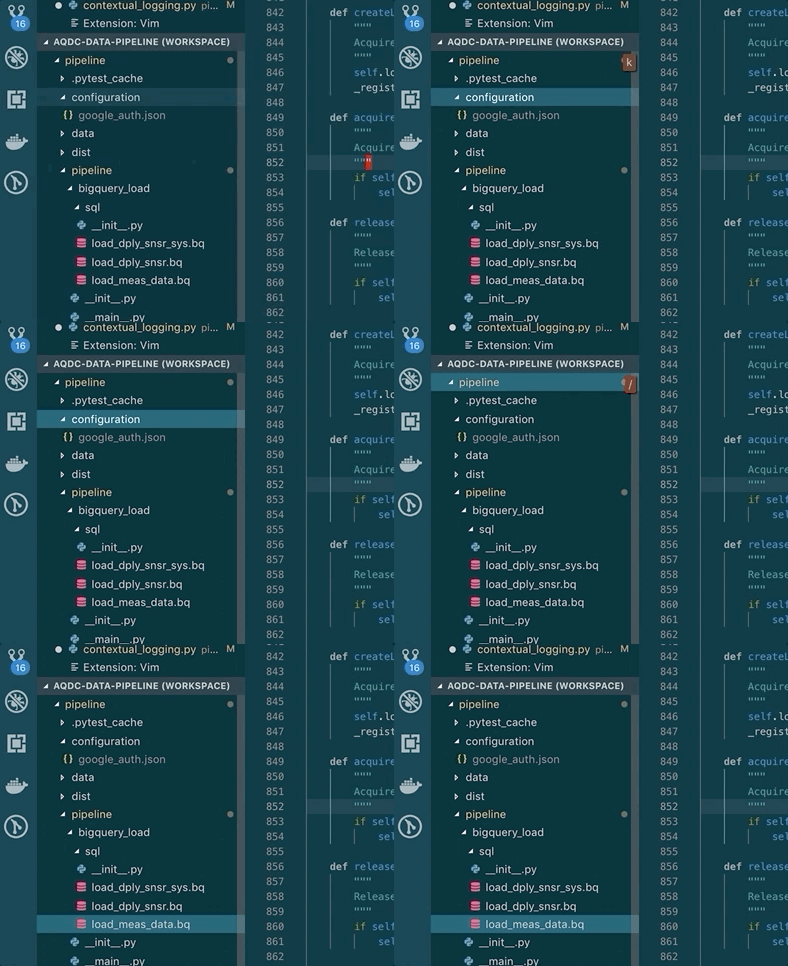
micimize
on 27 Feb 2019
@jpoon would you consider reopening this, or expanding on the linked comment to help explain how to revert to the old navigation behavior?
davewasmer
on 27 Feb 2019
@micimize no need to downgrade, just add this to your settings.json:
"workbench.list.keyboardNavigation": "simple"
 nosajio
on 27 Feb 2019
nosajio
on 27 Feb 2019
@nosajio, that does not work for me. The issue described originally persists. Anyone else having this issue after taking @nosajio's suggestion?
 martinjaime
on 28 Feb 2019
martinjaime
on 28 Feb 2019
@martinjaime What worked for me was adding "workbench.list.automaticKeyboardNavigation": false to my settings.json 👍
 tommcgurl
on 28 Mar 2019
tommcgurl
on 28 Mar 2019
@tommcgurl That got it for me. Thanks! I've been dealing with this for weeks!
 brennongs
on 15 Apr 2019
brennongs
on 15 Apr 2019
Awesome @brennongs glad to hear it 👍
tommcgurl
on 15 Apr 2019
Related issues
 triztian
·
3Comments
triztian
·
3Comments
 liamdawson
·
3Comments
liamdawson
·
3Comments
 rajinder-yadav
·
3Comments
rajinder-yadav
·
3Comments
 spinningarrow
·
3Comments
spinningarrow
·
3Comments
 stefanoio
·
3Comments
stefanoio
·
3Comments
Most helpful comment
@martinjaime What worked for me was adding
"workbench.list.automaticKeyboardNavigation": falseto mysettings.json👍