- Click thumbs-up 👍 on this issue if you want it!
- Click confused 😕 on this issue if not having it makes VSCodeVim unusable.
The VSCodeVim team prioritizes issues based on reaction count.
Is this a BUG REPORT or FEATURE REQUEST? (choose one): BUG REPORT
Environment:
- VSCode Version: 1.18.0
- VsCodeVim Version: 0.10.2
- OS: macOS 10.13.2 Beta (17C67b)
What happened:
When I upgrade to VSCode 1.18.0 the CPU ran into extreme high, I found it caused by two Code Helper.app processes. Then I just disabled all extensions, everything is OK. It is clear that this issues is caused by extensions conflicts with VSCode, so I re-enabled each extension to figure out which one caused this situation. Finally I found it is VSCodeVim, I just re-enabled every other extensions everything is OK, but after re-enable VSCodeVim, the CPU went high.
So I don't know do you guys have the same issue?
What did you expect to happen:
Normal CPU usage.
How to reproduce it:
- Install VSCode 1.18.0
- Install VSCodeVim and enabled it
 gonghao
All 23 comments
On Windows 10, the same happens.
 francescarpi
on 9 Nov 2017
francescarpi
on 9 Nov 2017
Same on High Sierra 10.13. Opening a file creates 2 CodeHelper processes with 100%+ CPU usage.
 ivanvoznyakovsky
on 9 Nov 2017
ivanvoznyakovsky
on 9 Nov 2017
Yep. Same on High Sierra, also on VSCode Insiders
 MythicalFish
on 9 Nov 2017
MythicalFish
on 9 Nov 2017
Same occurs on macOS 10.12.6
 stevestmartin
on 9 Nov 2017
stevestmartin
on 9 Nov 2017
I've got the same problem on Ubuntu 17.10.
I disabled "Easy motion", I.E added "vim.easymotion": false, to the user settings file, restarted VS Code and opened a Ruby source file. Once the "indexing ruby source" finishes the CPU dropped away.
So it looks like an issue with "Easy Motion".
Ignore the above. It hasn't fixed it. The CPU stays down until you start moving the cursor around in the source file, once you do that the CPU rises again and stays up.
Last Attempt
I open the User settings and quit VS Code. Then start it up again, open my Ruby source file and start editing, everything is fine, CPU is low. Play around for a while, quit and restart. Now the problem starts again.
It seems that if VS Code has a source file active when it starts up then the problem occurs but if you start it up with the user settings as the active pane and then open a source file you are ok.
Can anybody else confirm this behaviour or am I going slightly crazy- its been a long day.
 colbell
on 10 Nov 2017
colbell
on 10 Nov 2017
@colbell confirmed, if I open it with any source file active even a blank one CPU usage spikes, if i open the user settings tab and relaunch CPU is low. I can consistently reproduce this, switching to a source code tab after launch, or having source code tabs open (regardless of tab order) at launch CPU still remains low, it seems this occurs only when a source code based tab has focus on launch.
stevestmartin
on 10 Nov 2017
I have my CPU going crazy whenever a file is focused or vscode is re-open with a prev file opened. once I have any file opened CPU usage spikes.
ivanvoznyakovsky
on 10 Nov 2017
Same for me on Sierra 10.12.6, running VS code 1.18.0.
 adamwiggall
on 10 Nov 2017
adamwiggall
on 10 Nov 2017
Have the same thing. Arrived at Vim extension by elimination of extensions. Profiled the extension and got this:
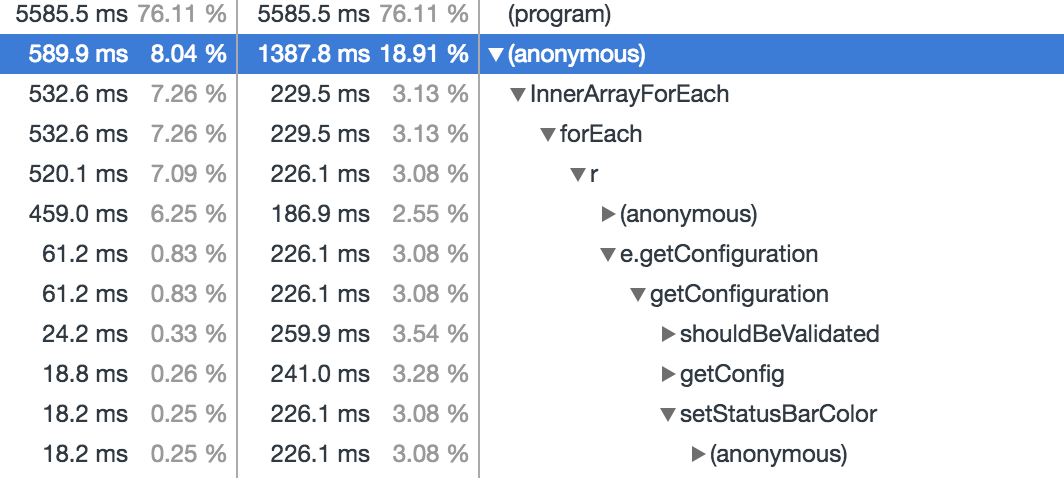
Which hints at my customising the status bar colors. Removed my config and everything is normal again!
 jondot
on 10 Nov 2017
jondot
on 10 Nov 2017
Disabling custom status bar colors corrected the problem for me also.
stevestmartin
on 10 Nov 2017
@jondot Great job! I just disabled the customize status bar colors, everything goes well!
gonghao
on 10 Nov 2017
Nice one @jondot disabling the colours fixed it for me too.
colbell
on 10 Nov 2017
confirm that "vim.statusBarColorControl": false fixes the issue. great catch @jondot 👍
don't think it's a real fix but rather a workaround 😄
ivanvoznyakovsky
on 11 Nov 2017
I can reproduce consistently on Version 1.18.
Just tested in Version 1.19.0-insider 11-11-17 on MacOS Sierra 10.12.5 and _cannot_ reproduce CPU spike.
@MythicalFish can you still repro? I can't find a PR relevant to this issue landing in vscode from the past few days - which I find strange https://github.com/Microsoft/vscode/pulls?utf8=%E2%9C%93&q=is%3Apr%20is%3Aclosed%20closed%3A%3E2017-11-07
 chasestarr
on 11 Nov 2017
chasestarr
on 11 Nov 2017
same for me on macOS 10.11.6 and vscode 1.18.
 samumist
on 12 Nov 2017
samumist
on 12 Nov 2017
I am experiencing a phenomenon that the CPU becomes higher after vscode 1.18 update in the Win10 environment.
The code helper process is using a high CPU, and disabling the vim plugin disables the symptom.
 newro
on 14 Nov 2017
newro
on 14 Nov 2017
It was the vim extension causing the 100% CPU usage issue for me also. Removing any/all "neovim" related settings took care of the problem. Just changing some to a 'disabled' value or just commenting out did not work. I had to totally remove then entries.
 sc0ttwad3
on 3 Dec 2017
sc0ttwad3
on 3 Dec 2017
Does anybody still get this issue on recent versions of VSCodeVim?
 Chillee
on 8 Mar 2018
Chillee
on 8 Mar 2018
I still experienced this issue in 1.21.1 and for me it was fixed by commenting out the "vim.disableAnnoyingNeovimMessage" setting.
 bas0
on 27 Mar 2018
bas0
on 27 Mar 2018
@stevebasford that setting is deprecated, it was removed awhile ago. Closing this issue as it seems resolved.
 jpoon
on 27 Mar 2018
jpoon
on 27 Mar 2018
I was brought here by the below link (about 2/3 of the way down the page, in the emulated-plugins section), thinking I couldn't use vim-airline with VSCodeVim. It seems this no longer affecting vim-airline, yes? Might be best to remove the disclaimer at the top of the emulated-plugins section
https://marketplace.visualstudio.com/items?itemName=vscodevim.vim#-emulated-plugins
 ChasKane
on 8 Jun 2019
ChasKane
on 8 Jun 2019
From my experience it depends on the machine you are using. Maybe it was worse in 2017 regardless of your machine, but it is still an issue.
 xelaos
on 2 Jul 2019
xelaos
on 2 Jul 2019
I'd recommend sticking a 👍 on https://github.com/microsoft/vscode/issues/43226 if you want to be able to enable statusbar colours without performance issues.
 andyearnshaw
on 2 Mar 2020
andyearnshaw
on 2 Mar 2020
Related issues
 waltiam
·
3Comments
waltiam
·
3Comments
 AndersenJ
·
3Comments
AndersenJ
·
3Comments
 st-schneider
·
3Comments
st-schneider
·
3Comments
 Jimmy-Z
·
3Comments
Jimmy-Z
·
3Comments
 lucastheisen
·
3Comments
lucastheisen
·
3Comments
Most helpful comment
Have the same thing. Arrived at Vim extension by elimination of extensions. Profiled the extension and got this:
Which hints at my customising the status bar colors. Removed my config and everything is normal again!