If I turn vim plugin on (all other plugins off), vscode starts to lag. There is a noticeable delay (0.1 sec) on every keyboard input.
 Josef-Vonasek
All 154 comments
I have noticed this lag too. It's subtle but definitely noticeable compared to plain vim, and even compared to the Visual Studio vim plugin. Some more info:
- The lag is there even with a new plain text file and no open project.
- Only the editor lags: Typing in the command palette feels fine. Not surprising.
- The lag seems to be on all actions: insert mode edits, normal mode edits, cursor movements. For me it's actually most noticeable for me on cursor movements as I often scan forward with multiple taps of
wand go one word too far.
This is on Windows. It's possible this is a platform specific thing so it's worth mentioning.
 theprash
on 15 Sep 2017
theprash
on 15 Sep 2017
I've just tested this on a colleague's macbook and I think the lag is present there too.
theprash
on 15 Sep 2017
I've noticed that things become much more snappy when you make the window very small, which suggests that the problem is rendering time.
I also discovered a method that may expose this more easily: Type 100aa<Esc> to insert a 100 times.
Small window:

Maximised (2048x1152 with 125% scaling):

theprash
on 15 Sep 2017
I can type only one character per 2 seconds after I enabled vim. What happened?
 movsb
on 18 Jan 2018
movsb
on 18 Jan 2018
Any fixes?
 kennym
on 1 Feb 2018
kennym
on 1 Feb 2018
@theprash That example is a little bit different. What people typically seem to mean about "lag" is latency, that's throughput.
I'm not sure what would cause such extreme latency. I'll do some performance profiling this weekend. Maybe the main causes of slowdown are just accentuated for some users.
 Chillee
on 2 Feb 2018
Chillee
on 2 Feb 2018
I haven't quantified any of these suspicions but possible areas of improvement:
- Every time a key is pressed, it goes through every possible action and tests whether it is applicable (https://github.com/VSCodeVim/Vim/blob/master/src/actions/base.ts#L193), we can quickly limit the amount of actions to check by building a dictionary/trie on
@RegisterActiondecorator. - I think we update the screen way too often. Whenever I walkthrough and debug the extension, it always seems like https://github.com/VSCodeVim/Vim/blob/master/src/mode/modeHandler.ts#L1139 is called multiple times.
 jpoon
on 2 Feb 2018
jpoon
on 2 Feb 2018
Definitely profile before chasing down any potential problems. I am 95% certain the problem lies in us doing updateView more than we have to. Problem is that even a single call to updateView is expensive and I don't believe there's a way to do VSCodeVim without calling it at least once :P
 johnfn
on 3 Feb 2018
johnfn
on 3 Feb 2018
So one major source of performance issues is caused by interacting with the system clipboard (I'm guessing that might be why Windows users seem to complain more about this?). It's at least a quarter of the time needed on my computer right now.
This issue is accentuated by us making multiple calls to the Register object for a command like p.
Could anybody getting immense performance issues try setting useSystemClipboard: false and seeing if they go away?
Chillee
on 4 Feb 2018
@johnfn @jpoon Also as an update, I don't think updateView is the main cause of the issues people are talking about. For "elementary" actions like p, it only gets called once, and it takes up a very small proportion of the time (typically <5ms).
The majority of the time is spent in await action.execCount.
Chillee
on 4 Feb 2018
Is there any movement on this? VSCode with VSCodeVIM and vscode-go is unusably slow for me. I notice it's worse in _test.go files. Disabling either extension returns to a snappy performance, but the two together appear incompatible.
 saites
on 12 Mar 2018
saites
on 12 Mar 2018
Could anybody getting immense performance issues try setting useSystemClipboard: false and seeing if they go away?
Definitely this for me. I was unusable until I set this to false. And as you vimmers know, without this option life is very sad.
 armoucar
on 13 Mar 2018
armoucar
on 13 Mar 2018
Definitely this for me. I was unusable until I set this to false.
@armoucar: My User Settings show that false is the default value. Is that not the case for you? I tried explicitly setting it to false in my personal settings, but didn't see a difference.
saites
on 13 Mar 2018
Sorry @saites, I was wrong there. My performance problem happens when this flag is set to true, only on Windows.
armoucar
on 13 Mar 2018
Very interesting -- are you both on Windows @armoucar @saites ?
jpoon
on 13 Mar 2018
are you both on Windows
@jpoon I am on Windows
To follow-up on setting useSystemClipboard, I don't find a discernable performance difference regardless of its setting.
More observations:
- Even with both extensions enabled, I have not noticed issues with editing other types of files, which isn't terribly surprising.
- It seems much worse for
_test.gofiles than it is for non-test.gofiles - Typing slowly is fine; inserting a single letter appears instant
- Typing hangs very badly for multiple characters, then "catches" up to suddenly insert others
- When it's very bad, I have to wait for the buffer to complete writing characters before I can use
esc - Other operations (navigation, highlighting (visual mode), yank, put, delete, and switching to insert mode) are plenty snappy and don't appear affected by this
saites
on 14 Mar 2018
@jpoon I use the plugin on Mac (at work) and Windows (at home, but not that much).
Doing a little bit of test now on Windows, vim operations that would send to clipboard (when vim.useSystemClipboard: true) are really slow: d, c, x, dd, yy.
I have no issues when on a OS X
armoucar
on 14 Mar 2018
I think there's a couple causes of massive lag. The first is the system clipboard library we use. Another one is interactions with other extensions, especially extensions that do a lot of work.
One design deficiency imo of the current extension system is that all the extensions run on one thread :/
Chillee
on 14 Mar 2018
Having really bad lag issues on OSX as well
 BWoodfork
on 28 Mar 2018
BWoodfork
on 28 Mar 2018
I found a workaround:
The delay on the keyboard input is gone if you turn on Zen Mode.
And I use the following lines in my User Settings:
  "zenMode.hideStatusBar": false,
  "zenMode.hideActivityBar": false,
  "zenMode.hideTabs": false,
  "zenMode.restore": true,
 vxio
on 12 Apr 2018
vxio
on 12 Apr 2018
@xiao-vincent No help, still lag for me.
 dyxushuai
on 13 Apr 2018
dyxushuai
on 13 Apr 2018
I'm not sure, but seems redo and undo actions quite fast. I think it's possible to take part of implementation of this actions to make others. Is it possible? For example hack like this: create fake action and redo it.
 Diadlo
on 18 Apr 2018
Diadlo
on 18 Apr 2018
I notice too this delay. I don't know if this is of any use, but in my case:
- Hiding the sidebar improves performance
- Adding relative line numbering hinders performance
- Enabling or disabling easymotion does not seem to have any effect on performance
I've done those tests by holding the j or k keys down, in smaller and bigger files.
 acicovic
on 25 Apr 2018
acicovic
on 25 Apr 2018
I've been suffering this, to the point of thinking about returning to Spacemacs, but finally it improved by setting "vim.statusBarColorControl": false,. Disabling color change has improved editing performance a lot. I still can notice some lag, but it's mostly usable.
 Peluko
on 2 May 2018
Peluko
on 2 May 2018
@Peluko According to the documentation this feature is set to off by default. Did you have it enabled?
acicovic
on 2 May 2018
@acicovic I enabled it on purpose some weeks ago, but at the moment I switched from working on Windows to working on macOS, so I didn't relate this to the lag.
Peluko
on 2 May 2018
For my case insert mode is fine, most jumps are relatively snappy, but line movements are awful on my laptop. I press j and can see the cursor move down a line, move back up one line, then move back down again. If I press it multiple times, it does the same routine. If I press and hold, when I let go it'll still be moving as it's trying to catch up. It's at the unusable point for me. Time to learn how to transfer my extensions and settings onto real Vim....
 jrwrigh
on 11 May 2018
jrwrigh
on 11 May 2018
In addition to my previous comment, VSCodes newest feature "Highlighted indent guides" further worsens the situation as it degrades Vim's performance.
acicovic
on 13 May 2018
@u2berggeist more or less the same here. By disabling statusBarColorControl it performs better, almost usable but annoying.
Peluko
on 14 May 2018
Has anyone found a solve for this?
I'm using a 2013 macbook pro with 8gigs of Ram, and running zero other extensions or user settings,
Still get terrible performance.
with vsCodeVim
can hold J and then watch the editor catch up as It scrolls

 J1marotta
on 16 May 2018
J1marotta
on 16 May 2018
@Peluko I already had that disabled unfortunately.
jrwrigh
on 17 May 2018
So I have switched to amVim, its performance is quite good.
 Molunerfinn
on 23 May 2018
Molunerfinn
on 23 May 2018
@Chillee do you know if there are any plans to work on this? Is there a conclusion on why this lag occurs?
Thanks!
acicovic
on 26 May 2018
@J1marotta now that I'm working again on Windows I've noticed that the lag is also there. But on Windows it's less annoying because, even at maximum speed, the key repeat rate is much lower on Windows than on macOS, so on a Mac VSCodeVim has a hard time catching key events when you scroll by keeping pressed movement keys.
Peluko
on 28 May 2018
This is also still a problem for me too, unfortunately. I have a separate issue open related to performance as well, specifically pertaining to how this plugin works with larger files. VSCode with VIM enabled is very slow on bigger files, and is completely unusable for large files with thousands of lines: https://github.com/VSCodeVim/Vim/issues/2216
 jsonMartin
on 2 Jun 2018
jsonMartin
on 2 Jun 2018
I have the same problem in a Mac. It turns simply impossible to work with the VIM extension. =(
 carneiroDotDev
on 9 Jul 2018
carneiroDotDev
on 9 Jul 2018
I've observed this problem on any computer that has an i5 3rd gen/HD4000 gfx or older. Without VIM enabled, vscode is as fast as any editor. With VIM enabled, any action that involves redrawing it's painfully slow. Wow, you need a last generation computer to do text scrolling!!
Peluko
on 9 Jul 2018
I have this problem in a i7. Actually I have another MAC with a i5 and there I never saw this problem.
carneiroDotDev
on 9 Jul 2018
Can confirm, its unusable on macOS.
VERY slow
 jorgemmsilva
on 11 Jul 2018
jorgemmsilva
on 11 Jul 2018
Hey,
I wasted hours on it yesterday and it seems that there is a conflict with
the auto rename tag extension.
Try disabling all of your extensions, reboot your VScode and load the
extensions after restarting VScode.
But do not use Auto-rename Tag anymore.
It is working for me since yesterday.
Cheers,
Luiz
Am Mi., 11. Juli 2018 um 19:40 Uhr schrieb Jorge Silva <
[email protected]>:
Can confirm, its unusable on macOS.
VERY slow
—
You are receiving this because you commented.
Reply to this email directly, view it on GitHub
https://github.com/VSCodeVim/Vim/issues/2021#issuecomment-404252671, or mute
the thread
https://github.com/notifications/unsubscribe-auth/AWfnIdxd5H4yl03X4Y_WF22kiT-4qFbuks5uFjh0gaJpZM4PYq80
.
--
Luiz P. Carneiro
carneiroDotDev
on 12 Jul 2018
Hey,
I wasted hours on it yesterday and it seems that there is a conflict with
the auto rename tag extension.
Try disabling all of your extensions, reboot your VScode and load the
extensions after restarting VScode.
But do not use Auto-rename Tag anymore.
It is working for me since yesterday.
carneiroDotDev
on 12 Jul 2018
+1 I'm experiencing major slow-down on .vue files only when Vim is enabled.
 conrman
on 12 Jul 2018
conrman
on 12 Jul 2018
@luizdotpro I don't use Auto Rename Tag, and I'm getting the slow down.
Peluko
on 12 Jul 2018
Just for the record, the tests I've made:
- VSCode without any extension. Open large file. Scroll down or up by keeping pressed keyboard arrows => it works as expected, blazingly fast.
- VSCode with only VSCodeVim enabled. Open large file. Scroll down or up by keeping pressed keyboard arrows or J/K => noticeably slower, and once you release the key you can watch how the editor catchs up the scroll for a little while.
I've observed that the larger the scrolling area (window) is, the slower it scrolls, so it maybe has something to do with screen redrawing. Maybe VSCodeVim forces redrawing of the whole window, while normal scrolling doesn't.
I've tested scrolling because is where you can notice the effects easily, but it affects any editing or moving operation also.
Peluko
on 12 Jul 2018
Unfortunately it is also unusable for me on my Windows 10 laptop; even after all the settings' recommendations in this thread. However, the latency reduces if the sidebar is hidden, and it is much better (but still slightly noticeable) in zen mode.
EDIT: I just noticed that adjusting the viewing pane width in zen-mode has a large effect. Having the standard zen-mode pane size shows a large improvement in latency; whilst expanding the pane to near-full-screen exacerbates the latency enormously.
 samueltlg
on 18 Jul 2018
samueltlg
on 18 Jul 2018
I like how https://github.com/jpotterm/vscode-simple-vim has taken the route of mostly implementing features which vscode natively provides. I think if this project also adopted that method it would improve performance significantly.
 ghost
on 21 Jul 2018
ghost
on 21 Jul 2018
@nealot Thanks for the link, I really like the plugin. My only wish was that I could support a custom key to enter normal mode(I like to use jk in vim). Sadly the creator has advised this isn't possible as he only uses vscode keyboard shortcuts and they don't have the ability to do this.
 Oliver-Fish
on 25 Jul 2018
Oliver-Fish
on 25 Jul 2018
the latest version seems to be working much better for me on macOS 10.13.6 👍
 AJMiller
on 3 Aug 2018
AJMiller
on 3 Aug 2018
Also noticing big improvements on the latest version, still a little bit of lag while navigating code but no where near as bad.
Arch Linux
Oliver-Fish
on 4 Aug 2018
Brand new windows 10 surfacebook 2. VS Code is lagging whenever the vim extension is enabled and you move the cursor up and down over a file. This is happening regardless of whether I use the vim bindings or not.
Disable the extension and restart and it works fine.
Willing to pair on this if a committer needs to check it out.
 togakangaroo
on 5 Aug 2018
togakangaroo
on 5 Aug 2018
Yup, it has improved a lot. Also on macOS 10.13.6.
Still a bit sluggish sometimes, but its much better now!
jorgemmsilva
on 6 Aug 2018
Yes, it has improved noticeably! Not perfect but more usable.
Peluko
on 6 Aug 2018
Things got really really worse for me with VSCode 1.26.1 and Vim 0.16.2.
acicovic
on 31 Aug 2018
I think (from my profiling) this again is back to the issue where VSCodeVim tweaks configuration for the insert/normal/etc. mode display.
On each configuration change (which equals each time changing mode) - VSCode does a complete reflow and styling calculation.
 jondot
on 3 Sep 2018
jondot
on 3 Sep 2018
@jondot This seems to be exactly my issue, most of my noticeable lag comes from delayed typing when entering insert mode.
Is this fixable in the plugin or will it require VSCode changes?
Oliver-Fish
on 3 Sep 2018
@Oliver-Fish you can see it in your own eyes. Go to Help->Developer Tools, once the developer tools pop up go to Performance tab, start recording. Go to your VSCode and do a short editing session (1minute will do).
Go back to the developer tools and stop recording performance.
Now look at the chart generated and zoom into an area where CPU was spiking. You'll see methods for configuration being called, which means VSCodeVim is modifying configuration which causes havoc.
I remember this was brought up and fixed in the past
jondot
on 3 Sep 2018
@jondot Thanks for the info, yep I can confirm I am seeing the same problem on my end.
Oliver-Fish
on 5 Sep 2018
Is this being worked on at all? VSCodeVim is literally unusable at this point, as in, there's no point in having it installed.
 JesseObrien
on 5 Sep 2018
JesseObrien
on 5 Sep 2018
Running into this right now with latest vscode update (1.27.1). Can't seem to pinpoint a specific language type that it's doing this on, but some files are still working okay.
extensionHost is maxing our cpu usage whenever after any vim operation outside of simple moving (h,j,k,l)
 loremipson
on 7 Sep 2018
loremipson
on 7 Sep 2018
@JesseObrien I don't think anybody is actively looking into this. Contributions are wholly welcomed.
jpoon
on 7 Sep 2018
Same boat here, win 10, brand new tricked out surface book 2, all the bells and whistles.
With this plugin enabled, typing in insert mode slows down to the speed of a 1200 baud modem on a noisy loop (yes, I'm old). I can type several lines of code before it "catches up". Makes vscode unusable in it's current form.
Ironic, since I switched to vscode from webstorm because that editor was too slow and bloated, now I might have to switch back just to be able to get work done :-(
If I wasn't working till 4am every day on this project, I'd jump in and try to fix the issue. Maybe I'll be able to once sanity resumes.
Thanks for the great extension though, I wouldn't be able to use vscode at all without it!
P.S. - hiding the status bar via user settings improved things a bit, still pretty laggy though. Maybe 2400 baud modem? 😄
 claytongulick
on 13 Sep 2018
claytongulick
on 13 Sep 2018
For anyone that's still bumping into this: you can disable this specific feature, look for the statusBarColorControl key and turn it off.
jondot
on 13 Sep 2018
Also having this problem, but as of 1.27.2 its ever present now. Basically, on any file that has syntax highlighting (esp typescript), this plugin causes heavy typing lag in any decent sized project.
Unfortunately I'm new to VSCode plugins so I'm not the best person to look into this. However, here are some things from running the profiler.
The test I do is just basically go into insert mode, and hold a key down and watch it repeat. When I stop holding down the key, the character continues to repeat for a few seconds afterwards. You can see vscode stuttering/not keeping up. Its the same thing with normal typing -- I see vscode stuttering and I am out typing the editor with the plugin on. I'm on a beefy machine too, and it definitely seems related to having a project with many files being considered for intellisense. With other vim-like plugins, this behavior does not occur. Also vsvim with no folder open and just an empty file is reasonably fast. I do these tests with ONLY the vim plugin active.
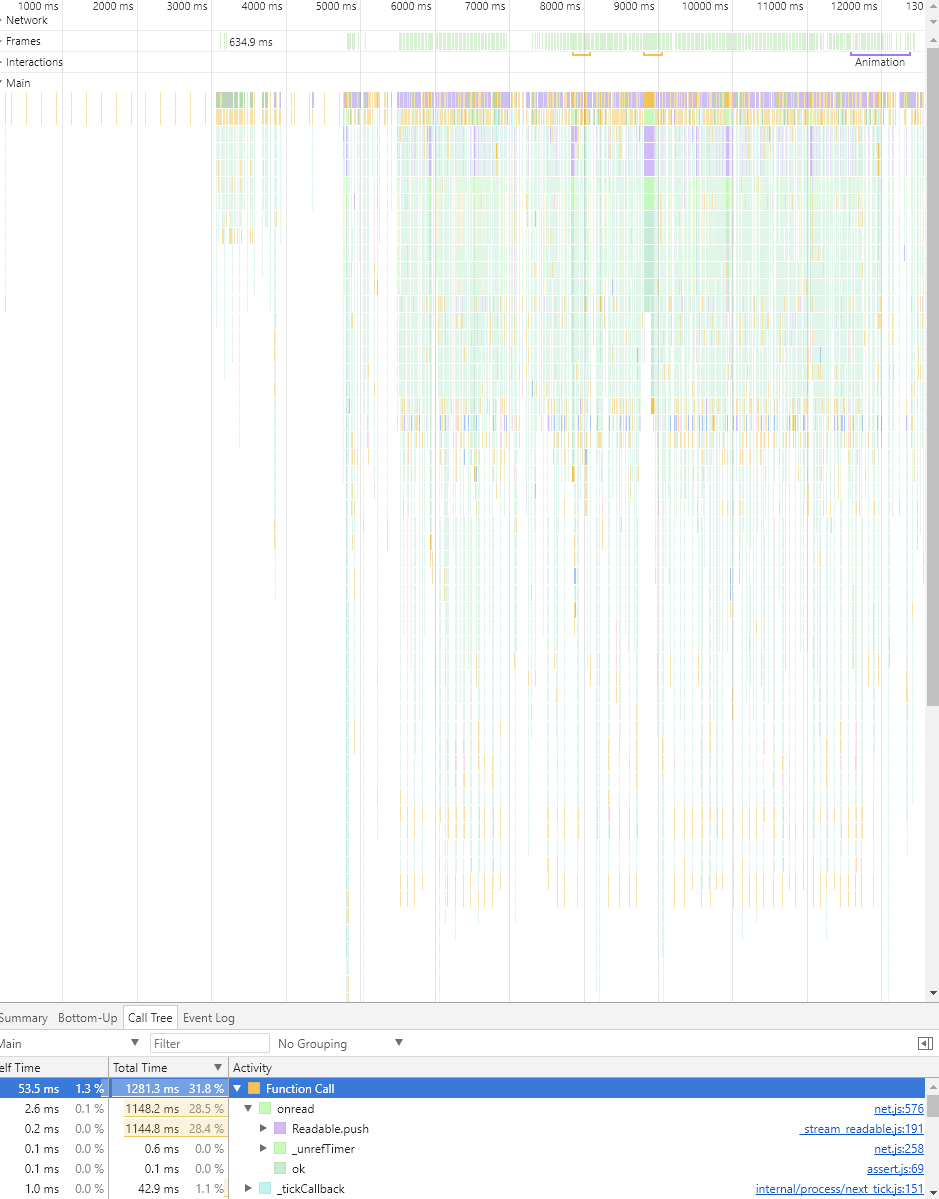
I did run the profiler to see what is going on. Most of the time is spent in net.js onread. I've attached a quick screenshot to show what it looks like. In this screen shot I was just typing really fast. It looks roughly the same if I just hold a key down.
 cmcclellen
on 21 Sep 2018
cmcclellen
on 21 Sep 2018
Looks like the biggest clue to the problem so far! Hopefully someone is willing to fix this; I imagine by now it would make a lot of our vs-code lives a lot more pleasant (with having usable vim emulation).
samueltlg
on 21 Sep 2018
@cmcclellen It would be helpful if you could right click on that profile view and save the profile for others to view. Is there a public project that you are experiencing the issue on? I would be happy to take a look, but I'm not experiencing the same issues if I load a substantial TypeScript project like the vscode project itself.
 shawnaxsom
on 22 Sep 2018
shawnaxsom
on 22 Sep 2018
This issue is similar to #2216.
As I mention there, I thought I was able to reproduce the slowness issues, but it ended up being caused by the Import Cost extension, not VSCodeVim by itself.
The issues described here sound different than what I saw (people experiencing issues with no other extensions installed). I haven't been able to reproduce that yet. But anyone visiting that does have other extensions installed should try disabling them all and checking whether that helps.
I didn't find any issues with our handling of the code. The only part that was slow in our code was updateView, just where it calls setContext it was taking 300ms if I spammed in insert mode. But it takes just 0-6ms again if I remove the Import Cost extension.
  public async updateView(
   [...]
    const foo = console;
    foo.time('setContext');
    // This is only slow for me with Import Cost enabled on a file with many imports
    await vscode.commands.executeCommand(
      'setContext',
      'vim.mode',
      ModeName[this.vimState.currentMode]
    );
    foo.timeEnd('setContext');
}
@cmcclellen This may be the case for you. Have you tried testing without Import Cost extension or other extensions? If you are experiencing the delay in TypeScript projects, and not experiencing it with empty projects, and you see high net.js onread, I was seeing the same issues. It seemed that possibly VSCodeVim typing was triggering Import Cost to re-read imported files and check the file size, which I assume to be the net.js onread call.
shawnaxsom
on 23 Sep 2018
Many people here, including myself, have this issue without any extensions installed. Sure, having additional extensions may exacerbate it, but even without, it is unusable here when it is the only extension. A lot of those here report the issue being on windows machines also, but if you read through there are reports of the problem (with no extensions) on high-end machines with vs code on Linux, too, so it seems to be across the board. I think a couple have suggested that the cause could be how vscode-vim interacts with certain graphic card families (the problem can be lessened greatly by reducing the editor window width).
samueltlg
on 23 Sep 2018
@samueltlg Yeah I am sure there are multiple causes for the slowness. What @cmcclellen describes doesn't sound as likely to be from the same root cause as other users have described. Hopefully his issue at least is resolved by removing an extension like Import Cost. For other users, I wish I could reproduce the issue to help.
I would be happy to do a screen share to look into the issue for anyone that can reproduce. You can find me on our https://vscodevim.slack.com Slack channel. The profiler was pretty noisy when I was debugging, so we'd probably just debug by putting some console.time statements in extension.ts for overrideCommand(context, 'type', async args => {}).
shawnaxsom
on 23 Sep 2018
@shawnaxsom The project i was working on isn't public unfortunately. The problems experienced were with no other plugins installed -- only vscode vim. What I'm seeing is tons of calls to the lang server. Ie, it looks like tsserver is getting spammed, and which is why I'm seeing thousands of net reads in a short period just typing.
I'll try to get on slack and see if I can show you what its doing. And to @samueltlg above -- VS code is running at 2560x1440. If I shrink it down it gets noticeably faster, but still somewhat laggy. Also, turning on Zen mode speeds it up the most. At full resolution with zen mode on, even with a full set of plugins, its fast no lag.
cmcclellen
on 24 Sep 2018
FYI we made some progress today via a screenshare. Thanks @shawnaxsom for taking the time to look into the issue. Just wanted to let people know who are tracking this issue that progress was made, but I'll leave it to Shawn to give details about it as I don't want to be inaccurate.
cmcclellen
on 24 Sep 2018
Fantastic guys, that’s good news!
samueltlg
on 24 Sep 2018
Yes as @cmcclellen mentioned, we did find details that can help make some headway on the issue.
We confirmed that it isn't a conflict with other extension, though some of it does mimic behavior I was seeing with the Import Cost extension. I'm guessing there are multiple causes:
- Inefficiencies painting with some video cards or drivers?
- Something may be triggering reads from disk (for imports/intellisense?) when we insert text with
vscode.commands.executeCommand('default:type', { text })? - Extra async actions are also competing with the event loop when awaiting in the handling of the text command override.
In relation to those issues, the main delays in our modeHandler.handleKeyEvent function stack involved:
await vscode.commands.executeCommand('setContext', 'vim.mode', ... ), which I need to research. This was substantial, accounting for 50ms per key press, or about65%of the processing time for each key press.- handling of
insertTextVSCode, which handles the TextEditor.insert that results in thedefault:typecommand to vscode. This accounted for an extra ~15ms, or about20%of the processing time for each key press. - Awaits in
modeHandler.handleKeyEventandmodeHandler.handleKeyEventHelper, when something else must have been using the event loop. This accounted for about ~7ms, or about10%of the time.
At least to start, I am going to look at optimizing use of (1) setContext. It is likely the easier fix, and commenting it out substantially improved performance for @cmcclellen. The (2) default:type command fix will be harder to diagnose and may involve support from the vscode team, unless there is some alternative, more efficient way to insert characters.
shawnaxsom
on 25 Sep 2018
Good progress tonight on await vscode.commands.executeCommand('setContext', 'vim.mode', ... ).
I think that command is just letting vscode know what mode we are in, which appears to be used for our custom keybindings. It was executing every key press, and now I have it only executing when VimMode actually changes.
https://github.com/shawnaxsom/Vim/tree/feature/insert-mode-optimizations
shawnaxsom
on 25 Sep 2018
Ran this branch locally and it definitely improved things quite a bit. @samueltlg If you can you may want to grab the above repo & branch and try it out.
For anyone wanting to try it out:
1) clone the repo above
2) checkout the feature/insert-mode-optimizations branch
3) npm/yarn install
4) open the directory in vscode
5) Menu: Debug | Start / Start Without
6) in the extension host version of vscode that pops up, open up the project you usually work on and see if it is better for you.
cmcclellen
on 25 Sep 2018
@cmcclellen I have attempted to try this commit out in order to give some feedback, but the build phase upon the beginning of debugging is failing due to being unable to find the "gulp: build" task (the preLaunch task set in launch.json). I have tried changing names around here and there within launch.json and tasks.json (such as to "gulp" and "gulp: default", and variations without spaces), but the build isn't going ahead. Any idea?
samueltlg
on 26 Sep 2018
@samueltlg Take a look at our contributing guide if you haven't yet, it has some steps to get going. Make sure you ran steps in there like npm install -g gulp-cli.
Let me know if that doesn't resolve it and I can assist further.
shawnaxsom
on 26 Sep 2018
@samueltlg Take a look at our contributing guide if you haven't yet, it has some steps to get going. Make sure you ran steps in there like
npm install -g gulp-cli.Let me know if that doesn't resolve it and I can assist further.
Ah, that would be it! I did not realise gulp-cli was not installed correctly on this machine. Thanks for that.
I managed to try it out, but I should mention that the build phase failed again due to not being able to find the 'vscode' module in the tsc phase(in fact it was not able to find the d.ts file of the vscode module due to a bug where it fails to be installed - see Microsoft/vscode#2810 ). So I had to insert a custom script in vim/vscode's package.json "pkgvars": "node ./node_modules/vscode/bin/install" and npm run it (alternatively I think you could npm run postinstall since it is the same script); and then run the debug/build afterwards.
I have noticed an improvement in typing latency, more so in smaller typescript files (I tried it in both 400 line and 3000 line typescript files) - but still an improvement overall. There is still a fairly large delay when moving the cursor up and down with j/k too. Unfortunately though, the delay in typing and cursor movement is still largely unpleasant and on this machine it is still overall unusable. Good progress, though.
Something else perhaps of noteworthiness. On every movement in normal mode and every key press in insert mode, I get this error in the console:
error: Remapper: insertModeKeyBindingsNonRecursive. Duplicate configuration. before=<C-f>. command=editor.action.extensioneditor.showfind. args=.
Sometimes it is 'before \
samueltlg
on 26 Sep 2018
@samueltlg Thanks for the feedback! Well I will get a PR up for the changes so far, and then we can keep this issue open and investigate further. If you would like to do a screen share at some point, I can help diagnose what else is causing the delay on your machine. Just reach out to me on our slack channel sometime after 5pm ET any day.
shawnaxsom
on 27 Sep 2018
@shawnaxsom No problem Shawn. And that would be great thank you; I'm sure it will help solve a few things since it is quite an extreme example (of slowness). I will try to get in touch with you via Slack next Monday or Tuesday evening, probably no later than 6pm ET if that's ok with you (I am five hours ahead); speak to you later!
samueltlg
on 28 Sep 2018
@samueltlg That sounds good to me. A simple PR #3078 is up with the fix so far. We can fold any optimizations into there or wait for another PR if the changes will be larger.
shawnaxsom
on 28 Sep 2018
Note to all that the first PR was merged. Hopefully it alleviates much of the slowness for some users. Feel free to leave feedback after our next release.
I'll see what else we can identify during that screen share session this coming week.
shawnaxsom
on 29 Sep 2018
foldfix: true == very slow
 enricribas
on 4 Oct 2018
enricribas
on 4 Oct 2018
Awesome work! Thanks for investigating this. I've tried it a bunch the last week and found no issues anymore.
JesseObrien
on 12 Oct 2018
Thanks for the feedback @JesseObrien!
Someone else on our Slack channel mentioned it is still slow for them unfortunately, but I am glad to know it solved the issue for some individuals.
@samueltlg or others, please reach out on Slack if you would still like to screen share to investigate further.
shawnaxsom
on 12 Oct 2018
@shawnaxsom - my dearest apologies! I have had every intention of reaching you over Slack, but I have been incredibly busy over the past two weeks. As soon as I get a spare couple of hours I shall be in contact on a day 5pm ET or later. I have also been using vscode vim over the past couple of weeks, even with the moderate delay in typing and sometimes movement. But as we all know, vim is so bloody useful and fun to use, that (at least for me) it’s worth having long delays in your text rendering!
samueltlg
on 12 Oct 2018
@shawnaxsom So far the fix for this issue has made a world of difference on my laptop and desktop, so I definitely appreciate it! I'm not seeing the issues that @samueltlg is, so unfortunately I am not much help there.
cmcclellen
on 22 Oct 2018
Blargh, I super super appreciate the efforts, but for myself on Mac at least, there's still a great deal of latency while just typing. The oddity is, that when you first turn on the plugin, you notice nothing. It's not until you've been actively using it for a few minutes that the latency begins to build until it can't keep up at all. Now, I do use it on larger project folders and the like, but that's probably not uncommon (though it may be for testing the development of this plugin)
 jcolemorrison
on 26 Oct 2018
jcolemorrison
on 26 Oct 2018
I am finally going to attempt to get hold of @shawnaxsom via Slack to do a screen share and attempt to get some insight into what is going on - I guess the next mutually convenient time will be next Monday after 5pm ET (I cannot do tonight, sorry, but could do any time this Sunday if it were possible). I shall put aside what I am doing and promise to aid in making some progress on this issue.
I'm not sure if @jcolemorrison 's issue is related to mine (or anyone else's so far), however, since I am using Windows 10 and do not notice issues a few minutes after booting up VS code, but instead immediately. It would be great if all the performance problems were coming from the same source(s) though, so let's hope that is the case!
samueltlg
on 26 Oct 2018
I've noticed that VSCodeVim slowed down a lot when installed PowerShell extension.
Tested on macOS Mojave and Windows 10, VSCode 1.18.2.
I haven't noticed anything suspicious when looking into debug console, but I have to admit I wasn't digging really deep.
In order to reproduce:
- Install PowerShell extension and PowerShell.
- Open for example this file and make sure that PowerShell extension has been enabled and PowerShell session is activated (you should notice on status bar).
- Try to navigate with
j,kor{,}, mark number of lines in visual mode, remove selected text, then restore the step withu-- you'll need to wait a few seconds for this.
 scadu
on 29 Oct 2018
scadu
on 29 Oct 2018
I did a screen share with @samueltlg this evening and we found slowness was mainly in Visual Studio itself. Even if we just override their "type" command, and send the keys pressed back to them with executing the "default:type" command, it still was taking often 180ms or more for a single character. It was much faster if we didn't override the "type" command at all, but it should theoretically be doing the same thing in either case.
I may have to open an issue with VSCode.
shawnaxsom
on 15 Nov 2018
@shawnaxsom did you open issue in vscode? @rebornix might know about this
 Astrantia
on 30 Dec 2018
Astrantia
on 30 Dec 2018
@Astrantia Shawn and I distilled the issue over a month now I think, I apologise for not putting it forward yet as we decided a week or so after that I would. I shall post it By the end of today (GMT) and reference this issue too.
samueltlg
on 30 Dec 2018
I've been suffering this, to the point of thinking about returning to Spacemacs, but finally it improved by setting
"vim.statusBarColorControl": false,. Disabling color change has improved editing performance a lot. I still can notice some lag, but it's mostly usable.
wow, that really helped. such a noticeable difference.
 chulander
on 7 Feb 2019
chulander
on 7 Feb 2019
I've been suffering this, to the point of thinking about returning to Spacemacs, but finally it improved by setting
"vim.statusBarColorControl": false,. Disabling color change has improved editing performance a lot. I still can notice some lag, but it's mostly usable.wow, that really helped. such a noticeable difference.
It seems this also has a pretty big effect for me too. It's still laggy but it takes it from totally un-useable to mostly useable territory.
 bjeanes
on 20 Feb 2019
bjeanes
on 20 Feb 2019
FYI. We've made a huge effort in keeping our docs up-to-date. There's a disclaimer on our README regarding the perf issues for status bar color (https://github.com/VSCodeVim/Vim#vim-airline).
vim-airline
⚠️ There are performance implications to using this plugin. In order to change the status bar, we override the configurations in your workspace settings.json which results in increased latency and a constant changing diff in your working directory (see issue#2124).
jpoon
on 20 Feb 2019
If the status bar color has such a negative impact on perf, we should really just remove it until it works better, or at the very least make it obvious to the user that it will detrimentally affect their experience. Maybe pull a React and rename it it to something like vim-airline-THIS_WILL_RUIN_PERFORMANCE
johnfn
on 21 Feb 2019
I also see generally poor performance of VSCodeVim but only on Windows (surface book 2). I've used this extension on a Mac for years with no issues. I tried "vim.statusBarColorControl": false and I don't notice any meaningful difference.
I disabled all my other extensions as well which did help quite a bit (The C# and Java ones were pretty heavy), but still seeing poor performance just navigating the file (j, k keys for example).
 mlynch
on 25 Feb 2019
mlynch
on 25 Feb 2019
I almost exclusively use javascript/typescript. Disabling autocomplete suggestions for typescript (javascript was already turned off) has improved performance for me immensely.
I type fast, and generally the slow down is switching between normal and insert modes after typing something out, trying to hit escape to go back to normal mode to navigate elsewhere, and then either having the k/j keys picked up as text instead or some random autocomplete suggestion being inserted in place of what I typed.
I've only been using this now without autocomplete suggestions for the last hour, but I'm seeing vastly noticeable improvement from what I've been dealing with for the last year.
As a side note, I've now also adjusted the Quick Suggestion Delay to 100ms as the default is 10ms. While this doesn't seem to affect vim slowness much, I see it as a quality of life improvement as I have no need to see intellisense suggestions nearly literally after a key is pressed.
 jensbodal
on 28 Feb 2019
jensbodal
on 28 Feb 2019
This just began happening to me today on linux. Is there useful information I can share?
 pm0u
on 11 Mar 2019
pm0u
on 11 Mar 2019
This VSCode issue is still open that spawned from this thread:
https://github.com/Microsoft/vscode/issues/65876
Useful information to share would be if anyone with the slowness issues can replicate the slowness with the extension code posted there:
https://github.com/Microsoft/vscode/issues/65876#issuecomment-451911036
I haven't been able to reproduce the slowness myself or I would give it a shot.
Instructions for creating an extension are here:
https://code.visualstudio.com/api/get-started/your-first-extension
 shawn-pe
on 12 Mar 2019
shawn-pe
on 12 Mar 2019
@jensbodal Thank you for the tip! This has been driving me crazy and I'm seeing an immediate change after implementing your suggestion.
 jeffbernst
on 15 Mar 2019
jeffbernst
on 15 Mar 2019
As a side note, I've now also adjusted the
Quick Suggestion Delayto 100ms as the default is 10ms. While this doesn't seem to affect vim slowness much, I see it as a quality of life improvement as I have no need to see intellisense suggestions nearly literally after a key is pressed.
@jensbodal This made a massive difference for me - thanks for the suggestion! Sadly this is only by reducing the frequency of the underlying issue occurring.
I investigated and profiled the extensions and it looks like the underlying issue in my case seems to be the VSCode typescript extension locking up the shared webworker process while processing a large amount of completion suggestions. I think this prevents the VSCodeVim extension from processing input during that time as I think all extensions are run in a single worker thread? On the otherhand, without VSCodeVim enabled, the main process can handle user input immediately even while the typescript extension is slow to process/build intellisense.
 armstrjare
on 1 May 2019
armstrjare
on 1 May 2019
Adding editor.quickSuggestions": false to my settings fixed typing lag for me.
Also see this issue.
I tried adjusting editor.quickSuggestionsDelay as well, but it only makes a real difference if I set it to 500 or more. 200 for instance still results in some lag.
However in that case just pressing Ctrl-Space only when I like a suggestion works better.
 thlorenz
on 9 May 2019
thlorenz
on 9 May 2019
There are many "fixes" you can do to make VIM plugin work better, but ultimately these are band-aids. I've switched back to Atom which has much better VIM support but worse in almost every other way. I really hope VSCode fixes VIM support and I'll be back in seconds.
enricribas
on 9 May 2019
For me, Simple Vim extension works better (but not usable due to other things). With keyboard autorepeat set to 45/s, it's not lagging when holding Enter in input mode.
EDIT: 4k portrait screen. on smaller screens lag isn't so visible.
 univerz
on 17 May 2019
univerz
on 17 May 2019
Setting "editor.quickSuggestions": false like @thlorenz suggested fixed lag for me on OSX. The editor is much more snappy now.
 umutseven92
on 28 May 2019
umutseven92
on 28 May 2019
Hey guys, if you want to see motion on this, the easiest thing you can do is go thumbs up this issue over on vscode:
https://github.com/microsoft/vscode/issues/65876
Maybe leave a comment, too. :)
johnfn
on 17 Jul 2019
Hi folks, I went through the whole discussion again and there are multiple causes of the high latency, let's tackle them one by one. Considering that all extensions run in the same node process, it's possible that other extensions slow the type handling of VSCodeVim but for now, we may want to look into the simple case: running VS Code only with VSCodeVim but still suffer from the latency
To help troubleshoot, when you are facing the performance issue, you can execute "F1 > Toggle Developer Tools." and open the Performance or JavaScript Profiler tab and start recording, and then try to record the minimal scenario that lags, like pressing a few hjkl but seeing noticeable latency. Stop recording and share the log. Only with the log, we can know what happens exactly after pressing a key.
As mentioned in microsoft/vscode#65876, the latency between VS Code and an extension is tens of ms but many things may kick in before the next rendering frame, like Title bar status re-render (if you don't turn on auto save), quick suggestion (by default it triggers after 10ms), etc.
 rebornix
on 18 Jul 2019
rebornix
on 18 Jul 2019
Hi there.
Please find attached a log for a minimal scenario that causes a lag when switching between normal and insert mode.
Thanks in advance for your support.
switchBetweenInsertAndNormalDelay_Profile-20190726T094311.json.zip
 davidmeredith
on 26 Jul 2019
davidmeredith
on 26 Jul 2019
After upgrading to 1.36.1, I notice there's huge performance suffer of vim plugin, especially switching between normal mode and insert mode. By checking relevant settings, I found disabling "Status Bar Color Control" helps out.
 CodeingBoy
on 2 Aug 2019
CodeingBoy
on 2 Aug 2019
Getting the same performance issues when switching modes in vim.
Also includes using easymotion.
 RononDex
on 6 Aug 2019
RononDex
on 6 Aug 2019
I can confirm that this is still an issue. But changing vim.statusBarColorControl": true to false solved my issue.
(for now, I'll update if I'll encounter any lag issues, if I dont consider that I dont have any)
Thanks to @Peluko for his observation over the status bar configuration performance issues.
 exapsy
on 7 Aug 2019
exapsy
on 7 Aug 2019
The slowness involved with switching between insert and normal mode is tracked at https://github.com/VSCodeVim/Vim/issues/3868
 rattrayalex-stripe
on 7 Aug 2019
rattrayalex-stripe
on 7 Aug 2019
I'm noticing a huge slowdown too, going to try a few things in here but wanted to weigh in that I am another macOS user whose VSCode has slowed down a tonne after using VIM mode; to the point where I can noticeably see the cursor propagating and travelling between things in slow motion.
 tsujp
on 29 Aug 2019
tsujp
on 29 Aug 2019
An update on #issuecomment-518923174 two comments above, it still lagging after a long VSCode session (meaning I haven't closed it for a while), but much less.
But surely it has some lag just not that much as it had before. So, for sure, go for the solution @Peluko proposed and you'll see an improvement.
I've been suffering this, to the point of thinking about returning to Spacemacs, but finally it improved by setting
"vim.statusBarColorControl": false,. Disabling color change has improved editing performance a lot. I still can notice some lag, but it's mostly usable.
exapsy
on 31 Aug 2019
While playing around with the Zen-Mode workaround by @xiao-vincent, I noticed that by just entering full screen (not maximizing the window but pressing the F11 key) even without Zen-Mode fixes the input lag for me.
 x3rAx
on 25 Sep 2019
x3rAx
on 25 Sep 2019
I'm also encountering this issue: my symptoms are boiling down to slow movement, press and hold j and watch "not-fast-as-it-should-be" cursor movement.
Simple Vim seems to do the trick in that regard but it doesn't have all those configuration options which I like in VSCodeVim
 pmalekn
on 26 Sep 2019
pmalekn
on 26 Sep 2019
Vsc will get very slow after opening vim for a while.
 guodong2005
on 2 Oct 2019
guodong2005
on 2 Oct 2019
Here is cpuprofile of only navigating with j/k. with a rather high key repeat.
 st-schneider
on 17 Oct 2019
st-schneider
on 17 Oct 2019
Happy belated second birthday, thread! Maybe next year, we can have a resolution!
enricribas
on 17 Oct 2019
soo... I've only noticed this within the last 2 months or so but the performance is unbearably slow, every key stroke just takes forever, it's terribly bad when moving up or down using j and k...
: /
 asilvadesigns
on 18 Oct 2019
asilvadesigns
on 18 Oct 2019
soo... I've only noticed this within the last 2 months or so but the performance is unbearably slow, every key stroke just takes forever, it's terribly bad when moving up or down using
jandk...
: /
Have you tried turning off the coloured status bar, this is a huge memory killer. I've unfortunately not been able to fix the terrible performance and had to resort to simpleVim extension: which ditches a lot of the functionality but is way more performant.
J1marotta
on 21 Oct 2019
yea I actually have that disabled, and tried deleting some hotkeys and other things : (, I'll checkout simple vim
asilvadesigns
on 23 Oct 2019
I have found using VSCode remote ssh to localhost mitigates this issue https://code.visualstudio.com/docs/remote/ssh
 Avery-Whitaker
on 13 Nov 2019
Avery-Whitaker
on 13 Nov 2019
using simple vim instead of this extension fixed it for me as well...
FYI the problem does seem to be with this particular extension, even with tons of other extensions disabled, and all the other workarounds on this issue, I was still experiencing (despite it being slightly less) incredible amount of lag moving around, that seems to scale proportionately with the file size im looking at.
 djmittens
on 1 Dec 2019
djmittens
on 1 Dec 2019
@djmittens Really? I just tried simple vim and it had the same (or similar) lag after o in a ~4k line typescript file.
 J-Fields
on 3 Dec 2019
J-Fields
on 3 Dec 2019
mine was a 1.4k line C++ file and it was really fast.
djmittens
on 3 Dec 2019
C-e / C-y is really laggy, especially if held down to execute multiple times;
everything else seems fine.
I've disabled all my extensions except vim, and it's still the same.
Tested both in vscodium & code-insiders. Files were pretty small, < 100 LOC
My setup: https://gist.github.com/sarpik/de9160a0602463fb752f2d84d7aa4fd8
via https://marketplace.visualstudio.com/items?itemName=Shan.code-settings-sync (don't override your own settings though)
$ uname -a
Linux arch-usb 5.4.3-arch1-1 #1 SMP PREEMPT Fri, 13 Dec 2019 09:39:02 +0000 x86_64 GNU/Linux

$ vscodium --version
1.41.0
9579eda04fdb3a9bba2750f15193e5fafe16b959
x64

$ code-insiders --version
1.42.0-insider
e74405d11443c5361c31e2bc341866d146eee206
x64
 kiprasmel
on 19 Dec 2019
kiprasmel
on 19 Dec 2019
I did some digging and identified an issue in either VSCode or in the typescript language server that is causing us a lot of grief. If you're interested, follow this issue.
J-Fields
on 29 Dec 2019
After a bit of digging, I discovered that this is the fault of Bracket Pair Colorizer 2. If anyone else has this extension (or similar) enabled, try disabling it and see if that improves performance for you. I'm going to investigate if that extension can be optimized, as it's very helpful to me.
J-Fields
on 29 Dec 2019
I don't have that extension installed.
st-schneider
on 29 Dec 2019
A broader point is this: the extension host is, if I remember correctly, single-threaded, so VSCodeVim needs to wait its turn, and can't help making the editor unresponsive when it does so.
There are optimizations to be made in this extension, but if performance on anything smaller than huge files is a consistent issue for you, try disabling other extensions and see if that helps!
Edit: here's a discussion on the topic I was having trouble finding earlier: https://github.com/microsoft/vscode/issues/75627
J-Fields
on 29 Dec 2019
I solved this probem by deactivating Nvidia GSync under Linux Manjaro. VSCode is based on Electron/Chromium and Chrome browser had really bad lag before I deactivated GSync. Now VSCode VIM plugin is PERFECT and FAST.
 djalan
on 1 Jan 2020
djalan
on 1 Jan 2020
@djalan More details on how you deactivated gsync, please?
I myself now went through https://wiki.archlinux.org/index.php/Variable_refresh_rate but I haven't experienced a performance improvement.
kiprasmel
on 1 Jan 2020
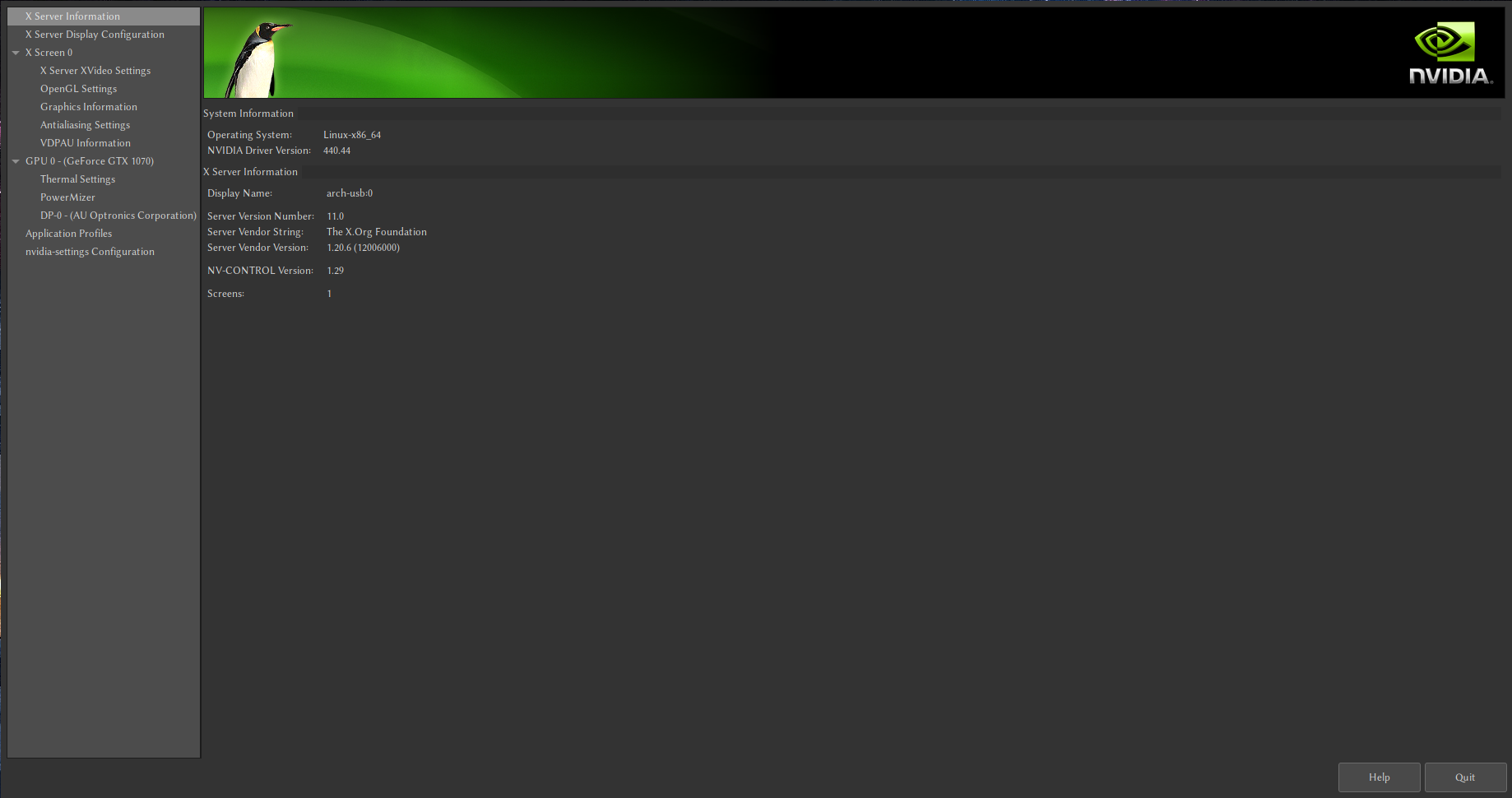
@sarpik I have installed nvidia drivers under manjaro and they have a GUI where you can do this. I didnt't have to edit xorg.conf manually or do any command line type of stuf
djalan
on 2 Jan 2020
@djalan You're probably talking about nvidia-settings?
kiprasmel
on 2 Jan 2020
100aa<esc> takes literal ~4 seconds to complete. how to fix.
 emansrazor
on 7 Jan 2020
emansrazor
on 7 Jan 2020
@e-z-p How big is the file? Is it this slow with all other extensions disabled?
J-Fields
on 7 Jan 2020
@djalan You're probably talking about nvidia-settings?
@sarpik I unchecked the third option called "Allow G-SYNC/G-SYNC Compatible"

djalan
on 16 Jan 2020
https://code.visualstudio.com/api/advanced-topics/extension-host
The Extension Host in VS Code prevents extensions from:
- Impacting startup performance
- Slowing down UI operations
VSCodeVim's perf issues demonstrate how completely the Extension Host fails at this mission. The extra complexity it adds to implementing and debugging extensions is clearly not worth it.
 jedwards1211
on 30 Jan 2020
jedwards1211
on 30 Jan 2020
tried all the solutions here and still have issues with large files on macos and windows, usually using typescript.
seems like theres no real fix to this and we just have to deal with it?
fwiw, the lag does seem to reduce when having less extensions, but i need extensions :)
 xy137
on 3 Mar 2020
xy137
on 3 Mar 2020
I had the same problem in a 5k line file.
But Disabling the extension "Bracket Pairs Colorizer" solved the problem.
 takas3
on 3 Apr 2020
takas3
on 3 Apr 2020
I uninstalled those long time ago and still had the impact.
st-schneider
on 3 Apr 2020
I was troubleshooting this issue today and came across the neovim extension. So far it meets my needs well and doesn't have any of the same performance problems. I've used and loved this extension for a long time, but the performance issues have become intolerable. In case it helps someone else, here's the extension I'm using now: https://github.com/asvetliakov/vscode-neovim
 chasingmaxwell
on 8 Apr 2020
chasingmaxwell
on 8 Apr 2020
I'm trying out the neovim plugin now.
Note that the extension requires neovim being installed, and configuring it is a lot different than the vscode extension. I don't want to derail this issue on vim vs neovim, but vscode vim has become extremely problematic for large projects.
jensbodal
on 9 Apr 2020
I even took a way different road and switched to https://marketplace.visualstudio.com/items?itemName=gregoire.dance which is mainly the kakoune keymap
st-schneider
on 9 Apr 2020
Observation: for me it helped to add some metal to the stack. After installing a dedicated GPU, the sluggishness of this plug-in disappeared in total. The problem is not a general one though: before installing the GPU, VSCode would be barely usable with VSCodeVim but fast otherwise, regardless of the VSCode hardware acceleration setting.
 adriaangraas
on 29 Apr 2020
adriaangraas
on 29 Apr 2020
For me it seems like the longer VSCode is open, the worse/slower/laggier it gets. I think for me it's tied to the VSCodeVim clipboard? (the main thing that gets sluggish for me is whenever I'm yanking/pasting. I don't know what the setting useSystemClipboard does (sounds related), I haven't played with that, it's set to false for me. _I'm on a Mac_)
This likely isn't the main issue here but might be related to it. My hack/workaround is not a solution, but it might help others.
If I run Developer: Reload Window in the Command Palette, I'll be good again for an hour or two before the sluggishness makes it unusable again. It's horrible I need to run that command so often 😞
 skplunkerin
on 29 Apr 2020
skplunkerin
on 29 Apr 2020
In my case, I changed "Render Whitespace" from "none" to "selection", changed "Cursor Style" from "Block" to "line", and changed "Cursor Smooth Cart Animation" from "true" to "false". By changing the setting like this, it is not perfect, but it is solved by slowing down.
ghost
on 16 May 2020
In my case, I changed "Render Whitespace" from "none" to "selection", changed "Cursor Style" from "Block" to "line", and changed "Cursor Smooth Cart Animation" from "true" to "false". By changing the setting like this, it is not perfect, but it is solved by slowing down.
I'm getting desperate so I'll try anything. Neovim didn't work out, I had everything setup but had way too many issues with undo/redo and going from insert to normal mode.
Your settings for anyone interested:
    "editor.renderWhitespace": "selection",
    "editor.cursorStyle": "line",
    "editor.cursorSmoothCaretAnimation": false
I feel like I'm just throwing paint at the wall at this point
jensbodal
on 16 May 2020
@jensbodal What extensions do you have installed? They are by far the most impactful factor.
J-Fields
on 16 May 2020
Introduction.
I use a translation tool because I don't speak English.
I'm sorry if the English is awkward.
I was trying to find out more about this issue, and I found something surprising.
In my case, I only suffered from this problem when I used vscodevim on my laptop (OS:win10).
When I connected HHKB which my friend gave me as a present by bluetooth today, the problem did not occur even though I did not change anything in the setting.
I usually use autohotkey and set up the cursor keys to do vim-like operations.
When using HHKB, fn+hjkl is set to replace the cursor keys in the HHKB body. (The cursor keys are actually being typed.)
In other words, when the cursor keys are used, no delay occurs, but I think that the phenomenon of delay occurs when various tools are used to simulate the cursor keys.
I'm testing it in a variety of environments and will report back with the results.
 hiro0604-0120
on 17 May 2020
hiro0604-0120
on 17 May 2020
Since this expansion program was updated yesterday, there has been a tremendous increase in speed in my work environment. I usually vs code to work with the "wsl". My Thinkpad T420s laptop also uses setting sync, so it's the same VS Code environment, but there's no slow down in T420s. The operating system of the T420s is CentOS 8. Maybe the speed problem of WSL1 is the root cause?
ghost
on 19 May 2020
If you use Dart extension : Dart-Code/Dart-Code#2902
... which is caused by some extensions (like Vim) having to send keypresses through the extension host, where they fight for a single thread with all other extensions (see microsoft/vscode#75627).
Enabling the LSP preview (the dart.previewLsp setting) should significantly improve
It works for me.
 deepDinosaur
on 13 Dec 2020
deepDinosaur
on 13 Dec 2020
Related issues
 AndersenJ
·
3Comments
AndersenJ
·
3Comments
 edwintorok
·
3Comments
ghost
·
3Comments
edwintorok
·
3Comments
ghost
·
3Comments
 rajinder-yadav
·
3Comments
rajinder-yadav
·
3Comments
 spinningarrow
·
3Comments
spinningarrow
·
3Comments
Most helpful comment
Having really bad lag issues on OSX as well