Vim: Pressing 'u' will undo all the stack.
- Click thumbs-up 👍 on this issue if you want it!
- Click confused 😕 on this issue if not having it makes VSCodeVim unusable.
The VSCodeVim team prioritizes issues based on reaction count.
Is this a BUG REPORT or FEATURE REQUEST? (choose one):
This is a bug report
Environment:
- VSCode Version: 1.15.1
- VsCodeVim Version: 0.10.0
- OS: macos 10.12.6
What happened:
I press uin Normal mode in an editor window. Every single action in the undo stack was undone. Here's a GIF:

What did you expect to happen:
I expected the last action on the stack to be undone.
How to reproduce it:
I have no idea. I was reliably triggering the bug with the exact buffer I had but at some point it stopped doing it. Then it did it again.
 yacinehmito
All 155 comments
And now it's doing it again in another project. When I reloaded the project the bug stopped.
The only similarity between the two instances of the bug is that it happened both times on an HTML-like file (first time on a vue file; second time on a proper html file).
This is the list of the extensions that I have installed and their versions:
- Auto Close Tag 0.4.3
- Auto Rename Tag 0.0.14
- Code Runner 0.7.1
- Debugger for Chrome 3.2.1
- EditorConfig 0.10.1
- ESLint 1.2.11
- Git History (git log) 0.2.3
- Git Lens 4.4.3
- HTML Snippets 0.1.0
- JavaScript (ES6) code snippets 1.4.1
- Nix 1.0.1
- npm 0.2.1
- npm Intellisense 1.3.0
- Path Intellisense 1.4.2
- Search node_modules 1.1.1
- stylelint 0.29.0
- Vetur 0.9.7
- Vim 0.10.0
- vscode-icons 7.12.0
yacinehmito
on 9 Sep 2017
Having same issue
Extension List
- Beautify css/sass/scss/less 1.7.2
- Color Picker 0.4.5
- HTML CSS support 0.1.8
- HTML Snippets 0.1.0
- IntelliSense for CSS class names 1.10.0
- Javascript ES6 Code Snippets 1.4.1
- Live Server 2.1.1
- Node.js Modules IntelliSense 1.4.0
- npm 0.2.1
- npm IntelliSense 1.3.0
- TODO highlight 0.5.11
- Vim 0.10.0
 ryanpag3
on 14 Sep 2017
ryanpag3
on 14 Sep 2017
Putting this inside vim.otherModesKeyBindings is a good temporary fix if this is a big issue for you:
{
"before": [
"u"
],
"after": [],
"commands": [
{
"command": "undo"
}
]
},
{
"before": [
"<C-r>"
],
"after": [],
"commands": [
{
"command": "redo"
}
]
}
 Chillee
on 15 Sep 2017
Chillee
on 15 Sep 2017
@Chillee
I think you meant to say
"before": [
"<C-r>"
],
for the redo.
 petejkim
on 15 Sep 2017
petejkim
on 15 Sep 2017
@petejkim You're correct! Thanks!
Chillee
on 15 Sep 2017
Terrible, confusing behavior. I cannot tell what has been undone, more times than not it's too much. Please make it VIM-like
Thanks @Chillee for the fix. This is better than the default behavior, too much is better than too little. Is there a way to have this undo block edits, etc?
 tbsf
on 22 Sep 2017
tbsf
on 22 Sep 2017
@tbsf We try, but unluckily bug-free software is hard to write :(
I don't believe so. Not without a significant amount of work.
Chillee
on 26 Sep 2017
Is anyone here NOT using enableNeovim? Just want to rule that out...
 xconverge
on 27 Sep 2017
xconverge
on 27 Sep 2017
vim.enableNeovim is set to false for me
tbsf
on 27 Sep 2017
Great thanks, just wanted to make sure
xconverge
on 27 Sep 2017
Next time this happens to someone, can you check to see if you have the same file open twice in vscode please, then either thumbs up this for yes, or thumbs down it for no
xconverge
on 28 Sep 2017
I can confirm this bug as well:
Runtime:
- VSCode: 1.15.1
- Mac 10.12.6
Extensions:
- Editor Config: 0.10.1
- Prettier: 0.21.1
- ESLint: 1.3.2
- Vim: 0.10.1
Only custom vim settings are:
"vim.disableAnnoyingNeovimMessage": true,
"vim.useSystemClipboard": true,
I did not have two copies of the file open (voted above)
 justinaray
on 28 Sep 2017
justinaray
on 28 Sep 2017
I had the issue too and the temporary fix with the keyBindings seems to help. It's a very disturbing behavior to me as ViM is my main editor. I basically did the clicks to undo stuff for a while because of that bug...
 cecton
on 6 Oct 2017
cecton
on 6 Oct 2017
No actually the temporary fix of @Chillee is still not the behavior of ViM. If you are in insert mode and remove character with backspace, go to normal mode and press u, every character will be undo one by one.
cecton
on 6 Oct 2017
I also have this bug. I am disabling this plugin for now. Looking forward to a fix.
I press u and all characters in the document are deleted one by one.
 jakkan
on 7 Oct 2017
jakkan
on 7 Oct 2017
FWIW, I also am experiencing this bug. Hitting undo is like rolling the dice.
 jcjolley
on 12 Oct 2017
jcjolley
on 12 Oct 2017
@cecton Yes, unluckily it's a temporary fix that's not very good. It's why we haven't rolled it out as a default.
Chillee
on 13 Oct 2017
@Chillee still you and all the contributors are doing an amazing job with this plugin. Thanks 👍 I think Vi is a really complicate editor to emulate the behavior.
I use some times a "normal" editor on other's computer but I have grown so much with Vi that anything else feels cumbersome to use.
cecton
on 13 Oct 2017
I've been evangelizing VS Code at my office for the past few months for TypeScript work. Most of us use vim, and this fantastic plugin is key to VSCode being a viable option at all. Fantastic work!
However, this issue is a huge pain for many of us. I've paired with at least 5 people who have run into this issue and considered switching editors as a result. It is by far our number one pain point with VS Code. I've asked on our slack channel for others to upvote this issue, but I can say for certain that I know close to ten other people directly who feel pain from this issue.
Hopefully this issue is still on the radar.
 dcolthorp
on 19 Dec 2017
dcolthorp
on 19 Dec 2017
This happened to me last night. It's very scary seeing your editor deleting lines that was not supposed to delete and you haven't add the file to VCS yet.
Please if possible prioritize this bug!
 yegle
on 21 Dec 2017
yegle
on 21 Dec 2017
Happy to help debug it – it might be a conflict with another extension?
 bsaf
on 21 Dec 2017
bsaf
on 21 Dec 2017
Just nuked like an hour of work in front of my eyes. I am very sad.
I have fresh VS Code with ESlint, Vetur, Vim, that's it. I only had one copy of the file open.
Version 1.19.1 (1.19.1)
OSX High Sierra
 lmiller1990
on 29 Dec 2017
lmiller1990
on 29 Dec 2017
My installed plugins re https://github.com/VSCodeVim/Vim/issues/2007#issuecomment-353399493
- AutoHotKey
- Bracket Pair Colorizer
- Go
- Vim
yegle
on 29 Dec 2017
@lmiller1990 If it happens to you again don't panic and just press ⌃R. Then ⌘⇧P and look for the Reload Window command. That should fix it.
yacinehmito
on 29 Dec 2017
Given the information we have I think we can safely say that it is not caused by some conflict with another extension, but rather with how VSCodeVim handles the Undo stack.
Now that I've had this bug more times than I can count, in various situations, my guess would be that VSCodeVim identifies all the changes as a single action. The bug wouldn't be in the Undo itself but with the way the extension determines the boundary between two undoable actions.
yacinehmito
on 29 Dec 2017
Just ran into this issue, lost 45 minutes of work. I clicked the 😕 but, honestly, this makes all of VSCode unusable, not just the plugin, because not having reliable vim keybindings in my editor is a deal breaker for me.
 tctimmeh
on 29 Jan 2018
tctimmeh
on 29 Jan 2018
I've still never run into this problem, but I'll commit to spending a chunk of time in a couple days either fixing this issue (hopefully), or at least implementing some kind of failsafe to prevent it from deleting so much work :(
Chillee
on 29 Jan 2018
I opened an issue on another plugin thinking the bug was there, but now reading this I'm starting to think it's here. This is the specific combination that seems to kick it off. Neither seem to cause the issue I'm seeing on their own.
- Vim 0.10.13
- Parinfer 0.6.1
Here's what happened. I was changing some user settings, then clicked over to a Clojure file. Parinfer asked me if I wanted to let it reformat the document (it needs to be formatted in a certain way for it to work) so I said yes. Everything seemed to be fine, then I started editing the file, made a mistake, hit ESC then u, and suddenly my whole file didn't just get nuked, but got replaced by my user settings file. I panicked and quit, but of course my VS Code autosaves on quit, so I nearly lost that file. Some state of it happened to still be in memory, so I was able to recover it, but it nearly gave me a heart attack.
I hadn't had any issues with the Vim port yet, so I figured it was Parinfer, and when I disabled it, the issue went away. Then I tried again today, and saw the same problem (committed my changes first so I wouldn't lose anything). This time it replaced it with my .gitignore. I'm pretty sure the only correlation there is that it was the first file I edited upon opening the app.
So, I opened an issue on Parinfer about it, but I'm also thinking it might be related to this issue as well.
 jonlaing
on 31 Jan 2018
jonlaing
on 31 Jan 2018
Thanks for the work on this plugin! I love VS Code and this plugin makes it supremely useful for me.
I've had a similar problem in the last few days where the contents of a file I was editing were replaced, character by character, with a package.json file I had open in the same project when I typed u.
 smerrill
on 31 Jan 2018
smerrill
on 31 Jan 2018
This issue happened twice to me today, similar to @smerrill
 KarboniteKream
on 31 Jan 2018
KarboniteKream
on 31 Jan 2018
@jonlaing Does it happen consistently when you're using parinfer?
Chillee
on 2 Feb 2018
@Chillee We've seen this happen without parinfer. It seems to like Vim gets confused about which buffer the undo history belongs to. It may be related to other plugins modifying the buffer. We use Prettier heavily with format on save enabled.
I've experienced both, but couldn't tell if this issue is related to the large numbers of changes getting lumped together which I'd spoken up on this thread about – they feel different in the moment, though I certainly wouldn't know if they share a root cause.
dcolthorp
on 2 Feb 2018
@Chillee I was having a hard time reliably reproducing, but I'm pretty sure the first issue I saw got kicked off by Parinfer editing the buffer to format it. That said, I also noticed the same thing without Parinfer enabled just recently, so I'm pretty confident it's not Parinfer.
The most recent one I saw was with Parinfer disabled, and no formatting plugins that I know of. Just raw JS with ESLint. I have noticed some success with closing the affected file without saving and opening it again. I'm starting to get into the habit of pressing u before making any changes just to make sure it doesn't do the replacement after I've done a bunch of stuff.
jonlaing
on 2 Feb 2018
It should also be noted that Cmd-Z does not trigger this behavior, only u.
jonlaing
on 2 Feb 2018
I also use Prettier format-on-save on at least some of the projects where this happens.
smerrill
on 2 Feb 2018
I used format-on-save with my ReasonML projects, but hadn't noticed it. That said I haven't worked on those for a month or two, so maybe this issue is new and related to a change in VS Code that broke Vim. Just speculating.
jonlaing
on 2 Feb 2018
I'm mainly just trying to look for some kind of reliable repro. Perhaps it has something to do with format on save, or more generally, some kind of interaction between VSCode triggered changes + undo?
Chillee
on 2 Feb 2018
That said I haven't worked on those for a month or two, so maybe this issue is new and related to a change in VS Code that broke Vim.
This issue is from Sep 2017.
Perhaps it has something to do with format on save, or more generally, some kind of interaction between VSCode triggered changes + undo?
@Chillee It seems to be a good idea to investigate towards format-on-save. I've been working without format-on-save for a month and the issue didn't happen even once during that time.
However I don't think the bug is related to the undo itself. I think it's the "action stack" that's problematic. What I mean by that is that VSCodeVim is probably seeing all the edits on the file as a single one.
yacinehmito
on 2 Feb 2018
One more thing. Does it only occur when you guys've been working on a file for a while?
Also, do you guys have any remappings?
Chillee
on 4 Feb 2018
Also, reading back through the thread, I'm starting to think that issue isn't actually that it's going through the undo stack, but that it's trying to go back to some previous state of the file (for w.e. reason).
Going back through the undo stack would mean that it's replaying the changes made to the file, just in reverse order.
What I suspect is happening is that it loads a history that thinks it's at some state A in the past, while the file is at some state B in the present. VSCodeVim notices that this new state B has a bunch of changes that weren't made previously, turns it into a sequence of additions/deletions, and stores them in as an undo action. Then, some unsuspecting soul presses u, causing the behavior we're seeing.
I tried playing around with a bunch of things on a single file (using ParInfer, which simultaneously modifies the file, using format on save + trying to overlap that with typing, some format on type stuff), and although I found some other buggy behavior, I didn't find any thing close to the behavior people are noting.
More importantly, I took a close look at the undo logic, and I don't think there's any way for it to blow through the undo stack. (famous last words...)
Chillee
on 4 Feb 2018
I have a remapping "vim.insertModeKeyBindings: {"before": ["j", "k"], "after": ["\ I can let you know how I experience this; Note: I can 'see' all the undos happening rapidly on my file.
This is the common scenario: Edit some code, run the 'Format Document' function, edit some more code both insert and command mode, press 'u' - then I can see how it undoes my latest change ...and continues to undo all my recent changes, and it usually keeps going all the way back to before the "Format Document". I immediately press ctrl-r and sometimes I think it correctly plays back all the changes, but sometimes it definitely stops in a weird state. I can't remember how this happens.
 steinso
on 5 Feb 2018
steinso
on 5 Feb 2018
I've had this happen, and it basically undid a whole file as if it were one action, and then CTRL-R didn't have a stack to fast-forward back to.
I don't have parinfer or suchlike. I do not have any custom keymappings
I do have:
"files.trimTrailingWhitespace": true,
"files.insertFinalNewline": true,
"vim.hlsearch": true,
"vim.startInInsertMode": true,
 kezabelle
on 5 Feb 2018
kezabelle
on 5 Feb 2018
I just experienced the variant of this issue where one buffer is replaced by another. You can see here that I'm looking at the contents of a graphql resolver file, and pressing u replaces the entire buffer line by line with a completely different file. The other file it was replaced with is the only other file I had open at the time.

dcolthorp
on 5 Feb 2018
@steinso @dcolthorp That makes it sound like there's 2 different issues here. One in which autoformatting screws up setting undo points, and another where the vimstate of a file gets replaced with another.
Chillee
on 5 Feb 2018
@Chillee I was speculating that they were the same issue, but if you think they're different issues, then the file replacement issue is the one I'm having.
jonlaing
on 5 Feb 2018
Pressed u, my whole file was reverted to how it looked half an hour ago. No way to go back.
 KristofferC
on 7 Feb 2018
KristofferC
on 7 Feb 2018
@KristofferC Next time it happens, don't panic and just press ^R right away. Then restart VSCode to temporarily fix the bug.
yacinehmito
on 7 Feb 2018
Thanks for the tip. I really like this extension but being burned by this make it just too scary to use :(
KristofferC
on 7 Feb 2018
I've yet to have it undo an entire file for me, but it has jumped back
several operations before.
On Wed, Feb 7, 2018 at 3:38 AM Kristoffer Carlsson notifications@github.com
wrote:
Thanks for the tip. I really like this extension but being burned by this
it is just too scary to use :(—
You are receiving this because you commented.
Reply to this email directly, view it on GitHub
https://github.com/VSCodeVim/Vim/issues/2007#issuecomment-363728148, or mute
the thread
https://github.com/notifications/unsubscribe-auth/AB_VIIRWVdaxnEl301bx_O_ElWb6XA6dks5tSX0dgaJpZM4PO5xD
.
jcjolley
on 8 Feb 2018
⚠️ I think it's important to mention for the future readers and for the development team that the problem is not the same for everybody: on my side with the TypeScript extensions and a spell checker installed (and that's all, very simple) I've never experienced lost of data. I only complained about the inconsistency of the behavior with the real ViM.
cecton
on 8 Feb 2018
@dcolthorp same behavior here (whole file being switched). Very scary, but so far I could get it back with CTRL+R.
 doudou
on 14 Feb 2018
doudou
on 14 Feb 2018
Hi! I experience this issue as well, hope my info helps.
I noticed that it often happens after inserts of several lines from a clipboard. "vim.useSystemClipboard" is true if it matters.
The most common version of this issue is when it replaces my whole file with contents of some other previously opened file.
 StaverDmitry
on 20 Feb 2018
StaverDmitry
on 20 Feb 2018
I'm experiencing this issue multiple times per day. It undo not the whole file, but about 10 lines. I can't belive that none of the team experiencing this. Do you use this plugin, do you? :)
[email protected]
[email protected]
[email protected]
[email protected]
[email protected]
[email protected]
[email protected]
[email protected]
[email protected]
[email protected]
One more thing. Does it only occur when you guys've been working on a file for a while?
I'm not sure, but I think yes.
Also, do you guys have any remappings?
No. My workspace settings are empty and user settings:
{
"workbench.colorTheme": "Ysgrifennwr",
"terminal.integrated.scrollback": 100000,
"terminal.integrated.shell.linux": "bash",
"terminal.integrated.fontSize": 13
}
But unique about my environments:
- Ubuntu, custom keyboard mapping, because of need of german umlauts on english keyboard, vsc runs from docker container.
- Ubuntu, but in installed in VirtualBox and vsc runs from docker container.
EDIT:
Also, reading back through the thread, I'm starting to think that issue isn't actually that it's going through the undo stack, but that it's trying to go back to some previous state of the file (for w.e. reason).
I'm not vim pro user to distinguish both cases, but possibly yes.
 Bessonov
on 21 Feb 2018
Bessonov
on 21 Feb 2018
@Bessonov I definitely do use the extension all the time. A couple things about my use that have perhaps limited my exposure to this issue are
- I don't use split pane editing very much.
- I don't have autoformat on save turned on.
Chillee
on 21 Feb 2018
@Chillee I'm new to vsc and don't play with settings very much. My usage is like yours: no split pane and no autoformat. Is there any thing to help you to find the issue like verbose logs?
Bessonov
on 21 Feb 2018
Here is a screen recording of pressing u to undo and then pressing ^-r to redo.

Note that none of those edits were done without switching back to NORMAL mode. Was expecting only a one-line change when hitting u
 psbanka
on 27 Feb 2018
psbanka
on 27 Feb 2018

Here is another instance of it
FWIW, the editor pane was split, and this file was open in the second pane as well. The issue persisted after closing the second version and the split
VSCode version
Version 1.21.0-insider
Commit b76a4a71434d6cdee69fa1d8bdc7533d09598d53
Date 2018-03-02T13:48:32.486Z
Shell 1.7.9
Renderer 58.0.3029.110
Node 7.9.0
Architecture x64
Extensions
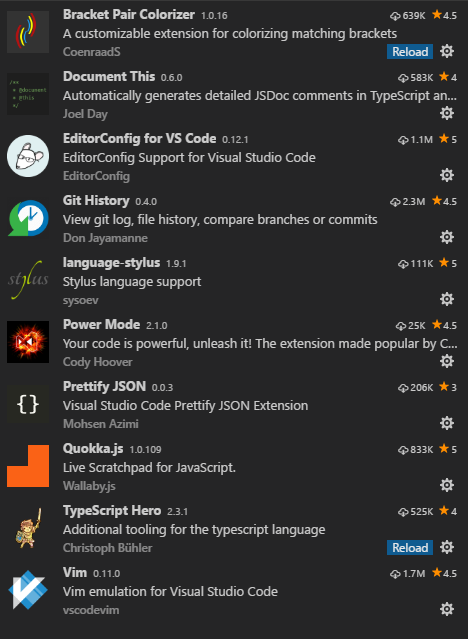
User settings
// Place your settings in this file to overwrite the default settings
{
/**********************************************
* VIM
***********************************************/
"editor.cursorBlinking": "solid",
"editor.lineNumbers": "relative",
"vim.neovimPath": "nvim",
"vim.enableNeovim": true,
"vim.easymotion": true,
"vim.incsearch": true,
"vim.useSystemClipboard": true,
"vim.useCtrlKeys": true,
"vim.leader": "<space>",
"vim.hlsearch": true,
"vim.handleKeys":{
"<C-a>": false,
"<C-f>": false,
"<C-s>": false
},
"vim.insertModeKeyBindings": [
{
"before": ["j","k"],
"after": ["<Esc>"]
}
],
"vim.otherModesKeyBindingsNonRecursive": [
{
"before": ["<leader>","d"],
"after": ["d", "d"]
},
{
"before": ["<C-j>"],
"after": ["<C-n>"]
},
{
"before": ["<C-k>"],
"after": ["<C-p>"]
},
{
"before":["<C-n>"],
"after":[],
"commands": [
{
"command": ":nohl"
}
]
},
{
"before": [
"j"
],
"after": [
"g",
"j"
]
},
{
"before": [
"k"
],
"after": [
"g",
"k"
]
},
{
"before": [
"<leader>",
";",
";"
],
"after": [
"g",
"c",
"c"
]
}
],
/*********************************************************
* TYPESCRIPT
*********************************************************/
"typescript.tsdk": "C:\\Users\\jjolley\\AppData\\Roaming\\npm\\node_modules\\typescript\\lib",
"search.exclude": {
"**/node_modules": true,
"**/bower_components": true,
"**/assets": true,
"**/dist": true
},
"files.exclude": {
"**/.git": true,
"**/.svn": true,
"**/.hg": true,
"**/CVS": true,
"**/.DS_Store": true,
},
"powermode.presets": "flames",
"powermode.enabled": true,
/*********************************************************
* MISC
*********************************************************/
"files.autoSave": "off",
"git.autofetch": false,
"git.enableSmartCommit": true,
"window.zoomLevel": 0,
"editor.fontSize": 15,
"vim.disableExtension": false
}
I have had the contents of file replaced with another file twice over the last couple of weeks. Like dcolthorp described above.
Here are my custom settings...was editting .js files
"vim.disableAnnoyingNeovimMessage": true,
"editor.fontSize": 16,
"vim.insertModeKeyBindings": [
{
"before": [
"j",
"j"
],
"after": [
"<Esc>"
]
}
],
"rufo.formatOnSave": true,
"editor.acceptSuggestionOnEnter": "off",
"editor.tabSize": 2,
"editor.minimap.enabled": false,
"editor.formatOnSave": true,
"editor.quickSuggestions": {
"other": true,
"comments": false,
"strings": false
},
"editor.quickSuggestionsDelay": 100,
"editor.parameterHints": false,
"editor.formatOnType": true,
"editor.snippetSuggestions": "bottom",
"editor.mouseWheelZoom": true,
"terminal.integrated.scrollback": 100000,
"terminal.integrated.fontSize": 14
 delateurj
on 9 Mar 2018
delateurj
on 9 Mar 2018
This also happens to me occasionally. It's super frustrating. I'm not sure if it's related, but a thing I've noticed that has felt related before is middle click pasting into current buffer if you just click on the tab bar, but not on an actual tab.
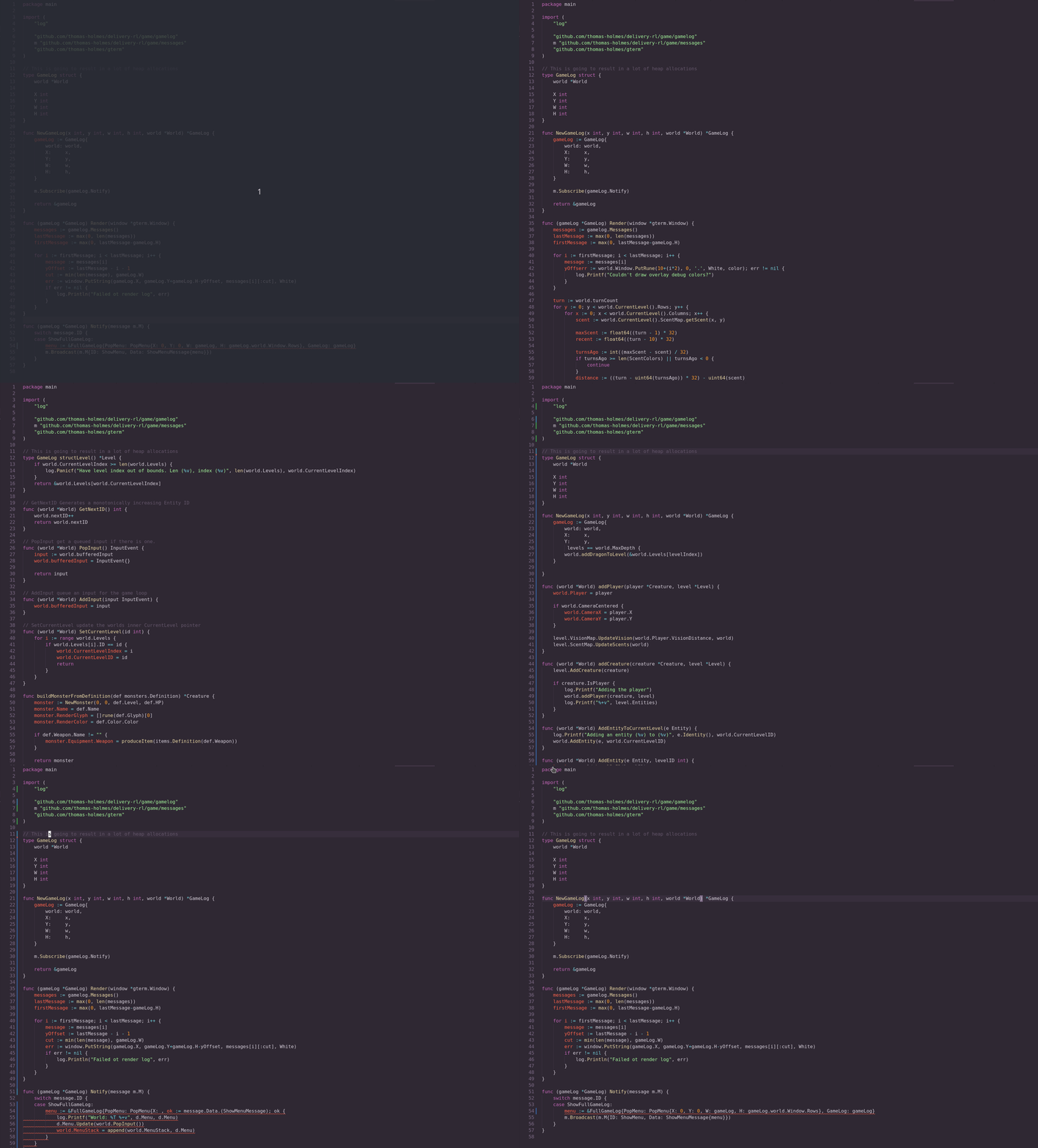
In this case it was undoing the entire contents of another file into this one. :cry:
 thomas-holmes
on 11 Mar 2018
thomas-holmes
on 11 Mar 2018
I haven't had an entire file replaced before though I suspect one of my coworkers has based on git histories. I often get more undone that what I was expecting however, especially around autoformatting changes on save and similar things that happen automatically rather than being things i type into the keyboard.
 mscharley
on 13 Mar 2018
mscharley
on 13 Mar 2018
@thomas-holmes This happens to me a lot. I messed up with my user settings because of this bug, multiple times now. As you said, it is super frustrating...
 uloco
on 15 Mar 2018
uloco
on 15 Mar 2018
I've seen this happen to me once myself when coding, but I can't seem to get a good repro. I've tried various things like split screen / auto-formatting.
From the above issues it seems like the theme is auto-formatting and/or split screen may be cause and the result of which is that the buffer is from a different file (so we maybe mixing the vimState of the files)
If anybody is able to provide minimal repro steps, this would help a lot.
 jpoon
on 16 Mar 2018
jpoon
on 16 Mar 2018
I'm working with auto-formatting disabled for quite some time and don't see the "rollback in time" error happening. However I sometimes (though rarely) have the "buffer replaced with another file's content" error.
Therefore I think there is two different issues at play here.
yacinehmito
on 16 Mar 2018
Maybe someone mentioned that, but undoing also sometimes rewrite the entire buffer of another file? At this point the undo/redo stack of the file alternate between the content of the two files so exiting (without saving) is the sanest option.
It never seem to happen in a single-file setup so it could be some race-condition when switching buffers..?
EDIT: Ok now that I think about it I don't think I've had this exact issue at all, only the other file's content one. So they seem to be different problems as mentioned in the comment above
 lesurp
on 16 Mar 2018
lesurp
on 16 Mar 2018
Hope I'm not cluttering this thread but I've several times seen the entire content of my file being replaced with the content of some other file on pressing u in normal mode.
I often have two panes open and it's possible that that was the case when I've seen this happen. It's also possible that the file that my previous file was replaced with was already open in another buffer. Relevant settings are:
"vim.insertModeKeyBindings": [
{
"before": [
"j",
"k"
],
"after": [
"<Esc>"
]
}
],
"tslint.autoFixOnSave": true,
 eysi09
on 27 Mar 2018
eysi09
on 27 Mar 2018
So following the repro given in this issue: https://github.com/VSCodeVim/Vim/issues/2545, I bisected it and found one source of the issue. However, I believe there are actually 2 separate bugs here. I have summarized my findings and put up a fix to one of the bugs here: https://github.com/VSCodeVim/Vim/pull/2547
Chillee
on 19 Apr 2018
@Chillee Impressive investigation. Thank you very much for the work!
yacinehmito
on 19 Apr 2018
I just stopped trying. I use undo and redo command mapped to the vim keybinding lol.
 dagadbm
on 20 Apr 2018
dagadbm
on 20 Apr 2018
Same here. This should be top most priority! Completely nukes out hours of work!
 dwlsalmeida
on 20 Apr 2018
dwlsalmeida
on 20 Apr 2018
The newest release includes the fix for one of the undo related bugs. If people are still encountering any form of this bug, could you react with a :confused: ? If not, respond with a :+1:
In addition, we'd also appreciate feedback on whether the frequency of this issue has been reduced.
Chillee
on 23 Apr 2018
After looking at the code and thinking, I think I've found what the other bug is. I've put up a fix here. I'm hopeful that this fixes the issue once and for all.
Chillee
on 23 Apr 2018
Most infuriating bug ever. I just see it go absolutely crazy and delete my file contents all because I pressed u once or twice.
 wldcordeiro
on 14 May 2018
wldcordeiro
on 14 May 2018
Fixed for me on 0.11.6. Just using this new version, now it doesnt revert the whole file.
Managed to get more fine grained revert action by using the following settings:
"vim.otherModesKeyBindingsNonRecursive": [
{
"before": ["u"],
"after": [],
"commands": [
{
"command": "undo",
"args": []
}
]
},
{
"before": ["<C-r>"],
"after": [],
"commands": [
{
"command": "redo",
"args": []
}
]
}
],
 chipironcin
on 14 May 2018
chipironcin
on 14 May 2018
@wldcordeiro Are you still seeing this bug with the newest version? 0.11.6
Chillee
on 14 May 2018
@Chillee btw, haven't seen it for a while already, just realized it after your comment :)
StaverDmitry
on 14 May 2018
@Chillee I can report an instance of the original bug with 0.11.6 (VSCode v1.23.1).
By original bug I mean unwanted undos of the same buffer, not the content of the buffer being replaced by another.
Let me know if you need any other info.
yacinehmito
on 16 May 2018
I'm also still seeing this. Usually with TSX files after Prettier has run on save.
 jleclanche
on 16 May 2018
jleclanche
on 16 May 2018
@yacinehmito @jleclanche As in, a very large portion of work is being undone? Or, at least, far more than you're expecting?
At least with prettier, there's a related issue (which isn't exactly the same as this one), where if you save with prettier, run a command, and then undo, the undo will undo the command + prettier.
The issue I'm more worried about is things like people saying "I just lost an hour of work to this bug".
Chillee
on 16 May 2018
I've not seen it undo more than a handful of changes at once recently, so definitely not an hour of work.
jleclanche
on 16 May 2018
@Chillee I'm not using prettier, and yes it does undo much more than expected.
By the way, thank you very much for tackling this.
yacinehmito
on 16 May 2018
@yacinehmito Ah damn. I was hopeful that the recent fix had completely fixed the issue. So, a couple more questions (directed specifically at your experiences since 0.11.6):
When you say "undo much more than expected", how much work is that? Is that typically 10s of seconds of work, a couple minutes of work, tens of minutes, or arbitrarily long? Or in other words, how many minutes worth of work does it typically undo?
Do you use splits often when you're developing? Or, when this issue occurs, were you using splits at some point in this development session?
Chillee
on 18 May 2018
I'd like to clarify things a bit here.
The behavior that I see is that pressing u in normal mode will undo the last normal mode action. If your last normal mode action was to switch into insert mode and make numerous edits, u will undo all of those edits as one atomic change. I assume that this is the intended behavior?
I'm wondering if some people are encountering this (numerous changes in one insert mode edit), and confusing that with the previous bad behavior of this bug (which was far worse, doing essentially nonsense to the document). @yacinehmito can you clarify your experience, and if/when you are switching modes?
Personally, I generally like this behavior (it is close to what vim does), but have found it to be surprising in some cases. This is usually when I've been switching between tabs, or clicking and jumping around in the document, making numerous edits without ever leaving insert mode. I wonder if this might be addressed by auto-switching back to normal mode when you change tabs? Might be nice to have this as a preference.
 murrayju
on 18 May 2018
murrayju
on 18 May 2018
+1 on switching modes when you change tabs, that seems reasonable. (Vim itself doesn't have a way not to do that)
On to your first point though, when I did see this, I've definitely been seeing things done through multiple mode switches. But it's even harder to remember as it's been happening less since the release, and I might be confusing some instances of it with the Prettier bug. Agreed that vscode-vim should be as close as possible to native vim behaviour when it comes to undo/redo.
I also feel like I've seen this happen around the times I get #2557 to trigger. I don't know if there's some failure mode that happens there...
jleclanche
on 19 May 2018
The behavior that I see is that pressing u in normal mode will undo the last normal mode action. If your last normal mode action was to switch into insert mode and make numerous edits, u will undo all of those edits as one atomic change. I assume that this is the intended behavior?
Now that's interesting and that would explain a lot for me.
Normally in ViM when you change of line during an insert mode it's like leaving the insert mode, moving, and getting to the insert mode again (compatible with Vi where you cannot change of line during the insert mode without leaving the insert mode).
If you say that the ViM plugin is intentionally changing this behavior to make the insert mode a big "blob" of changes in the undo stack, then that is bad (in my opinion). If I have a ViM plugin, I want the behavior of ViM and everything that deviates is either a limitation or a bug. Otherwise let's not call it "ViM emulation plugin" but "ViM-like plugin".
Now let's consider people who are using ViM like notepad: they go into insert mode and do everything in it. I understand the point of using the ViM plugin is quite limited. But it's a valid use case (ViM has a mode that makes the insertion mode the default mode) and this behavior would make their life very bad.
cecton
on 19 May 2018
@Chillee It just happened again so I can answer your questions:
When you say "undo much more than expected", how much work is that? Is that typically 10s of seconds of work, a couple minutes of work, tens of minutes, or arbitrarily long? Or in other words, how many minutes worth of work does it typically undo?
It's hard to say. I would say more than 15min, but I doubt that this estimate would be of any use to you. It _looks_ like it undoes until the last save.
Do you use splits often when you're developing? Or, when this issue occurs, were you using splits at some point in this development session?
I do. The issue occurred while there was not split but I did use splits in this development session.
yacinehmito
on 28 May 2018
I think we can close this out now? I haven't seen a new report of this issue since @Chillee's fixes in https://github.com/VSCodeVim/Vim/releases/tag/v0.12.0
jpoon
on 11 Jun 2018
I deactivated this plugin last week. It was not fixed.
Bessonov
on 11 Jun 2018
@Bessonov can you give us more information on what happened? a repro would greatly help.
jpoon
on 11 Jun 2018
@jpoon I can try it again, but it was as described above: multiple changes were undone. I didn't saw any pattern behind that and didn't used prettier or split. But I use extensively middle click, ctrl+w in insert mode and like.
Bessonov
on 11 Jun 2018
If you could whittle it down to a repro, that would greatly help in figuring out the root cause.
jpoon
on 11 Jun 2018
@jpoon I think @yacinehmito report is evidence that it's not gone yet. https://github.com/VSCodeVim/Vim/issues/2007#issuecomment-392558376
@Bessonov When you say that multiple changes were undone, how much time worth of changes are you talking about? Several minutes? Or just a couple of changes.
Chillee
on 11 Jun 2018
@Chillee tested it today. I doesn't had many changes (10-20 steps, 10-20 minutes of work) and all changes are reverted. ctrl+r redone all changes again. There is no stop between. Current plugins:
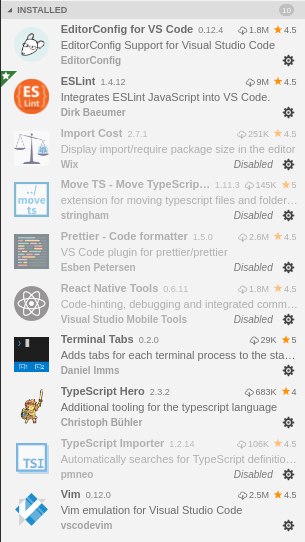
I don't find any repro steps, it just happen.
Bessonov
on 13 Jun 2018
@Bessonov still happening here as well.
 asilvadesigns
on 3 Jul 2018
asilvadesigns
on 3 Jul 2018
 alanjds
on 4 Jul 2018
alanjds
on 4 Jul 2018
It seems to be also happening for me as well. They were changes a few lines apart and several mode switches between normal and insert were definitely involved. I think the current bug might have something to do with Prettier but I'm not sure. The suggested key remapping in "vim.normalModeKeyBindingsNonRecursive":
{
"before": [
"u"
],
"after": [],
"commands": [
{
"command": "undo"
}
]
},
{
"before": [
"<C-r>"
],
"after": [],
"commands": [
{
"command": "redo"
}
]
}
does solve the issue but that's not the default Vim behavior.
On a separate note, actually I was wondering if it's possible for VSCodeVim to have a setting for "fine undo", offered in Evil mode in Emacs, which performs undos in smaller units than "all the changes performed in insert mode", just as what the key remapping above does. I'm more used to fine undos rather than the default undo behavior. Though I guess I should open a feature request for that. I opened it at https://github.com/VSCodeVim/Vim/issues/2835
 x-ji
on 11 Jul 2018
x-ji
on 11 Jul 2018
Same here! with latex editing.
And the above solution ("vim.normalModeKeyBindingsNonRecursive") DOES NOT work for me!
very frustrating! now I have to disable the autosave in case a mistaken undo action.
 honghaoli
on 17 Jul 2018
honghaoli
on 17 Jul 2018
Same here. Use with HTML.
 cutelittleturtle
on 17 Jul 2018
cutelittleturtle
on 17 Jul 2018
I was encountering this issue, but I think it was caused by having split editors and the file open in two locations. Closing one of them fixed the issue.
 DoubleB123
on 26 Jul 2018
DoubleB123
on 26 Jul 2018
Adding args: [] to both as shown here helped me:
https://stackoverflow.com/questions/47527162/vscode-vscodevim-undo-key-rebinding
So now I have:
"vim.normalModeKeyBindingsNonRecursive": [
{
"before": ["u"],
"after": [],
"commands": [
{
"command": "undo",
"args": []
}
]
},
{
"before": ["<C-r>"],
"after": [],
"commands": [
{
"command": "redo",
"args": []
}
]
}
],
 jeffmcutter
on 30 Aug 2018
jeffmcutter
on 30 Aug 2018
@jeffmcutter Where do you add that section you pasted above?
 mmikolajczyk
on 13 Sep 2018
mmikolajczyk
on 13 Sep 2018
@mmikolajczyk It just goes in your standard vscode user settings file. (accessed from e.g. the command Preferences: Open Settings (JSON).
 shawnaxsom
on 13 Sep 2018
shawnaxsom
on 13 Sep 2018
@shawnaxsom works, thanks!
mmikolajczyk
on 13 Sep 2018
Had this happen to me today on the insiders build. It started on the next undo after using F2 to refactor a variable name.
jcjolley
on 27 Sep 2018
If it wasn't for the awesome work you guys have done with this plugin I'd never even use vscode.
With that said, I just nuked a huge chunk of work because undo was working but suddenly ctrl-R wasn't working, so the initial undo nuked more than I expected (granted, I understand that it should revert to a previous normal state but this was significantly more than a single normal state it reverted back to), and then ctrl-R only opened up the control palette and the vscode redo didn't do beans. I have ctrl-keys set to true, been using vscode for the majority of my programming all week and then bam, suddenly I cannot redo after an undo nuke. I restarted vscode and it's behaving like it has never had an issue.
vscode
Version: 1.28.2
Commit: 7f3ce96ff4729c91352ae6def877e59c561f4850
Date: 2018-10-17T00:20:56.183Z
Electron: 2.0.9
Chrome: 61.0.3163.100
Node.js: 8.9.3
V8: 6.1.534.41
Architecture: x64
vscodevim: 0.16.11
OS: ubuntu 18.04.1
Sorry I cannot offer a reproduction - I had a live server running and dart-sass running, other than that I don't know what else to offer. Thanks again for your hard work.
 prescottbreeden
on 19 Oct 2018
prescottbreeden
on 19 Oct 2018
I discovered that in vim c-r and c-R are the same. I’ve always done c-R because that’s what the docs say.
Turns out VSCodeVim uses c-r (but NOT c-R) so make sure lowercase/no shift key. Just mentioning in case it helps anyone.m, it applies to all ctrl- combos
 benjie
on 20 Oct 2018
benjie
on 20 Oct 2018
I've had this issue for some time now. It's reverting dozens of line changes in one shot. The issue always happens after I use shift+V and yank/paste multiple times over a coding session.
My vscode:
Version: 1.28.2 (system setup)
Commit: 7f3ce96ff4729c91352ae6def877e59c561f4850
Date: 2018-10-17T00:23:51.859Z
Electron: 2.0.9
Chrome: 61.0.3163.100
Node.js: 8.9.3
V8: 6.1.534.41
Architecture: x64
 mfigueroa
on 29 Oct 2018
mfigueroa
on 29 Oct 2018
It is still happening if you are doing lots off editing in normal mode via yanking, selecting putting and so on pressing undo remove all changes since they were all done in normal mode it should undo only last change. Also redo don't work after that.
 ibeex
on 13 Nov 2018
ibeex
on 13 Nov 2018
Yep, it is still happening. However it does seem to be fairly rare now though.
EDIT: Well, it had not happened in quite a while, now it happened twice this morning. It is totally erasing my whole file when it does it too. I am not staying in one mode either. I switch in and out of insert / normal modes, and I am saving often. Unfortunately I had auto-save on, so when it nukes it, I lost everything. 😞
 Dannzzor
on 28 Nov 2018
Dannzzor
on 28 Nov 2018
Yep, it is still happening. However it does seem to be fairly rare now though.
I can vouch for that. It used to happen everyday for me. Now it's happening less than once a week.
yacinehmito
on 28 Nov 2018
It happens every time i press u. The fix is very inconvenient. Is there an alternative plugin that doesn't have this persistent bug?
 hroachewilson
on 2 Dec 2018
hroachewilson
on 2 Dec 2018
@hroachewilson You can bind the native VSCode undo over the Vim undo as suggested in this thread https://github.com/VSCodeVim/Vim/issues/2007#issuecomment-404264451
I personally use it even I have not really seen this bug happen. I just find it confusing to have two undo stacks.
 esamattis
on 2 Dec 2018
esamattis
on 2 Dec 2018
It happens every time i press u.
Then please tell us everything you're doing. We've been chasing this bug for more than a year now and can't find the proper cause.
yacinehmito
on 2 Dec 2018
For me it was only occurring in a newly created file. I was working in a project and I created a new SCSS file, which I believe I created in finder for some reason. worked for a few hours, then a random 'u' undid everything until the file was empty. that happened a couple more times, so I went back to Vim for the day. But it only occurred in that newly created file. Have not had any more occurrences yet. 🤞
Dannzzor
on 11 Dec 2018
Seems to me, it undoes all things way back to the last time I moved the cursor (caret). Please, this is really annoying.
 Magicloud
on 18 Dec 2018
Magicloud
on 18 Dec 2018
I am surprised that this issue has not been fixed yet.
 hackedWifi
on 26 Dec 2018
hackedWifi
on 26 Dec 2018
Comparing to standalone vim it appears to be a bug in determining when to end an undo block related to cursor movement after exiting edit mode. In standalone vim, you can type a whole bunch of code, hit u and have a bunch of it disappear (I haven't dug into any limits or all of the specific delimiters that might end an undo block, so its possible there are limits), so this isn't completely wrong. However, in vim if you type a bunch of stuff in edit mode and move your cursor position vertically, it will end the undo block, and vim mode in vscode does not follow that behavior.
To repeat this:
i# go into edit mode- type a bunch of text on multiple lines, don't use the vertical arrow keys yet
- delete some text #
esc uand all of the text would disappear... thats what standalone vim does too - use the vertical arrow keys to navigate to another line #
esc uhere will also rightfully delete all the text - make an edit to the text on any line #
esc uhere does the wrong thing. it should only undo the edit made in this step and not affect the previous code.
The plugin seems to handle horizontal arrow keys correctly (as far as I can tell), so the bug appears to be in the vertical arrow keys
 melevine
on 3 Jan 2019
melevine
on 3 Jan 2019
Unfortunately, this issue still persists. It makes this otherwise perfect plugin into an unusable one.
 qguv
on 13 Feb 2019
qguv
on 13 Feb 2019
Unfortunately, this issue still persists. It makes this otherwise perfect plugin into an unusable one.
It is an amazing plugin.You just have to apply the workaround mentioned above.
hackedWifi
on 13 Feb 2019
I can't believe this issue has been open for years. If we could crowd fund bug fixes, I'd gladly contribute a few bucks. Unfortunately we need a free volunteer. Anybody want to be a hero?
Isn't there a quick fix to automatically add the work around settings by default? (E.g. using vim.normalModeKeyBindingsNonRecursive to map u to undo and C-r to redo, see https://github.com/VSCodeVim/Vim/issues/2007#issuecomment-417468079)
 jahooma
on 16 Feb 2019
jahooma
on 16 Feb 2019
I'm still having this issue too. The work around settings do not fix the issue for me...
any thoughts?
 hinterlandsupplyco
on 1 Mar 2019
hinterlandsupplyco
on 1 Mar 2019
@jahooma The reason that this issue has been around for so long is that this issue has served as a dumping ground for all sorts of issues surrounding undo.
The initial one that caused most of the complaints and frustration was a seriously deal breaking one causing some people to lose hours of work. That's always been interleaved with issues related to not setting undo stops when we should.
Chillee
on 1 Mar 2019
What a real fix whould be? Issuing a finishCurrentStep() on every cursor move when in INSERT mode?
alanjds
on 1 Mar 2019
Is there a way to disable the undo feature until the issue is fixed ?
 tevariou
on 15 Mar 2019
tevariou
on 15 Mar 2019
Yes. It's mentioned multiple times in this thread.
https://github.com/VSCodeVim/Vim/issues/2007#issuecomment-404264451
esamattis
on 15 Mar 2019
IMO the native vscode undo/redo behavior should be the default until this is fixed
 pumpkinlink
on 8 Apr 2019
pumpkinlink
on 8 Apr 2019
I found out a way to recover the stuff if you happen to be lucky and not have overwritten the stack.
After u deletes most of the stuff, use ctrl-r to go forward, and once you are just after the disaster, click i to enter insert mode, and click by click, use Edit -> Undo.
It may take a few clicks, but it recovered all the content I had typed.
 txomon
on 11 Apr 2019
txomon
on 11 Apr 2019
If it helps, I have found a minimal reproducer with all other extensions disabled:
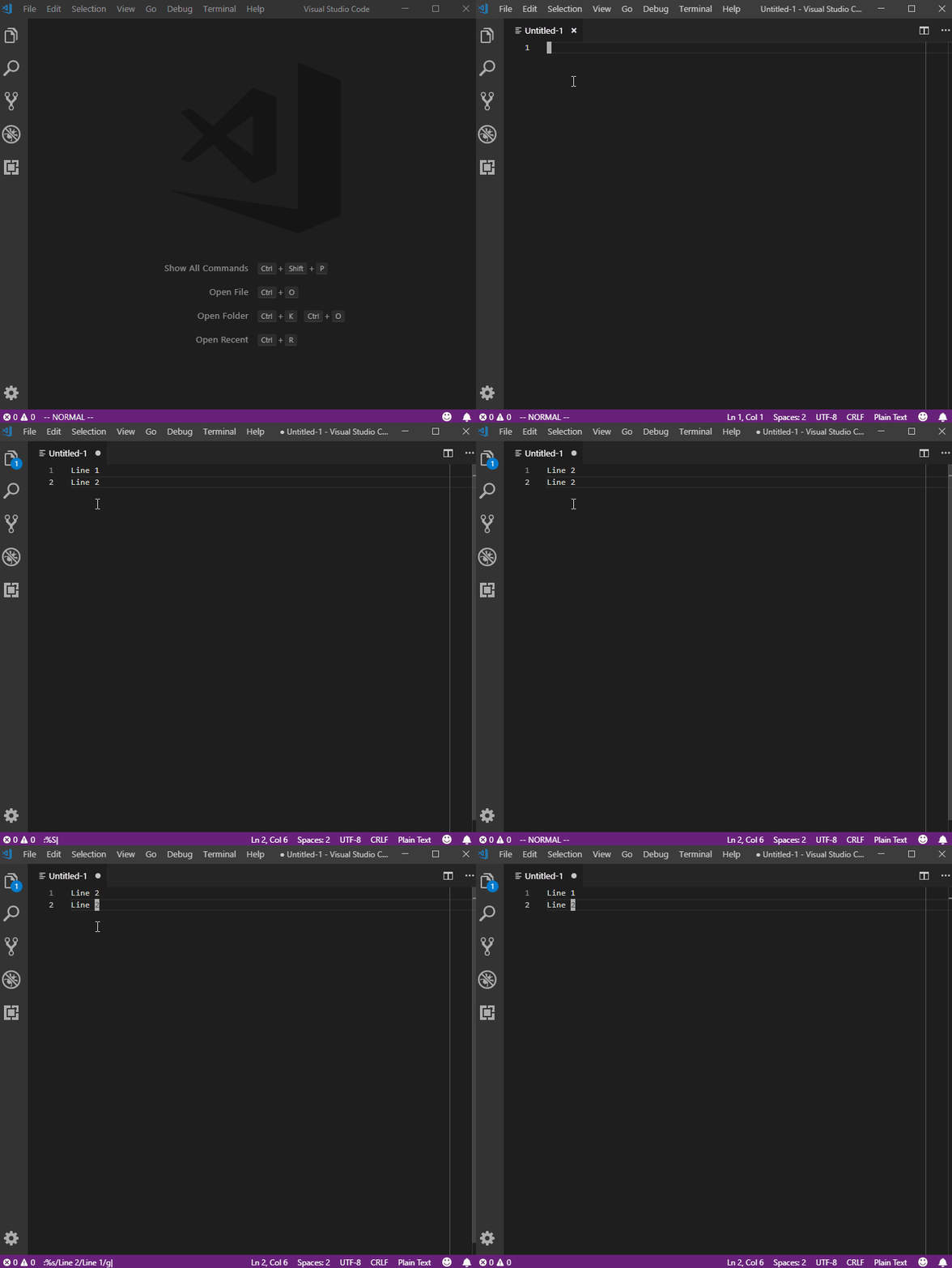
At the end I press u which undoes both of the %s commands I had previously typed.
 samkearney
on 14 May 2019
samkearney
on 14 May 2019
Sorry to repeat, but can anyone confirm if this seems like a good approach?
What a real fix whould be? Issuing a
finishCurrentStep()on every cursor move when in INSERT mode?
alanjds
on 14 May 2019
Adding args: [] to both as shown here helped me:
https://stackoverflow.com/questions/47527162/vscode-vscodevim-undo-key-rebinding
So now I have:
"vim.normalModeKeyBindingsNonRecursive": [ { "before": ["u"], "after": [], "commands": [ { "command": "undo", "args": [] } ] }, { "before": ["<C-r>"], "after": [], "commands": [ { "command": "redo", "args": [] } ] } ],
Can you say why "args":[] is needed in the "commands" section? The solution by x-li https://github.com/VSCodeVim/Vim/issues/2007#issuecomment-404264451 without it seems to work for me so far.
I think the issue that still remains after the workaround https://github.com/VSCodeVim/Vim/issues/2007#issuecomment-404264451 is that now the undo will undo everything done up until the last normal mode (which is still far better than the default behavior which I don't understand). This will be a problem for those who do a lot of editing in insert mode in one go. As mentioned by others, Vim knows how to create checkpoints when you switch lines within one editing session during insert mode, so when you undo in Vim the undo happens line by line.
 chanshing
on 26 May 2019
chanshing
on 26 May 2019
@x-ji What do you mean by "does solve the issue but that's not the default Vim behavior"?
It makes u trigger VSCode's undo command to work around this bug, but VSCode's undo behaves somewhat differently from Vim's.
 hagabaka
on 1 Jun 2019
hagabaka
on 1 Jun 2019
Sorry to repeat, but can anyone confirm if this seems like a good approach?
What a real fix whould be? Issuing a
finishCurrentStep()on every cursor move when in INSERT mode?
https://github.com/VSCodeVim/Vim/blob/e7dd01105ff038b1d27e53f8fa22058f3b5fc95f/src/history/historyTracker.ts#L479-L484
@alanjds if I understood correctly, it should solve some cases, but not all of them, like when its caused by calling external commands, like "Format Document" and ESLint's "Fix all".
pumpkinlink
on 11 Jun 2019
Added this code to my settings.json solved the problem.
The above solution added at vim.otherModesKeyBindings does not work for me.
"vim.normalModeKeyBindingsNonRecursive": [
        {
            "before": [
                "u"
            ],
            "after": [],
            "commands": [
                {
                    "command": "undo"
                }
            ]
        },
        {
            "before": [
                "<C-r>"
            ],
            "after": [],
            "commands": [
                {
                    "command": "redo"
                }
            ]
        }
    ]
 khanhhuy
on 10 Sep 2019
khanhhuy
on 10 Sep 2019
The above works just fine, I can work again in peace! Thanks!
 syfenx
on 18 Sep 2019
syfenx
on 18 Sep 2019
The messaging for voting in the issue description is confusing.
Click thumbs-up on this issue if you want it!
Click confused on this issue if not having it makes VSCodeVim unusable.
What is "it" referring to? The current behaviour or fixing it? The title of the issue is "Pressing 'u' will undo all the stack." which is most certainly not what I want. The current behaviour makes VSCodeVim unusable without the workaround given above.
 hackel
on 11 Mar 2020
hackel
on 11 Mar 2020
@hackel 👍 means the issue affects you; 😕 means the issue makes the extension unusable for you.
 J-Fields
on 11 Mar 2020
J-Fields
on 11 Mar 2020
@Chillee I haven't had the bug in a long while. Should I close the issue?
yacinehmito
on 6 May 2020
I had to do the remapping hack proposed by @khanhhuy a couple of weeks ago, so I guess the issue persists. Btw, the remapping taps into vscode's undo stack and logic which is slightly different to vim's.
 maasha
on 7 May 2020
maasha
on 7 May 2020
I have this behaviour too right now. Writing rust, with these extensions enabled:
cssho.vscode-svgviewer
dbaeumer.vscode-eslint
DotJoshJohnson.xml
dracula-theme.theme-dracula
eamodio.gitlens
esbenp.prettier-vscode
James-Yu.latex-workshop
mechatroner.rainbow-csv
ms-python.python
rust-lang.rust
vscodevim.vim
I can repeatedly press u and <C-r> to reproduce it. I've saved and committed my changes and it still does it. I can try to keep the editor open while I look for a way to have logs about this. If you could point me in the right direction I may be more successful.
 ohemelaar
on 9 May 2020
ohemelaar
on 9 May 2020
Having the problem when editing latex code, I have lost entire lines of text. This should be a top priority bug. I will now try the workaround suggested. I started noticing the problem after activating the extension Code Spell Checker, but since it occurs randomly I don'y know if that is (one of) the (possible) cause(s) of the problem.
 LucaMarconato
on 20 May 2020
LucaMarconato
on 20 May 2020
I have not had the issue until recently, writing C/C++ and Javascript
The especially annoying thing is that if you try a redo it seems to miss newlines occasionally so you get this mess of lines that are half overwritten by what was below them. When it happens I just lean on Ctrl-Z until things get back to normal.
Will try khanhhuy's fix
 wilkinsw
on 27 May 2020
wilkinsw
on 27 May 2020
I know no one asked, but... I just gave up and now am using asvetliakov/vscode-neovim instead. It's not perfect and has it's own set of bugs, but works better for me. Thank you everyone for the great work
pumpkinlink
on 28 May 2020
@pumpkinlink @LucaMarconato @ohemelaar: Have you tried the fix described above? I got the undo bug all the time until I added that snippet to my settings.json on February 2019—since then, I haven't seen the bug a single time.
qguv
on 28 May 2020
I have tried the code from @khanhhuy and I haven't encountered the bug anymore, but I have also not written much more latex code since then, and for other languages everything always worked fine, so maybe it was just luck.
LucaMarconato
on 28 May 2020
Have you tried the fix described above
yes, and it works, but native vim's undo behavior is way better than vscode's IMO, that's one of the reasons I want a vim extension in first place, to get rid of that nodepad-ish undo history. Vim wont separate your text chunk in many arbitrary separate undo steps just because you're typing in bursts, a new step will be "committed" only when you press Esc. Also now I can use :earlier and :later, etc.
pumpkinlink
on 28 May 2020
@pumpkinlink Oh don't get me wrong, I agree that this bug totally breaks the extension. I just wanted to make sure you saw the current partial workaround since it's pretty far up in the thread now and easy to miss.
qguv
on 28 May 2020
I'm also seeing this bug occasionally but have been unable to pinpoint it. Do we know in which circumstances it happens?
This bug can be especially mean if you don't notice that text you want to keep is deleted. If I notice it, my workaround is to fall back to native undo behavior (hitting Cmd+Z). I then close and reopen the tab as I have the impression (totally unproven) this decreases the likelihood of this bug.
 trkoch
on 5 Jun 2020
trkoch
on 5 Jun 2020
I also just experienced this - almost didn't notice that I had deleted a couple hours of work. Redoing with Ctr+R and reloading the workspace to go back to normal undo behavior did the trick, but I'm not sure how to reproduce the bug.
 jkulskis
on 10 Jun 2020
jkulskis
on 10 Jun 2020
This happened to me after using the Rename Symbol command. I'd expect any kind of refactoring that's done by VSCode as opposed to VSCodeVim to interact badly with VSCodeVim's undo stack.
 BigPictures
on 15 Aug 2020
BigPictures
on 15 Aug 2020
FWIW, I have a very simple minimal example. You can do this in a new/existing buffer.
- Press 'A' to append to the end of the current line
- Type any character
- Press 'Esc' / CTRL-']' to leave insert mode
- Press '.' a few times to repeat the previous operation
- Press 'u'
The result is that everything will be undone.
 coreysharris
on 8 Oct 2020
coreysharris
on 8 Oct 2020
FWIW, I have a very simple minimal example. You can do this in a new/existing buffer.
- Press 'A' to append to the end of the current line
- Type any character
- Press 'Esc' / CTRL-']' to leave insert mode
- Press '.' a few times to repeat the previous operation
- Press 'u'
The result is that everything will be undone.
@coreysharris while I definitely experience this bug all the time, your reproduction steps don't actually recreate the issue for me. 😞
I'm wondering if there is some more global state that is causing this. Are you able to recreate the issue with your steps after you quit and start VSCode?
 dcalhoun
on 8 Oct 2020
dcalhoun
on 8 Oct 2020
I disabled all other extensions and restarted VSCode. I can still reproduce by following the steps above.

Here's my version info:
Version: 1.49.2
Commit: e5e9e69aed6e1984f7499b7af85b3d05f9a6883a
Date: 2020-09-24T16:23:52.277Z
Electron: 9.2.1
Chrome: 83.0.4103.122
Node.js: 12.14.1
V8: 8.3.110.13-electron.0
OS: Darwin x64 18.7.0
coreysharris
on 8 Oct 2020
FWIW, I have a very simple minimal example. You can do this in a new/existing buffer.
- Press 'A' to append to the end of the current line
- Type any character
- Press 'Esc' / CTRL-']' to leave insert mode
- Press '.' a few times to repeat the previous operation
- Press 'u'
The result is that everything will be undone.
Unfortunately I'm unable to reproduce using these steps.
J-Fields
on 15 Oct 2020
FWIW, those steps also don't reproduce it for me. Each . is undone by an execution of u (ie: ..... requires uuuuuu)
The only way I can make the above gif occur is by using the VSCode undo (ctrl-z/cmd-z) which does display that behaviour.
Given one of the proposed solutions somewhere upthread is to remap u to VSCode's undo (IIRC), @coreysharris is there a possibility you've done so?
kezabelle
on 16 Oct 2020
Ah, yes I do have that workaround in my settings. Here's everything vim-related:
    // ViM settings
    "vim.normalModeKeyBindingsNonRecursive": [{
            "before": ["u"],
            "after": [],
            "commands": [{
                "command": "undo",
                "args": []
            }]
        },
        {
            "before": ["<C-r>"],
            "after": [],
            "commands": [{
                "command": "redo",
                "args": []
            }]
        }
    ],
    "vim.useSystemClipboard": true,
    "vim.easymotion": true,
    "vim.easymotionMarkerWidthPerChar": 12,
    "vim.easymotionMarkerFontFamily": "Fira Code",
    "vim.easymotionMarkerFontWeight": "normal",
    "vim.foldfix": true,
    "vim.leader": ",",
    "vim.sneak": true,
My two cents: I get this problem when I do _multiple edits without leaving insert mode_.
If you enter insert mode, edit some text, _exit insert mode, move, enter insert mode,_ edit some text, exit insert mode.
Then this will be considered as _two separate actions_ by the extension's undo.
But if you enter insert mode, edit some text, then _move with the mouse or the arrow keys_, edit some text, exit insert mode.
Then this is considered as _one undo action_. Oh no! Vim would consider this to be two actions.
This is what I experience, but others may be experiencing something else. I work mainly in JS/TS/MD files.
In this case, a possible solution might be to detect any movement in insert mode, and at that point mark a boundary/ending for the latest undo action.
(It is also worth noting that sometimes VSCode's native undo appears to group separate edits together, and sometimes it doesn't. I'm not sure why. I observed this when using VSCodeVim, not in default mode.)
 joeytwiddle
on 18 Nov 2020
joeytwiddle
on 18 Nov 2020
Related issues
 jaredly
·
3Comments
jaredly
·
3Comments
 AndersenJ
·
3Comments
AndersenJ
·
3Comments
 st-schneider
·
3Comments
st-schneider
·
3Comments
 WangRongda
·
3Comments
WangRongda
·
3Comments
 Jimmy-Z
·
3Comments
Jimmy-Z
·
3Comments
Most helpful comment
Added this code to my settings.json solved the problem.
The above solution added at
vim.otherModesKeyBindingsdoes not work for me.