Vim: Add Selection To Next Find Match selects whole word in insert mode
- Click thumbs-up 👍 on this issue if you want it!
- Click confused 😕 on this issue if not having it makes VSCodeVim unusable.
The VSCodeVim team prioritizes issues based on reaction count.
Environment:
- VSCode Version: 1.12.2
- VsCodeVim Version: 0.7.1
- OS: MacOS 10.12.5
What happened:
Select a part of a word in insert mode and press cmd + d (ctrl + d). The occurrences of whole word got selected.

What did you expect to happen:
Only the occurrences of the selected part should have been selected (just like without vim enabled):

 binarious
All 14 comments
Thanks for making this a separate issue!
While this is definitely broken behavior with respect to native vscode, I have mixed feelings about whether we should add support for it, for a couple of reasons.
For one, the desired behavior here can be replicated through selection in visual mode. Like so,

Second, this behavior would involve interacting with selections in insert mode. We don't really handle that anywhere. We allow it, for some purposes, but in general, all selection is done through visual mode.
Thoughts on this? @johnfn @xconverge @rebornix
 Chillee
on 17 May 2017
Chillee
on 17 May 2017
I'm a big fan of fixing this. I use multi cursor mode in insert mode alot, and expect the functionality to remain the same as VSCode while in that mode. Not being able to select words properly or highlight multiple cursors in insert mode has been a deal breaker for me.
Not sure how possible it would be to make the plain insert mode cursors to work just like vanilla VSCode, but that would be ideal!
 jsonMartin
on 21 Jun 2017
jsonMartin
on 21 Jun 2017
@jsonMartin What do you mean by highlight cursors in insert mode?
Chillee
on 21 Jun 2017
Hey @Chillee , so if I'm in regular insert mode, I can highlight just fine, for example hold shift and press right or "end" to select the entire line.
If I'm in "Insert Mode Multi Cursor", I lose the ability to highlight completely.
Here's a graphic showing this in action (note, my Ctrl+G is bound to Add Next Occurrence instead of Cmd+D):
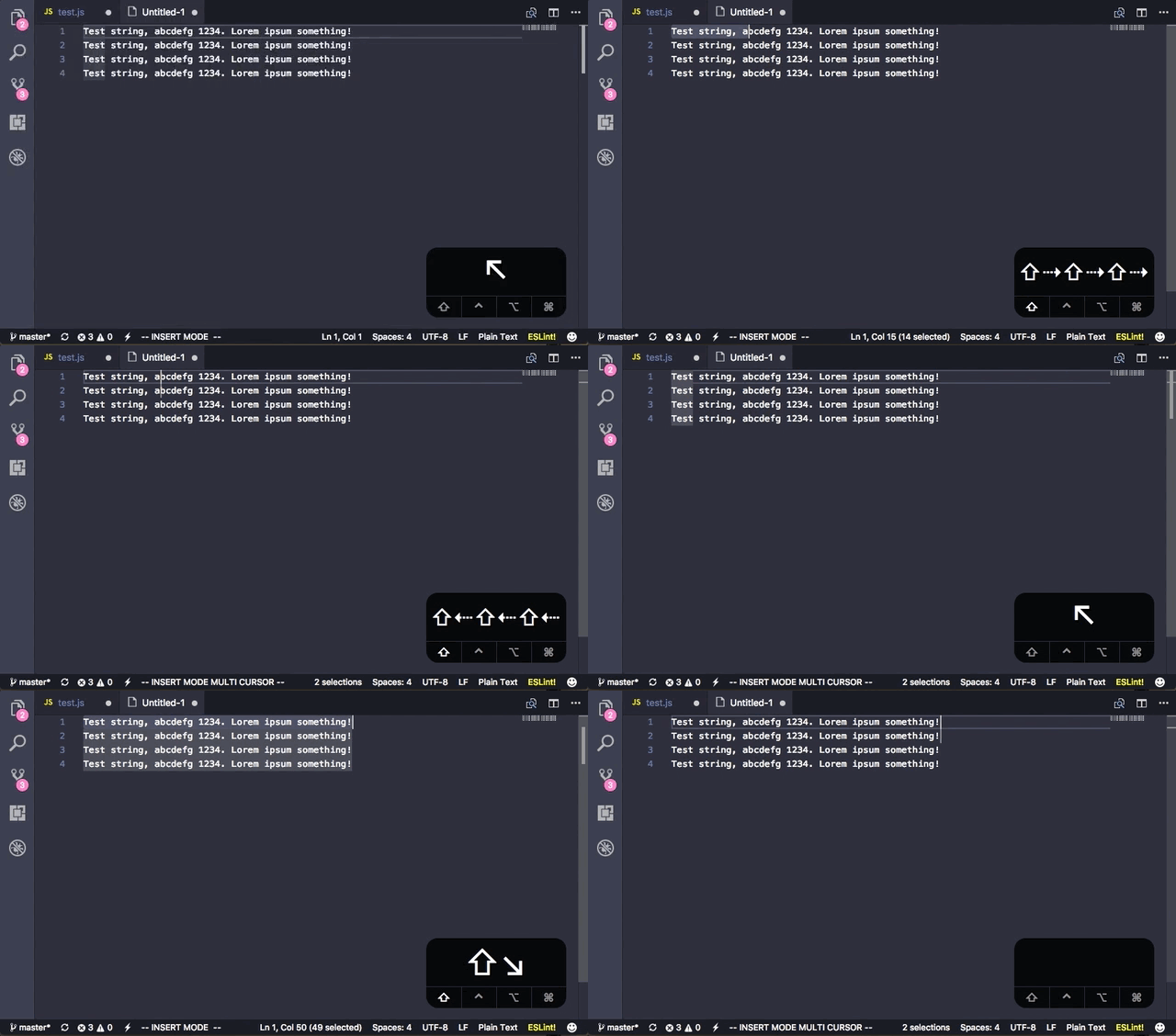
Plus, not sure if this was related to the VSCode May upgrade, but Add Next Occurrence stopped working for me as well (I remember you had patched this in not too long ago). I can only select up to the second match again, then it fails to continue matching any additional occurrences.
jsonMartin
on 21 Jun 2017
@jsonMartin I think we're likely to simply put you into visual mode when you select things in insert mode.
Add Next Occurrence still seems to work fine for me. Are you sure you don't have Match Whole Word or something turned on?
Chillee
on 21 Jun 2017
@Chillee Yeah, I did have Match Whole Word on. Turning that off helped, thx. However, I'm having issues when selecting things in visual mode as well:
Selecting left while in visual multi cursor mode causes jumping cursors:
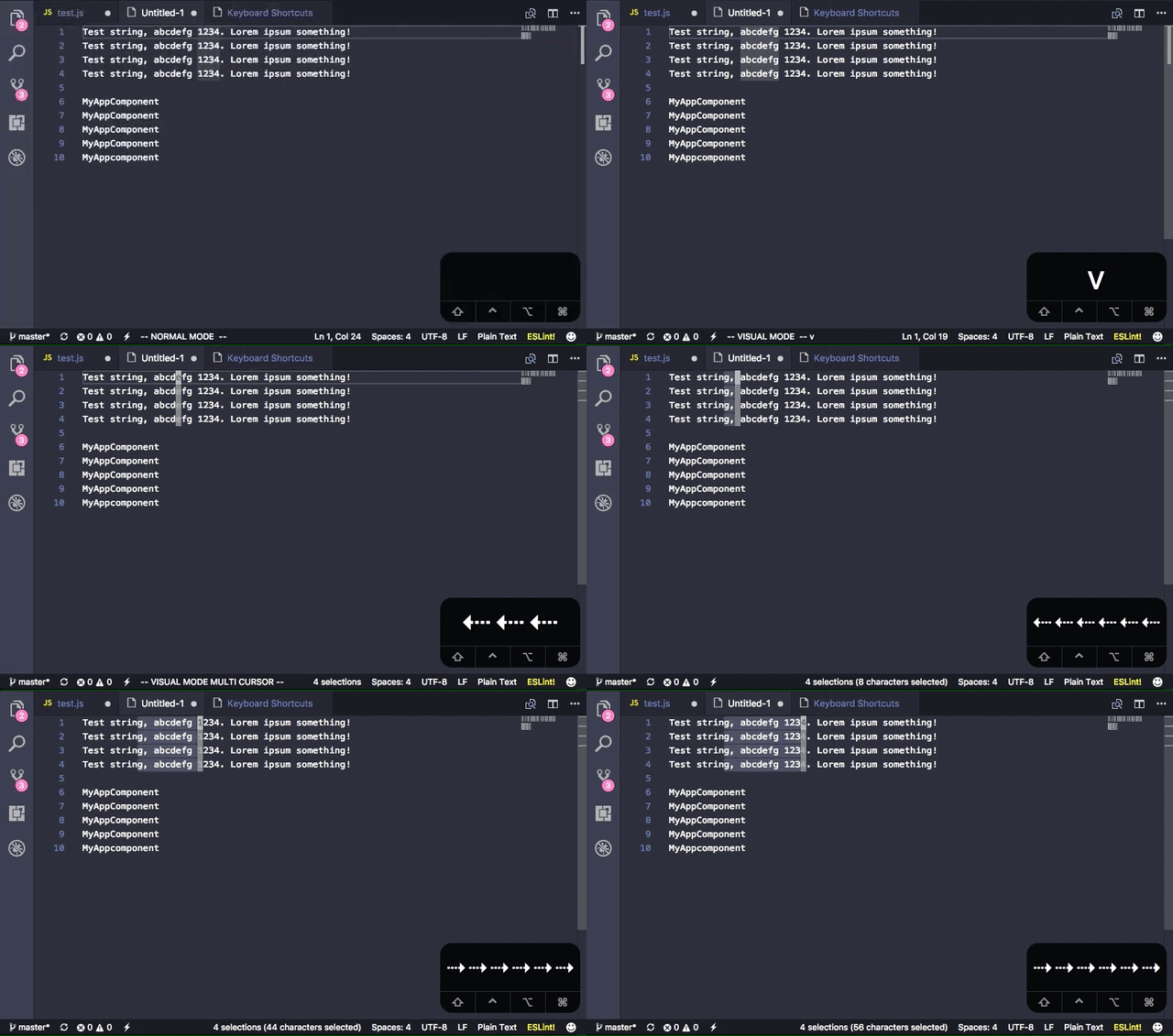
In this example, I'm trying to get rid of all the
*(space + star + space) text. When I select it in Insert mode, the wrong selections are added, it's adding two on the same line on lines that have/**.
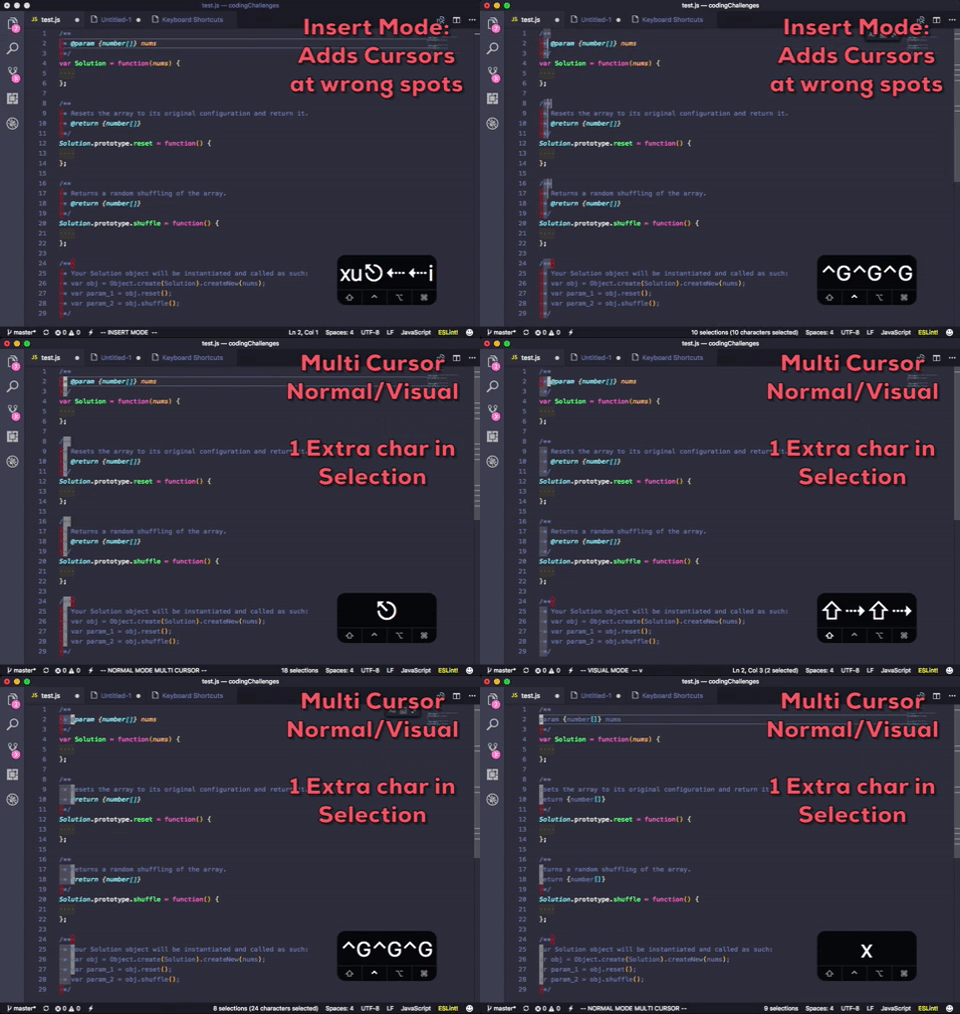
When I try to select it in visual mode, I have to go one character past the desired selection because it doesn't seem to be matching the whitespace correctly. Then after adding next occurrences, when I delete the entries it doesn't delete just what I selected, but the additional character in front where the cursor is located because I had to select one past what I really wanted to get the match. (The only way I can make it work is by again pressing the left arrow to deselect the last character).
A similar thing happens when I try to select the semicolons at the end of the line. If for example, I want to remove semicolons in Visual mode, I have to select one character past the semicolon (which selects the line terminator as well, apparently). Then unless I hit the left arrow again, deleting the character will also remove the line-end, joining the two lines instead of just deleting the one character I want. If I try this in insert mode, it isn't selecting all of the semicolons (none below line 22 are selected in insert mode, but are found in normal/visual).
The inconsistencies between the multi cursor & add next occurrence functionality of these modes is really the only big show stopper I have when using this plugin. Hopefully it's clear from what I'm showing, but LMK if not and I can provide more details.
Here's the text sample I was using for reference:
/**
 * @param {number[]} nums
 */
var Solution = function(nums) {

};

/**
 * Resets the array to its original configuration and return it.
 * @return {number[]}
 */
Solution.prototype.reset = function() {

};

/**
 * Returns a random shuffling of the array.
 * @return {number[]}
 */
Solution.prototype.shuffle = function() {

};

/**
 * Your Solution object will be instantiated and called as such:
 * var obj = Object.create(Solution).createNew(nums);
 * var param_1 = obj.reset();
 * var param_2 = obj.shuffle();
 */
@jsonMartin Did you mean to post a second gif for 2? I'm not sure what example you're talking about.
I can replicate the first problem fine. Would you mind opening an issue for it?
Chillee
on 22 Jun 2017
@Chillee Yeah, the gif was too large to upload, sorry didn't realize it failed! I just uploaded it to GIPHY and posted it again, should be showing up now
jsonMartin
on 22 Jun 2017
And for issue 1 just opened: https://github.com/VSCodeVim/Vim/issues/1860
jsonMartin
on 22 Jun 2017
@jsonMartin Ah I see what you mean. In this case the cause of this bug is this one: https://github.com/VSCodeVim/Vim/issues/1160
There's pretty much only one solution for that, and it's to get rid of the block cursor entirely in Visual mode and either don't have a block cursor or use a decoration to "simulate" a cursor.
I still can't decide whether that's a good idea.
Chillee
on 22 Jun 2017
@Chillee Ah, I see. Is there any easy way to disable the block cursor in Visual mode so I can try that out? I would normally use multiple insert mode selections to handle this kind of stuff, but that's not an option right now since it isn't working properly.
Or, if that's not possible, any other suggestions on things I could try for these types of edits would be appreciated. The only other way I was able to deal with text like this was to do a find/replace, but would prefer to Add next occurrence or use multiple cursors if possible.
Thanks!
jsonMartin
on 22 Jun 2017
@jsonMartin Disabling the block cursor isn't just a small setting change, it requires changing everything that deals with visual selections currently.
The "vim" way to solve each one of your problems.
For 1, use Visual Block mode (<ctrl+v>).
For 2, use :s/ \* //g. Alternately, you can do what you were talking about before. Select one extra character when pressing gb, and move the cursor back one character before deleting.
For gb specifically, it actually is possible to fix it without making too large of a change actually. I'll try to do it tonight.
Chillee
on 22 Jun 2017
@Chillee Nice, if I could use visual mode multi cursor without having to press the left key again, that would be the best solution for this issue as it has been my biggest pain point. Then the idea about putting the user in visual mode after select something in insert mode should work great as well.
Looking forward to the fix, thanks!
jsonMartin
on 22 Jun 2017
Fixed through https://github.com/VSCodeVim/Vim/pull/1862
Chillee
on 24 Jun 2017
Related issues
 ACollectionOfAtoms
·
3Comments
ACollectionOfAtoms
·
3Comments
 cckowin
·
3Comments
cckowin
·
3Comments
 spinningarrow
·
3Comments
spinningarrow
·
3Comments
 st-schneider
·
3Comments
st-schneider
·
3Comments
 elithrar
·
3Comments
elithrar
·
3Comments
Most helpful comment
I'm a big fan of fixing this. I use multi cursor mode in insert mode alot, and expect the functionality to remain the same as VSCode while in that mode. Not being able to select words properly or highlight multiple cursors in insert mode has been a deal breaker for me.
Not sure how possible it would be to make the plain insert mode cursors to work just like vanilla VSCode, but that would be ideal!