Vim: Backspace does not honor "editor.useTabStops" setting.
- Click thumbs-up 👍 on this issue if you want it!
- Click confused 😕 on this issue if not having it makes VSCodeVim unusable.
The VSCodeVim team prioritizes issues based on reaction count.
Is this a BUG REPORT or FEATURE REQUEST? (choose one):
BUG REPORT
Environment:
- VSCode Version: 1.12.1
- VsCodeVim Version: 0.7.1
- OS: Linux Mint
What happened:
Wrong number of spaces deleted when pressing Backspace
What did you expect to happen:
When pressing backspace in insert mode I expected my editor.tabStop number of spaces to be deleted (in this case 4 spaces)
How to reproduce it:
When using "editor.useTabStops": "true" and using spaces for indentation:
- In insert mode, press Tab.
[4] spaces are inserted - Press Backspace.
1 space is deleted.
When disabling Vim plugin, the editor behaves as expected.
 hk0i
hk0i
All 9 comments
I can't reproduce this on Arch Linux, VsCode 1.12.1, and VsCodeVim 0.7.1
 Chillee
on 12 May 2017
Chillee
on 12 May 2017
I'm reproducing this exact issue on MacOS 10.12.6 VSCode 1.17.2 VSCodeVim 0.10.2.
Make sure your editor is set to indent using spaces (run > Indent Using Spaces).
This makes editing files that indent using spaces a pretty bad experience since you have to press backspace so many times to simply dedent.
 renfredxh
on 5 Nov 2017
renfredxh
on 5 Nov 2017
I have a problem on Ubuntu 18.04, VSCode 1.23.1, VSCode Vim 0.12.0 that I believe belongs here... If not, please tell, I'll open new issue...
Anyway, un-indenting using backspace in insert mode works only on empty line. If line is not empty, backspace will move by single space. Best shown with some pictures...
disabled VSCode Vim:

enabled VSCode Vim, insert mode:
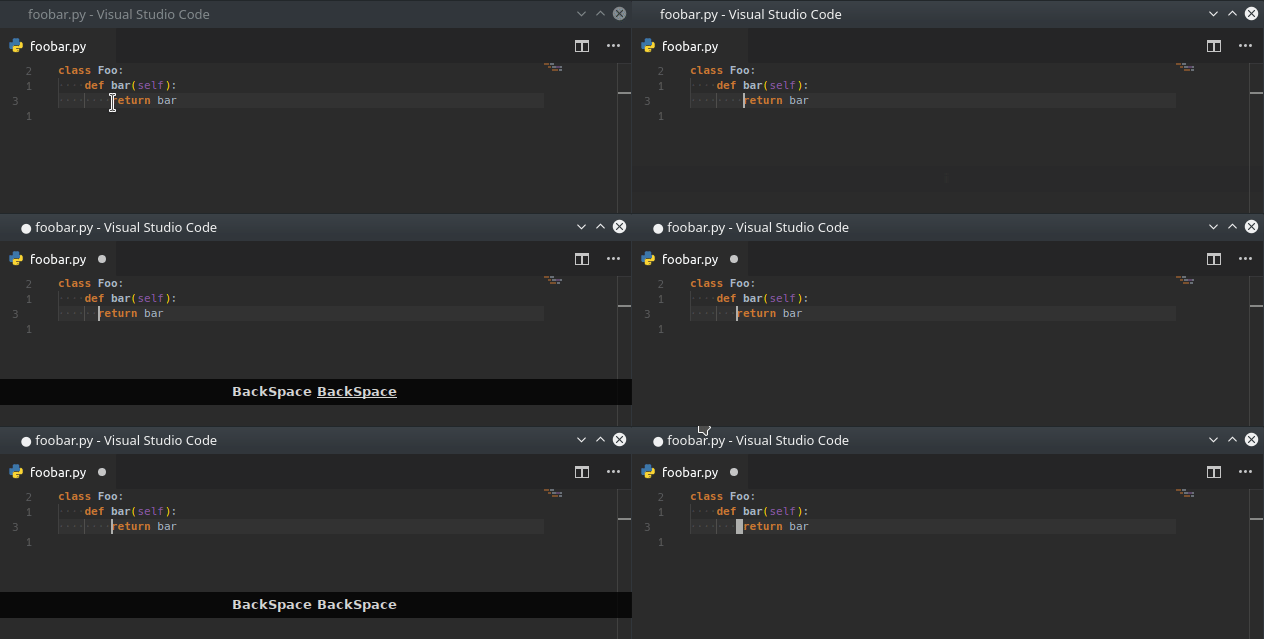
enabled VSCode Vim, empy line, insert mode:

 tadams42
on 29 May 2018
tadams42
on 29 May 2018
I can confirm @tadams42 behaviour on VSC Version 1.24.0 (1.24.0), vim 0.12.0, Mac OSX 10.13.4
 teddyhwang
on 9 Jun 2018
teddyhwang
on 9 Jun 2018
Hello, same issue here when editing files with space. There's another little demo (for C):

And the only extension enabled is vscodevim.
System info:
Windows 10 64bit, vscodevim 0.16.12.
Version: 1.29.0 (user setup)
Commit: 5f24c93878bd4bc645a4a17c620e2487b11005f9
Date: 2018-11-12T07:47:15.448Z
Electron: 2.0.12
Chrome: 61.0.3163.100
Node.js: 8.9.3
V8: 6.1.534.41
Architecture: x64
 AlexGuo1998
on 15 Nov 2018
AlexGuo1998
on 15 Nov 2018
Can confirm with vscodevim 1.0.0 on macOS 10.13. VSCode 1.30.1
The same exact problem as AlexGuo1998.
 a-vrma
on 5 Jan 2019
a-vrma
on 5 Jan 2019
Same issue here on macOS 10.13.1, VSCode 1.30.2, Vim 1.0.2
 ZhengRui
on 16 Jan 2019
ZhengRui
on 16 Jan 2019
Using the VSCodeVim plugin along with Backspace++ plugin seems to bring back the intended behavior (ie. delete full tab width on backspace instead of just one space). Temporary option for anybody else wanting that behavior.
OSX: 10.14.3
VSCode: 1.31.1
vscodevim: 1.0.8
backspace++: 0.0.17 (deprecated)
 multifascinated
on 18 Feb 2019
multifascinated
on 18 Feb 2019
This can be fixed by remapping backspace to extension.vim_shift+backspace and removing the mapping of extension.vim_backspace. Pressing shift + backspace will respect tab stops.
Add the following entries to your keybindings.json:
[
  {
    "key": "backspace",
    "command": "extension.vim_shift+backspace",
    "when": "editorTextFocus && vim.active && vim.use<shift+BS> && !inDebugRepl && vim.mode == 'CommandlineInProgress' || editorTextFocus && vim.active && vim.use<shift+BS> && !inDebugRepl && vim.mode == 'SearchInProgressMode'"
  },
  {
    "key": "shift+backspace",
    "command": "-extension.vim_shift+backspace",
    "when": "editorTextFocus && vim.active && vim.use<shift+BS> && !inDebugRepl && vim.mode == 'CommandlineInProgress' || editorTextFocus && vim.active && vim.use<shift+BS> && !inDebugRepl && vim.mode == 'SearchInProgressMode'"
  },
  {
    "key": "backspace",
    "command": "-extension.vim_backspace",
    "when": "editorTextFocus && vim.active && !inDebugRepl"
  }
]
 st3iny
on 9 Nov 2020
st3iny
on 9 Nov 2020
Related issues
 typeoneerror
·
3Comments
typeoneerror
·
3Comments
 jaredly
·
3Comments
jaredly
·
3Comments
 triztian
·
3Comments
triztian
·
3Comments
 elithrar
·
3Comments
elithrar
·
3Comments
 AndersenJ
·
3Comments
AndersenJ
·
3Comments