Vim: Easymotion "Start of word Forwards/backwards" doesn't work for large files
- Click thumbs-up 👍 on this issue if you want it!
- Click confused 😕 on this issue if not having it makes VSCodeVim unusable.
The VSCodeVim team prioritizes issues based on reaction count.
BUG REPORT :
Environment:
- VSCode Version: 1.12.1
- VsCodeVim Version: 0.7.1
- OS: Windows 10
What happened:
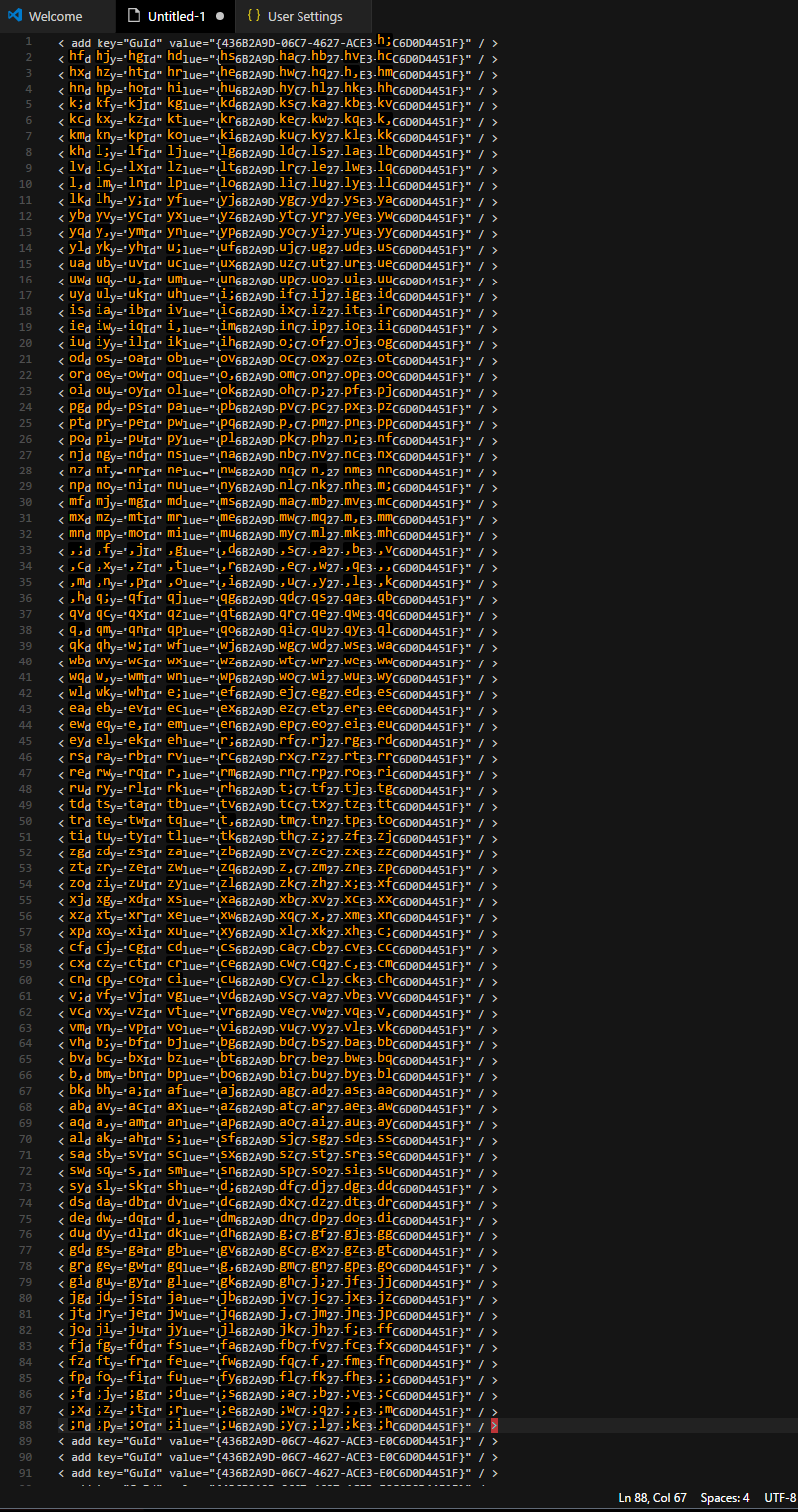
For lagrge files Start of word backwards < leader > < leader > b and Start of word forwards < leader > < leader > w does not work properly. See screenshots.
What did you expect to happen:
I expect to go to a word backwards.
How to reproduce it:
copy the following line more then 82 times:
< add key="GuId" value="{436B2A9D-06C7-4627-ACE3-E0C6D0D4451F}" / >
Go to last line and press < leader > < leader > b with easy motion on.
The option to jump back to near words from end of line higher then 81 (eg. 88) is not present. I can only go back to words in line 81. See attached screenshot:

Same happens for search of words forwards. Cannot go forward immediately for the same file from line 2. Only able to go to line 7.

 atiqorin
All 10 comments
the way we fixed #1627 causes this
I think it is an improvement from the previous behavior you reported, and is now a feature request
Thanks for reporting it! What does easymotion in vim do? does it change to 3 characters ever?
@rebornix
 xconverge
on 10 May 2017
xconverge
on 10 May 2017
We switched from showing undefined to nothing. I'm not familiar with the behavior of easymotion :(
 rebornix
on 10 May 2017
rebornix
on 10 May 2017
Isn't the problem that we're starting from the wrong place? I don't think it's a problem that we don't show the entire file, so long as we show stuff near the cursor.
I think search has a similar problem.
 Chillee
on 10 May 2017
Chillee
on 10 May 2017
@xconverge nope I've never seen it change to 3 characters ever.
atiqorin
on 10 May 2017
Actually, I can't reproduce this issue.

Chillee
on 21 May 2017
I initially reported it for Windows. It happens in Mac also. @Chillee , use the following line for reproducing the issue. Paste it more than 81 times and it should be reproduced.
< add key="GuId" value="{436B2A9D-06C7-4627-ACE3-E0C6D0D4451F}" / >
On the screenshot my cursor is at the very last line.

atiqorin
on 21 May 2017
Here's another screenshot showing forwards search:

atiqorin
on 21 May 2017
@atiqorin @Chillee I cannot reproduce this issue on the latest version of extension.
For your information, characters to be used for marker names are like hklyuiopnm,qwertzxcvbasdgjf;, and the marker names are generated by these 28 characters, so at most 784(=28^2) marker names are available.
 maxfie1d
on 4 Sep 2017
maxfie1d
on 4 Sep 2017
It seems like this has already been fixed? Please reopen this issue if it's still a problem.
Chillee
on 17 Sep 2017
An improvement could be to limit the scope of the markers to the current view? I see that currently it tries to mark the entire file from the beginning.
Edit: Actually, I am not sure what is the actual behavior. I use vscode to edit latex files and I get this issue a lot since I normally run out of markers for large texts.
 chanshing
on 30 Jan 2019
chanshing
on 30 Jan 2019
Related issues
 ghost
·
3Comments
ghost
·
3Comments
 cckowin
·
3Comments
cckowin
·
3Comments
 jaredly
·
3Comments
jaredly
·
3Comments
 spinningarrow
·
3Comments
spinningarrow
·
3Comments
 AndersenJ
·
3Comments
AndersenJ
·
3Comments
Most helpful comment
Isn't the problem that we're starting from the wrong place? I don't think it's a problem that we don't show the entire file, so long as we show stuff near the cursor.
I think search has a similar problem.