Vim-prettier: First undo after :Prettier takes me to the top of the file
Do you want to request a feature or report a bug? bug
What is the current/expected behavior?
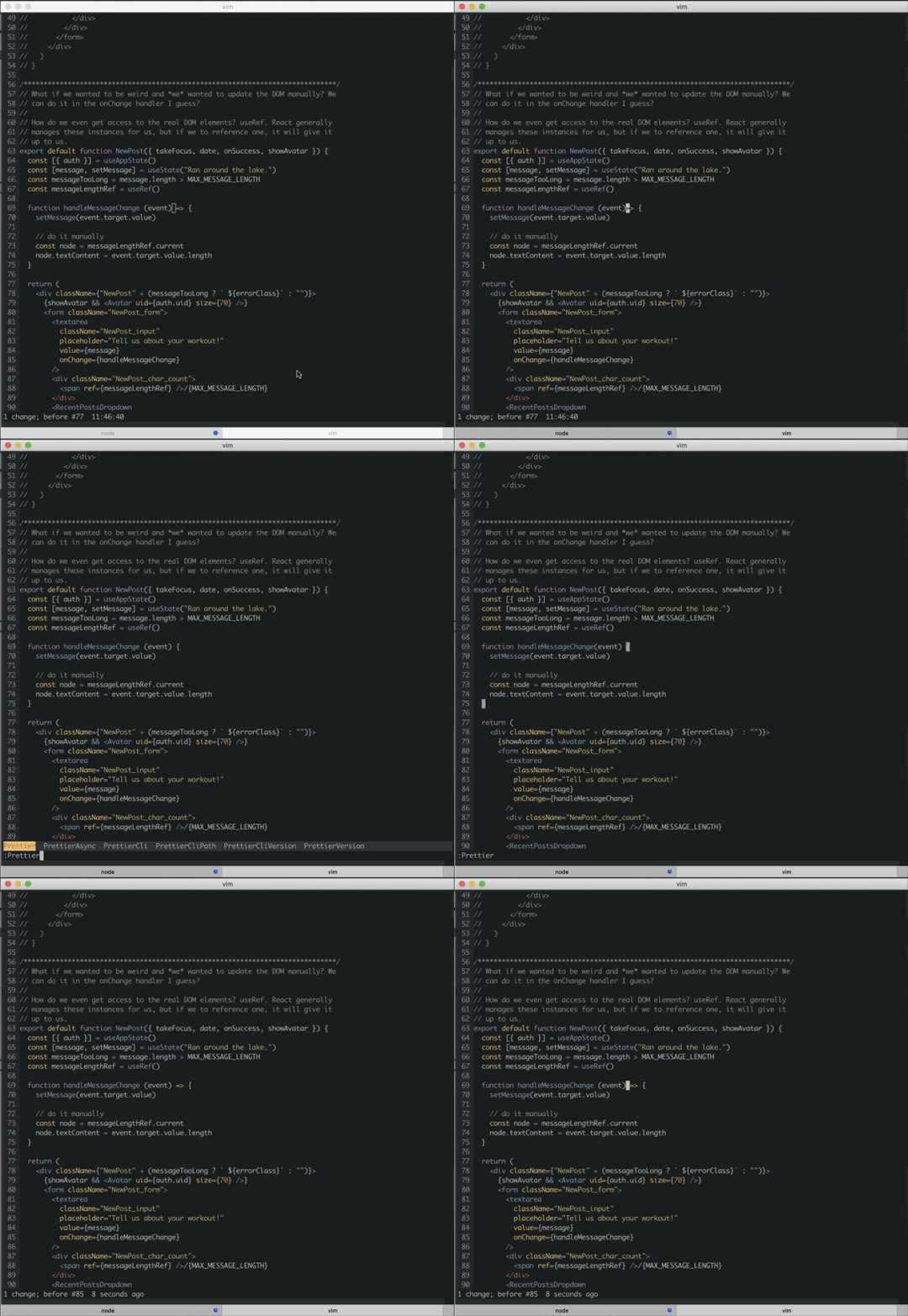
When I use u immediately after :Prettier, the cursor moves to the top of the file. It would be awesome if it just stayed where it was.
I made a small video to illustrate:
What version of vim-prettier are you using - (output of :PrettierVersion) ? 0.2.7
What version of prettier are you using - (output of :PrettierCliVersion) ? 1.16.4
What is your prettier executable path - (output of :PrettierCliPath) ? ./node_modules/.bin/prettier
Did this work in previous versions of vim-prettier and/or prettier ? I don't know.
 mjackson
All 19 comments
This definitely should not be happening! thanks for reporting this issue
 mitermayer
on 18 Apr 2019
mitermayer
on 18 Apr 2019
FWIW it looks like this is still present in the release/1.x branch (version 1.0.0-alpha).
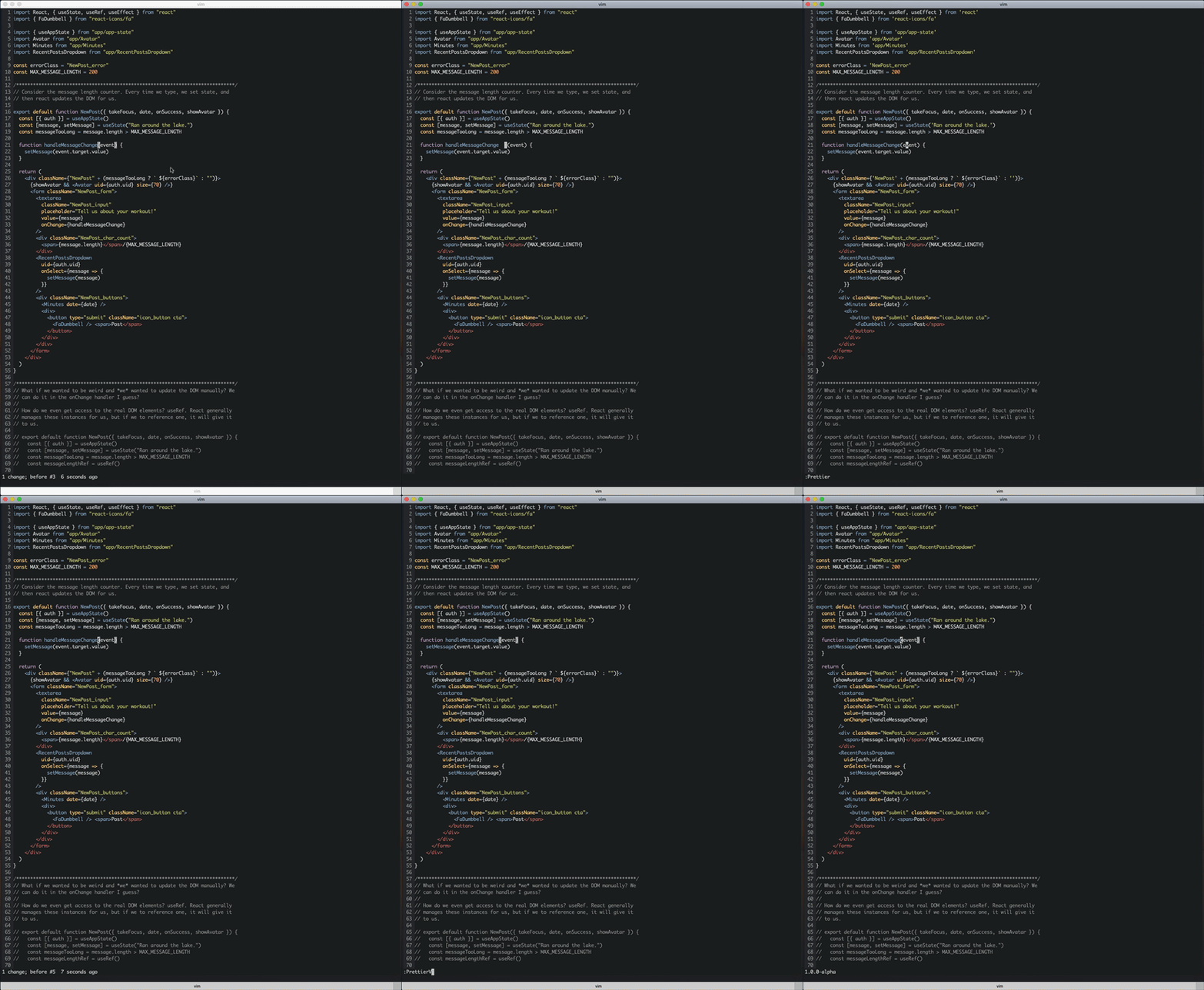
mjackson
on 19 Apr 2019
Ahhh I thought this was fixed in there.
@mjackson could you please provide me some info like output of vim --version ?
I will work on this issue this weekend and make sure its fixed. Sorry for that
mitermayer
on 19 Apr 2019
@mjackson could you please provide me some info like output of
vim --version?
Absolutely, here's vim --version:
VIM - Vi IMproved 8.1 (2018 May 18, compiled Nov 29 2018 04:51:04)
macOS version
Included patches: 1-550
Compiled by Homebrew
Huge version without GUI.  Features included (+) or not (-):
+acl               +extra_search      +mouse_netterm     +tag_old_static
+arabic            +farsi             +mouse_sgr         -tag_any_white
+autocmd           +file_in_path      -mouse_sysmouse    -tcl
+autochdir         +find_in_path      +mouse_urxvt       +termguicolors
-autoservername    +float             +mouse_xterm       +terminal
-balloon_eval      +folding           +multi_byte        +terminfo
+balloon_eval_term -footer            +multi_lang        +termresponse
-browse            +fork()            -mzscheme          +textobjects
++builtin_terms    +gettext           +netbeans_intg     +timers
+byte_offset       -hangul_input      +num64             +title
+channel           +iconv             +packages          -toolbar
+cindent           +insert_expand     +path_extra        +user_commands
-clientserver      +job               +perl              +vartabs
+clipboard         +jumplist          +persistent_undo   +vertsplit
+cmdline_compl     +keymap            +postscript        +virtualedit
+cmdline_hist      +lambda            +printer           +visual
+cmdline_info      +langmap           +profile           +visualextra
+comments          +libcall           -python            +viminfo
+conceal           +linebreak         +python3           +vreplace
+cryptv            +lispindent        +quickfix          +wildignore
+cscope            +listcmds          +reltime           +wildmenu
+cursorbind        +localmap          +rightleft         +windows
+cursorshape       +lua               +ruby              +writebackup
+dialog_con        +menu              +scrollbind        -X11
+diff              +mksession         +signs             -xfontset
+digraphs          +modify_fname      +smartindent       -xim
-dnd               +mouse             +startuptime       -xpm
-ebcdic            -mouseshape        +statusline        -xsmp
+emacs_tags        +mouse_dec         -sun_workshop      -xterm_clipboard
+eval              -mouse_gpm         +syntax            -xterm_save
+ex_extra          -mouse_jsbterm     +tag_binary
   system vimrc file: "$VIM/vimrc"
     user vimrc file: "$HOME/.vimrc"
 2nd user vimrc file: "~/.vim/vimrc"
      user exrc file: "$HOME/.exrc"
       defaults file: "$VIMRUNTIME/defaults.vim"
  fall-back for $VIM: "/usr/local/share/vim"
Compilation: clang -c -I. -Iproto -DHAVE_CONFIG_H   -DMACOS_X -DMACOS_X_DARWIN  -g -O2 -U_FORTIFY_SOURCE -D_FORTIFY_SOURCE=1
Linking: clang   -L. -fstack-protector -L/usr/local/lib -L/usr/local/opt/libyaml/lib -L/usr/local/opt/openssl/lib -L/usr/local/opt/readline/lib  -L/usr/local/lib -o vim        -lncurses -liconv -lintl -framework AppKit  -L/usr/local/opt/lua/lib -llua5.3 -mmacosx-version-min=10.14 -fstack-protector-strong -L/usr/local/lib  -L/usr/local/Cellar/perl/5.28.0/lib/perl5/5.28.0/darwin-thread-multi-2level/CORE -lperl -lm -lutil -lc  -L/usr/local/opt/python/Frameworks/Python.framework/Versions/3.7/lib/python3.7/config-3.7m-darwin -lpython3.7m -framework CoreFoundation  -lruby.2.5.3 -lobjc
My current :PrettierVersion is 1.0.0-alpha.
Thanks, @mitermayer!
mjackson
on 22 Apr 2019
This bug continues to exist and is terrible. Is anybody working on it? I would be happy to give more information if needed.
 timonson
on 1 Sep 2019
timonson
on 1 Sep 2019
Not sure if this helps but ale doesn't have this problem. Maybe you could borrow their approach?
Right now I'm using
let g:ale_fixers = {
\ 'css': ['prettier'],
\ 'javascript': ['prettier']
\}

let g:ale_fix_on_save = 1
in my .vimrc and it works great.
mjackson
on 4 Sep 2019
Sorry for the above issues. I managed to root cause the problem.
It was due my old naive implementation for supporting auto formatting on pragma files. When that feature was implemented at first prettier itself did not have a native support for pragma @format.
The naive implementation had been done in here https://github.com/prettier/vim-prettier/blob/release/1.x/autoload/prettier.vim#L48 , Basicaly it was moving vim cursor to the top of the file in order to check for the existence of a @format pragma prior to formatting and saving, this in turn created an extra undo added to the stack.
Prettier now supports conditional formatting by the require-pragma flag and we can leverage that https://prettier.io/docs/en/options.html#require-pragma to fully delete the above naive implementation fixing this undo stack issue
mitermayer
on 4 Sep 2019
Thank you very much mitermayer. This sounds exactly like the cause of the problem. Will you be able to release the fix with the V 1.0?
timonson
on 5 Sep 2019
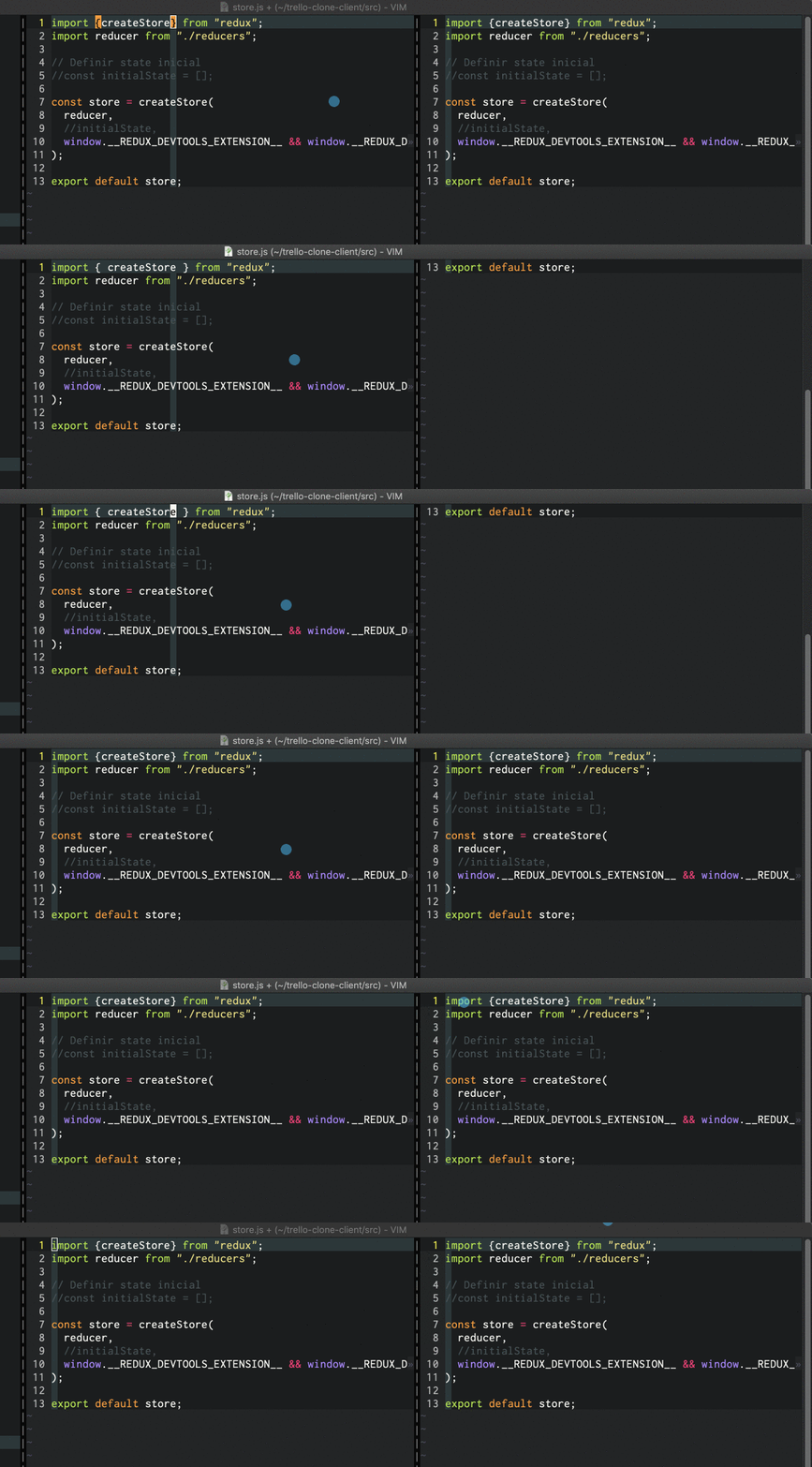
I had the same problem but I do confirm that using release/1.x with pathogen, do not solves the problem!

- I still have the same issue when saving file and auto-format runs. I'm taken to the last line of the file.
- Also when undoing changes, I'm taken to the first line of the file.
 alexventuraio
on 8 Sep 2019
alexventuraio
on 8 Sep 2019
Looking into the implementation of vim itself for that on https://github.com/vim/vim/blob/master/src/undo.c
my previous assumption of the pragma fix did NOT fix this issue (https://github.com/prettier/vim-prettier/pull/206). So the bug is unrelated.
This issue seems common on vim execution of calls example of https://stackoverflow.com/questions/31548025/vim-undo-why-does-the-cursor-jump-to-the-wrong-position-when-undoing-undojoin
I will dig into ale to see how they got around it
mitermayer
on 14 Sep 2019
Managed to figure out a fix for this on https://github.com/prettier/vim-prettier/pull/207/commits/87f217f953b64103e8bef48980c0f002aa0f00c7
This fix is now getting merged via this PR https://github.com/prettier/vim-prettier/pull/207 and will be available on the release/1.x
Please would be great if everyone could give this another try!
mitermayer
on 14 Sep 2019
Sorry that took me long to find time to look into this issue. Combination of busy with work and family duties!
Hopefully it should be now unblocking everyone
mitermayer
on 14 Sep 2019
I just delete the vim-prettier cloned folder and clone it one more time (since I use pathogen). And this time instead of testing in MacVim I use Vim directly in my terminal.
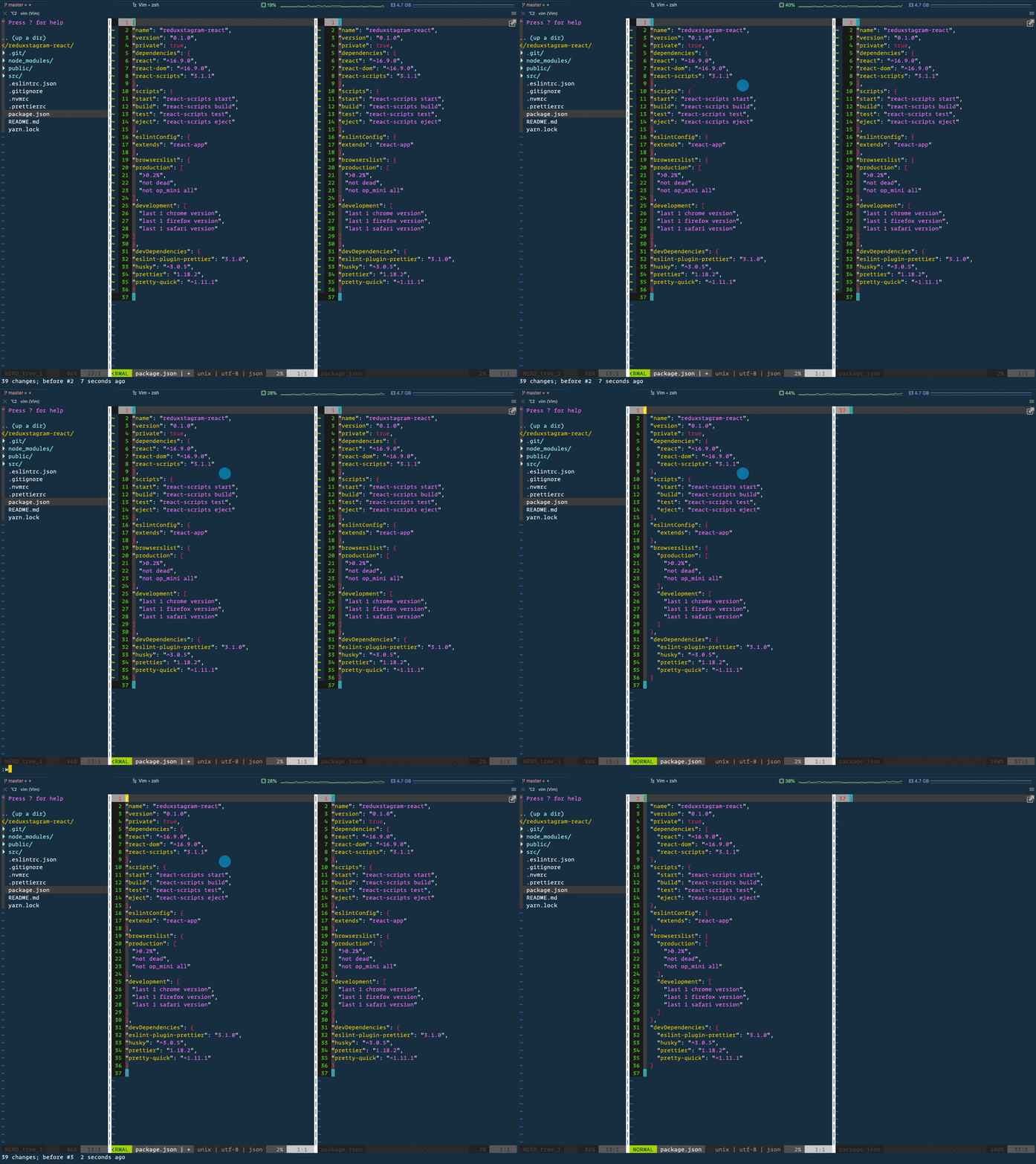
I do confirm, I still have the same issue.
Not sure if there's something else maybe going wrong with my personal config or something like that, any suggestion is welcome to make it easier to reproduce.
By the way, I use the Janus: Vim Distribution.

alexventuraio
on 14 Sep 2019
@alexjoverm,
can you help me debug this issue a bit further ?
- Whats the git hash commit you have in there? latest should be
9c216df3a57d35dc90222473a3438697624c9a4f - whats the output of your
vim --version? - Not sure I understand what the above you are demonstrating, is it the same file opened in 2 different buffers ?
Can you test this workflow ?
create a file with around 30 lines of code of just
const a = 1;
Then indent some of them and run :Prettier then run your undo command and see if the cursor still jumps
mitermayer
on 14 Sep 2019
@alexjoverm
I was able to reproduce your issue only when having vim oppening the same file in 2 different buffers. But if the file is open in a single buffer this is not an issue anymore (as per the original description of this issue)
mitermayer
on 14 Sep 2019
if you can repro this issue in a single buffer please feel free to comment in here and i will reopen this.
mitermayer
on 14 Sep 2019
Hi, I am reporting similar behavior: instead of undo, redo is taking me to the top of the file though not sure if it is an intended behavior.
Do you want to request a feature or report a bug?
Report a bug.
What is the current/expected behavior?
Current behavior:
When I press u after :Prettier, the cursor correctly stays where the last change was made. However when I press Ctrl-r after that the cursor jumps to the top line.
Expected behavior:
The cursor stays where the change was made.
What version of vim-prettier are you using - (output of :PrettierVersion) ?
1.0.0-alpha
What version of prettier are you using - (output of :PrettierCliVersion) ?
1.19.1
What is your prettier executable path - (output of :PrettierCliPath) ?
./node_modules/.bin/prettier
Did this work in previous versions of vim-prettier and/or prettier ?
No, I've been experiencing since 2017.
Here is my vim --version:
VIM - Vi IMproved 8.2 (2019 Dec 12, compiled Dec 12 2019 16:52:17)
macOS version
Compiled by Homebrew
Huge version without GUI.  Features included (+) or not (-):
+acl               -farsi             -mouse_sysmouse    -tag_old_static
+arabic            +file_in_path      +mouse_urxvt       -tag_any_white
+autocmd           +find_in_path      +mouse_xterm       -tcl
+autochdir         +float             +multi_byte        +termguicolors
-autoservername    +folding           +multi_lang        +terminal
-balloon_eval      -footer            -mzscheme          +terminfo
+balloon_eval_term +fork()            +netbeans_intg     +termresponse
-browse            +gettext           +num64             +textobjects
++builtin_terms    -hangul_input      +packages          +textprop
+byte_offset       +iconv             +path_extra        +timers
+channel           +insert_expand     +perl              +title
+cindent           +job               +persistent_undo   -toolbar
-clientserver      +jumplist          +popupwin          +user_commands
+clipboard         +keymap            +postscript        +vartabs
+cmdline_compl     +lambda            +printer           +vertsplit
+cmdline_hist      +langmap           +profile           +virtualedit
+cmdline_info      +libcall           -python            +visual
+comments          +linebreak         +python3           +visualextra
+conceal           +lispindent        +quickfix          +viminfo
+cryptv            +listcmds          +reltime           +vreplace
+cscope            +localmap          +rightleft         +wildignore
+cursorbind        +lua               +ruby              +wildmenu
+cursorshape       +menu              +scrollbind        +windows
+dialog_con        +mksession         +signs             +writebackup
+diff              +modify_fname      +smartindent       -X11
+digraphs          +mouse             -sound             -xfontset
-dnd               -mouseshape        +spell             -xim
-ebcdic            +mouse_dec         +startuptime       -xpm
+emacs_tags        -mouse_gpm         +statusline        -xsmp
+eval              -mouse_jsbterm     -sun_workshop      -xterm_clipboard
+ex_extra          +mouse_netterm     +syntax            -xterm_save
+extra_search      +mouse_sgr         +tag_binary
   system vimrc file: "$VIM/vimrc"
     user vimrc file: "$HOME/.vimrc"
 2nd user vimrc file: "~/.vim/vimrc"
      user exrc file: "$HOME/.exrc"
       defaults file: "$VIMRUNTIME/defaults.vim"
  fall-back for $VIM: "/usr/local/share/vim"
Compilation: clang -c -I. -Iproto -DHAVE_CONFIG_H   -DMACOS_X -DMACOS_X_DARWIN  -g -O2 -U_FORTIFY_SOURCE -D_FORTIFY_SOURCE=1
Linking: clang   -L. -fstack-protector-strong -L/usr/local/lib -L/usr/local/opt/libyaml/lib -L/usr/local/opt/[email protected]/lib -L/usr/local/opt/readline/lib  -L/usr/local/lib -o vim        -lncurses -liconv -lintl -framework AppKit  -L/usr/local/opt/lua/lib -llua5.3 -mmacosx-version-min=10.15 -fstack-protector-strong -L/usr/local/lib  -L/usr/local/Cellar/perl/5.30.0/lib/perl5/5.30.0/darwin-thread-multi-2level/CORE -lperl -lm -lutil -lc  -L/usr/local/opt/python/Frameworks/Python.framework/Versions/3.7/lib/python3.7/config-3.7m-darwin -lpython3.7m -framework CoreFoundation  -lruby.2.6
 byeokim
on 16 Feb 2020
byeokim
on 16 Feb 2020
Hi @byeokim,
Thanks for reporting this. Can you check if the undo case is working as expected for you ? If so could you open a new issue for the redo ?
Thanks a lot!
mitermayer
on 16 Feb 2020
Thank you for your guidance. Undo is working as expected. I am opening a new issue for redo.
byeokim
on 17 Feb 2020
Related issues
 axelav
·
4Comments
axelav
·
4Comments
 n-xlkt
·
5Comments
n-xlkt
·
5Comments
 andreiglingeanu
·
12Comments
andreiglingeanu
·
12Comments
 ajcrites
·
8Comments
ajcrites
·
8Comments
 tugorez
·
7Comments
tugorez
·
7Comments
Most helpful comment
This definitely should not be happening! thanks for reporting this issue