Vim-go: "Invalid channel id" error in go#lsp#DidChange
What did you do? (required: The issue will be closed when not provided)
:w to save any .go file
What did you expect to happen?
no error
What happened instead?
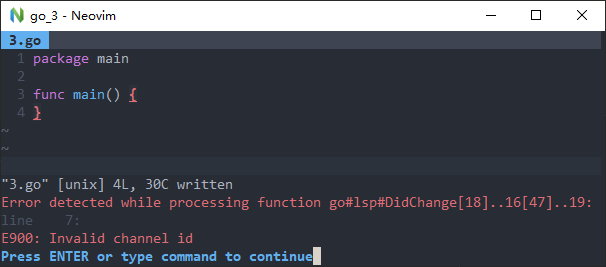
Configuration (MUST fill this out):
vim-go version:
1.20
vimrc you used to reproduce (use a minimal vimrc with other plugins disabled; do not link to a 2,000 line vimrc):
vimrc
call plug#begin('d:/neovim/nvim/plugged')
Plug 'fatih/vim-go'
let g:go_highlight_functions = 1
let g:go_highlight_methods = 1
let g:go_highlight_fields = 1
let g:go_highlight_types = 1
let g:go_highlight_operators = 1
let g:go_highlight_build_constraints = 1
let g:syntastic_go_checkers = []
let g:go_fmt_fail_silently = 1
let g:go_fmt_command = "goimports"
call plug#end()
Vim version (first three lines from :version):
NVIM v0.4.0-450-g2d50bf349
Go version (go version):
go1.11.5 windows/amd64
Go environment
go env Output:
set GOARCH=amd64

set GOBIN=

set GOCACHE=C:\Users\aj\AppData\Local\go-build

set GOEXE=.exe

set GOFLAGS=

set GOHOSTARCH=amd64

set GOHOSTOS=windows

set GOOS=windows

set GOPATH=e:\gopath;

set GOPROXY=

set GORACE=

set GOROOT=D:\Go

set GOTMPDIR=

set GOTOOLDIR=D:\Go\pkg\tool\windows_amd64

set GCCGO=gccgo

set CC=gcc

set CXX=g++

set CGO_ENABLED=1

set GOMOD=

set CGO_CFLAGS=-g -O2

set CGO_CPPFLAGS=

set CGO_CXXFLAGS=-g -O2

set CGO_FFLAGS=-g -O2

set CGO_LDFLAGS=-g -O2

set PKG_CONFIG=pkg-config

set GOGCCFLAGS=-m64 -mthreads -fmessage-length=0 -fdebug-prefix-map=c:\temp\go-build326589518=/tmp/go-build -gno-record-gcc-switches
 aj3423
All 17 comments
The gopls integration has changed quite a bit since vim-go 1.20. I'd recommend that you upgrade to the latest master and also that you upgrade your Go version. After doing both of those things, run :GoUpdateBinaries gopls see if you still experience problems.
 bhcleek
on 2 Sep 2019
bhcleek
on 2 Sep 2019
I tried update Go to the latest version go1.12.9, and update vim-go to the latest master, then :GoUpdateBinaries gopls, but problem still exists.
aj3423
on 3 Sep 2019
@aj3423 I solved this by making my directory a go module. My directory was outside the go path and so I think that was causing issues without being a module.
I figured this out seeing this in gopls wiki
You can make you project a module like so:
go mod init github.com/aj3423/projectname
 guyfedwards
on 6 Sep 2019
guyfedwards
on 6 Sep 2019
@guyfedwards This works, for modules ouside gopath, but some project are inside gopath, it says:
go: modules disabled inside GOPATH/src by GO111MODULE=auto; see 'go help modules'
There may be another workaround, but for now this is not big problem, I just press 'Enter' one more time when save file.
Wait for the gopls upgraded to solve the problem.
aj3423
on 6 Sep 2019
You definitely do not need to be in a module in order to avoid this issue. I work in both GOPATH mode and module aware mode regularly and never see this issue. I'm not sure if it's related to the version of Neovim you're using or something else, but anything you can do to help identify unique characteristics of your configuration may be helpful.
bhcleek
on 6 Sep 2019
@bhcleek My vimrc can be found in origin post (the vimrc section), I use vim-plug, and I tried to erased everything else in vimrc except vim-go, but still the same.
aj3423
on 6 Sep 2019
Does :messages show anything useful? Perhaps an error is getting output and then overwritten before you see it.
bhcleek
on 6 Sep 2019
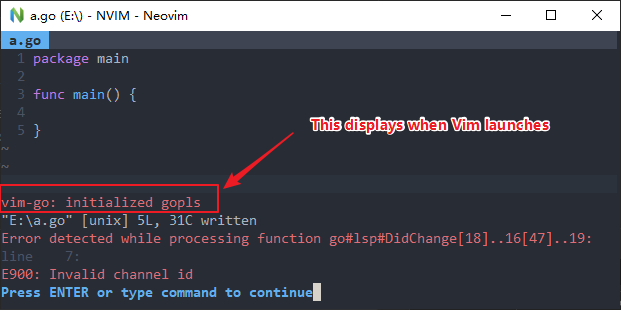
@bhcleek Oh, yes I forgot to mention, there is a red message on startup: vim-go: initialized gopls. It's is confusing that the text looks like gopls is successfully initialized, but it's in red which means it's an error.
aj3423
on 6 Sep 2019
the coloring there is an artifact of your syntax file. vim-go's progress messages are highlighted as Identifier.
bhcleek
on 6 Sep 2019
I am also getting this issue
NVIM v0.3.8
Build type: Release
LuaJIT 2.0.5
Compilation: /usr/local/Homebrew/Library/Homebrew/shims/mac/super/clang -Wconversion -U_FORTIFY_SOURCE -D_FORTIFY_SOURCE=1 -DNDEBUG -DMIN_LOG_LEVEL=3 -Wall -Wextra -pedantic -Wno-unused-parameter -Wstrict-prototypes -std=gnu99 -Wimplicit-fallthrough -Wvla -fstack-protector-strong -fdiagnostics-color=auto -DINCLUDE_GENERATED_DECLARATIONS -D_GNU_SOURCE -DNVIM_MSGPACK_HAS_FLOAT32 -DNVIM_UNIBI_HAS_VAR_FROM -I/tmp/neovim-20190704-11886-1ukicoc/neovim-0.3.8/build/config -I/tmp/neovim-20190704-11886-1ukicoc/neovim-0.3.8/src -I/usr/local/include -I/usr/local/opt/gettext/include -I/Applications/Xcode.app/Contents/Developer/Platforms/MacOSX.platform/Developer/SDKs/MacOSX10.14.sdk/usr/include -I/tmp/neovim-20190704-11886-1ukicoc/neovim-0.3.8/build/src/nvim/auto -I/tmp/neovim-20190704-11886-1ukicoc/neovim-0.3.8/build/include
Compiled by [email protected]

Features: +acl +iconv +jemalloc +tui
See ":help feature-compile"

   system vimrc file: "$VIM/sysinit.vim"
  fall-back for $VIM: "/usr/local/Cellar/neovim/0.3.8/share/nvim"

Run :checkhealth for more info
vim-go is at master
 taybart
on 6 Sep 2019
taybart
on 6 Sep 2019
@aj3423 Try updating can you check that gopls by runnning GoUpdateBinaries gopls. Afterwards, if you still experience this problem,gopls is running immediately after you get the gopls initialized message and again after trying to save your file?
If it's running after you get the gopls initialized message, but you still get the error message when trying to save a file, then exit out of Neovim and restart it with with nvim -c 'let g:go_debug=["lsp"]' and then edit and save your file. I'll be interested in the contents of the __GOLSP_LOG__ window.
edit: I realized that you've already updated gopls.
bhcleek
on 8 Sep 2019
Getting a panic from an interface conversion. This all happend around the time I updated to 1.13 last week. I can't imagine what would cause the lsp to go crazy.
stderr: panic: interface conversion: types.Object is nil, not *types.Func
stderr:
stderr: goroutine 3378 [running]:
stderr: golang.org/x/tools/go/analysis/passes/ctrlflow.run.func1(0x17af740, 0xc00038ccc0)
stderr:     /Users/taybart/dev/.go/pkg/mod/golang.org/x/[email protected]/go/analysis/passes/ctrlflow/ctrlflow.go:105 +0x398
stderr: golang.org/x/tools/go/ast/inspector.(*Inspector).Preorder(0xc00780aea0, 0xc00492dbe0, 0x2, 0x2, 0xc00492dc00)
stderr:     /Users/taybart/dev/.go/pkg/mod/golang.org/x/[email protected]/go/ast/inspector/inspector.go:77 +0x9f
stderr: golang.org/x/tools/go/analysis/passes/ctrlflow.run(0xc004211220, 0xc0081d5700, 0xc0000284f0, 0x8, 0xf)
stderr:     /Users/taybart/dev/.go/pkg/mod/golang.org/x/[email protected]/go/analysis/passes/ctrlflow/ctrlflow.go:102 +0x1a1
stderr: golang.org/x/tools/internal/lsp/source.(*Action).execOnce(0xc007a438c0, 0x17b9200, 0xc00693bb40, 0xc00009dc40, 0x102f77a, 0x0)
stderr:     /Users/taybart/dev/.go/pkg/mod/golang.org/x/[email protected]/internal/lsp/source/analysis.go:169 +0x7f1
stderr: golang.org/x/tools/internal/lsp/source.(*Action).exec.func1()
stderr:     /Users/taybart/dev/.go/pkg/mod/golang.org/x/[email protected]/internal/lsp/source/analysis.go:103 +0x4e
stderr: sync.(*Once).doSlow(0xc007a438c0, 0xc000053ed8)
stderr:     /usr/local/Cellar/go/1.13/libexec/src/sync/once.go:66 +0xe3
stderr: sync.(*Once).Do(...)
stderr:     /usr/local/Cellar/go/1.13/libexec/src/sync/once.go:57
stderr: golang.org/x/tools/internal/lsp/source.(*Action).exec(0xc007a438c0, 0x17b9200, 0xc00693bb40, 0xc00009dc40, 0xc008852cd0, 0x17b9200)
stderr:     /Users/taybart/dev/.go/pkg/mod/golang.org/x/[email protected]/internal/lsp/source/analysis.go:102 +0xb5
stderr: golang.org/x/tools/internal/lsp/source.execAll.func1(0xc000053f68, 0xc000053ef8)
stderr:     /Users/taybart/dev/.go/pkg/mod/golang.org/x/[email protected]/internal/lsp/source/analysis.go:94 +0x48
stderr: golang.org/x/sync/errgroup.(*Group).Go.func1(0xc008d5be60, 0xc0077ed0e0)
stderr:     /Users/taybart/dev/.go/pkg/mod/golang.org/x/[email protected]/errgroup/errgroup.go:57 +0x64
stderr: created by golang.org/x/sync/errgroup.(*Group).Go
stderr:     /Users/taybart/dev/.go/pkg/mod/golang.org/x/[email protected]/errgroup/errgroup.go:54 +0x66
@bhcleek I'm using the nvim-qt.exe, it doesn't support -c, so I put let g:go_debug=["lsp"] at the top of my vimrc. When I open an HelloWorld .go file, this is the output:
sent: Content-Length: 384
{"method": "initialize", "jsonrpc": "2.0", "id": 1, "params": {"rootUri": "file:///E:/go/2", "capabilities": {"workspace": {"workspaceFolders": true, "configuration": true, "didChangeConfiguration": {"dynamicRegistration": true}}, "textDocument": {"hover": {"contentFormat": ["plaintext"]}}}, "processId": 12896, "workspaceFolders": [{"uri": "file:///E:/go/2", "name": "E:\\go\\2"}]}}
stderr: flag provided but not defined: -debug
stderr: The Go Language source tools.
stderr:
stderr: Usage: gopls [flags] <command> [command-flags] [command-args]
stderr:
stderr: Available commands are:
stderr:   serve : run a server for Go code using the Language Server Protocol
stderr:   query : answer queries about go source code
stderr:
stderr: gopls flags are:
stderr:   -listen string
stderr:         address on which to listen for remote connections
stderr:   -logfile string
stderr:         filename to log to. if value is "auto", then logging to a default output file is enabled
stderr:   -mode string
stderr:         no effect
stderr:   -port int
stderr:         port on which to run gopls for debugging purposes
stderr:   -profile.cpu string
stderr:         write CPU profile to this file
stderr:   -profile.mem string
stderr:         write memory profile to this file
stderr:   -profile.trace string
stderr:         write trace log to this file
stderr:   -remote string
stderr:         *EXPERIMENTAL* - forward all commands to a remote lsp
When I save file with :w, there is no more error. But if I remove the let g:go_debug=["lsp"] from vimrc, the error get back again.
aj3423
on 9 Sep 2019
@taybart is that relevant to @aj3423's issue? If not, feel free to open a new issue to ask for help (FWIW, try :GoUpdateBinaries gopls)
bhcleek
on 9 Sep 2019
@aj3423 it looks like you may be using an old version of gopls. To verify, can you also add 'shell-commands' to g:go_debug (e.g. let g:go_debug=["lsp", "shell-commands"]). That will cause vim-go to output the full shell command that it uses to start gopls, including the full path to gopls.
bhcleek
on 9 Sep 2019
@bhcleek Thanks. I checked the modify-date of the gopls.exe, it's 2019.4.16, Maybe it's too old. I updated to latest version by set GO111MODULE=on and go get golang.org/x/tools/gopls@latest. Now everything works fine, no more error.
aj3423
on 10 Sep 2019
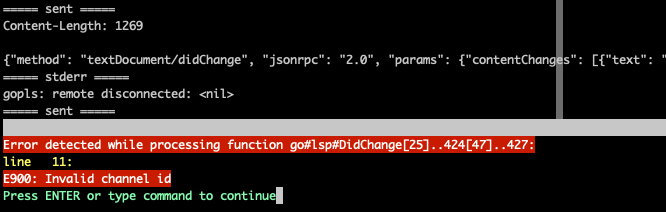
It looks like this is a thing again with gopls 0.5 ?
See this gist for lsp + shell-commands log and versions etc https://gist.github.com/robinbryce/81a39993a60c8eb2ffe5d326a32a85d6
 robinbryce
on 27 Sep 2020
robinbryce
on 27 Sep 2020
Related issues
 preslavmihaylov
·
3Comments
preslavmihaylov
·
3Comments
 MattFlower
·
4Comments
MattFlower
·
4Comments
 derekchiang
·
3Comments
derekchiang
·
3Comments
 groob
·
3Comments
groob
·
3Comments
 SirmaXX
·
3Comments
SirmaXX
·
3Comments
Most helpful comment
@aj3423 I solved this by making my directory a go module. My directory was outside the go path and so I think that was causing issues without being a module.
I figured this out seeing this in
goplswikiYou can make you project a module like so: