Vim-go: golangci-lint doesn't show any errors
What did you do? (required: The issue will be closed when not provided)
Create a simple main.go file inside your $GOPATH.
Cause some obvious vet issues:
package main

import (
    "fmt"
)

func main() {
    a := 5
}
setup the gometalinter to use golangci-lint in your vimrc:
let g:go_metalinter_command='golangci-lint'
Run :w to save the file and expect the metalinter to run.
What did you expect to happen?
golangci-lint runs and detects two errors.
What happened instead?
Received lines vim-go: [golangci-lint] SUCCESS
Note: Executing the golangci-lint manually from bash:
golangci-lint run --print-issued-lines=false
--build-tags --disable-all --exclude-use-default=false --enable=vet --enable=errcheck /home/pmihaylov/programming/go/src/github.com/preslavmihaylov/learn-golang/go-webdev/lenslocked.com/exp/main.go
yields reasonable output:
main.go:19:2: a declared but not used (typecheck)
main.go:4:2: "fmt" imported but not used (typecheck)
The commands I executed in the shell are derived after enabling the g:go_debug flag:
let g:go_debug=['shell-commands']
based on vim-go output:
vim-go: job command: ['/home/pmihaylov/programming/go/bin/golangci-lint', 'run', '--print-issued-lines=false', '--build-tags', '', '--disable-all', '--exclud
e-use-default=false', '--enable=vet', '--enable=errcheck', '/home/pmihaylov/programming/go/src/github.com/preslavmihaylov/learn-golang/go-webdev/lenslocked.c
om/exp/main.go']
Configuration (MUST fill this out):
vim-go version:
255f903c14350fb5d615b316661bac93db1544ce
vimrc you used to reproduce (use a minimal vimrc with other plugins disabled; do not link to a 2,000 line vimrc):
vimrc
""" -------------------- vim-go -------------------------

" all errors are shown in the quickfix window

let g:go_list_type = "quickfix"
" automatically add import paths when saving file
"let g:go_fmt_command = "goimports"
" enable syntax highlighting
let g:go_highlight_types = 1
let g:go_highlight_fields = 1
let g:go_highlight_functions = 1
let g:go_highlight_function_calls = 1
let g:go_highlight_operators = 1
let g:go_highlight_extra_types = 1
let g:go_highlight_build_constraints = 1
let g:go_highlight_generate_tags = 1
" enable go metalinter
let g:go_metalinter_enabled = ['vet', 'golint', 'errcheck']
" let g:go_metalinter_autosave_enabled = ['vet', 'golint', 'errcheck']
let g:go_metalinter_autosave_enabled = ['vet', 'errcheck']
let g:go_metalinter_autosave = 1
" default metalinter is deprecated. Change to better alternative
let g:go_metalinter_command='golangci-lint'
" vim-go debug: show shell commands being executed
let g:go_debug=['shell-commands']
" automatically show GoInfo output
" let g:go_auto_type_info = 1
" automatically highlight variable your cursor is on
let g:go_auto_sameids = 1
" adjust quickfix window height
let g:go_list_height = 8
" terminal opens as a horizontal split below the main window
let g:go_term_mode = "split above"
" More verbose output on failed tests in quickfix window
let g:go_test_show_name = 1
Vim version (first three lines from :version):
NVIM v0.3.7
Build type: Release
LuaJIT 2.1.0-beta3
Go version (go version):
go version go1.12.5 linux/amd64
Go environment
go env Output:
GOARCH="amd64"

GOBIN=""

GOCACHE="/home/pmihaylov/.cache/go-build"

GOEXE=""

GOFLAGS=""

GOHOSTARCH="amd64"

GOHOSTOS="linux"

GOOS="linux"

GOPATH="/home/pmihaylov/programming/go"

GOPROXY=""

GORACE=""

GOROOT="/usr/local/go"

GOTMPDIR=""

GOTOOLDIR="/usr/local/go/pkg/tool/linux_amd64"

GCCGO="gccgo"

CC="gcc"

CXX="g++"

CGO_ENABLED="1"

GOMOD=""

CGO_CFLAGS="-g -O2"

CGO_CPPFLAGS=""

CGO_CXXFLAGS="-g -O2"

CGO_FFLAGS="-g -O2"

CGO_LDFLAGS="-g -O2"

PKG_CONFIG="pkg-config"

GOGCCFLAGS="-fPIC -m64 -pthread -fmessage-length=0 -fdebug-prefix-map=/tmp/go-build627459415=/tmp/go-build -gno-record-gcc-switches"
 preslavmihaylov
All 4 comments
This was already discussed in https://github.com/fatih/vim-go/issues/2331. golangci-lint is returning a 0 exit code, indicating that it did not find any problems (and indeed, it did not find any _linting_ problems). vim-go
 bhcleek
on 10 Jun 2019
bhcleek
on 10 Jun 2019
I'm having the same problem and I don't understand what @bhcleek said. The command is not returning 0 when I run it from the terminal, either from the same or different working dir
 dcu
on 3 Sep 2019
dcu
on 3 Sep 2019
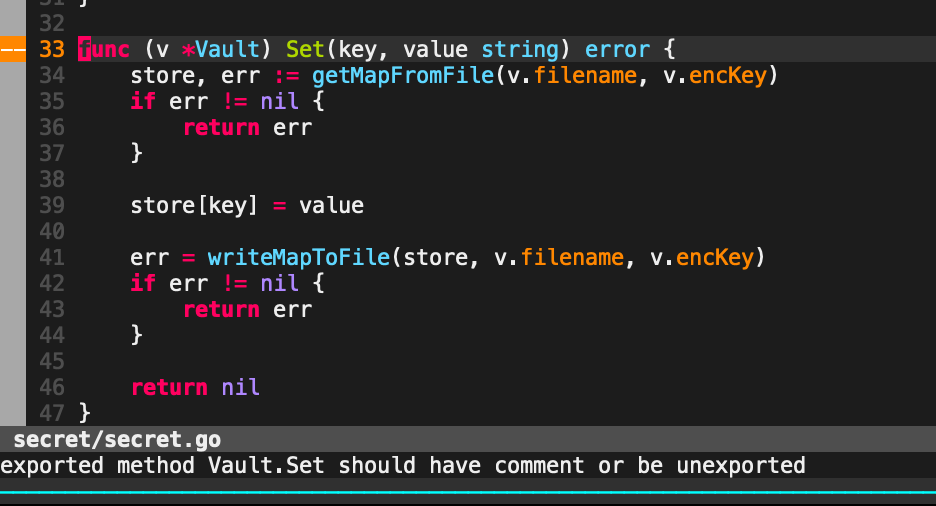
I finally managed to find an alternative which works for me. Nowadays, I am using the ALE plugin. It has golint support by default. Just install it with pathogen and it works out of the box.
Here's how the plugin works:
preslavmihaylov
on 6 Oct 2019
@preslavmihaylov ALE is a good plugin.
If, however, you just want to run golint, vim-go provides that for you with :GoLint and also with its go-lint plugin mapping, which you can setup anytime you want to make it easier to run.
If you want golint to run when saving a buffer, you can add something like this to your vimrc:
autocmd BufWritePost *.go call go#lint#Golint(1)
bhcleek
on 6 Oct 2019
Related issues
 derekchiang
·
3Comments
derekchiang
·
3Comments
 surest
·
3Comments
surest
·
3Comments
 andrejvanderzee
·
3Comments
andrejvanderzee
·
3Comments
 wpaulino
·
4Comments
wpaulino
·
4Comments
 joeblubaugh
·
3Comments
joeblubaugh
·
3Comments
Most helpful comment
@preslavmihaylov ALE is a good plugin.
If, however, you just want to run
golint, vim-go provides that for you with:GoLintand also with itsgo-lintplugin mapping, which you can setup anytime you want to make it easier to run.If you want
golintto run when saving a buffer, you can add something like this to your vimrc:autocmd BufWritePost *.go call go#lint#Golint(1)