Vim-go: Autocomplete fails with "no file information for..." in vim 8.1
What did you do? (required. The issue will be closed when not provided.)
I'm just starting out with Go, and had some trouble getting vim-go to work.
I copied a hello world sample from online, ran go install binaries, installed mucomplete https://github.com/lifepillar/vim-mucomplete, and then tried the following:
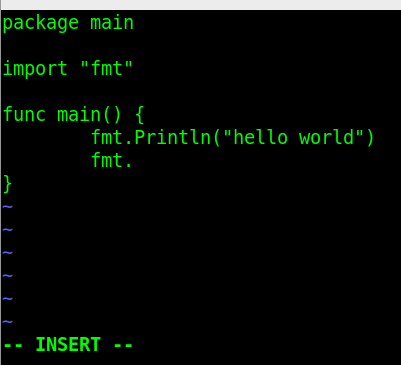
- Type
fmt.(didn't work) - Type
log.after typing in another lineimport "log"belowimport "fmt"(again didn't work) - Type
appe(againappendwas not suggested) - Looked at
messagesto find this:

I removed mucomplete and then tried triggering autocomplete by doing control x - control o instead of having mucomplete do the real time autocomplete. Same thing. Both times the messages about vim-go's completion failing were there in messages output.
What did you expect to happen?
Autocomplete to work (some popup showing potential matches or something)
NOTE: If I use YCM to do the completion, 1 and 2 from above work - 3 (built-in function autocomplete) doesn't though.
What happened instead?
Nothing happened
Looked at messages to find this:
Configuration (MUST fill this out):
vim-go version:
commit686167f5f03cedbfa5d188ee0d88c1ff2a1892ac

vimrcyou used to reproduce (use a minimal vimrc with other plugins disabled; do not link to a 2,000 line vimrc):
With mucomplete
set nocompatible              " be iMproved, required
filetype off
"set the runtime path to include Vundle and initialize
set rtp+=~/.vim/bundle/Vundle.vim
call vundle#begin()
Plugin 'VundleVim/Vundle.vim'

" Autocomplete for C#
Plugin 'lifepillar/vim-mucomplete'

" Go development
Plugin 'fatih/vim-go'

call vundle#end()
filetype plugin indent on
set encoding=utf-8

" Get MuComplete to trigger for go files
autocmd BufEnter * if &ft ==# 'go' | MUcompleteAutoOn | else | MUcompleteAutoOff | endif

highlight link goBuiltins Keyword

" Note that I'd normally have this in go.vim, but have it here since
" I'm testing vim-go
let g:mucomplete#can_complete = {
  \ 'default': {
  \    'omni': { t -> strlen(&l:omnifunc) > 0 && t =~# '\%(\k\k\|\.\)$' }
  \    }
  \  }
Without mucomplete:
I commented out Plugin 'lifepillar/vim-mucomplete', the autocmd BufEnter line, and the very last block with let g:mucomplete#can_complete
- Vim version (first three lines from
:version):
vim -version
VIM - Vi IMproved 8.1 (2018 May 18, compiled Mar 29 2019 13:49:15)
Garbage after option argument: "-version"
Go version (
go version):
go version go1.10.4 linux/amd64Go environment (
go env):
GOARCH="amd64"
GOBIN=""
GOCACHE="/home/joe/.cache/go-build"
GOEXE=""
GOHOSTARCH="amd64"
GOHOSTOS="linux"
GOOS="linux"
GOPATH="/home/joe/go"
GORACE=""
GOROOT="/usr/lib/go-1.10"
GOTMPDIR=""
GOTOOLDIR="/usr/lib/go-1.10/pkg/tool/linux_amd64"
GCCGO="gccgo"
CC="gcc"
CXX="g++"
CGO_ENABLED="1"
CGO_CFLAGS="-g -O2"
CGO_CPPFLAGS=""
CGO_CXXFLAGS="-g -O2"
CGO_FFLAGS="-g -O2"
CGO_LDFLAGS="-g -O2"
PKG_CONFIG="pkg-config"
GOGCCFLAGS="-fPIC -m64 -pthread -fmessage-length=0 -fdebug-prefix-map=/tmp/go-build700964998=/tmp/go-build -gno-record-gcc-switches"
 ghost
ghost
All 13 comments
In light of https://github.com/fatih/vim-go/pull/2218, can you try again with latest master?
 bhcleek
on 9 Apr 2019
bhcleek
on 9 Apr 2019
Hi @bhcleek -
Looks like it's still happening all across the board.
Note: for these test cases, I only did the fmt. (number 1 above) - I didn't try log. or appen since fmt. failed.
- Did
PluginUpdate - Checked the repo in bundle directory - looks like commit is on
9a7cf4a68adcc9327af33cd1449e7859c0e32af8now. If I open with my normal vimrc, this happens:
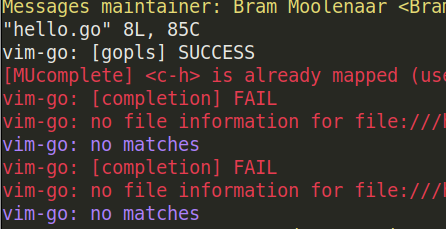
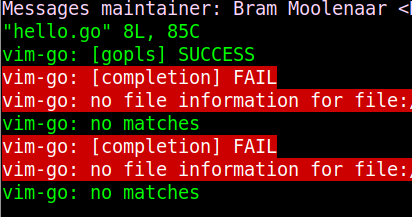
With minimum vimrc + mucomplete:
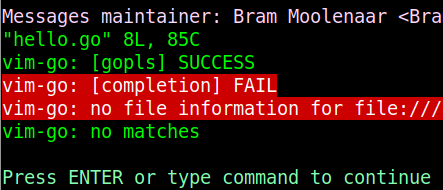
with minimum vimrc without mucomplete:
ghost
on 9 Apr 2019
what's the complete error message on the vim-go no file information for file lines?
bhcleek
on 9 Apr 2019
hi @bhcleek -
The remaining information that shows up is the absolute path to the hello.go file I have - so /home/joe/tmp/hello.go.
ghost
on 9 Apr 2019
what's the output of go list /home/jo/tmp?
bhcleek
on 9 Apr 2019
can't load package: package /home/joe/tmp: import "/home/joe/tmp": cannot import absolute path
I tried to add hello.go so it looks like go list /home/joe/tmp/hello.go at the end, at it just prints command-line-arguments
ghost
on 9 Apr 2019
ah yes. But you can use a relative path or just change to the directory and run go list ..
Actually, I'm interested in go list -json for the directory...
bhcleek
on 9 Apr 2019
I gotta focus on other things for rest of the day, but will check back tomorrow - thanks for the help so far.
{
    "Dir": "/home/joe/tmp",
    "ImportPath": "_/home/joe/tmp",
    "Name": "main",
    "Stale": true,
    "StaleReason": "build ID mismatch",
    "GoFiles": [
        "hello.go"
    ],
    "Imports": [
        "fmt",
        "log"
    ],
    "Deps": [
        "errors",
        "fmt",
        "internal/cpu",
        "internal/poll",
        "internal/race",
        "internal/testlog",
        "io",
        "log",
        "math",
        "os",
        "reflect",
        "runtime",
        "runtime/internal/atomic",
        "runtime/internal/sys",
        "strconv",
        "sync",
        "sync/atomic",
        "syscall",
        "time",
        "unicode",
        "unicode/utf8",
        "unsafe"
    ]
}
The problem here is that the file is neither in $GOPATH nor is it in a module. If you'll run go mod init in /home/joe/tmp, I think you'll find that autocompletion starts to work as expected.
bhcleek
on 9 Apr 2019
I was busy creating an issue for the same problems with :GoDef and I resolved the issue by removing this line from my .vimrc:
let g:go_def_mode='gopls'
I think vim-go uses gopls now anyway? But hopefully it helps somebody else!
EDIT:
Monitoring the processes on my system, it seems that without this inside my .vimc, vim-go uses guru rather than gopls in order to run :GoDef.
 nickcorin
on 10 Apr 2019
nickcorin
on 10 Apr 2019
@bhcleek - ah, that did it. Thanks for the help! I also found that I had to upgrade to Go 1.12 - 1.10 didn't have go mod init.
Curious since I'm just playing around with go - what was it that told you that the file not being in a module was the issue?
Reading this, it sounds like modules are kind of like csproj in .net.
https://github.com/golang/go/wiki/Modules#modules
ghost
on 10 Apr 2019
The import path with a leading underscore, _/home/joe/tmp, and no Module property told me that the directory wasn't in GOPATH and that there wasn't a go.mod file.
Modules aren't really similar to a csproj file other than they contain references to other packages.
bhcleek
on 10 Apr 2019
I ran into the same error, "no file information for file", when trying to use go to definition with gopls enabled for a repo that was outside the gopath, set up as a go module. Seems like an issue with gopls + go modules + vim-go?
 gracenoah
on 24 Apr 2019
gracenoah
on 24 Apr 2019
Related issues
 preslavmihaylov
·
3Comments
preslavmihaylov
·
3Comments
 Michael-F-Ellis
·
3Comments
Michael-F-Ellis
·
3Comments
 mnarrell
·
3Comments
mnarrell
·
3Comments
 joeblubaugh
·
3Comments
joeblubaugh
·
3Comments
 orlangure
·
3Comments
orlangure
·
3Comments
Most helpful comment
I ran into the same error, "no file information for file", when trying to use go to definition with gopls enabled for a repo that was outside the gopath, set up as a go module. Seems like an issue with gopls + go modules + vim-go?