Vim-devicons: Inconsistent alignment in the presense of nerdtree-git-plugin icons
Required Info
- [x] I have searched the issues for my issue and found nothing related and/or helpful
- [x] I have read or at least glanced at the FAQ
[x] I have read or at least glanced at the Wiki
[x] What version of vim are you using?
8.0- [x] What version of vim-devicons are you using?
- 0.9.3
- [x] Are you using vim from the terminal or a GUI vim?
terminal - [x] Are you using Mac, Linux or Windows?
arch linux
Optional Info
- [x] Provide screenshots where appropriate
When using nerdtree-git-plugin with devicons and having set g:WebDevIconsNerdTreeGitPluginForceVAlign to 1, there is a mismatch in the alignment of the devicons. Here is a screenshot.

side note: In the image, there are some other bugs present too (folder names being cutoff at the end when git icons are present, super small devicons, inconsistent right padding between folder icons and file icons).
 nkakouros
All 24 comments
@tterranigma thanks for the report :+1:
 ryanoasis
on 11 Jan 2018
ryanoasis
on 11 Jan 2018
@tterranigma I assume you still have this issue?
For me it is looking _okay_ but there is definitely something going on here.
Is there any minimal vimrc you can share? Do you know if you have any other settings other than defaults?
ryanoasis
on 9 Mar 2018
super small devicons
You can 'fix' this by using the non-mono version of the font (as long as your terminal supports it). Looks like you are using Fura Code Regular Nerd Font Complete Mono ? If so try Fura Code Regular Nerd Font Complete
folder names being cutoff at the end when git icons are present
That's very strange. Not quite sure yet why that'd be. If you remove vim-devicons do those folder names still get cut off? and if you only remove nerdtree-git-plugin do they get cut off? If you remove both?
inconsistent right padding between folder icons and file icons
Working on a fix for this
ryanoasis
on 10 Mar 2018
Sorry for not responding earlier.
After reading this issue, I opened a bug report on KDE's side to discuss it. You can find it here. I have no idea if this helps even a little.
So, I updated everything to their latest versions. I also switched to neovim.
You can 'fix' this by using the non-mono version of the font (as long as your terminal supports it). Looks like you are using Fura Code Regular Nerd Font Complete Mono ? If so try Fura Code Regular Nerd Font Complete
I tried this but it didn't have any effect. The icons show up with the width of a single letter.
Not quite sure yet why that'd be. If you remove vim-devicons do those folder names still get cut off? and if you only remove nerdtree-git-plugin do they get cut off? If you remove both?
Here are two screenshots,
with devicons disabled:

with both devicons and nerdtree-git disabled:

The same happens if I disable everything in my init.vim except for the two plugins (plus nerdtree of course).
nkakouros
on 2 May 2018
@thehappydinoa Have you updated the vim-devicons as well? Can you share a minimal vimrc as @ryanoasis said?
 kutsan
on 2 May 2018
kutsan
on 2 May 2018
@kutsan I can look into it, but I'm not sure how helpful I can be. I just helped with a easy README.md fix.
 thehappydinoa
on 2 May 2018
thehappydinoa
on 2 May 2018
@thehappydinoa There was a problem about artifact fix char earlier, and it's fixed now. Updating to latest version of this plugin might solve the problem. I am no boss here; if you want, you are free to look into and try to solve.
kutsan
on 2 May 2018
I am working on some more fixes and I'll also merge in @kutsan's PRs. Maybe this week :crossed_fingers:
ryanoasis
on 3 May 2018
@ryanoasis I have the same issue and have had it since I starterd using vim-devicons. It looks exactly like the OP's screenshot. All my plugins are up-to-date.
 deniskabana
on 24 Jun 2018
deniskabana
on 24 Jun 2018
@deniskabana Are you sure they are up-to-date? Artifact fix char problem already solved. Can you send me a screenshot and upload your whole .vim/ folder (or ~/.config/nvim/) with its plugins and .vimrc or init.vim to me? I'll try to reproduce the error.
Note that, GitHub comments supports sharing files up to 25MB.
kutsan
on 24 Jun 2018
@kutsan I am sorry for the very late reply. I have diagnosed the issue now.
It was only due to the plugin loading ordering - my vim-devicons plug was loaded before nerdtree-git-plugin. I read the wiki when I first set it up, however I installed and removed dozens of plugins over the months I've been using it. Works wonders. Thank you!
deniskabana
on 18 Sep 2018
@deniskabana Thanks for the update.
Sorry it has been so long.. so I really was in the middle of merging @kutsan's PRs but then .. lots of things and I haven't been good at all in supporting things lately. Anyway I have renewed desire so hopefully you will see some activity from me (but I'm going to stay away from specific or even rough time lines :disappointed: )
ryanoasis
on 28 Jan 2019
@tterranigma @thehappydinoa @deniskabana Are any of you still having this issue with the latest version of master branch?
Sorry about the start and stop nature of this issue.
ryanoasis
on 10 Feb 2019
Thanks for looking into this so far. Some issues still persist. Here is an updated screenshot.

The issues are:
- the opening square at the beginning of the tree
- the off-by-one alignment of the files that have a git icon. This is on the latest Konsole, if it is of any importance.
nkakouros
on 10 Feb 2019
Thanks again @tterranigma
- Do you have
g:WebDevIconsNerdTreeGitPluginForceVAlignset? - Are you using all default settings (i.e. do you have no DevIcon configurations set in your
vimrc) ? - the opening square at the beginning of the tree
That is odd, did you set something besides the default, you can select if with your cursor and enter
gAto get the character code, that would be of some help.- the off-by-one alignment of the files that have a git icon. This is on the latest Konsole, if it is of any importance.
Should be okay as far as I know
ryanoasis
on 11 Feb 2019
- Yes
- I have the following settings for devicons:
set guifont=DroidSansMono\ Nerd\ Font\ 19
set guifont=Ubuntu\ Mono\ Bold\ Nerd\ Font\ Complete\ Mono\ 12
let g:WebDevIconsNerdTreeAfterGlyphPadding = ' '
let g:webdevicons_conceal_nerdtree_brackets = 1
let g:WebDevIconsUnicodeDecorateFolderNodes = 1
let g:DevIconsEnableFoldersOpenClose = 1
let g:WebDevIconsNerdTreeGitPluginForceVAlign = 1

if exists('g:loaded_webdevicons')
  call webdevicons#refresh()
endif
I commented out everything and I still get the off-by-one padding, plus square brackets around git icons for folders:
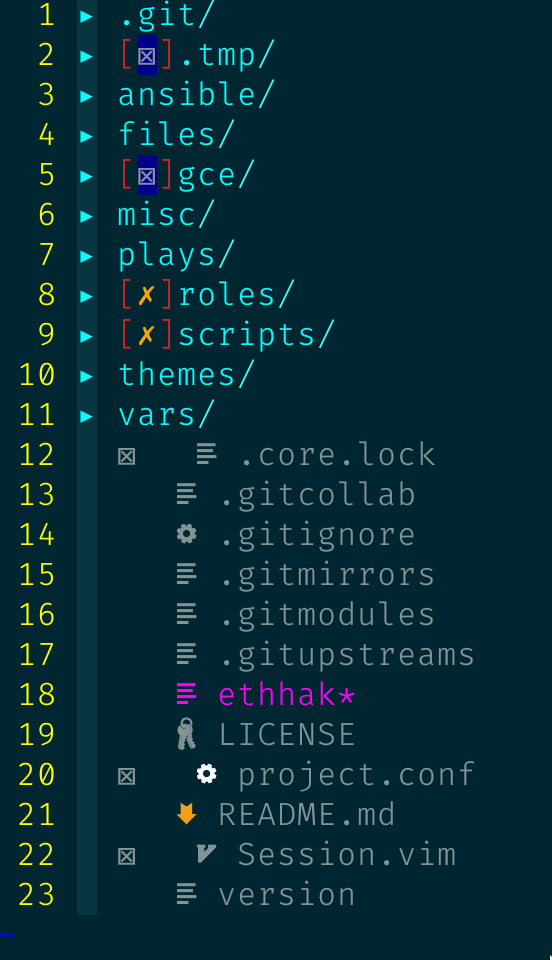
- This is the result of pressing
gaon the square bracket:
<[> 91, Hex 5b, Oct 133, Digr <(
I also tried the folder-file-alignment branch with no changes to the icon alignment. I also removed all my plugins except devicons, nerdtree and nerdtree git icons and the alignment stayed the same.
nkakouros
on 11 Feb 2019
Thanks @tterranigma. I thought at least you'd see some improvement.
I will try to replicate with your settings as best as I can this week if I can...
ryanoasis
on 12 Feb 2019
I don't seem to run into alignment-issues with defaults enabled per-se BUT I do have some artifacts with nerdtree-git-plugin enabled.
(although when enabling the config variables from @tterranigma I can reproduce the results e.g. opening bracket in first list-item of nerdtree)
here's a visual demo

^ click to get to the webm
EDIT: The alignment issues (with default settings (== no explicit settings at all)) that @tterranigma is experiencing might stem from him loading devicons before nerdtree and nertree-git-plugin.
That's at least the way I got to reproduce the behavior he described.
A refresh of nerdtree will fix the alignment though!
The opening bracket stems from let g:WebDevIconsUnicodeDecorateFolderNodes = 1 but disappears if one were to source the init.vim / vimrc once again.
EDIT 2:
Funny enough, If I also load the devicons before nerdtree and the git-plugin, the artifact-situation above doesn't arise. But if I do that I'm also stuck with faulty alignment.
 TildeSlashC0re
on 12 Feb 2019
TildeSlashC0re
on 12 Feb 2019
My bad... I just went through the doc to see if I have conigured everything properly and, boom, I was loading the git plugin after devicons... I changed that and the alignment is perfect. Sorry for keeping you busy with a none issue, really.
EDIT: and I just read @TildeSlashC0re 's comment..
The bracket at the beginning still remains.
nkakouros
on 13 Feb 2019
Thanks @TildeSlashC0re and @tterranigma
I think the alignment is much better now and should mostly be consistent with the folder-file-alignment branch but I will try to look into the other issues mentioned...
@tterranigma No problem I hadn't really started to try out your settings yet and I needed to work on the alignment issues anyway!
ryanoasis
on 14 Feb 2019
I am going to consider this closed with #255 merged in. Prefer to open a new issue unless there are still issues related to the original problem per the ticket
ryanoasis
on 28 Jun 2019
Everything looks great so far! :tada:
nkakouros
on 28 Jun 2019
If you have misaligned icons, make sure devicons plugin is loaded after nerdtree-git-plugin.
damn it
Spent so much time reading the code of 2 extensions to get to the source of the problem. And of course, it's written in readme.
 Dreomite
on 4 Jan 2020
Dreomite
on 4 Jan 2020
@ryanoasis We seem to be the rockers of late responses here :) JK, I ditched coding for 6 months and I'm back. All working well on both my mac and linux machines :) Thanks!
deniskabana
on 7 Jan 2020
Related issues
 extrante
·
8Comments
extrante
·
8Comments
 ELLIOTTCABLE
·
5Comments
ELLIOTTCABLE
·
5Comments
 soulomoon
·
10Comments
soulomoon
·
10Comments
 slabua
·
6Comments
slabua
·
6Comments
 kiranps
·
7Comments
kiranps
·
7Comments
Most helpful comment
@kutsan I am sorry for the very late reply. I have diagnosed the issue now.
It was only due to the plugin loading ordering - my
vim-deviconsplug was loaded beforenerdtree-git-plugin. I read the wiki when I first set it up, however I installed and removed dozens of plugins over the months I've been using it. Works wonders. Thank you!