Vim-airline: Powerline fonts work in console vim, but not in gvim
Yes, I checked, they _do_ work with powerline, both in gvim and console vim. They don't work in gvim if I use airline.
I made an album with screenshots. I've installed the patched fonts using the fontconfig method.
 ~ LANG=C gvim --version | head -n 3
VIM - Vi IMproved 7.4 (2013 Aug 10, compiled Sep  3 2013 20:01:21)
Included patches: 1-16
Compiled by Arch Linux
However, the glyphs show up if I use a patched font.
 ravicious
All 22 comments
hmm, that's something i haven't seen before....the arrows look right, but the branch and line number symbols are messed up.
can you try installing one of the fonts from https://github.com/Lokaltog/powerline-fonts and see if it fixes it for you?
 bling
on 17 Sep 2013
bling
on 17 Sep 2013
Yeah, as I said, patched fonts work fine. It's the fontconfig method that causes some problems.
ravicious
on 17 Sep 2013
ok, just to confirm, you're using the fontconfig to patch your own font. after installing it works in powerline vim and gvim, works in airline vim, but _not_ airline gvim?
but if you install one of the pre-patched fonts, it works in all 4 combos?
bling
on 17 Sep 2013
Exactly!
ravicious
on 17 Sep 2013
:confused: that makes no sense!!
i'll fire up a VM tonight and see if i can reproduce. is there anything special about your OS other than it being arch and configured for polish?
bling
on 17 Sep 2013
and i'll also need to know which font you patched. and if you can upload your patched version somewhere so i can try it out it'd be great. thanks.
bling
on 17 Sep 2013
Just don't spend too much time trying to fix this bug! :) There's probably nothing you can do about it, it must be a bug in gvim or something.
As for the font I patched: I didn't patch any. With the fontconfig method you just copy some files and that's it, you don't have to change any font. Later I used patched Inconsolata to see if the glyphs work with patched fonts.
is there anything special about your OS other than it being arch and configured for polish?
I use fontconfig-infinality.
ravicious
on 17 Sep 2013
i was able to reproduce on my arch vm. it looks like this only happens in gvim, and not qvim (running inside kde). haven't tried gnome yet.
bling
on 18 Sep 2013
I have encountered the same problem, also using Inconsolata incidentally (Arch Gvim). I patched the font and it works fine now.
 jwoudenberg
on 18 Sep 2013
jwoudenberg
on 18 Sep 2013
@ravicious @jwoudenberg fyi, i've reverted the space back to the default as this appears to be causing problems elsewhere (#283). however, if you still want to use fontconfig you can declare g:airline_symbols.space = "\ua0" manually. i'll add this info the wiki. thanks.
bling
on 30 Sep 2013
That's cool, thanks for all the work you put into this bugreport!
ravicious
on 30 Sep 2013
I'm running into this exact issue. I've followed the install directions pretty closely, and can't figure out what's wrong.
Here's a gist with some relevant files: https://gist.github.com/rossipedia/990753050f47f13b4526
Some other possibly useful information:
$ uname -a
Linux 3.13.0-27-generic #50-Ubuntu SMP Thu May 15 18:06:16 UTC 2014 x86_64 x86_64 x86_64 GNU/Linux

$ fc-query -V
fontconfig version 2.11.0
 rossipedia
on 5 Jun 2014
rossipedia
on 5 Jun 2014
A work around may be set g:airline_symbols.space = "\u3000" though the spaces would be larger.
 spacelis
on 2 Oct 2014
spacelis
on 2 Oct 2014
I use DejaVu Sans Mono, and encountered this problem tonight when looking into GVim. The patched font from powerline-fonts fixed it for me.
 cjwelborn
on 12 Oct 2015
cjwelborn
on 12 Oct 2015
On my machine it seems like some colorschemes dont show airline correctly
 voyeg3r
on 22 Nov 2016
voyeg3r
on 22 Nov 2016
I had the same identical problem as in @ravicious screenshot, fixed by setting font in gVim using
:set guifont=* and select some powerline font.
Also you can add it to vimrc, thus you won't need to set every time
if has('gui_running')
  set guifont=Inconsolata-g\ for\ Powerline\ Medium\ 10
endif
 verden11
on 12 Aug 2017
verden11
on 12 Aug 2017
@verden11's solution doesn't work for me.
vim in console:

gvim with default font configuration:

gvim using @verden11's solution:

 jonorthwash
on 13 Aug 2017
jonorthwash
on 13 Aug 2017
+1 Also having this issue on both patched and fontconfig method.
 VentGrey
on 20 Mar 2018
VentGrey
on 20 Mar 2018
Issue with airline_symbols.branch only
Powerline Fonts installed using sudo apt install fonts-powerline
In Vim

In Gvim

Gvim :h airline
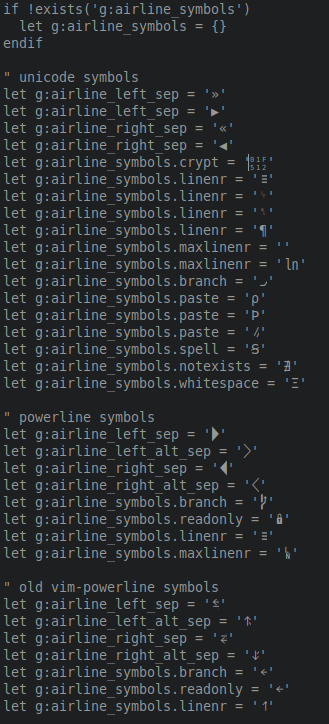
when i change airline_symbols.branch to '⭠' it works

any possible troubleshooting suggestions or solutions how to use branch symbol as in Vim?
 stadniklksndr
on 21 Mar 2018
stadniklksndr
on 21 Mar 2018
try to use a different font or change the symbol.
 chrisbra
on 21 Mar 2018
chrisbra
on 21 Mar 2018
@chrisbra, we've found work-arounds, suggesting more doesn't really help move this forward:
In regards to changing the font, isn't powerline supposed to work in gvim if it works in vim?
In terms of changing the symbol, as @stadniklksndr pointed out, that works. But it's not ideal for several
reasons:
- It's buggy out of the box.
- You don't get the intended symbol.
- Less advanced users aren't going to find it easy to fix, even if they find this issue. (The solution to this would be to document the kludge in the official documentation, but that's even kludgier.)
The bottom line is that this needs to be debugged. It's been reproduced by many different people, so in principle should be considered a confirmed bug.
So my question to the devs is this: should we expect this issue to be reopened, or should we file a new one?
jonorthwash
on 21 Mar 2018
(At the very least, someone could tell us why they believe the bug is gone—e.g., in some code that hasn't made it into our package managers yet.)
jonorthwash
on 21 Mar 2018
Related issues
 brotatos
·
21Comments
brotatos
·
21Comments
 notpratheek
·
18Comments
notpratheek
·
18Comments
 arthurkiller
·
34Comments
arthurkiller
·
34Comments
 tnguyen14
·
24Comments
tnguyen14
·
24Comments
 ypxu
·
29Comments
ypxu
·
29Comments
Most helpful comment
@chrisbra, we've found work-arounds, suggesting more doesn't really help move this forward:
In regards to changing the font, isn't powerline supposed to work in gvim if it works in vim?
In terms of changing the symbol, as @stadniklksndr pointed out, that works. But it's not ideal for several
reasons:
The bottom line is that this needs to be debugged. It's been reproduced by many different people, so in principle should be considered a confirmed bug.
So my question to the devs is this: should we expect this issue to be reopened, or should we file a new one?