Viewers: How to directly access a study without using "Study List" menu
To keep it simple, my web app has its own interface that queries through my server and gets all stored studies. When I press on a study, I want my web app to redirect to the study in OHIF viewer.
For example:

By clicking on Video (361 files) i want to be redirected to the OHIF viewer page of that study.

Of course, using the same URL - Views/DICOMViewer/viewer/<study_instance_uid> does not work and gives a 404 error.
 wi55em
All 6 comments
This sounds like a server issue.
Your application exists at http://localhost:59914/Views/DICOMViewer/
When you request that URL, your server knows to return the index.html file at that location; which in turn pulls down the other assets it needs to start/run the progressive web application.
So say the initial page load takes place at Views/DICOMViewer/viewer/<study_instance_uid>? What would you expect your server to return? It's likely checking server registered routes and static files. If none exist, a 404 is returned.
Normally, to get around this, you say if no physical file can be found/returned with a route like Views/DICOMViewer/* to instead return the resource at Views/DICOMViewer/. How you do this will depend on what you're using to serve your websites.
A netlify.toml would look like:
[[redirects]]
  from = "/*"
  to = "/index.html"
  status = 200
An nginx location block might look like:
location / {
  alias  /var/www/html/;
  index index.html;
  try_files $uri $uri/ /index.html;
}
 dannyrb
on 26 Jul 2019
dannyrb
on 26 Jul 2019
Thank you so much @dannyrb !
As you suggested, I added in my ASP.NET application a redirect in my Web.config:
    <rewrite>
      <rules>
        <rule name="SPA Routes" stopProcessing="true">
          <match url="Views/DICOMViewer/*" />
          <action type="Rewrite" url="Views/DICOMViewer/index.html" />

          <conditions logicalGrouping="MatchAll">
            <add input="{REQUEST_FILENAME}" matchType="IsFile" negate="true" />
            <add input="{REQUEST_FILENAME}" matchType="IsDirectory" negate="true" />
          </conditions>
        </rule>
      </rules>
    </rewrite>
Still got some path errors and had to modify my _hrefs_ and _src_ in index.html to redirect to the correct path because my app is running on /Views/DICOMViewer, i had to update each of the links with /Views/DICOMViewer as a prefixe.
<link rel="manifest" href="/Views/DICOMViewer/manifest.json" />
<script type="text/javascript" src="/Views/DICOMViewer/config/default.js"></script>
<link href="/Views/DICOMViewer/static/css/main.e15eb8d8.chunk.css" rel="stylesheet">
<script src="/Views/DICOMViewer/static/js/2.f6e962ff.chunk.js"></script>
<script src="/Views/DICOMViewer/static/js/main.80e749d1.chunk.js"></script>
It is working, so I am closing this issue ! Thanks again @dannyrb, have a great weekend.
wi55em
on 26 Jul 2019
Instead of manually prefixing things, you could set window.config.routerBasename = '/Views/DICOMViewer'. That is meant to support use cases where the viewer is hosted at a subdirectory.
 swederik
on 27 Jul 2019
swederik
on 27 Jul 2019
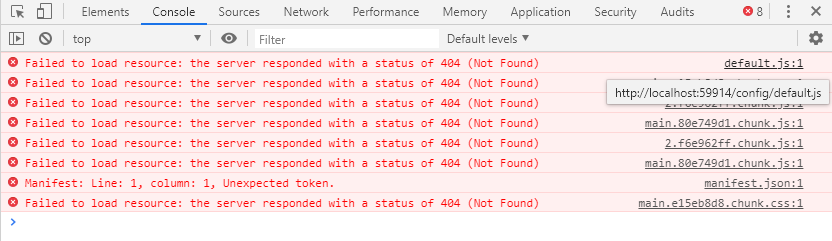
@swederik Yeah I did set my routerBasename to /Views/DICOMViewer and still got errors (path issues). This is what happens.
wi55em
on 29 Jul 2019
So when I add /Views/DICOMViewer to the path in each src and hrefs in index.html, it works fine.
wi55em
on 29 Jul 2019
We don't have control over the output index.html template unless we eject, which we'll be doing shortly in the yalc pr.
dannyrb
on 29 Jul 2019
Related issues
 trypag
·
4Comments
trypag
·
4Comments
 MuriloSchaefer
·
3Comments
MuriloSchaefer
·
3Comments
 panzhengo1
·
3Comments
panzhengo1
·
3Comments
 ranasrule
·
4Comments
ranasrule
·
4Comments
 pieper
·
3Comments
pieper
·
3Comments
Most helpful comment
We don't have control over the output
index.htmltemplate unless we eject, which we'll be doing shortly in theyalcpr.