Viewers: Google Healthcare API docker image update and MPR?
Hi OHIF team
Will the ohif/viewer-google-cloud docker image receive any more updates?
Alternatively is there a way to use the ohif/viewer image with Google Healthcare API and are there any guides for how?
I am particularly interested in getting MPR working so it this a possibility with Healthcare API as the backend?
 Stormert
All 14 comments
Not yet, but we are actively working on this. I'll post an update when it's possible.
We plan to bake in support in the main ohif-viewer image itself so the ohif/viewer-google-cloud image will not be updated anymore (unless there are changes added to 1.x).
 swederik
on 24 Jun 2019
swederik
on 24 Jun 2019
Will this include MPR when the Google Healthcare API support is baked in with ohif-viewer image?
Stormert
on 24 Jun 2019
Yep!
There are two ongoing PRs actually (https://github.com/OHIF/Viewers/pull/584 and https://github.com/OHIF/Viewers/pull/523). #523 is now superseded by #584 and we will work with @pavertomato to get it working ASAP.
swederik
on 24 Jun 2019
This should be working now, please give it a try. Docs are here: https://docs.ohif.org/connecting-to-image-archives/google-cloud-healthcare.html
Make sure you pull the latest docker image docker pull ohif/viewer:latest
Then you can run it with e.g.:
docker run --env CLIENT_ID=723928408739-k9k9r3i44j32rhu69vlnibipmmk9i57p.apps.googleusercontent.com --publish 5000:80 ohif/viewer:latest
Don't hesitate to reopen if you have any issues.
swederik
on 11 Jul 2019
Hi @swederik not quite sure how to open this issue again but hope tagging you might work, I have been trying to get this up and running in a container optimized GCP Compute engine, similarly to how i tested the ohif/viewer-google-cloud but i get this error message.
Error: redirect_uri_mismatch
The redirect URI in the request, http://localhost:5000/callback, does not match the ones authorized for the OAuth client. To update the authorized redirect URIs, visit: https://console.developers.google.com/apis/credentials/oauthclient/MY_CLIENT_ID.apps.googleusercontent.com?project=MY_GCP_PROJECT
It seems this docker image is redirecting to localhost rather than what is specified in the CLIENT_ID. The only thing i have changed is the container image from ohif/viewer-google-cloud:latest to ohif/viewer:latest and the redirrect worked perfectly with the google cloud image. Is there other changes that i need to make in order to get this working? I could not spot any in the documentation.
Also is there a recomended way of running this viewer in GCP? would it possibly work serverless in Cloud Run?
Stormert
on 17 Jul 2019
I don't see any reason why it wouldn't work in Cloud Run but we haven't tested it. You might have to mark your GCP Project "Internal" to avoid the OAuth Validation process though.
You'll need to change the redirect URI in the config: https://github.com/OHIF/Viewers/blob/master/public/config/google.js#L16
Sorry I completely forgot about adding that as an environment variable in the entrypoint script (https://github.com/OHIF/Viewers/blob/master/docker/Viewer-v2.x/entrypoint.sh#L4). For now you will have to manually edit the config file inside the container at /usr/share/nginx/html/config/default.js. You can check that your edits have been done correctly by looking at e.g. https://viewer.ohif.org/config/default.js (with your base URL).
Another way to run on GCP is to store it in a Cloud Storage Bucket, then use CloudFlare to provide SSL. That is how viewer.ohif.org is hosted.
Update: You can try making the redirect_uri a relative path instead of absolute, but @pavertomato says that doesn't seem to be working.
swederik
on 17 Jul 2019
Could you pull the latest Docker image and try this again? @pavertomato may have fixed this for you.
swederik
on 17 Jul 2019
it seems the redirect is working now, a point to add to the docs might be that it now seems you need to add the your domain/callback to the authorized redirects in the client ID.
I do however seem to be having some issues loading up the 2D MPR View, i am not sure but the buttom seems a bit darker than the rest so it might be disabled? when clicked the browser locks up for a while before 3 window layout shows up that says loading in what seems like forrever. Could this be due to the hosting vm beeing to weak and would it improve if hosted in a storage bucket or in any other way?
Stormert
on 18 Jul 2019
Hmm good point. Right now the docs say Add your domain, plus _oauth/google (e.g. http://localhost:3000/_oauth/google) to Authorized Redirect URIs. but you are right this should be /callback now.
Right now it waits for the whole volume to be downloaded before setting up the MPR view. It could just be your internet connection. Check the Network panel to make sure it is downloading the images? We plan to change this but we have limited time and resources.
It has nothing to do with the VM since it's all client-side code. The VM is just serving the HTML/JS/CSS, not the images, right?
"i am not sure but the buttom seems a bit darker than the rest so it might be disabled" - Screenshot? I have no idea what you are talking about.
swederik
on 18 Jul 2019
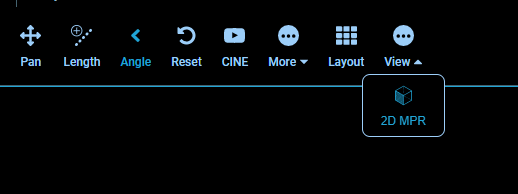
I was just curious if there could be something that might cause the button to be disabled, and if that migth be the cause of my browser locking up, might just be me but it looks darker than the other buttons kinda like a disabled look compared to these ones?
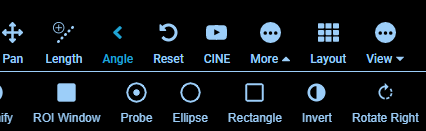
Also it seems there is no hover over effect when you move the mouse cursor over it.
Also not quite sure where to find the network pannel?
Stormert
on 18 Jul 2019
No mouse cursor over it, different colour - Yes these look like UI issues. That is not intentional.
As for locking up, we will look into that. There is a lot of work to do on the VTK component.
https://developers.google.com/web/tools/chrome-devtools/network/
swederik
on 18 Jul 2019
Ahh ofc, that network pannel, sorry i wasn't thinking. And yeah, i understand. Another thing i noticed is that this new version seems like it is using port 5000, in the docs it stays 3000.
Been checking with the network pannel now, it starts downloading my fairly large ct image set (600-700mb) but chrome seems to crash at about 330mb transfered with the "Awww Snap" error message. But i guess this might be a limitation in chrome possibly?
I got MPR to work in Firefox Dev Editon after clicking wait several times, however in Chrome and Vivaldi the MPR images never shows up.
Also what decides what tools are available in the different views? such as the POI tool is not available in standard view and the measuring tools not available in the MPR view? Is this just config somewhere or have they not beein implemented in the different views yet?
Stormert
on 18 Jul 2019
Ahh ofc, that network pannel, sorry i wasn't thinking. And yeah, i understand. Another thing i noticed is that this new version seems like it is using port 5000, in the docs it stays 3000.
Please feel free to make small PRs to update doc discrepancies like this (or the code to match). It's very easy for things to drift over time.
But i guess this might be a limitation in chrome possibly?
That is a very large CT set, but chrome should be able to handle it on most modern computers. I don't think our current VTK + Cornerstone implementation share an image cache, so it's possible you end up loading double that into memory; maybe more while decoding. Lot's of things that can be improved here.
Also what decides what tools are available in the different views?
Our default view is using cornerstone and cornerstone-tools under the hood. Everything volume/MPR is vtk.js. Our cornerstone-tools work when we're rendering with cornerstone. Our vtk "widgets/interactors" work when we're rendering with vtk.js. We've been working on and off with Kitware to create an SVG Widget Manager that might eventually allow for a more generic tool layer, but it's honestly not a high priority at the moment.
 dannyrb
on 18 Jul 2019
dannyrb
on 18 Jul 2019
I'll close this issue because the original issue is solved and I think the docs are up-to-date now. Feel free to open a new one with specific issues about the VTK extension.
swederik
on 21 Jul 2019
Related issues
 AtmiyaVaghela
·
4Comments
AtmiyaVaghela
·
4Comments
 pieper
·
3Comments
pieper
·
3Comments
 szwang-wthealth
·
3Comments
szwang-wthealth
·
3Comments
 MathisGuilhin
·
3Comments
MathisGuilhin
·
3Comments
 panzhengo1
·
3Comments
panzhengo1
·
3Comments