Viewers: Thumbnails not appearing in Series sidebar (WADO-RS against Orthanc not working?)
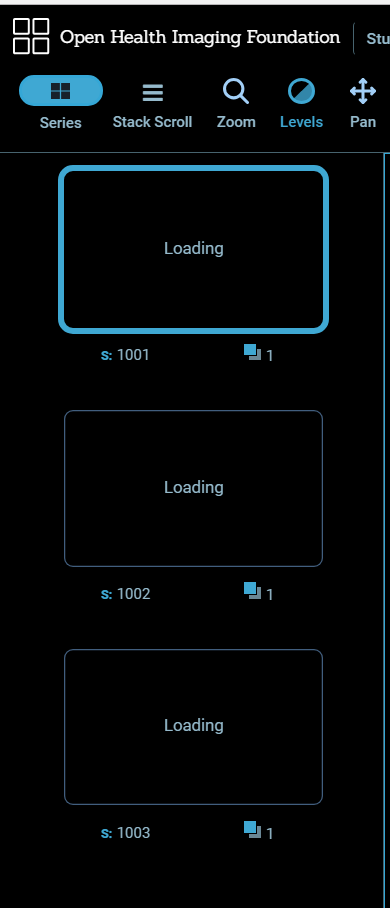
Hello, I just updated to the latest Docker Image and when you click on "Series" after you open a patients Image set, the thumbnails just say loading and does not display any thumbnail. I attached a console log from Chrome's Dev Tools. I can confirm the thumbnails did show with a previous build.
thumbnail.txt
 davidi1
All 26 comments
This appears to be working for me, and in the live standalone viewer (http://ohif-viewer.s3-website.eu-central-1.amazonaws.com/?url=https://s3.eu-central-1.amazonaws.com/ohif-viewer/sampleDICOM.json)
Is there anything specific about the images, or your configuration?
 swederik
on 9 Jul 2018
swederik
on 9 Jul 2018
Hello. I haven't changed any configuration parameters between the builds and I tried loading different images. I do have an older build of OHIF running in production for our users to use while I test the newer builds and the images are loading fine on the older build using the same images and configs.
I just updated to the newest Docker build to try the iOS fixes and these images are still not loading in the Series sidebar. It just sits there and says "Loading" but never loads the image. The image itself on the right will load just fine. Any other logs I can get you or anything else I can try?
davidi1
on 10 Jul 2018
Is there anything in the development console in Chrome at all?
swederik
on 10 Jul 2018
I attached a new console log.
davidi1
on 10 Jul 2018
I think the first takeaway I have from this thread is that we should create a 'development' version of the Docker image for debugging issues like this. It's hard to see because this is all minimal output because it's using production logging.
swederik
on 10 Jul 2018
Ahhh I see. Well, sorry I couldn't be of more help. I do know this started happening when you initially fixed this error: https://github.com/OHIF/Viewers/issues/219
davidi1
on 10 Jul 2018
I had a chance to build the viewer from the latest master branch and this issue does not exist there. So, I can say that this issue is only happening with the newest Docker image.
davidi1
on 10 Jul 2018
@davidi1 the same issue with me,how to fixed it?
 jacklau88
on 11 Jul 2018
jacklau88
on 11 Jul 2018
Could you try to use the ohif/viewer-dev:latest docker image (https://hub.docker.com/r/ohif/viewer-dev/)? That will run the application using Meteor in the development state. It should be better for logging what's going on.
swederik
on 11 Jul 2018
@jacklau88 Hi, I did not fix it. For now, I am using an older Docker image that is working. Also, if you compile the Viewer from source yourself, it will work fine that way as well.
@swederik I just loaded the Dev version and attached the log from Chrome's Dev Tools Console. There is definitely a lot more information in this log.
davidi1
on 11 Jul 2018
I feel I should also mention that after I ran docker-compose up command, I see this error:
viewer_1 | W20180711-13:33:42.588(0)? (STDERR) The stylus package has been deprecated.
viewer_1 | W20180711-13:33:42.659(0)? (STDERR)
viewer_1 | W20180711-13:33:42.660(0)? (STDERR) To continue using the last supported version
viewer_1 | W20180711-13:33:42.661(0)? (STDERR) of this package, pin your package version to
viewer_1 | W20180711-13:33:42.662(0)? (STDERR) 2.513.14 (meteor add stylus@=2.513.14).
I have a feeling this is what is causing this issue because I do not see this error when manually compiling from source plus this error does not show up when using an older Docker image. Just a gut feeling, I could be wrong. Just trying to help :-)
davidi1
on 11 Jul 2018
Looks like you are getting an Error 400 Bad Request from your server:
ohif_cornerstone.js?hash=b4a15b2429ba6faf04082c7efc02a097e9a8e6a8:34251 GET http://192.168.10.129:3000/__wado_proxy?url=http%3A%2F%2FpacsIP%3A8042%2Fdicom-web%2Fstudies%2F1.2.392.200036.9125.2.1607228133191147.64879451494.317223%2Fseries%2F1.2.392.200036.9125.3.1607228133191147.64879451495.317225%2Finstances%2F1.2.392.200036.9125.4.0.253424558.487759944.478527379%2Fframes%2F1&serverId=tZM7R95Z324AzRSmg 400 (Bad Request)
Is there any more information there?
FYI: The stylus warning does not matter whatsoever for this issue.
swederik
on 11 Jul 2018
@swederik Information regarding what exactly? The log I attached contains everything that the Console is showing me. Should I look somewhere else? Sorry, for the basic questions. Still learning :-)
Regarding the stylus error, ok. Just making sure :-)
davidi1
on 11 Jul 2018
Turns out to be an issue with the WADO Image Loader. It's been patched and master is rebuilding with 2.1.3
swederik
on 11 Jul 2018
Well, I updated to the newest build and it is still not working. I still see the Error 400. I attached a new Console log.
davidi1
on 11 Jul 2018
There was an issue with the 2.1.3 release of WADO Image Loader, I hadn't run the build and it was published with the same 'dist' files as 2.1.2, so the error persisted. We had to release 2.1.4 to fix it. It should be fixed now (when build finishes...), assuming the issue you are seeing is actually the same as mine (WADO-RS issue).
swederik
on 11 Jul 2018
I updated to the newest image (Docker Image tag number: 847e693a) and it is still not working. I am attaching a new Console log as well as something new I noticed. Now, along with the Error 400, I see:
{
"HttpError" : "Bad Request",
"HttpStatus" : 400,
"Message" : "Parameter out of range",
"Method" : "GET",
"OrthancError" : "Parameter out of range",
"OrthancStatus" : 3,
"Uri" : "/dicom-web/studies/1.2.392.200036.9125.2.18417211170132151.64879562099.3056894/series/1.2.392.200036.9125.3.18417211170132151.64879562099.3056895/instances/1.2.392.200036.9125.9.0.253424990.911194284.1866892439/frames/1"
}
davidi1
on 11 Jul 2018
That's a bit odd. Are you using the default server configuration in the docker image? Can you post your server configuration? (type OHIF.servers.getCurrentServer() in the Chrome dev console)
Could you use the ohif/viewer-dev:latest instead? That will give more useful logs.
I'm not sure what parameter would be out of range, unless it's the frame index.
You can try switching from WADO-RS to WADO-URI for the thumbnails.
swederik
on 12 Jul 2018
Yes, I am using the default configuration. Here are the exact steps I take when trying this out:
- I wipe the Viewers directory completely and delete any Docker Images I have. I then run git clone https://github.com/OHIF/Viewers.git to get a fresh copy.
- I then modify the docker-compose.yml file and only change the extra hosts line to include my Orthanc Server address. I only modify the actual IP address.
- After saving the docker-compose.yml file, I then run sudo docker-compose up
- I open Chrome and go to the Viewer once it downloads the Images and runs them.
That is all I do. I do not modify anything else. Should I be? Maybe, I am not configuring it correctly.
I attached the log from the dev Docker Image and I also attached the output of the OHIF.servers.getCurrentServer() command you asked me to run. Based on the config, I believe I am using WADO-URI. I could be wrong...
If I am using the Docker-Dev Image, I also change the
viewer:
image: ohif/viewer:latest
to
viewer:
image: ohif/viewer-dev:latest
davidi1
on 12 Jul 2018
It's not really clear to me why WADO-RS is failing in your situation.
I switched the default config to use WADO-URI, so you can use that for now and we'll try to reproduce the issue. If I hit my Orthanc with this URL I will also get 400 Bad Request, interestingly enough:
http://localhost:8042/dicom-web/studies/1.2.392.200036.9125.2.18417211170132151.64879954981.30561171/series/1.2.392.200036.9125.3.18417211170132151.64879954981.30561172/instances/1.2.392.200036.9125.9.0.253426524.2495264940.1866892439/frames/1
swederik
on 12 Jul 2018
Well, switching to WADO-URI worked. I was definitely looking at the wrong config. Sorry about that. Everything is working now. Ya, I am not sure why WADO-RS was failing either and I am glad the issue happened to you as well because it proves I am not going crazy lol I do appreciate all of your help! Thank you :-)
davidi1
on 12 Jul 2018
yes,use dicom-web Api cant return frame ,return Http 400 error,but use WADO-URI works fine.there is an other problem that if image's size then 5M ,then client loads very low.
jacklau88
on 16 Jul 2018
@jacklau88 I noticed the slow loading too at one point but after updating to the newest Docker Image, everything is running great now :-)
davidi1
on 16 Jul 2018
The WADO-RS issue seems to be on the Orthanc side. I've filed a bug report here: https://bitbucket.org/sjodogne/orthanc/issues/96/dicomweb-plugin-wado-rs-retrieveframes
swederik
on 19 Jul 2018
Hi @swederik Ahh ok. Sounds good. Hopefully, the Orthanc devs fix it but like you said there is a workaround and its nothing critical at the moment.
davidi1
on 19 Jul 2018
@swederik's issue in the Orthanc issue tracker appears to have been resolved 👍
 dannyrb
on 23 May 2019
dannyrb
on 23 May 2019
Related issues
 AtmiyaVaghela
·
4Comments
AtmiyaVaghela
·
4Comments
 panzhengo1
·
3Comments
panzhengo1
·
3Comments
 MathisGuilhin
·
3Comments
MathisGuilhin
·
3Comments
 MuriloSchaefer
·
3Comments
MuriloSchaefer
·
3Comments
 rossetantoine
·
5Comments
rossetantoine
·
5Comments