Video.js: High CPU usage after the player stays in background for a while
Description
I've implemented an Audio player with VideoJS and we noticed a very high CPU usage after sustained usage in background.
We did some tests and it happens also with the standard demo: https://videojs.com/advanced/
Steps to reproduce
- Open Chrome browser and go to the demo page: https://videojs.com/advanced/
- Open the DevTools
- Toggle DeviceToolbar in the window and throttle the CPU to Low-end mobile (this step will make it easier to highlight the problem, but the issue is visible also at full CPU)
- Start playing and put the window in background for 30 minutes
- Open the window and try to scroll, the page will not respond for some seconds, the more you keep the player in background the more the seconds, eventually will completely block the page
I was able to profile it on my mac with the following procedure:
1-2-3: as above
- Detach the DevTools from the Window and put the window with the player in background by clicking the yellow round button in the window top bar to minimise it to the dock
- You should now only have the DevTools window opened, press Cmd+H to hide the browser completely and wait
- Show Chrome again but clicking on the Chrome icon, you should now see the DevTools window but not the player window that it's still minimised
- In the devtools window, go to the performances tab and start recording
- Maximize the player window and wait until the window start reacting again
- Stop the profiler in the DevTools window and see the results
You can notice a 100% cpu usage for some seconds until it goes back to normal:
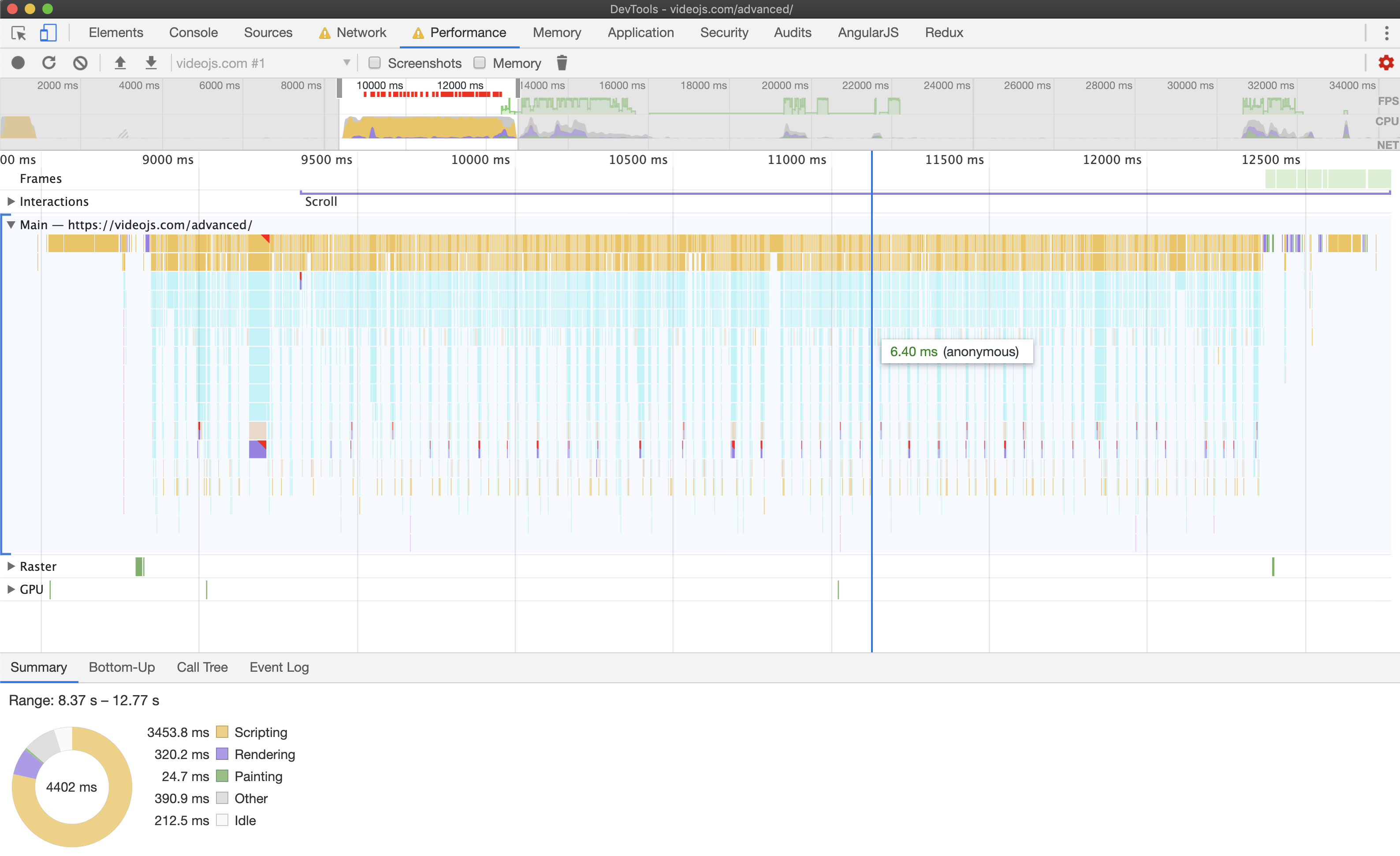
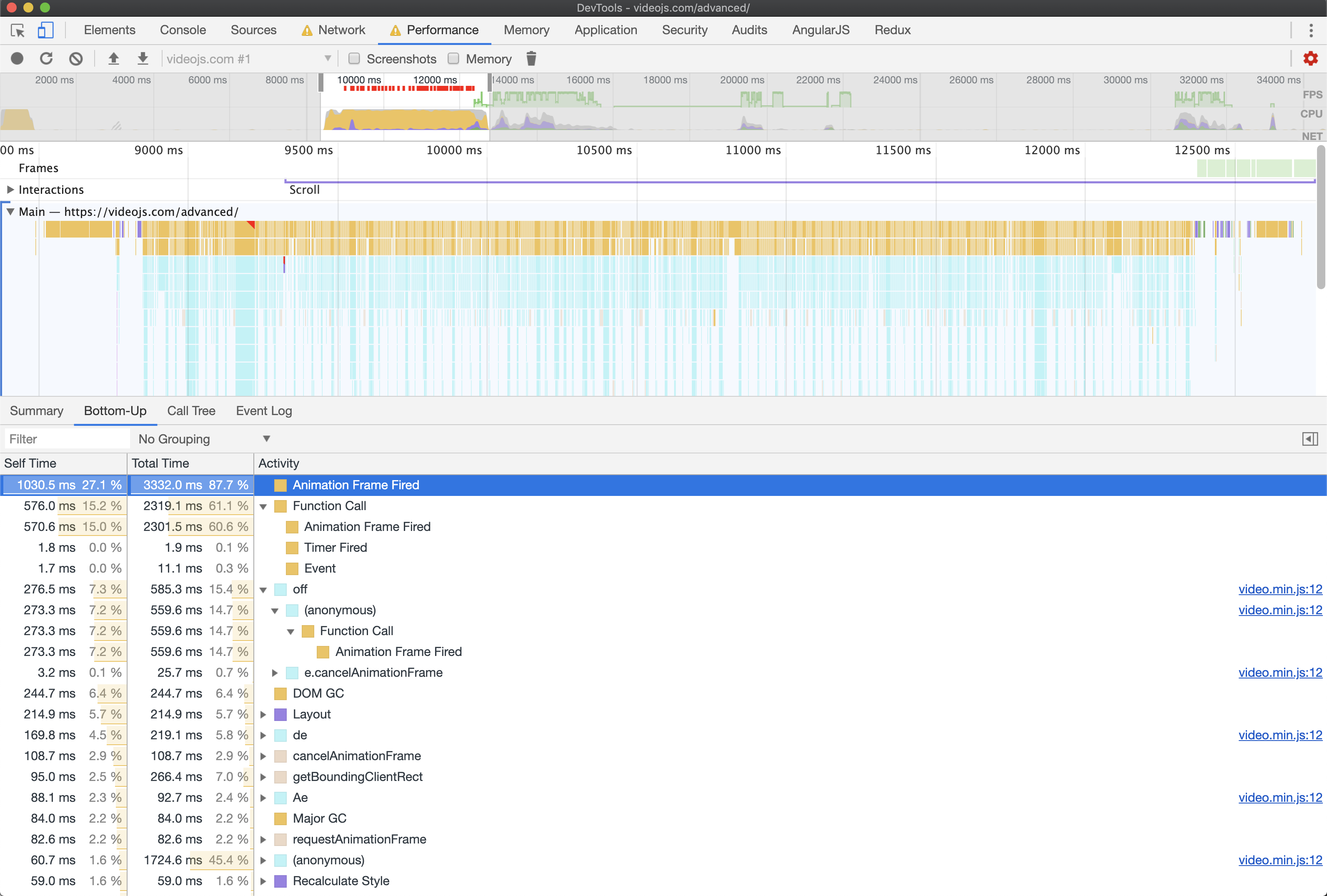
I've tested on multiple Macs (even very fast ones).
Any suggestions?
Thanks,
Dem
 demetrio812
All 22 comments
👋 Thanks for opening your first issue here! 👋
If you're reporting a 🐞 bug, please make sure you include steps to reproduce it. We get a lot of issues on this repo, so please be patient and we will get back to you as soon as we can.
To help make it easier for us to investigate your issue, please follow the contributing guidelines.
![welcome[bot] picture](https://avatars0.githubusercontent.com/in/4141?v=4&s=40) welcome[bot]
on 15 Apr 2019
welcome[bot]
on 15 Apr 2019
Interesting, I'm a bit surprised that it's happening in more modern browsers as well but we recently fixed a similar bug for IE11 where the tab would just crash due to CPU usage. The fix we implemented isn't IE11 specific, so, it may improve things. It's available in the latest release now.
 gkatsev
on 18 Apr 2019
gkatsev
on 18 Apr 2019
@gkatsev we tested the 7.5.4 and things improved a bit but it's unusable as an audio player because if users keep it in background for a while and then try to access the page, they would have an non-resposive page using a lot of cpu that potentially will never recover, we didn't notice the same problem in another player we tested, HLS.js
demetrio812
on 20 Apr 2019
have the same trouble. after a while in background player become totally unresponsible.
7.5.4, no plugins.
ps: very popular case to put tab in background, where speech is interesting with boring video
 0caspy
on 4 May 2019
0caspy
on 4 May 2019
Encountering this issue also, and is even leading to instances of tabs fully crashing eventually.
Is there any workaround or mitigation?
related: https://github.com/videojs/video.js/issues/5607 & https://github.com/videojs/video.js/issues/5607
 DispatchCommit
on 22 May 2019
DispatchCommit
on 22 May 2019
This issue has been automatically marked as stale because it has not had recent activity. It will be closed if no further activity occurs. Thank you for your contributions.
![stale[bot] picture](https://avatars3.githubusercontent.com/in/1724?v=4&s=40) stale[bot]
on 21 Jul 2019
stale[bot]
on 21 Jul 2019
Encountering same issue here, bot please don't close this.
 meikidd
on 20 Sep 2019
meikidd
on 20 Sep 2019
@demetrio812
I Found out this issue is caused by the code here.
The following code is executed every 30ms, when user leave the current tab, setInterval still keeps working.
this.requestAnimationFrame(() => {
     this.update();
});
But requestAnimationFrame(callback) queues up the callback function when user leave the tab, and try to clear the queue when user back. So if user leave this tab for half an hour, when user come back, there are thousands of callbacks in the queue.
See minimal reproducible code here
It exists in version 7.3.0, newest version doesn't have this issue.
meikidd
on 8 Oct 2019
@meikidd thanks! That's really interesting. I guess we hadn't realized that the rAFs are queued, I think I figured that they'd end up being dropped? In some recent version of Video.js, on document visibilitychange, we just turn off a lot of these set intervals altogether.
gkatsev
on 8 Oct 2019
@gkatsev I see the same issue. But my case is worst since I load a table with 100 rows and one of the cells contains the player -> after coming from background my site is almost unusable. And the fan of the CPU goes crazy.
MacBook 15
Catalina
 andreiucm
on 8 Dec 2019
andreiucm
on 8 Dec 2019
Any updates on this?
 tzarebczan
on 28 Apr 2020
tzarebczan
on 28 Apr 2020
I can't recall which version exactly, but I believe this was fixed in one of the 7.6.x builds and re-surfaced in the 7.7.x builds.
I'm on 7.7.5 currently and have the issue. I might try downgrading back to the latest 7.6.x and testing. If my memory is correct and 7.6.x does not have the issue, I suspect that the changes made in 7.7.0 are the cause of the issue due to the above mentioned issue with RAF's being queued in the background.
If this is the case, I suspect it is because of this particular PR: https://github.com/videojs/video.js/pull/6155
Where a new RAF was added to the codebase at this line: https://github.com/videojs/video.js/pull/6155/files#diff-54c39e8f9281d253e730007a0b8c6f63R75
I'll downgrade to test and report back.
DispatchCommit
on 28 Apr 2020
Ok after some initial investigation this does appear to be a regression, 7.6.6 does not exhibit this behavior while 7.7.5 does.

@gkatsev @brandonocasey any thoughts?
I've only looked at simple performance comparisons so far, might be worth trying to do a code profile comparison to see which functions are running during that 100% CPU time, but I keep crashing dev tools while waiting for the process to finish.
DispatchCommit
on 28 Apr 2020
Here's a code profile comparison, v7.7.5 is substantially slower upon tab focus compared to v.7.6.6, and it appears to be related to an anonymous function call that calls functions such as update, getCurrentTime, duration, seekableEnd, and liveWindow which make me think my previous suspicions are correct.

DispatchCommit
on 28 Apr 2020
I found at least 2 sources for this issue in the current codebase, and have PR'd my changes for fixing both instances.
There may be additional issues hidden elsewhere, but removing the two biggest offending instances has resulted in a substantial improvement. With just 1 instance resolved I saw a drop from multiple minutes to complete in extreme cases to just around 10 seconds of lockup. After performance profiling on the 10 second lockups and resolving the second occurrence, I'm seeing instantaneous response.
I'm not sure I'm completely satisfied just yet, but I'm going to need to wait much longer periods in order to find other instances.
edit: 3 instances* found an additional issue in slider.js also.
DispatchCommit
on 28 Apr 2020
Thanks for the investigation and PR @DispatchCommit! It does sound right that we don't want to double up multiple rAFs.
We really appreciate your help.
gkatsev
on 30 Apr 2020
:( I'm not sure this is fully resolved yet @gkatsev
I just switched from my custom build of video.js back to 7.8.4 and I'm still seeing substantial issues with RAF calls.

v7.8.4

I can investigate the source(s) of RAF leaks and work on further improvements, should this issue be re-opened or would it be better to start a new issue to document findings?
DispatchCommit
on 10 Jul 2020
7.8.4 doesn't contain the rAF fix yet. Going to be releasing Video.js 7.9 tomorrow which will include that change.
gkatsev
on 10 Jul 2020
Well I'm glad my testing is at least consistent then haha!
My mistake, sorry about that, I jumped the gun there as are a few fixes that I'm hoping to benefit from this next update! looking forward to the release, and will update if any additional issues show up.
Thanks for the hard work 😄
DispatchCommit
on 10 Jul 2020
It's out now as next on npm
gkatsev
on 10 Jul 2020
You are amazing, thank's for the quick work, I am eager to get this new player on our site and to have finally eliminated two of the most annoying issues that we've been facing for far too long in some capacity or another.
Glad to finally see this resolved 🙏
DispatchCommit
on 11 Jul 2020
Thank you for tracking down the issue!
gkatsev
on 11 Jul 2020
Related issues
 TheKassaK
·
3Comments
TheKassaK
·
3Comments
 kitsunde
·
4Comments
kitsunde
·
4Comments
 shivamg705
·
4Comments
shivamg705
·
4Comments
 aagiulian
·
3Comments
aagiulian
·
3Comments
 SolmazKh
·
4Comments
SolmazKh
·
4Comments
Most helpful comment
@demetrio812
I Found out this issue is caused by the code here.
The following code is executed every 30ms, when user leave the current tab,
setIntervalstill keeps working.But
requestAnimationFrame(callback)queues up the callback function when user leave the tab, and try to clear the queue when user back. So if user leave this tab for half an hour, when user come back, there are thousands of callbacks in the queue.See minimal reproducible code here
It exists in version 7.3.0, newest version doesn't have this issue.