Video.js: Credential cookies not send to cloudfront
Hi there,
I'm trying to use videojs with a Cloudfront distribution using signed cookies and CORS to play a HLS video.
I've Setup my CloudFront distribution like this :
Origin:
- Restrict Bucket Access: Yes
Behaviors (*):
- Allowed HTTP Methods: GET, HEAD, OPTIONS
- Whitelist Headers: Origin, Access-Control-Request-Headers, Access-Control-Request-Method
- Restrict Viewer Access: Yes
Same for CORS on my S3 Bucket :
<CORSRule>
    <AllowedOrigin>myCorrectSubdomain.ngrok.io</AllowedOrigin>
    <AllowedMethod>HEAD</AllowedMethod>
    <AllowedMethod>GET</AllowedMethod>
    <MaxAgeSeconds>3000</MaxAgeSeconds>
    <ExposeHeader>ETag</ExposeHeader>
    <AllowedHeader>*</AllowedHeader>
</CORSRule>
On my player I'm setting up cookies like this :
(cookies are generated with CloudFront getSignedCookies method)
res.set('Set-Cookie', [
   "CloudFront-Policy=" + myCorrectCFPolicy + "; path=/; max-age=6000;",
    "CloudFront-Signature=" + myCorrectCFSignature + "; path=/; max-age=6000;",
    "CloudFront-Key-Pair-Id=" + myCorrectCFKeyPairId + "; path=/; max-age=6000;"
]);
Here is my player implementation (I've removed all other plugins implementation) :
<video id="video-player" width='800' height='600'
       class="video-js vjs-default-skin" controls>
</video>

<script>
    window.videojs = videojs;

    let player = videojs('video-player');

    player.src({
        src: 'http://distributionId.cloudfront.net/pathToRessource',
        type: 'application/x-mpegURL',
        withCredentials: true
    });
</script>
If I try to access my ressource using CloudFront url (e.g. http://_distributionId_.cloudfront.net/_pathToRessource_) with the correct signed cookies it works perfectly
However using my player (hosted on a ngrok) i got the followings errors :
- GET http://distributionId.cloudfront.net/pathToRessource 403 (Forbidden)
- Failed to load http://distributionId.cloudfront.net/pathToRessource: No 'Access-Control-Allow-Origin' header is present on the requested resource. Origin 'http://myCorrectSubdomain.ngrok.io' is therefore not allowed access. The response had HTTP status code 403.
Checking the ressource request on my browser I can see that videojs is not sending the credentials cookies :
Missing Key-Pair-Id query parameter or cookie value
Checking my browser cookies:
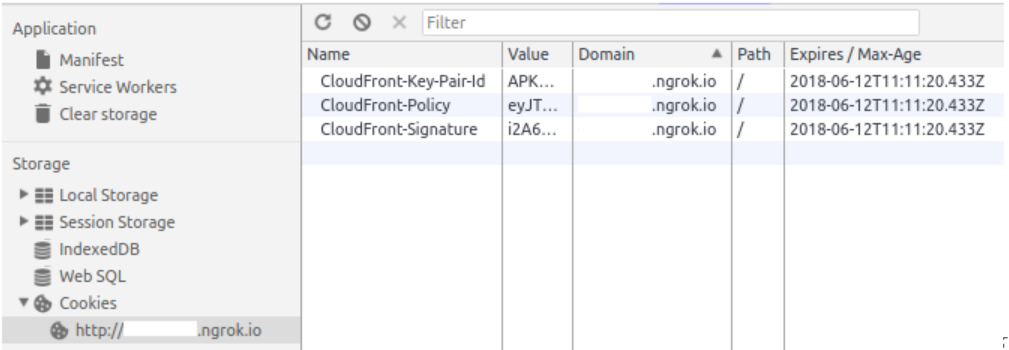
At this point I supposed videojs should be passing cookies to every request for manifests but for some reasons it doesn't ...
Have I forgot to implement something about CORS, cookies, ... , or is it a problem from videojs ?
Additional Information
versions
videojs
7.0.3
browsers
Tested on Chrome Firefox Opera
Thanks for any help,
Jordan
 JordanChazottes
All 26 comments
Hi again,
Some more informations for you, I've deployed it on EC2 an example of my problem here :
http://jordan-front.kinow.fr/api/player
It can be down/buggy sometimes as I'm still working on it.
JordanChazottes
on 19 Jun 2018
Finally i found the solution !
I had to set an alternate CName with the same domain of my video player on my CDN.
With CName set "Access-Control-Allow-Credentials" header is present on every request.
Closing.
JordanChazottes
on 20 Jun 2018
Glad you were able to figure it out, sorry we weren't able to help.
 gkatsev
on 20 Jun 2018
gkatsev
on 20 Jun 2018
@JordanChazottes Hi man! did you change the cloudfront url to the CNAME like:
src: 'http://distributionId.cloudfront.net/pathToRessource',
to
src: 'http://CNAME/pathToRessource',
 llioor
on 18 Dec 2018
llioor
on 18 Dec 2018
I had trouble finding information about how set this up for DASH, most documentation is for HLS. For future reference here is a more compute code snippet of what I did. I'd be interested if someone has a less confusing configuration.
``//these cookies will get sent along by videojs and will authenticate the user to cloudfront
const cookies = JSON.parse(<my cookies json>);
Object.keys(cookies).forEach((key) => {
// cookies can only be set by the same site a server is on
// so you have to make an alias in cloudfront for resources.mtonomy.com or similar
document.cookie =${key}=${cookies[key]};domain=.mtonomy.com`;
});
//the first request for the manifest needs to be with credentials
this.$video = videojs(this.$refs.video, {
html5: {
dash: {
setXHRWithCredentialsForType: ['MPD', true],
},
},
});
//set the video source using LOGIC and FACTS
// if video src setting function works without cloudfront then it's probably fine
await this.setVideoSource();
//this is called after the source is set and videojs is ready to play
// this.$video.dash doesn't exist until after the source is set and the ready function is called
this.$video.ready(() => {
//tell videojs that all the other kinds of requests it'll make need to have cookies
['GET', 'MediaSegment', 'InitializationSegment', 'IndexSegment', 'other'].forEach((credential) => {
this.$video.dash.mediaPlayer.setXHRWithCredentialsForType(credential, true);
});
});
```
 molten-firescar96
on 8 Feb 2019
molten-firescar96
on 8 Feb 2019
I did find something that seems to work just as well but requires less magic
//these cookies will get sent along by videojs and will authenticate the user to cloudfront
const cookies = JSON.parse(this.mediaFile.cookies);
Object.keys(cookies).forEach((key) => {
document.cookie = `${key}=${cookies[key]};domain=.mtonomy.com`;
});
//initialize a videojs instance
this.$video = videojs(this.$refs.video);
//we need to set xhr.withCredentials for every request to pass cookies onward
videojs.Html5DashJS.hook('beforeinitialize', (player, mediaPlayer) => {
function customLoader() {
const originalLoad = this.parent.load;
return {
//simple custom function that makes a change then calls the original
load: (httpRequest) => {
httpRequest.withCredentials = true;
originalLoad(httpRequest);
},
};
}
//XHRLoader is the class from dashjs we want to replace/extend
mediaPlayer.extend('XHRLoader', customLoader, true);
Talk about Pain
I had the fun time spending 😭 5 days 😭 with AWS Support on CloudFront to get this working and would feel awful if I didn't share my experience. I ran into several CORS and 403 errors.
AWS Support
AWS Support has internal tools that make it easy for them debug the configuration, so if you are truly stuck, upgrade to AWS Business Support and give them a call. AWS pro-rates so if you sign up for Business Support 10 days before the end of the month you are only charged the 10 days, and you can then cancel before end of month so you aren't charged the full amount for the next month. I would also suggest you mark your ticket as "System Imparied" as I find "General Guidance" tends to give you bottom of the barrel of their support team which will frustrate you to no end.
The JS that worked for me
I had to use a combination of the above js examples in this ticket and through trial and error I found this is what worked for me.
document.cookie = "CloudFront-Key-Pair-Id=#{@cookie[:id]};domain=exampro.co;secure;path=/"
document.cookie = "CloudFront-Signature=#{@cookie[:sig]};domain=exampro.co;secure;path=/"
document.cookie = "CloudFront-Policy=#{@cookie[:policy]};domain=exampro.co;secure;path=/"

var player = videojs('video')
videojs.Html5DashJS.hook('beforeinitialize', function(player, media_player) {
  console.log('beforeinitialize')
  function loader() {
    var load = this.parent.load
    return {
      load: function(req) {
        req.withCredentials = true
        load(req)
    }}
  } // loader
  media_player.extend('XHRLoader', loader, true)
  media_player.setXHRWithCredentialsForType('GET',true)
  media_player.setXHRWithCredentialsForType('MPD',true)
  media_player.setXHRWithCredentialsForType('MediaSegment',true)
  media_player.setXHRWithCredentialsForType('InitializationSegment',true)
  media_player.setXHRWithCredentialsForType('IndexSegment',true)
  media_player.setXHRWithCredentialsForType('other',true)
})

player.ready(function() {
  player.src({
    src: 'https://videos.exampro.co/#{@material.video_source_url}',
    type: 'application/dash+xml'
  });
  player.play()
});
You can see in my javascript that I am setting the cookies. You don't have to set them here you could also set them for the page that is being render. I wasn't sure which would work and set them in both places, but either in your controller action for the current view or your javascript will work.
  def show
    @material = @model.materials.where(id: params[:material_id]).first
    if @material
      @cookie = @material.signed_cookie
      id     = @cookie[:id].to_s
      sig    = @cookie[:sig]
      policy = @cookie[:policy]
      cookies["CloudFront-Key-Pair-Id"] = ''
      cookies["CloudFront-Key-Pair-Id"] = { path: '/', secure: true, domain: 'exampro.co', value: id }
      cookies["CloudFront-Signature"]   = { path: '/', secure: true, domain: 'exampro.co', value: sig }
      cookies["CloudFront-Policy"]      = { path: '/', secure: true, domain: 'exampro.co', value: policy }
    else
      @material = @model.materials.joins(:chapter).order('chapters.position ASC, materials.position ASC').first
      if @material
        redirect_to "/workshops/#{@model.handle}/materials/#{@material.id}"
      end
    end
  end
As long as these cookies are present they will get passed long with the requests.
The KeyPair for CloudFront
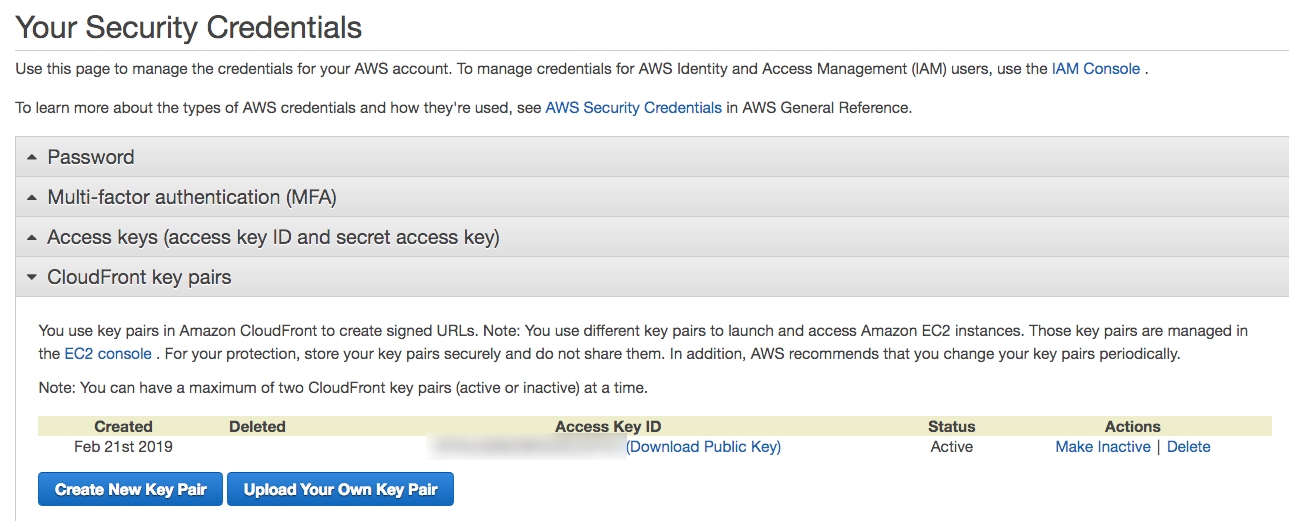
So in order to generate the key pair its turns out its not in the CloudFront Console. Would be nice if AWS integrated KMS with CloudFront but alas they have yet to do so.

To create the CloudFront key pair you have to log into your root account and go to My Security Credentials
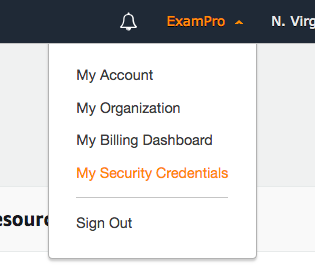
Then you generate and use this key.
I LOVE CORS
On the S3 Bucket serving the video content I had to set CORS for the Rails app:
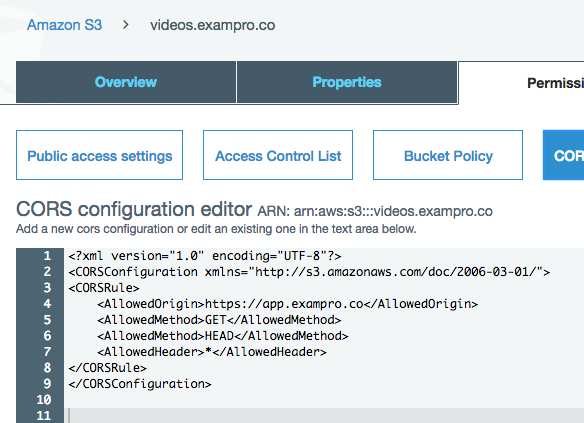
In my Rails application.rb had to so some CORS here as well.
module Exampro
  class Application < Rails::Application
    config.middleware.insert_before Rack::Sendfile, ActionDispatch::DebugLocks
    # Initialize configuration defaults for originally generated Rails version.
    config.load_defaults 5.1
    config.autoload_paths << Rails.root.join('lib')

   ### This is the part I had to add
    config.action_dispatch.default_headers = {
      'Access-Control-Allow-Origin'   => 'https://videos.exampro.co',
      'Access-Control-Request-Method' => %w{GET HEAD OPTIONS}.join(",")
    }

    # Settings in config/environments/* take precedence over those specified here.
    # Application configuration should go into files in config/initializers
    # -- all .rb files in that directory are automatically loaded.
  end
end
CloudFront Behaviour
For my CloudFront Distribution I needed to allow OPTIONS

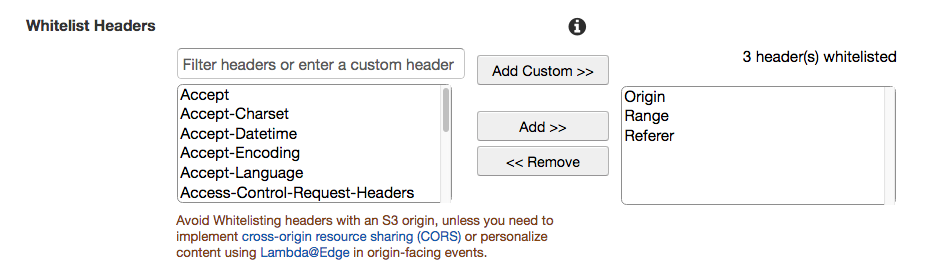
I had to Whitelist Origin. Range and Referrer aren't needed, I needed that for something else.
Debugging
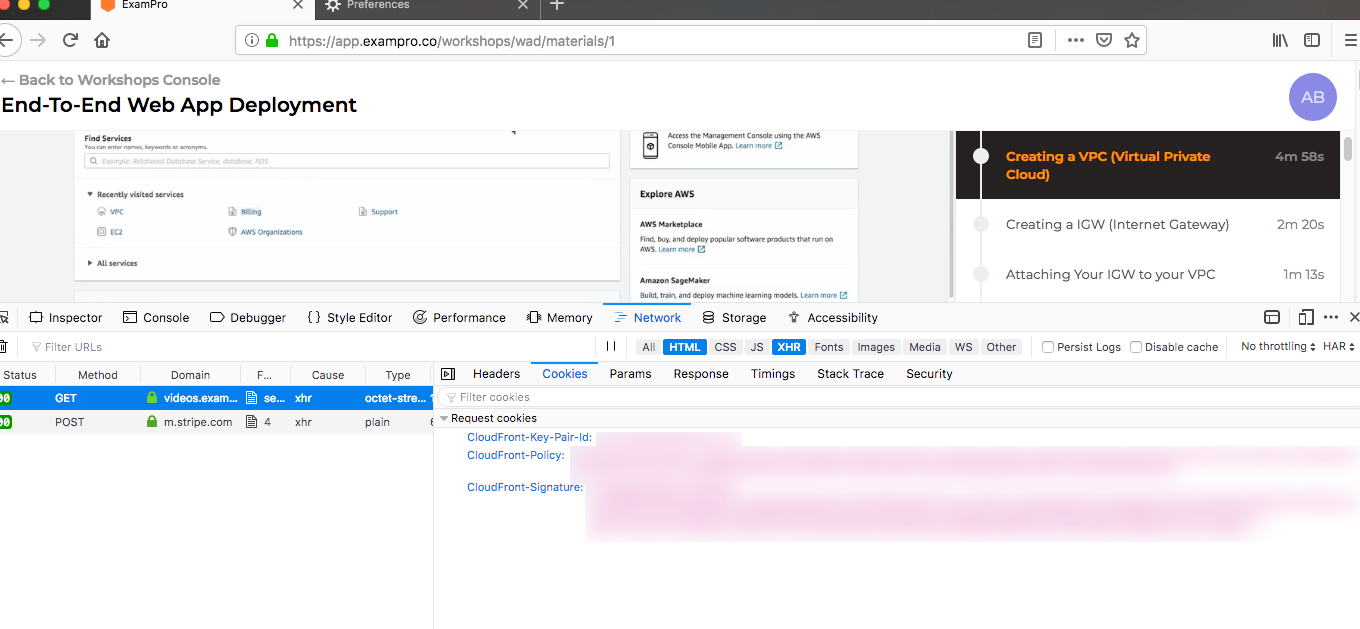
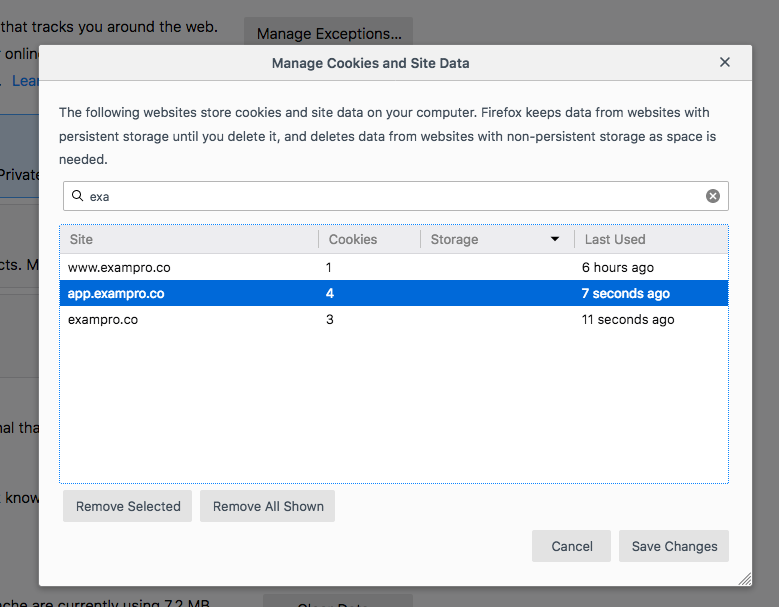
I found Firefox's Inspector much better at displaying information about requests headers and cookies than Chrome, in Chrome I kept guessing whether the cookies were being passed but Firefox clearly showed they were being passed along.
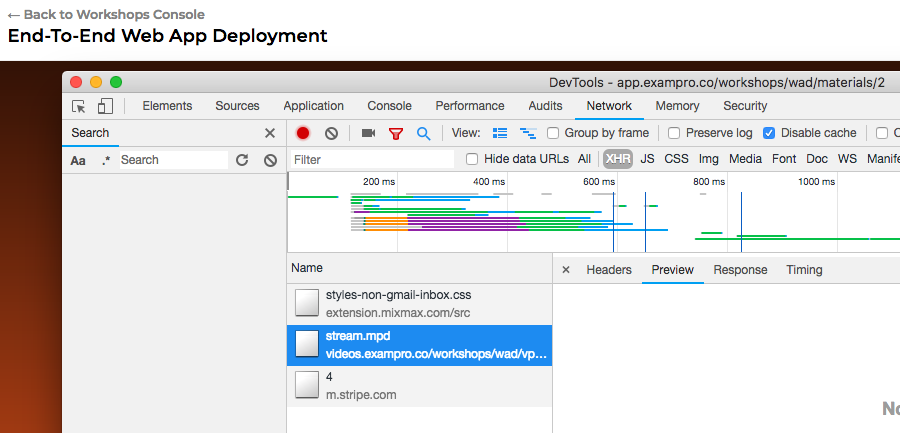
And here is chrome not telling me anything half the time where Firefox I always get a cookies tab.
Policy Problems
One thing that tripped me up was how should Resource be formatted and what should be passed to SignedCookie for url. The ruby sdk docs don't tell you much and I had to piece together incomplete github repos and work with support to figure this out.
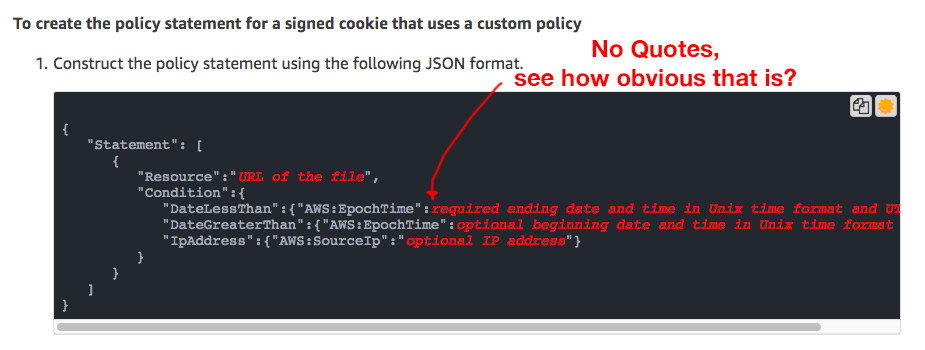
The thing that through me off the most was the Epoch times have to be integers not Strings which but Support and I spend a good 4 hours until we noticed in the AWS docs they were integers
def signed_cookie
  signer = Aws::CloudFront::CookieSigner.new(
    key_pair_id: ENV['CLOUDFRONT_ACCESS_KEY'],
    private_key_path: Rails.root.join('config','videos.pem')
  )

  policy = {
   "Statement" => [{
     "Resource"  => "https://videos.exampro.co/*",
     "Condition" => {
        # start date
        "DateLessThan"    => {"AWS:EpochTime" => 20.hours.from_now.to_i   },
        # end date
        "DateGreaterThan" => {"AWS:EpochTime" => Time.now.to_i }
   }
  }]
  }.to_json
  url = "https://videos.exampro.co/*"
  cookies = signer.signed_cookie url, policy: policy
  {
    sig:    cookies['CloudFront-Signature'],
    policy: cookies['CloudFront-Policy'],
    id:     cookies['CloudFront-Key-Pair-Id']
  }
end
This is what Im talking about in the docs. if you look closely there are no quotes which you need to infer, otherwise the policy won't work correctly.
Clear Your Cookies, Invalidate Your Cache
When debugging had to clear cookies constantly and invalidate CloudFront files a few times.
There's more too the story but hard to recall. Good lucky those who wish to have DASH + CloudFront + Video.js
 omenking
on 2 Mar 2019
omenking
on 2 Mar 2019
For anyone else who has been stuck on this for days, like me, you have to use an alternate domain name on your CloudFront distribution for this to work. This is because cookies cannot be used across domains due to CORS issues. Likewise, you will not be able to get this to work locally unless you use ngrok.
Some notes to add on to what @omenking has posted:
When you declare your cookies, make sure the domain is set to .mydomain.com. This will allow the cookies to be used across subdomains. If you do this and it still doesn't work then you will need to invalidate your CloudFront cache.
I am also on a rails project, so my erb template for the video view looks like this (I'm also streaming HLS instead of DASH):
<link href="https://vjs.zencdn.net/7.8.4/video-js.css" rel="stylesheet" />

<video
     id="video_player"
     class="video-js"
     controls
     preload="auto"
     data-setup="{}"
     width="281"
     height="500"
></video>

<script src="https://vjs.zencdn.net/7.8.4/video.js"></script>
<script>
  var player = videojs('video_player')

  player.ready(function() {
    player.src({
      src: '<%= @video.streaming_url %>',
      type: 'application/x-mpegURL',
      withCredentials: true
    });
  });
</script>
You shouldn't need more than that if you are setting the cookies in your controller.
Other than these two things, everything that @omenking said still holds true.
 samcdavid
on 14 Aug 2020
samcdavid
on 14 Aug 2020
hey Hii,
I am new to the cloud front I didn't know how to set cookies to cross domain like I'm working on localhost and want to set cookies for cloud front in angular I have tried with ngx-cookie-service and document.cookie().
Please tell me if anyone knows the solution for this
when I set cookies it set against localhost not for cloiudfront domain.
Thats reason Im getting forbidden error for cloudfront video url.
Thanks in advance.
 ashwinikhandve
on 1 Oct 2020
ashwinikhandve
on 1 Oct 2020
@ashwinikhandve to get it to work locally you need to use something like ngrok. It won't work at all on localhost.
samcdavid
on 1 Oct 2020
I would recommend not using cookies and using signed cloudfront links instead. You can use cloudfront to sign for a path prefix as well as individual files. Any signed link for "mybucket/something/*" will work for any files with the prefix "mybucket/something/"
Then you can modify the requests from videojs to add in the signature to each request.
const cacheLink = 'https://cloudfrontbucket.com/bucket/file?Policy=...&Signature=...&Key-Pair-Id=APKAIPV24LC5GWHQJHPQ'

videojs.Html5DashJS.hook('beforeinitialize', (player, mediaPlayer) => {
      //XHRLoader is the class from dashjs we want to replace/extend
      mediaPlayer.extend('RequestModifier', () => ({
        modifyRequestURL: (url) => {
          const requestURL = new URL(url);
          const baseURL = new URL(cacheLink);
          requestURL.search = baseURL.search;
          return requestURL.href;
        },
      }), true);
    });
@molten-firescar96 , if we use signed urls for hls streams, then wont it require presigned url for each of the chunk part of video file and manifest file wont be able to support that as it contains relative links?
 Aniket-Singla
on 29 Nov 2020
Aniket-Singla
on 29 Nov 2020
Yes. I can't post all my code for generating manifests with Bento4. But assuming you've generated one, I've provided the code for modifying the manifest at runtime.
If cookies work for your application by all means use them, but I found the signed URLs to be more flexible. Based on omenking's answer it seems like both methods require creating some custom hooks.
molten-firescar96
on 29 Nov 2020
After weeks of trying I need your help. Your input above has been useful.
Note that crerating a signed URL (with mp4) works fine. This tell me that Policy, Signature, KeyID and S3 access are all ok, anmd I must have an issue with the video player/cookies.
I get:
MissingKey
Question I have:
My cloudfront log (with cookies logging ON) does not show any cookies, does this mean it does not receive any? I guess so.
In that case I suspect that jsvideo does not pass the cookies (I see same with jwplayer). Here my header/cookies details:

I use following PHP code to sign the cookies:
function signACookiePolicy()
{
    $resourceKey = 'https://xxxxxxxx.cloudfront.net/*';
    $expires = time() + 3600; // 5 minutes (5 * 60 seconds) from now.
    $privateKey = realpath(getcwd() . '/private_key.pem');
    $keyPairId = 'xxxxxxxxxxxxxx';

    $customPolicy = <<<POLICY
{
    "Statement": [
        {
            "Resource": "{$resourceKey}",
            "Condition": {
                "DateLessThan": {"AWS:EpochTime": {$expires}
                }
            }
        }
    ]
}
POLICY;

    $cloudFrontClient = new CloudFrontClient([
        'profile' => 'default',
        'version' => '2014-11-06',
        'region' => 'us-east-1'
    ]);

    $result = signCookiePolicy($cloudFrontClient, $customPolicy,
        $privateKey, $keyPairId);

    foreach ($result as $cookie_name => $cookie_value)
    {
        setcookie($cookie_name, $cookie_value, 0, "/",".tricktribe.com", true, true);
    }

    header("Access-Control-Allow-Origin: www.tricktribe.com");
    header("Access-Control-Allow-Credentials: true");
    header("Access-Control-Max-Age: 1000");
    header("Access-Control-Allow-Headers: X-Requested-With, Content-Type, Origin, Cache-Control, Pragma, Authorization, Accept, Accept-Encoding");
    header("Access-Control-Allow-Methods: PUT, POST, GET, OPTIONS, DELETE");


    return $result;

}


function signCookiePolicy($cloudFrontClient, $customPolicy,
                          $privateKey, $keyPairId)
{
    try {
        $result = $cloudFrontClient->getSignedCookie([
            'policy' => $customPolicy,
            'private_key' => $privateKey,
            'key_pair_id' => $keyPairId
        ]);

        return $result;

    } catch (AwsException $e) {
        return [ 'Error' => $e->getAwsErrorMessage() ];
    }
}
Here my videojs code
<!DOCTYPE html>
<html>
<head>
    <meta charset=utf-8 />
    <link href="https://unpkg.com/video.js/dist/video-js.css" rel="stylesheet">
</head>
<body>
<h1>TrickTribe Videostream</h1>

<video-js id="my_video_1" class="vjs-default-skin" controls preload="auto" width="640" height="360">
    <source
            src="https://d2b2vayejckyrz.cloudfront.net/54faaa0f-dcb1-47ff-b085-fe9aec29c91e/DASHISO1/SWITCHALOPE.mpd"
            type="application/dash+xml"
            withCredentials="true">
</video-js>

<script src="https://unpkg.com/video.js/dist/video.js"></script>
<script src="https://unpkg.com/@videojs/http-streaming/dist/videojs-http-streaming.js"></script>

<script>
    var player = videojs('my_video_1');
</script>

</body>
</html>
Question:
Should I indeed use .tricktribe.com (start with a dot) when setting the cookies? I tried without it and with 'www' (or without) any luck.
Any bright ideas???????
 avanrietschoten
on 5 Dec 2020
avanrietschoten
on 5 Dec 2020
@avanrietschoten it seems like you are setting cookies for your domain (i.e. .tricktribe.com). You should set cookies to be sent to cloudfront request, which I can see in your video source is d2b2vayejckyrz.cloudfront.net. If you are using cloudfront Dist as an alias for your domain in route53 then you should try replacing the source url of video too ( though it does not seems you are using this option).
@molten-firescar96 , yes can you please share your code / source links that may be helpful for community.
Aniket-Singla
on 5 Dec 2020
@Aniket-Singla
Thanks for your prompt response. Note I have set www.tricktribe.com as CNAME for the cloud distribution (see below)
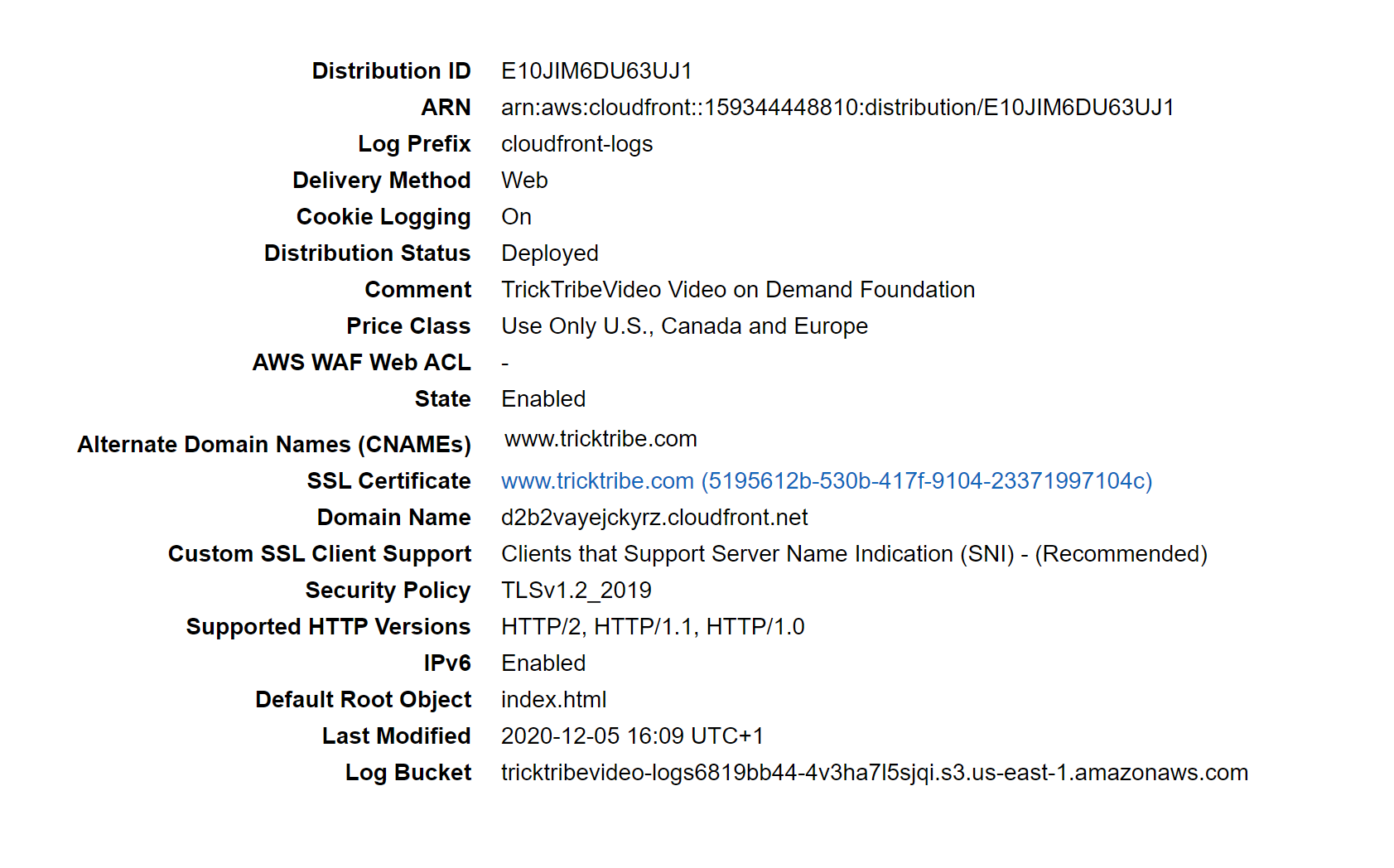
hence I should use the cookie with tricktribe.com domain. Anyway I tested it and it does not help.
avanrietschoten
on 5 Dec 2020
@avanrietschoten I think I see the problem after spending a few days trying to get signed cookies to work:
Your src should be https://www.tricktribe.com/54faaa0f-dcb1-47ff-b085-fe9aec29c91e/DASHISO1/SWITCHALOPE.mpd
That's the only way signed cookies will be passed on.
This also means that when your sign for the URL, your $resourceKey should instead be set to https://www.tricktribe.com/*
 sak360
on 6 Dec 2020
sak360
on 6 Dec 2020
@avanrietschoten yes I already said if you have set cname or alias then your video source should also be relative to your domain only. ( exactly what @sak360 has prompted). Secondly also make sure you have also configured route 53 to forward this request to cloudfront distribution. Clodfront settings looks fine.
Aniket-Singla
on 6 Dec 2020
Thanks, appreciate you thinking along! Did what you suggested and no
change. Remember about the following:
1) When I change cloudfront behaviour, and switch off Restrict Viewer
Access (Use Signed URLs or Signed Cookies), all works ok. Both on URL
starting with cloudfront.net as with www.tricktribe.com
2) When I create a signed URIL with same policy, signature and key pair id
it works.
I need to study your comments around route 53. I did not do anything in
that area, wonder if in light of the observed bevaviour matters, but will
do.
No, my suspicion is against videos. See issue 5438 on videojs, this has a
recent discussion around cross domain issues and credentials cookies
passing videojs and suggests some work arounds.
https://github.com/videojs/video.js/issues/5438
Arnaud
On Sun, Dec 6, 2020 at 5:02 AM Aniket Singla notifications@github.com
wrote:
@avanrietschoten https://github.com/avanrietschoten yes I already said
if you have set cname or alias then your video source should also be
relative to your domain only. ( exactly what @sak360
https://github.com/sak360 has prompted). Secondly also make sure you
have also configured route 53 to forward this request to cloudfront
distribution. Clodfront settings looks fine.—
You are receiving this because you were mentioned.
Reply to this email directly, view it on GitHub
https://github.com/videojs/video.js/issues/5247#issuecomment-739451320,
or unsubscribe
https://github.com/notifications/unsubscribe-auth/AR62PC7FWLERSOWJQPYGDVTSTL66JANCNFSM4FEQVRFQ
.
avanrietschoten
on 6 Dec 2020
Aniket,
I am not hosting the website www.tricktribe.com myself (although it is on a
AWS domain). I understand that is when you need route 53 isn't it?
I have some videos in S3 what need to get streaming at the website, so I
only work on establishing secure access to my S3 bucket.
Right?
Thanks,
Arnaud
On Sun, Dec 6, 2020 at 11:03 AM Arnaud van Rietschoten <
[email protected]> wrote:
Thanks, appreciate you thinking along! Did what you suggested and no
change. Remember about the following:1) When I change cloudfront behaviour, and switch off Restrict Viewer
Access (Use Signed URLs or Signed Cookies), all works ok. Both on URL
starting with cloudfront.net as with www.tricktribe.com
2) When I create a signed URIL with same policy, signature and key pair id
it works.I need to study your comments around route 53. I did not do anything in
that area, wonder if in light of the observed bevaviour matters, but will
do.No, my suspicion is against videos. See issue 5438 on videojs, this has a
recent discussion around cross domain issues and credentials cookies
passing videojs and suggests some work arounds.
https://github.com/videojs/video.js/issues/5438Arnaud
On Sun, Dec 6, 2020 at 5:02 AM Aniket Singla notifications@github.com
wrote:@avanrietschoten https://github.com/avanrietschoten yes I already said
if you have set cname or alias then your video source should also be
relative to your domain only. ( exactly what @sak360
https://github.com/sak360 has prompted). Secondly also make sure you
have also configured route 53 to forward this request to cloudfront
distribution. Clodfront settings looks fine.—
You are receiving this because you were mentioned.
Reply to this email directly, view it on GitHub
https://github.com/videojs/video.js/issues/5247#issuecomment-739451320,
or unsubscribe
https://github.com/notifications/unsubscribe-auth/AR62PC7FWLERSOWJQPYGDVTSTL66JANCNFSM4FEQVRFQ
.
avanrietschoten
on 6 Dec 2020
I just saw this thread now referred from commenter https://stackoverflow.com/a/64988224/1207732 here, and just solved the same thing (and the solution is 100% what this post outlines) but if anyone needs a different version of the solution writeup, see the stack link above. (i used reactJS front end, nodeJS backend, and a lot of AWS cloud, relevant links in the writeup.
i wish i saw @omenking's post on this earlier, or even this issue thread. Re-assuring to know both that others found this pretty insane and completely undocumented, and came to the same technology solution that I finally arrived at, after about 100hrs of trying literally everything.
nice work everyone!
 roblittle
on 8 Dec 2020
roblittle
on 8 Dec 2020
@roblittle I have followed the same instructions on AWS console and tried to implement the same on JS + PHP but still, the video does not play:
I set headers in PHP like this:
header('Access-Control-Allow-Credentials: true');
header('Access-Control-Allow-Origin: https://protected.onlinevideobooks.com');
Here is the JS code:
<link href="//vjs.zencdn.net/7.8.2/video-js.min.css" rel="stylesheet">
<script src="//vjs.zencdn.net/7.8.2/video.min.js"></script>

      <video
        id="my-player"
        class="video-js"
        controls
        preload="auto"
        poster="//vjs.zencdn.net/v/oceans.png"
        data-setup='{}'
        width=600 height=300>
    </video>
        <script type="text/javascript">

        var player = videojs('my-player');
        videojs.Hls.xhr.beforeRequest = function (options) {
          options.uri = `${options.uri}${videojs.getAllPlayers()[0].options().token}`;
          return options;
         };

player.ready(function() {
        player.src({
          src: 'https://protected.onlinevideobooks.com/output-plain/art.m3u8',
          type: 'application/x-mpegURL'
        });
      });
I also confirmed that signed cookies are setting in the browser without any issue. I tried to access the image file through the same CloudFront distribution and it is a working file. Also, I am able to download m3u8 file, However video does not play also cookies don't send in the request header too.
Can you please guide me on what I am doing wrong?
Thanx in advance.
 skfaisal93
on 19 Dec 2020
skfaisal93
on 19 Dec 2020
Hello Faisal,
Having spent weeks on this before I got it to work here some tips from me.
Disclaimer
I must admit I changed so much that I am not 100% sure what exactly did the
trick. I was so happy it worked I did not bother removing things one by one
to understand what really helped.
Redirect
I missed out completely to add a DNS redirect fromin Cloudfront> to . I used another registrar than AWS. I added the VideoJS domain to my CORS definition in the S3.
I got much help using the Firefox inspect developer screen
To validate your credentials are right try to access an MP4 with a
signed URLI moved my key-pair-id to the key pair ID created by your access
credentials. I think it is called tested signer iso keygroup. Not sure this
really is that important.
I am not near my laptop now, but this did it for me. Happy to share some if
my code. This is a very challenging integration and the AWS instructions do
not really help, directly the combination with VideoJS makes it extra
complex.
Contact me at arnaud.van.[email protected].
Arnaud
On Sat, Dec 19, 2020, 09:54 Faisal Shaikh notifications@github.com wrote:
@roblittle https://github.com/roblittle I have followed the same
instructions on AWS console and tried to implement the same on JS + PHP but
still, the video does not play:I set headers in PHP like this:
header('Access-Control-Allow-Credentials: true');
header('Access-Control-Allow-Origin:
https://protected.onlinevideobooks.com');Here is the JS code:
  <video
  id="my-player"
  class="video-js"
  controls
  preload="auto"
  poster="//vjs.zencdn.net/v/oceans.png"
  data-setup='{}'
  width=600 height=300>
Related issues
 cshah123
·
4Comments
cshah123
·
4Comments
 0xsven
·
3Comments
0xsven
·
3Comments
 SolmazKh
·
4Comments
SolmazKh
·
4Comments
 victorpfm
·
4Comments
victorpfm
·
4Comments
 askaliuk
·
3Comments
askaliuk
·
3Comments
Most helpful comment
Talk about Pain
I had the fun time spending 😭 5 days 😭 with AWS Support on CloudFront to get this working and would feel awful if I didn't share my experience. I ran into several CORS and 403 errors.
AWS Support
AWS Support has internal tools that make it easy for them debug the configuration, so if you are truly stuck, upgrade to AWS Business Support and give them a call. AWS pro-rates so if you sign up for Business Support 10 days before the end of the month you are only charged the 10 days, and you can then cancel before end of month so you aren't charged the full amount for the next month. I would also suggest you mark your ticket as "System Imparied" as I find "General Guidance" tends to give you bottom of the barrel of their support team which will frustrate you to no end.
The JS that worked for me
I had to use a combination of the above js examples in this ticket and through trial and error I found this is what worked for me.
You can see in my javascript that I am setting the cookies. You don't have to set them here you could also set them for the page that is being render. I wasn't sure which would work and set them in both places, but either in your controller action for the current view or your javascript will work.
As long as these cookies are present they will get passed long with the requests.
The KeyPair for CloudFront
So in order to generate the key pair its turns out its not in the CloudFront Console. Would be nice if AWS integrated KMS with CloudFront but alas they have yet to do so.
To create the CloudFront key pair you have to log into your root account and go to My Security Credentials
Then you generate and use this key.
I LOVE CORS
On the S3 Bucket serving the video content I had to set CORS for the Rails app:
In my Rails application.rb had to so some CORS here as well.
CloudFront Behaviour
For my CloudFront Distribution I needed to allow OPTIONS

I had to Whitelist Origin. Range and Referrer aren't needed, I needed that for something else.
Debugging
I found Firefox's Inspector much better at displaying information about requests headers and cookies than Chrome, in Chrome I kept guessing whether the cookies were being passed but Firefox clearly showed they were being passed along.
And here is chrome not telling me anything half the time where Firefox I always get a cookies tab.
Policy Problems
One thing that tripped me up was how should Resource be formatted and what should be passed to SignedCookie for url. The ruby sdk docs don't tell you much and I had to piece together incomplete github repos and work with support to figure this out.
The thing that through me off the most was the Epoch times have to be integers not Strings which but Support and I spend a good 4 hours until we noticed in the AWS docs they were integers
This is what Im talking about in the docs. if you look closely there are no quotes which you need to infer, otherwise the policy won't work correctly.
Clear Your Cookies, Invalidate Your Cache
When debugging had to clear cookies constantly and invalidate CloudFront files a few times.
There's more too the story but hard to recall. Good lucky those who wish to have DASH + CloudFront + Video.js