The best image viewer I have ever used is F-Stop for Android devices, and its best feature is its Smart Albums, which can be found elsewhere but never worked more smoothly. I cannot find a Linux program, or even a Windows program, that works better.
Such a feature would be great in Video Hub App. It would replace the need for saved filters but require two new dialogs, one of them dynamic based on the selection in a drop-down menu. This would not be easy to implement, but well worth in my opinion.
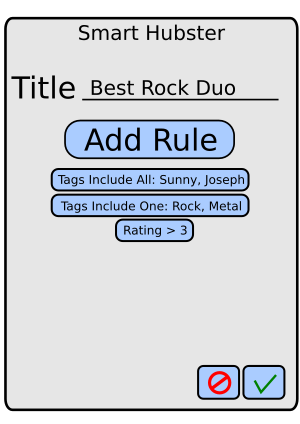
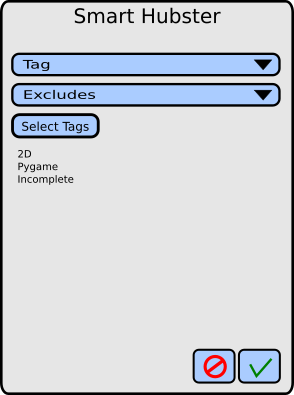
Here is a list of options that might be included:
- Length: at least, less than, equals
- Rating: at least, less than, equals
- Tags: Includes One, Includes All, Excludes, contains text, excludes text
- Tag Count: at least, less than, equals
- Resolution: at least, less than equals
 mcpalmer1980
All 13 comments
Ref to Named Saved Searches discussion: #169
 whyboris
on 17 Nov 2019
whyboris
on 17 Nov 2019
Thank you for starting this discussion.
I am unsure I understand fully. Please let me know what I'm missing.
1 - Named Saved Searches
In the sidebar, after the user searches for whatever they'd like (adding all the filters, etc), they have the option to save the current search as a favorite after naming it.
Since the sidebar allows the user to select multiple constraints at the same time (length, resolution, rating, tag-includes, tag-excludes, etc), all that's needed is an input field to save the search with a particular name and a button to save it 🤷♂ (and some way to remove old saved searches)
2 - Smart Albums
You say it would:
require two new dialogs
I'm unsure I can picture this yet -- I keep feeling that since we have the sidebar with all the settings selected, we're good to go.
I see the second dialog picture you posted, but I'm unsure when / where / why it would occur.
Sorry for the misunderstanding 😅
whyboris
on 17 Nov 2019
I tried to give examples that exhibited the usefulness of 'smart albums'. The main thing is that it allows multiple filters of the same or similar types. Check out F-Stop on the Google Play Store. It is the best photo gallery I've ever tried by no small margin.
Favorite Rock Duo
Tags(Includes All): Kala, Joseph
Tags(Includes One): Rock, Metal
Tags(Excludes All): Rehearsal, Instrumental, Live
Best Family Action Genre Films
Rating(At Least): 3
Tags(Includes One): Action, Adventure
Tags(Include One): Sci-Fi, Fantasy, Comic Book, Horror
Tags(Excludes All): Nudity, Sex, Graphic Violence
Untagged Movies
Tag Count(Equals): 0
Length(More Than): 70 minutes
mcpalmer1980
on 17 Nov 2019
I see the second dialog picture you posted, but I'm unsure when / where / why it would occur.
Clicking on 'Add Rule' will open the second dialog
- Open the New Smart Hubster with a button somewhere
- Click Add Rule button on dialog one
- Dialog 2 opens
- Use the first drop-down box to select Tag, Raging, Length, Folder, etc.
- Use the second drop-down box to select Includes One, Includes All, Equals, At Least, etc.
- The area beneath drop-down 2 will change to a list of tags or a text input depending on the option selected in drop-down box 2
- Select the tags, minimum rating, length, etc
- Click the Save Button to close dialog 2
- Dialog 1 reappears
- Click one of the rules to delete it if you made a mistake(editing unncessary)
- Click Save to add the Smart Hubster and close the dialog
12 Select the Smart Hubster from the Manual Tag Bar to filter the videos, which should probably clear the values in the sidebar
mcpalmer1980
on 17 Nov 2019
Is this not the same as saved filters? 🙂 You can apply all the filters you've suggested there at once, and then we could save those settings under a name, like you say.
I'm not sure I see the value in reimplementing filters? Am I missing something? 🙂
Do these hubsters appear somewhere? Perhaps we could use the existing filter system, and extend it to do what you desire?
 cal2195
on 18 Nov 2019
cal2195
on 18 Nov 2019
I see that the "Smart Albums" do have some more filter options that would be nice to have, but I'm not sure what the benefit of creating the new UI is vs. adding the remaining filters and being able to save them and maybe a folder view to see all saved filters is? 😄
Do correct me if I'm missing something! 👍
cal2195
on 18 Nov 2019
It is uncommon to have separate and, or, and not filters as in Video Hub, which almost negates the need for Smart Albums. Although I personally would prefer the dialog method over a dozen filters cluttering the side bar, you're right that reimplementing filters is unnecessary.
Besides the possible inclusion of a couple more filters, the only thing missing is the ability to use the same filter twice, such as (Action OR Adventure) AND (Fantasy OR Sci-Fi OR Horror). Perhaps adding the ability to add multiple tags at once, with or without parenthesis, will provide this feature for advanced users.
For instance, if you type Action Comedy on the _Tags Include_ line at the same time and then press enter, they will be added as one meta-tag and require one or the other to be true, along with all of the other tags or meta-tag groups listed under the _Tags Include_ line
If you typed Action Comedy under the _Tags Include Any_ line they will be added as one and require both to be true, or any other of the other tags or tag groups listed under the _Tags Include Any_ line.
mcpalmer1980
on 18 Nov 2019
The way the app is currently structured, there is no way to apply the same filter twice (I'm using _Angular pipes_ and their order and number is hardcoded: Code).
This feature would likely require a serious refactoring of how search is done across the app 😓
The _Named saved searches_ would be pretty-straight-forward to implement and may get users 90% of the way there.
I'm open to suggestions - if someone sees a relatively-straight-forward way to get the more-complex functionality working 👌
whyboris
on 18 Nov 2019
_Named Saves Searches_ or _Saved Searches_ will be get users 95% of the way. Although I like the way F-Stop Gallery works on Android, Video Hub App already surpasses gThumb and any other Linux photo gallery program I've tried. It's sad that the OS for geeks has been simplified over the years until its software lacks features available in Android!
In gThumb I cannot filter for photos that include tag1 or tag2 but not tag3, which severely limits is usefulness. It was this type of filtering I was looking for when I decided to request Smart Albums. I had read about Inclusive and Exclusive searches in Video Hub, but didn't know how to use them and assumed I could use one or the other, not both at once.
It was really a stretch when I came up with examples to exhibit what smart albums could do that Video Hub in its current form cannot. Even I would barely use the extra functionality, so if it would be difficult to implement it, you should probably close this if nobody comes up with any ideas in the near future.
mcpalmer1980
on 18 Nov 2019
One nice idea I could think of is implementing #169, and adding a view, similar to folder view, which shows each saved search like a folder - that way you could group things you like in a pleasing way, eg. by tag, recently added, hd, or any complex filter you'd imagine! 😄
cal2195
on 19 Nov 2019
Hmmm, this also give me the idea of having a tag view... 🤔
cal2195
on 19 Nov 2019
Some food for thought: we now have a bottom tray which can display things horizontally. I'm unsure if it's a good fit for this feature, but wanted to announce 📣
It's been almost a year since this discussion started (and ended). I'm thinking I might close the issue in the near future 🤔 (though worry not - it's easy to re-open too) 👍
whyboris
on 12 Oct 2020
I'm closing since there doesn't seem to be continued interest in this. I have no problem re-opening if someone would like to continue the discussion 👌
The most sensible solution to desiderata is "named saved searches" #169 -- but even those I don't think I'd want to implement (unless someone creates most of the feature for me to merge 😅 )
whyboris
on 15 Dec 2020
Related issues
cal2195
·
5Comments
cal2195
·
4Comments
whyboris
·
5Comments
whyboris
·
3Comments
cal2195
·
5Comments