Victory: Theme for Tooltips not Updating tooltips
I have a fairly straight forward bar graph with a global theme that is generally working as expected except for tooltips.
  ...

  tooltip: {
    style: assign({}, centeredLabelStyles, {
      padding: 16,
      pointerEvents: "none",
      fill: "#00ff00"
    }),
    flyoutStyle: {
      stroke: "#00ff00",
      strokeWidth: 0,
      fill: "#00ff00",
      pointerEvents: "none"
    },
    cornerRadius: 0,
    pointerLength: 8,
    pointerWidth: 16
  }
}
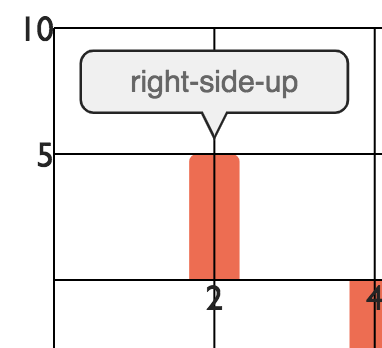
I made a codesandbox to demonstrate the issue. The expected outcome is that when you hover on one of the bars you'd see bright green tooltip.
If I then take from the theme and add the flyoutStyle theme and add it directly to the VictoryTooltip Component you'll see that it then works as expected:
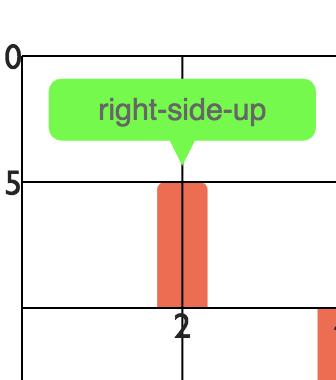
        <VictoryBar
          labelComponent={
            <VictoryTooltip
            flyoutStyle={{
                stroke: "#00ff00",
                strokeWidth: 0,
                fill: "#00ff00",
                pointerEvents: "none"
              }}
            />
          }
          ...
        />
 captDaylight
All 5 comments
@captDaylight thanks for this issue and reproduction. I'll get it fixed
 boygirl
on 25 Oct 2018
boygirl
on 25 Oct 2018
@boygirl
Having the same issue
Theme gets lost somewhere before rendering of the <VictoryTooltip /> and during evaluation of getCalculatedValues it defaults to greyscale.
https://github.com/FormidableLabs/victory/blob/1eb61fb20969254e559c3fde8c9a98f202a5ea6d/packages/victory-tooltip/src/victory-tooltip.js#L198
Interestingly enough theme seems to be passed through to tooltips created by voronoi container but not to the ones that are created by charts. Which may mean that it is connected to that issue. https://github.com/FormidableLabs/victory/issues/370
 ecnaidar
on 28 Mar 2019
ecnaidar
on 28 Mar 2019
I seem to be having the same issue here - I was just wondering if this was still an issue or if I'm doing something wrong. I'm pulling in my own custom theme based off of the VictoryTheme.grayscale and it works for everything except for the tooltip. I've opted for inline styling for the moment but I was wondering if this would be fixed soon.
 kevinyao93
on 27 Aug 2019
kevinyao93
on 27 Aug 2019
Same here too.
I've managed to workaround it with just passing the same theme object to the tooltip component:
const theme = { /* ... */ }

const tooltipComponent = <VictoryTooltip theme={theme} /* ... */ />

<VictoryChart
   theme={theme}
  //...
>
  // ...
  <VictoryStack labelComponent={tooltipComponent}>
    // ...
  </VictoryStack>
</VictoryChart>
though it's very likely to not be able to use it in the libs future versions, having in mind that the theme prop might be be removed from the tooltip with this PR: https://github.com/FormidableLabs/victory/pull/1533
 zzeni
on 28 Apr 2020
zzeni
on 28 Apr 2020
[email protected] includes a fix for this issue. The tooltip theme is now correctly applied whenever tooltips are used
boygirl
on 8 Jul 2020
Related issues
 seddonm1
·
5Comments
seddonm1
·
5Comments
 AndresTIY
·
5Comments
AndresTIY
·
5Comments
 esutton
·
6Comments
esutton
·
6Comments
 dinnayu
·
3Comments
dinnayu
·
3Comments
 tgoldenberg
·
5Comments
tgoldenberg
·
5Comments
Most helpful comment
@captDaylight thanks for this issue and reproduction. I'll get it fixed