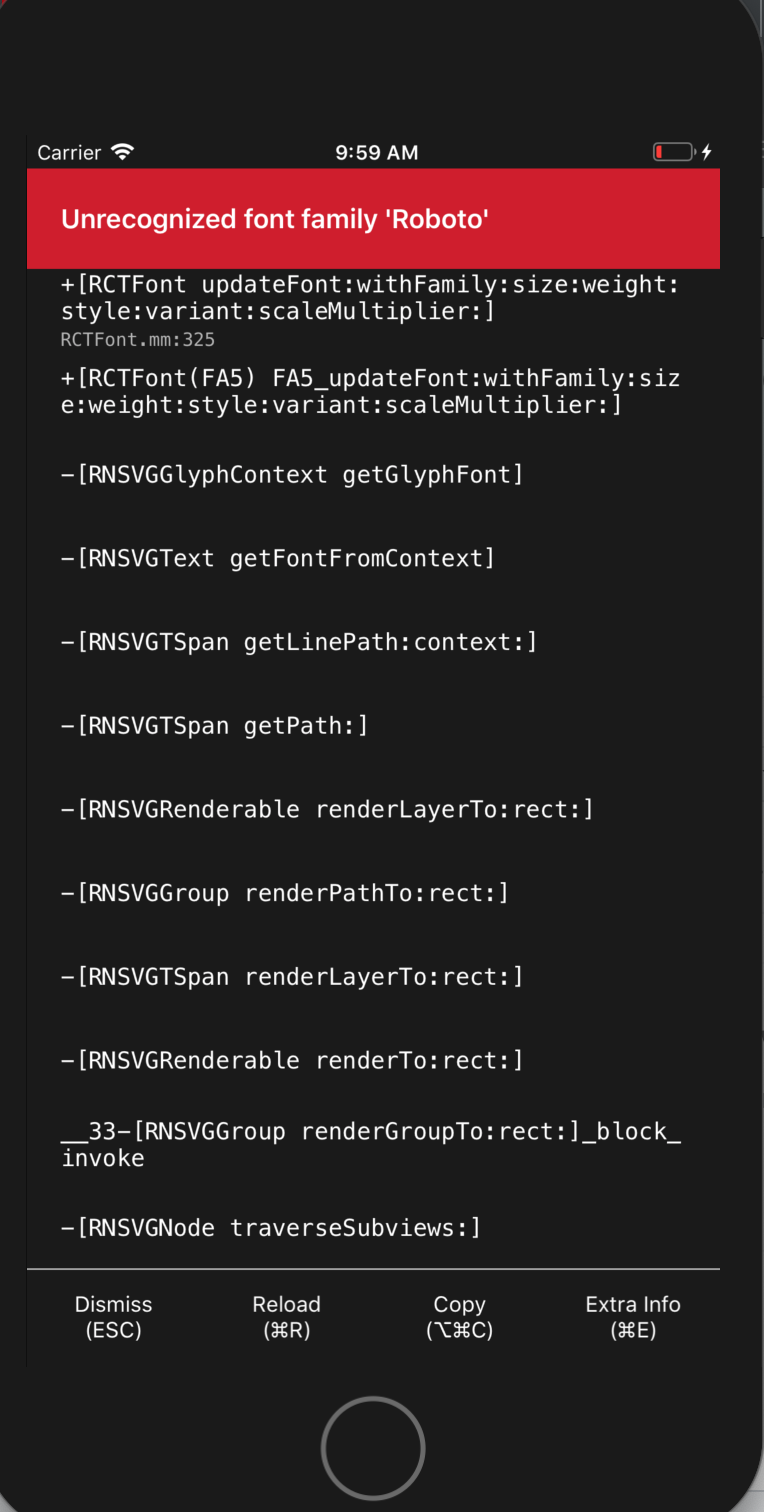
Victory-native: Unrecognized Font Familiy Roboto
 waleedarshad
All 19 comments
I'm having the same issue. Any luck fixing it?
 nickhough
on 23 Sep 2019
nickhough
on 23 Sep 2019
The offending code is theme={VictoryTheme.material}.
nickhough
on 23 Sep 2019
I am experiencing a similar and possibly related issue.
I am running Expo, and after upgrading to SDK35 I can no longer pass in custom fonts to tickLabels. Doing so results in an "Unrecognized font family" error. The font loads fine for the rest of the app, I only get the error when trying to pass it into victory-native.
 mortenc
on 24 Sep 2019
mortenc
on 24 Sep 2019
@mortenc Did you resolve the issue, same thing happening with Expo SDK35
 FH-Hersey
on 27 Sep 2019
FH-Hersey
on 27 Sep 2019
@FH-Hersey Unfortunately not yet – still not able to use my custom font. I'm unsure if the issue is with victory-native, or if it's actually to do with react-native-svg. But I haven't been able to resolve the problem yet.
mortenc
on 30 Sep 2019
This error happen to me , too. Could someone solve this problem ?
 nhatnor123
on 1 Oct 2019
nhatnor123
on 1 Oct 2019
Please, any idea how it could be solved?
 martinboksa
on 2 Oct 2019
martinboksa
on 2 Oct 2019
I ran into this issue while updating dependency versions of my app. I wound up going back to the earlier versions (rnsvg - 9.0.2 and victory-native - 31.0.0). The issue is with the react-native-svg package, so perhaps using older versions of both would be a temporary workaround.
 navaneeth-nenmini
on 3 Oct 2019
navaneeth-nenmini
on 3 Oct 2019
I commented out all instances of VictoryTheme.material and my app runs fine.
 jakecronin
on 17 Oct 2019
jakecronin
on 17 Oct 2019
Have this problem too
 tylinux
on 6 Nov 2019
tylinux
on 6 Nov 2019
Same
 matapo
on 6 Nov 2019
matapo
on 6 Nov 2019
I have expo sdk 35 and i have this problem.
I made a copy of the theme 'VictoryTheme.material'
origin file - 'node_modules > victory-core > es > victory-theme > material.js'
and removed the font from there
35 fontFamily: sansSerif,
now works with default fonts
 vvarh
on 19 Nov 2019
vvarh
on 19 Nov 2019
the default theme has Roboto on it
like this
const sansSerif = '\'Roboto\', \'Helvetica Neue\', Helvetica, sans-serif';
it worked well on 0.30.*
but breaks on 0.33.*
 sibelius
on 12 Dec 2019
sibelius
on 12 Dec 2019
Anyone with a solution to this, without having to duplicate themes?
 chiechelski
on 21 Jan 2020
chiechelski
on 21 Jan 2020
The offending code is
theme={VictoryTheme.material}.
Removing this fixed it for me.
 chrallard
on 6 Feb 2020
chrallard
on 6 Feb 2020
It's not pretty, but I'm able to use the material theme in iOS by removing the Roboto font family:
const theme = Object.assign({}, VictoryTheme.material, {
    axis: {
      ...VictoryTheme.material.axis,
      style: {
        ...VictoryTheme.material.axis?.style,
        tickLabels: {
          ...VictoryTheme.material.axis?.style?.tickLabels,
          fontFamily: "'Helvetica Neue', Helvetica, sans-serif",
        },
      },
    },
  });
I'd appreciate any feedback on how to make it smaller. TypeScript complains "The left-hand side of an assignment expression may not be an optional property access." when I try to set the font family directly on a local copy of the material theme.
 kas
on 17 May 2020
kas
on 17 May 2020
The offending code is
theme={VictoryTheme.material}.
Thats worked for me, thanks
 luizjr
on 11 Jun 2020
luizjr
on 11 Jun 2020
If you don't want to remove theme={VictoryTheme.material}, you can use the following:
function replaceRobotoWithSystemFont(obj: any) {
    const keys = Object.keys(obj);
    keys.forEach(function(key) {
        const value = obj[key];
        if (key === 'fontFamily') {
            obj[key] = obj[key].replace("'Roboto',", "'System',");
        }
        if (typeof value === 'object') {
            replaceRobotoWithSystemFont(obj[key]);
        }
    });
    return obj;
}

const themeWithSystemFont = replaceRobotoWithSystemFont({...VictoryTheme.material});
<VictoryChart theme={themeWithSystemFont}></VictoryChart>
 denniske
on 14 Jun 2020
denniske
on 14 Jun 2020
This issue is still happening.
Expo SDK 40.0.1
victory-native 35.3.1
Neither of the solutions suggested above work nor does creating my own theme with my custom font. I'm not sure why this issue was closed in the first place, since there was never a real fix implemented?
 gretzky
on 7 Mar 2021
gretzky
on 7 Mar 2021
Related issues
 ChrisGatzo
·
3Comments
ChrisGatzo
·
3Comments
 matejkriz
·
3Comments
matejkriz
·
3Comments
 yvonne6344
·
4Comments
yvonne6344
·
4Comments
 udfalkso
·
4Comments
udfalkso
·
4Comments
 xinhash
·
4Comments
xinhash
·
4Comments
Most helpful comment
The offending code is
theme={VictoryTheme.material}.