Victory-native: Can't set chart full width screen
Bugs and Questions
Checklist
[* ] This is a
victory-nativespecific issue. (Issues that _also_ appear invictoryshould be opened here)[ *] I have read through the FAQ and Guides before asking a question
[ *] I am using the latest version of
victory-native[* ] I have checked to make sure that my versions of
react-nativeandreact-native-svgare compatible with this version ofvictory-native. Read about version requirements[* ] I've searched open issues to make sure I'm not opening a duplicate issue
The Problem
I'm using victory-native to draw candles chart but I can't set the chart full width screen. I set width for both VictoryChart and VictoryAxis but nothing change.
My environment:
"react": "16.3.1",
"react-native": "0.55.4",
"react-native-svg": "^6.4.1",
"victory-native": "^0.18.2"
Here my code:
<View style={{borderWidth: 2, borderColor: '#c43a31'}}>
        <VictoryChart
          theme={VictoryTheme.material}
          domainPadding={{x: 20}}
          scale={{x: 'time'}}
          width={Dimensions.get ('window').width - 10}
          height={250}
        >
          <VictoryAxis
            tickFormat={t => `${t.getDate ()}/${t.getMonth ()}`}
            width={600}
            height={200}
          />
          <VictoryAxis
            dependentAxis
            offsetX={Dimensions.get ('window').width - 10}
            width={600}
            height={600}
          />
          <VictoryCandlestick
            candleColors={{positive: '#05e742', negative: '#c43a31'}}
            data={sampleDataDates}
          />
        </VictoryChart>
      </View>
Here is screen:
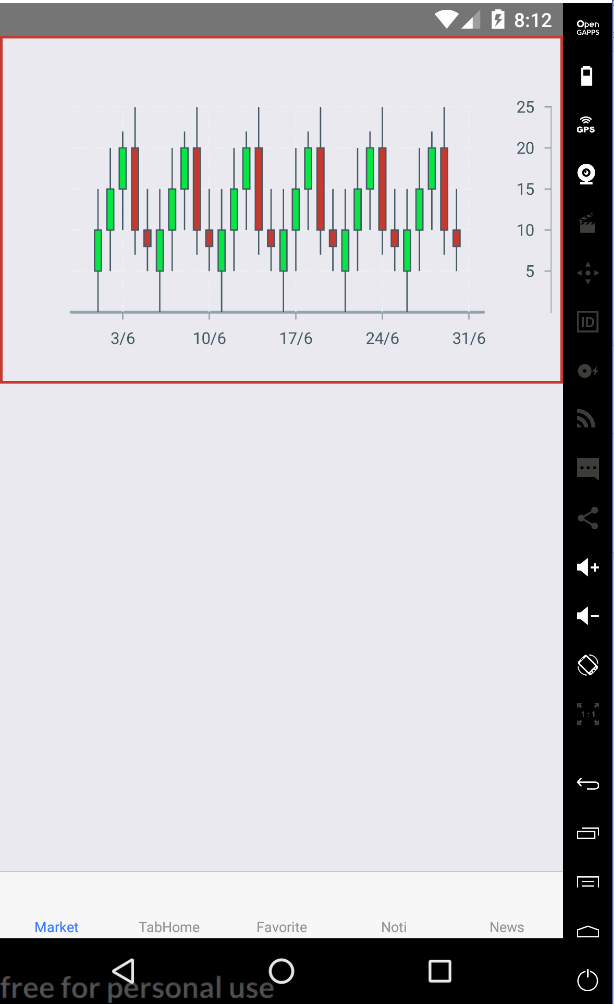
Please help me, thank you!
 khanhnt93
All 2 comments
Set padding={0}
 cameronRaymondCIBC
on 27 Jul 2018
cameronRaymondCIBC
on 27 Jul 2018
Ok, thank you
khanhnt93
on 28 Jul 2018
Related issues
 aszheng
·
5Comments
aszheng
·
5Comments
 udfalkso
·
4Comments
udfalkso
·
4Comments
 matejkriz
·
3Comments
matejkriz
·
3Comments
 WhyX
·
6Comments
WhyX
·
6Comments
 phunkren
·
5Comments
phunkren
·
5Comments
Most helpful comment
Set padding={0}