Vichuploaderbundle: Uploading Image for API using VichUploaderBundle
I have used VichUploaderBundle to upload images on my web project.
Now I am writing an API for the same project, so I wanted to know how do I upload images with VichUploaderBundle for my API.
    /**
     * @Route("/api/users")
     * @Method("POST")
     */
    public function signUpUserAction(Request $request)
    {
        $required = array('name', 'email', 'plainPassword', 'phoneNumber', 'imageFile', 'imageName', 'renNumber', 'agency', 'android_api_key', 'ios_api_key');
        $data = $request->request->all();
        $data['address'] = null;

        try {
            if (!(count(array_intersect_key(array_flip($required), $data)) === count($required))) {
                throw new \Exception();
            }
        } catch (\Exception $e) {
            return $this->dataNotValidatedJson();
        }

        $user = new User();
        $form = $this->createForm(UserProfileApiFormType::class, $user, array('csrf_protection' => false));
        $form->submit($data);

        $user->setUsername($data['email']);

        $em = $this->getDoctrine()->getManager();
        $em->persist($user);
        $em->flush();

        $token = $this->get('lexik_jwt_authentication.encoder')->encode(array(
            'username' => $user->getUsername(),
            'exp' => time() + 3600 // 1 hour expiration
        ));

        $json = $this->getJsonResponse(parent::API_ERROR_FALSE, 200, 'Created user', array('token' => $token));

        $response = new Response($json);
        $response->headers->set('Content-Type', 'application/json');

        return $response;
    }
P.s.

I am using POSTMAN to send data to the API.
 Zuhayer
All 17 comments
What's your problem, exactly?
 garak
on 19 Dec 2016
garak
on 19 Dec 2016
I am unable to find documentation to use VichUploader bundle with my API.
Q: How to upload file in my API using VichUploader?
Currently I am using normal upload code not VichUploader:
$file = $request->files->get('renFile');
            if ($file){
                $upload_dir = $this->getParameter('web_uploads_dir') . '/ren/' . $agency->getId();
                if (!dirname($upload_dir)) {
                    mkdir($upload_dir);
                }
                $file_name = $file->getClientOriginalName();
                $file->move($upload_dir, $file_name);
                $agency->setDocument($file_name);

                $em->persist($agency);
                $em->flush();
Well, if you're not using VichUploaderBundle, how can we help you?
garak
on 19 Dec 2016
I have tried to mention it clearly in my last two posts:
I have used VichUploaderBundle to upload images on my web project.
Now I am writing an API for the same project,
I am unable to find documentation to use VichUploader bundle with my API.
Zuhayer
on 19 Dec 2016
How your API is different from the examples shown in documentation of this bundle?
garak
on 20 Dec 2016
This solved my requirments: https://github.com/fre5h/VichUploaderSerializationBundle
Zuhayer
on 21 Dec 2016
@Zuhayer can you post some code here? I'm stuck with the same problem. Thanks!
 picks44
on 28 Jul 2017
picks44
on 28 Jul 2017
@picks44 as i remember my entities were already annotated by @vich and @JMS. just installed this bundle and added the annotation for @Fresh bundle as it says in the docs link above.
i can paste code tomorrow when i start up my work pc. comment here again tomorrow as a reminder if you need the code
Zuhayer
on 30 Jul 2017
@Zuhayer thanks. I can't install the bundle as it's not compliant with @jms 2.0 apparently...
picks44
on 1 Aug 2017
@picks44 Ah, bad luck.
Zuhayer
on 1 Aug 2017
@Zuhayer I've opened an issue about this, should be fixed soon hopefully.
picks44
on 1 Aug 2017
@Zuhayer can you post your code here? I've installer the bundle ! Thanks.
picks44
on 7 Aug 2017
@picks44 Attached is the Entity File in which I use VichUploaderSerializationBundle.
Zuhayer
on 7 Aug 2017
Ah yes, I was speaking about your controller method to get the image. I'm testing mine like this right now but it's not working
/**
     * @Route("/api/chatrooms/{id}")
     * @Method({"POST"})
     * @Security("has_role('ROLE_CHAT')")
     */
 public function createAction(Request $request, $id)
    {
        $user = $this->getUser();
        if (!$user) {
            throw $this->createNotFoundException('No user found.');
        }
        $data = json_decode($request->getContent(), true);
        $chat = new Chat();
        $form = $this->createForm(new ChatType(), $chat);
        $form->submit($data);
        $chat->setCreatedBy($user->getName())
            ->setRoom($id);
        $em = $this->getDoctrine()->getManager();
        $em->persist($chat);
        $em->flush();
        return $this->createApiResponse($chat);
    }
And my test
 public function testPOSTImage()
    {
        $this->createUser(array(
            'username' => 'user',
            'email' => '[email protected]',
            'plainPassword' => 'foo',
            'name' => 'User',
            'roles' => ['ROLE_CHAT' => 'ROLE_CHAT'],
            'enabled' => true
        ));
        $image = new File(
            '/path/to/photo.jpg',
            false
        );
        $data = ['imageFile' => $image];
        $response = $this->client->post('/api/chatrooms/1', [
            'body' => json_encode($data),
            'headers' => $this->getAuthorizedHeaders('user')
        ]);
        $this->assertEquals(200, $response->getStatusCode());
    }
I dont use the bundle to access images. I use it to serialize the response so that it has got the image url for my API.
        $agency = $this->getDoctrine()->getRepository('AppBundle:Agency')->findBy(array('status' => true), array('name' => 'asc'));

        $response_array = array('error' => parent::API_ERROR_FALSE, 'status' => 200, 'msg' => 'Listing agencies', 'data' => $agency,);

        $serializer = $this->container->get('jms_serializer');
        $json = $serializer->serialize($response_array, 'json', SerializationContext::create()->setGroups(array('agency'))->setSerializeNull(true));
        $response = new Response($json);
        $response->headers->set('Content-Type', 'application/json');

        return $response;
Found out how to do it. Full working code below.
 public function createAction(Request $request)
    {
        $chat = new Chat();
        $form = $this->createForm(new ChatType(), $chat);
        $data = json_decode($request->getContent(), true);
        if (array_key_exists('imageFile', $data)) {
            $uploadedFile = new UploadedBase64EncodedFile(new Base64EncodedFile($data['imageFile']));
            $data['imageFile'] = $uploadedFile;
        }
        $form->submit($data);
        if (!$form->isValid()) {
            $this->throwApiProblemValidationException($form);
        }
        $em = $this->getDoctrine()->getManager();
        $em->persist($chat);
        $em->flush();

        return $this->createApiResponse($chat);
    }
@garak i have a problem.. i working with API Platform, when i try to send multipart/form-data on postman, the status code response is 415.
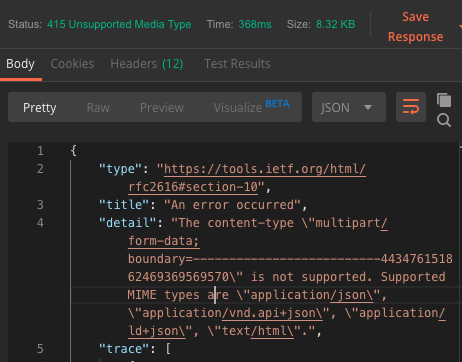
im using annotations @Vich\Uploadable in the entity
what's wrong?
 piedrucci
on 16 Nov 2019
piedrucci
on 16 Nov 2019
Related issues
 manguecreative
·
4Comments
manguecreative
·
4Comments
 petrjirasek
·
7Comments
petrjirasek
·
7Comments
 fleskalebas
·
6Comments
fleskalebas
·
6Comments
 NicolaPez
·
6Comments
NicolaPez
·
6Comments
 Propscode
·
4Comments
Propscode
·
4Comments
Most helpful comment
This solved my requirments: https://github.com/fre5h/VichUploaderSerializationBundle