Vexflow: Order of StaveNote.keys does not match StaveNote.note_heads or setKeyStyle index param
Here's a CodePen demonstrating the problem: http://codepen.io/anon/pen/YpWNML?editors=0010 based on the FAQ page here.
If I create a new StaveNote with the keys in a _particular order_ (notice how G/4 is a higher pitch than C/4 but I'm listing the notes out of order here):
var chord = new Vex.Flow.StaveNote({ keys: ['G/4', 'E/4', 'C/4'], duration: '8'});
I would like to be able to programmatically style my C/4 note, currently at chord.keys[2], to be a different color than all other notes -- let's say that I generate the StaveNote programmatically and I know that the last key has a special meaning, and all other keys in the chord are listed in the order in which they're pressed down by the user on a MIDI input device, not in order of their pitch.
So now if I try to do this, expected it to make my C/4 note red:
chord.setKeyStyle(2, {fillStyle: "red"});
When I render the note, G/4 note is colored red instead. I expected index 2 to match C/4 because that's how I listed the keys when I created the StaveNote. This is unintuitive and makes it harder for me to control the styling of my notes programmatically.
Thanks for your help on this! By the way, this is my first time opening an issue in an open source project (I'm still pretty newbish at programming), and just wanted to say I love this project and really appreciate all the hard work you all put into making VexFlow!!
 LearningNerd
All 20 comments
It's a bit unintuitive but here's what's happening: the array you pass into the constructor is sorted so that it's in order from lowest note to highest note before the StaveNote.note_heads are created. This makes it possible, for instance, to determine which side of the stem notes should go on if they're only a 2nd apart, etc...
So, in the example you give, the notes from lowest to highest would be ['C/4', 'E/4', 'G/4'], which is why setKeyStyle(2, {}) is coloring the G/4.
 gristow
on 14 Nov 2016
gristow
on 14 Nov 2016
Thanks Greg.
FYI, there is a warning on the console when note are added in the wrong order.
 0xfe
on 14 Nov 2016
0xfe
on 14 Nov 2016
Yup, that's exactly what I see happening -- thanks @gristow! And thanks @0xfe, I had completely missed that! I still think this could be clarified in the docs better at least, or certainly mentioned in https://github.com/0xfe/vexflow/wiki/The-VexFlow-FAQ#can-i-color-notes-individually
And perhaps it would be more intuitive and consistent if StaveNote.keys were _also_ reordered so that its order matches that of note_heads ?
LearningNerd
on 14 Nov 2016
Yes, the docs need work.
Re: reordering, we can't do that because it makes the indexes inconsistent and will break a lot of users.
0xfe
on 14 Nov 2016
By the way, @LearningNerd, contributing to the docs is a great way to start getting involved in open source projects. As you find 'gotchas' that those of us who are deep in the code take for granted, consider writing them up to help other newcomers to VexFlow!
gristow
on 15 Nov 2016
@0xfe - You're right, that _would_ be bad. Hmm. OK, my last suggestion then, which is @lsegal's idea: what about a little helper function like StaveNote.indexOf('C/4') that would give me the index of wherever VexFlow put the note after sorting them?
@gristow - ah, yes! I will! :)
LearningNerd
on 15 Nov 2016
Yes, indexOf sounds like a useful helper, and would be straightforward to add. If you file a feature request, it will (eventually) get done. Thanks :-)
0xfe
on 15 Nov 2016
Popping in to add some edge cases to the mix :)
A chord can have multiple notes with the same pitch. On a single staff this _typically_ doesn't exceed 2 identical pitches:

And I do believe VexFlow already handles this case. The noteheads should displace correctly.
But to complicate matters further, let's talk about cross-staff chords! Technically a chord can cross any number of staves and thus could have any number of duplicate pitches. I realize that VexFlow doesn't support cross-staff chords (yet!) but it occurs often enough in printed music that it's worth considering how it's impacted by new functionality.
To me it seems to me that an indexOf function doesn't cover these cases well, since the first occurrence is not necessarily what you're looking for. Maybe an indexesOf which returns an array of all indexes for that pitch?
 Silverwolf90
on 18 Nov 2016
Silverwolf90
on 18 Nov 2016
These are good corner cases, Cyril. For indexesOf to return an array, the sort needs to be stable (and I'm not sure if it is.)
0xfe
on 18 Nov 2016
Good point, if it's using the native Array#sort then it's not guaranteed to be stable (ie: depends on the browser).
Silverwolf90
on 19 Nov 2016
Any work around to add a dot or an accidental to the correct key then ?
I'm trying to tell Vexflow add a dot to my key.
 stephaneeybert
on 22 Mar 2020
stephaneeybert
on 22 Mar 2020
@stephaneeybert I replied on your Stackflow question. You need to have your notes sorted by frequency in Vexflow, the rest is not a Vexflow problem.
edit: rather than by frequency, you need to order the notes by the vertical order in Vexflow, so simply which line they appear on, ignoring accidentals, because a Dbb (double-flat) would still appear higher than a C#, though it has lower frequency.
 sschmidTU
on 24 Mar 2020
sschmidTU
on 24 Mar 2020
Following your suggestion I could create the methods to sort the notes before adding them as keys in the stave:
  private getNoteFrequency(note: Note): number {
    return Tone.Frequency(note.renderAbc()).toFrequency();
  }

  private sortNotesByPitch(notes: Array<Note>): Array<Note> {
    return notes.sort((noteA: Note, noteB: Note) => {
      return this.getNoteFrequency(noteA) - this.getNoteFrequency(noteB);
    });
  }
i believe this question was resolved on stackoverflow and can be closed.
sschmidTU
on 2 Apr 2020
As explained above I could avoid the warning message about the sorting of the keys, by sorting them by frequency in advance.
The sorting method that I used for this was:
private sortNotesByFrequency(notes: Array<Note>): Array<Note> {
  return notes.sort((noteA: Note, noteB: Note) => {
    return this.getNoteFrequency(noteA) - this.getNoteFrequency(noteB);
  });
}
Doing this I could see the keys are sorted like this: [ "C/5", "E/5", "A/5" ]
But the displayed notes on the stave look wrong, as if it's a reversed chord, with some space between them. See here
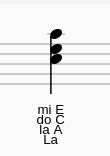
for the example.
But I would like to display the notes for the following chord: [ "A/5", "C/5", "E/5" ]
These notes should not have a space between them.
So I tried to feed the following notes: [ "A/5", "C/5", "E/5" ] using the method:
private renderNotesSortedByIndex(notes: Array<Note>): Array<string> {
  const vexflowNotes: Array<string> = new Array<string>();
  this.notationService.sortNotesByIndex(notes)
    .forEach((note: Note) => {
      vexflowNotes.push(this.renderNote(note));
    });
  return vexflowNotes;
}
But then I get again the same dreaded warning message.
So how to render the [ "A/5", "C/5", "E/5" ] chord ?
stephaneeybert
on 27 Jan 2021
@stephaneeybert
That chord that Vexflow displays is C5, E5, A5 exactly.
It's just a different order of A5, C5, E5 you seem to desire, which is actually out of order because it goes highest, lowest, middle.
Maybe you wanted A4, C5, E5? Or A5, C6, E6?
This would be A4, C5, E5:
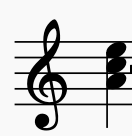
sschmidTU
on 27 Jan 2021
Thanks @sschmidTU I just talked to my end user, showing him your image and the explanation for it.
Here are the chords I want to display:
// 'G', 'A', 'B', 'C', 'D', 'E', 'F'
// 'E', 'F', 'G', 'A', 'B', 'C', 'D'
// 'C', 'D', 'E', 'F', 'G', 'A', 'B'
They are to be read from bottom to top as tuples.
For example, one is A C E
Now, what if I wanted to display three consecutive (no space in between) notes for the A C E chord on the octave 5 ? Is this possible ?
stephaneeybert
on 27 Jan 2021
@stephaneeybert, it sounds like your confusion might be over how the notes are named using letters and octave numbers. Octave numbers start from C. Middle C is C4. So, the C Major scale starting on middle C is:
C/4 D/4 E/4 F/4 G/4 A/4 B/4 C/5
You can render any combination of notes as long as you label them as such.
See here for information on note naming.
gristow
on 27 Jan 2021
@stephaneeybert yes, as gristow said. The chord A C E (from bottom to top) is technically not on the same octave, since new octave numbers start at C. So, you have to increase the octave every time you go over the C from bottom to top.
sschmidTU
on 27 Jan 2021
Thanks guys ! You shed the saving light !
stephaneeybert
on 28 Jan 2021
Related issues
gristow
·
5Comments
 aemion
·
3Comments
aemion
·
3Comments
 rowild
·
5Comments
rowild
·
5Comments
 dinukadesilva
·
5Comments
dinukadesilva
·
5Comments
 sug1no
·
7Comments
sug1no
·
7Comments