Vetur: Add command create vetur.config.js file
- [ x] I have searched through existing issues
Feature Request
Because by default, vetur v0.31.0 will warn if the vetur.config.js file is missing
I think vetur should add a command to support the quick creation of the vetur.config.js file
 kytosai
All 14 comments
The same problem
When the plugin is updated to 0.31.0, open the project with a warning
1 Vetur find tsconfig.json/jsconfig.json, but they aren't in the project root.
2 Vetur can't find tsconfig.json or jsconfig.json in d:\MyProject\tiger-ui.
Whether you need to add a custom configuration item
 nmgwap
on 9 Dec 2020
nmgwap
on 9 Dec 2020
The same problem
When the plugin is updated to 0.31.0, open the project with a warning
1 Vetur find
tsconfig.json/jsconfig.json, but they aren't in the project root.2 Vetur can't find
tsconfig.jsonorjsconfig.jsonin d:\MyProject\tiger-ui.Whether you need to add a custom configuration item
It's a warning.
if you know reason, You can use vetur.ignoreProjectWarning: true in vscode setting to close this warning.
 yoyo930021
on 9 Dec 2020
yoyo930021
on 9 Dec 2020
All instructions are here.
https://vuejs.github.io/vetur/guide/FAQ.html#vetur-can-t-find-tsconfig-json-jsconfig-json-in-xxxx-xxxxxx
Reason:
https://github.com/vuejs/vetur/issues/2539#issuecomment-741623704
yoyo930021
on 9 Dec 2020
I don't get it. Are we supposed to add these files ourselves? I don't really understand the documentation and I don't see anything changing in my project when I add a jsconfig.json file. I don't have a vetur.config.js file either.
The warning also disappeared when Vetur just updated to version 0.31.1.
 awulkan
on 9 Dec 2020
awulkan
on 9 Dec 2020
I don't get it. Are we supposed to add these files ourselves? I don't really understand the documentation and I don't see anything changing in my project when I add a jsconfig.json file. I don't have a vetur.config.js file either.
The warning also disappeared when Vetur just updated to version 0.31.1.
⚠️ Notice ⚠️ : If you don't need (path alias/decorator/import json) feature, you can just close it.
Maybe have some bug in the warring.
But it fix in v0.31.1 🤔
yoyo930021
on 9 Dec 2020
I get the same warning.
I've read the docs but those are quite confusing.
This warning pops up in every project I open.
I'm still not sure if I should ignore the warning or if the tool actually needs the config files, and why?
This is happening in the latest version as well - v0.31.1
Suggestion.: As I'm trying to learn VueJS and programming in general, this warning is confusing. I'm not sure if I need those extra features that require the config files or not, nor do I understand what am I supposed to do in order to use the configs.
May I suggest just adding this as an option in the Extention Settings page in VSCode instead of the warning every time I load a project?
 VGuerreiro
on 10 Dec 2020
VGuerreiro
on 10 Dec 2020
I get the same warning.
I've read the docs but those are quite confusing.
This warning pops up in every project I open.
I'm still not sure if I should ignore the warning or if the tool actually needs the config files, and why?
This is happening in the latest version as well - v0.31.1Suggestion.: As I'm trying to learn VueJS and programming in general, this warning is confusing. I'm not sure if I need those extra features that require the config files or not, nor do I understand what am I supposed to do in order to use the configs.
May I suggest just adding this as an option in the Extention Settings page in VSCode instead of the warning every time I load a project?
⚠️ Notice ⚠️ : If you don't need (path alias/decorator/import json) feature, you can just close it.
It have an option in VSCode.
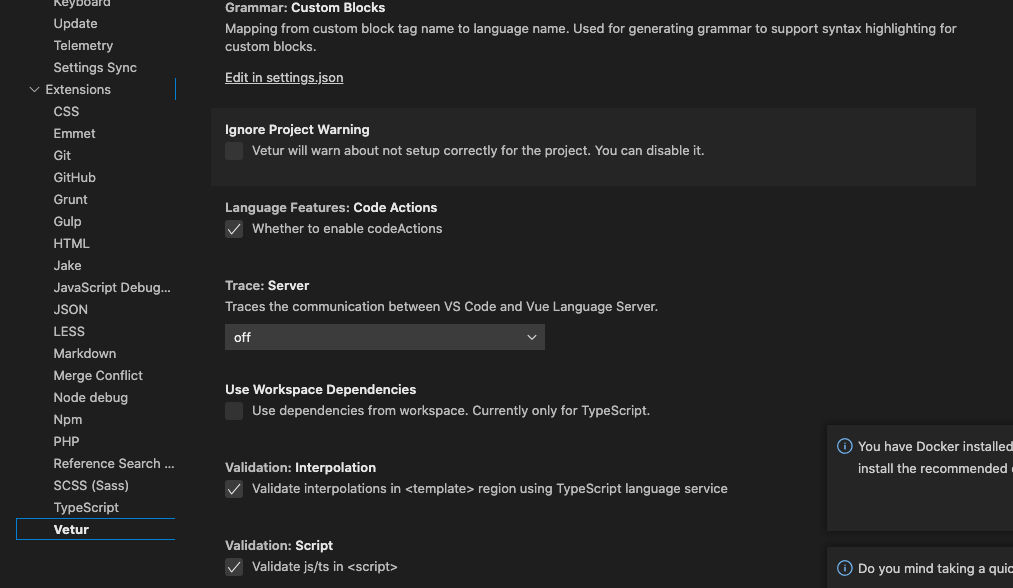
yoyo930021
on 10 Dec 2020
I get the same warning.
I've read the docs but those are quite confusing.
This warning pops up in every project I open.
I'm still not sure if I should ignore the warning or if the tool actually needs the config files, and why?
This is happening in the latest version as well - v0.31.1
Suggestion.: As I'm trying to learn VueJS and programming in general, this warning is confusing. I'm not sure if I need those extra features that require the config files or not, nor do I understand what am I supposed to do in order to use the configs.
May I suggest just adding this as an option in the Extention Settings page in VSCode instead of the warning every time I load a project?⚠️ Notice ⚠️ : If you don't need (path alias/decorator/import json) feature, you can just close it.
It have an option in VSCode.
Hah! Sorry! I missed that!
I think the wording in the options page makes it even more confusing, though.
So, if you say it's an optional setting, why does the option in the Extention Settings state that you are turning off a 'warning about a project that is not setup correctly'?
And if it's 'incorrect' in some way to not add those config files, then I agree with the original post - this should be somehow automated, or part of it.
I'm just saying that the way this 'extra' option of having the config files to setup 'extra' features is presented in a very confusing way and having it show warnings by default - every single time I open a new project isn't ideal imo. I'm glad we have the option to turn those off now.
As I've said in my previous post I'm new to programming, so I'm really not aware of how important those features that require the config files are. If those are not created 'by default'/in an automatic way (presets, etc), then maybe this suggests that they're not that 'important' and probably should be off by default?
I'm just trying to understand and somehow try to explain what I think the main 'issue' is - the UI/presentation of it.
In any case, thank you for your quick reply!
VGuerreiro
on 10 Dec 2020
I get the same warning.
I've read the docs but those are quite confusing.
This warning pops up in every project I open.
I'm still not sure if I should ignore the warning or if the tool actually needs the config files, and why?
This is happening in the latest version as well - v0.31.1
Suggestion.: As I'm trying to learn VueJS and programming in general, this warning is confusing. I'm not sure if I need those extra features that require the config files or not, nor do I understand what am I supposed to do in order to use the configs.
May I suggest just adding this as an option in the Extention Settings page in VSCode instead of the warning every time I load a project?⚠️ Notice ⚠️ : If you don't need (path alias/decorator/import json) feature, you can just close it.
It have an option in VSCode.
Hah! Sorry! I missed that!
I think the wording in the options page makes it even more confusing, though.
So, if you say it's an optional setting, why does the option in the Extention Settings state that you are turning off a 'warning about a project that is not setup correctly'?
And if it's 'incorrect' in some way to not add those config files, then I agree with the original post - this should be somehow automated, or part of it.I'm just saying that the way this 'extra' option of having the config files to setup 'extra' features is presented in a very confusing way and having it show warnings by default - every single time I open a new project isn't ideal imo. I'm glad we have the option to turn those off now.
As I've said in my previous post I'm new to programming, so I'm really not aware of how important those features that require the config files are. If those are not created 'by default'/in an automatic way (presets, etc), then maybe this suggests that they're not that 'important' and probably should be off by default?
I'm just trying to understand and somehow try to explain what I think the main 'issue' is - the UI/presentation of it.In any case, thank you for your quick reply!
I think your question is a problem in the docs.
But my English is not good enough to write good docs. =_=
I will open a issue for helping.
https://github.com/vuejs/vetur/issues/2543
yoyo930021
on 10 Dec 2020
I get the same warning.
I've read the docs but those are quite confusing.
This warning pops up in every project I open.
I'm still not sure if I should ignore the warning or if the tool actually needs the config files, and why?
This is happening in the latest version as well - v0.31.1
Suggestion.: As I'm trying to learn VueJS and programming in general, this warning is confusing. I'm not sure if I need those extra features that require the config files or not, nor do I understand what am I supposed to do in order to use the configs.
May I suggest just adding this as an option in the Extention Settings page in VSCode instead of the warning every time I load a project?⚠️ Notice ⚠️ : If you don't need (path alias/decorator/import json) feature, you can just close it.
It have an option in VSCode.
Hah! Sorry! I missed that!
I think the wording in the options page makes it even more confusing, though.
So, if you say it's an optional setting, why does the option in the Extention Settings state that you are turning off a 'warning about a project that is not setup correctly'?
And if it's 'incorrect' in some way to not add those config files, then I agree with the original post - this should be somehow automated, or part of it.
I'm just saying that the way this 'extra' option of having the config files to setup 'extra' features is presented in a very confusing way and having it show warnings by default - every single time I open a new project isn't ideal imo. I'm glad we have the option to turn those off now.
As I've said in my previous post I'm new to programming, so I'm really not aware of how important those features that require the config files are. If those are not created 'by default'/in an automatic way (presets, etc), then maybe this suggests that they're not that 'important' and probably should be off by default?
I'm just trying to understand and somehow try to explain what I think the main 'issue' is - the UI/presentation of it.
In any case, thank you for your quick reply!I think your question is a problem in the docs.
But my English is not good enough to write good docs. =_=
I will open a issue for helping.2543
Hah! No problem! :) Thanks a lot for helping clarify. :)
Awesome work with the plugin nonetheless! :D
VGuerreiro
on 10 Dec 2020
Hey! Thank you for this extension and your help / contributions!
I have followed the guide on how to create a vetur.config.js file and now I get this error:
Request initialize failed with message: The "path" argument must be of type string. Received type undefined
These is my configuration:
vetur.config.js
module.exports = {
  projects: [
    {
      jsconfig: './jsconfig.json',
      package: './[folder-name]/package.json',
    },
  ],
}
jsconfig.json
{
  "compilerOptions": {
    "baseUrl": ".",
    "paths": {
      "@/*": ["./[folder-name]/src/*"]
    }
  },
  "include": ["./[folder-name]/src/**/*"],
  "exclude": ["node_modules"]
}
 danielturus
on 14 Dec 2020
danielturus
on 14 Dec 2020
Hey! Thank you for this extension and your help / contributions!
I have followed the guide on how to create a vetur.config.js file and now I get this error:Request initialize failed with message: The "path" argument must be of type string. Received type undefinedThese is my configuration:
vetur.config.jsmodule.exports = { projects: [ { jsconfig: './jsconfig.json', package: './[folder-name]/package.json', }, ], }
jsconfig.json{ "compilerOptions": { "baseUrl": ".", "paths": { "@/*": ["./[folder-name]/src/*"] } }, "include": ["./[folder-name]/src/**/*"], "exclude": ["node_modules"] }
You must to set projects[0].root.
jsconfig and package will relative from root.
yoyo930021
on 15 Jan 2021
I don't want to add so many profiles,
"vetur.ignoreProjectWarning": true
 ifredom
on 31 Jan 2021
ifredom
on 31 Jan 2021
I created a jsconfig.json and put this code:
{
    "include": [
      "./src/**/*"
    ]
  }
The warning message stoped, but I don't know if the Vetur will work correctely.
follow this link to see the instructions -> https://vuejs.github.io/vetur/guide/setup.html#project-setup
 alexlopesbr
on 31 Jan 2021
alexlopesbr
on 31 Jan 2021
Related issues
 muhajirdev
·
3Comments
muhajirdev
·
3Comments
 LukeLin
·
3Comments
LukeLin
·
3Comments
 gabrielboliveira
·
3Comments
gabrielboliveira
·
3Comments
 AnnAngela
·
3Comments
AnnAngela
·
3Comments
 pdanpdan
·
3Comments
pdanpdan
·
3Comments
Most helpful comment
It's a warning.
if you know reason, You can use vetur.ignoreProjectWarning: true in vscode setting to close this warning.