Vetur: [Typescript] Not getting proper type check/IntelliSense
- [x] I have searched through existing issues
- [x] I have read through docs
- [x] I have read FAQ
- [x] I have tried restarting VS Code or running
Vetur: Restart VLS
Info
- Platform: macOS
- Vetur version: 0.31.0
- VS Code version: 1.51.1
Problem
When importing a method from a .ts file that returns null or undefined into a Vue component, it seems to lose the null or undefined type when invoked.
When hovering over the import:

It correctly shows that the method returns a string or null
When invoking the function and hovering over it:

It only shows that the method returns a string
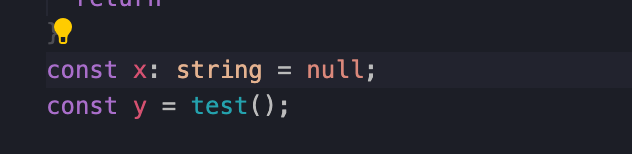
Also, this might be related to this issue, but I don't have any type checks against null. This line of code should complain that I'm assigning null to a string, but it doesn't.
Reproducible Case
 darthmeme
All 2 comments
Please use compilerOptions.strict: true in your tsconfig.json.
 yoyo930021
on 9 Dec 2020
yoyo930021
on 9 Dec 2020
@yoyo930021 hey, thanks for the quick reply! That totally worked for the repo I pushed to show the issue!
On other projects I work on, this was already set in tsconfig.json and still didn't work. But there seems to have been an update pushed yesterday and Vetur threw some issues with not finding certain files (tsconfig and package.json) - was able to fix those from the FAQ link and now everything works flawlessly!
darthmeme
on 10 Dec 2020
Related issues
 Dealerpriest
·
3Comments
Dealerpriest
·
3Comments
 octref
·
3Comments
octref
·
3Comments
 yoyoys
·
3Comments
yoyoys
·
3Comments
 OsterHuang
·
3Comments
OsterHuang
·
3Comments
 tczhangzhi
·
3Comments
tczhangzhi
·
3Comments
Most helpful comment
@yoyo930021 hey, thanks for the quick reply! That totally worked for the repo I pushed to show the issue!
On other projects I work on, this was already set in
tsconfig.jsonand still didn't work. But there seems to have been an update pushed yesterday and Vetur threw some issues with not finding certain files (tsconfigandpackage.json) - was able to fix those from the FAQ link and now everything works flawlessly!