Vetur: Error is shown for property not found for properties that are a member of this single page component
Info
- Platform: Windows 10
- Vetur version: 0.27.0
- VS Code version: 1.48.2
Problem
Vetur throws an error when using Vue in a single page component with a computed property.
Property 'foo' does not exist on type 'CombinedVueInstance<CombinedVueInstance<Vue, unknown, unknown, unknown, Record<never, any>>, object, object, object, Record<never, any>>'.Vetur(2339)
There is no error message in the Vue Language Server.
Reproducible Case
Create a new component and add props and data. Then add a computed property.
Sample component:
<template>
  <div>
    {{ foo }}
    {{ name }}
  </div>
</template>

<script>
export default {
  name: "Test",
  props: ["foo", "bar"],
  data() {
    return {
      name: "Joe",
    };
  },
  computed: {
    upperName() {
      return this.name.toUpperCase();
    },
  },
};
</script>

Reference commit: https://github.com/firstclown/property-not-found-vetur-issue/commit/52ced82e2a1e31b4f5c2d3cbbc76518562e43de4
 firstclown
All 14 comments
Either disable template validation or annotate your computed property with something like:
  computed: {
    /** @return {string} */
    upperName() {
      return this.name.toUpperCase();
    },
  },
Typescript can't always infer types automatically (even if in this case it would seem like it should be trivial).
 rchl
on 3 Sep 2020
rchl
on 3 Sep 2020
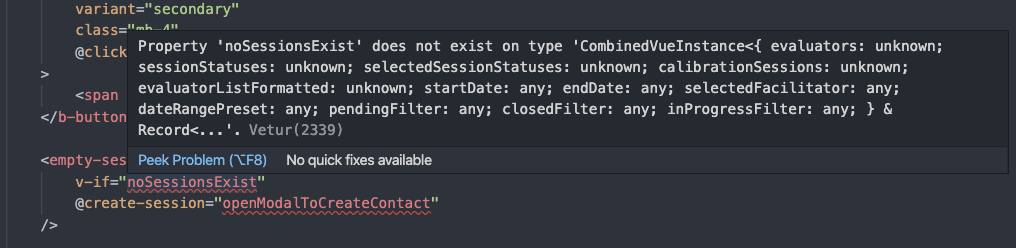
I am suddenly receiving the same issue:
Same file:

 ShetlandJ
on 3 Sep 2020
ShetlandJ
on 3 Sep 2020
Try disabling the new setting: vetur.validation.interpolation.
At least if you don't care about potential real issues being reported. Otherwise, annotate your JS code with JSDoc annotations where typescript can't infer types automatically.
rchl
on 3 Sep 2020
Either disable template validation or annotate your computed property with something like:
  computed: {
    /** @return {string} */
    upperName() {
      return this.name.toUpperCase();
    },
  },
Typescript can't always infer types automatically (even if in this case it would seem like it should be trivial).
I am not using Typescript on my project and I'm still getting this error.
firstclown
on 3 Sep 2020
Try disabling the new setting:
vetur.validation.interpolation.At least if you don't care about potential real issues being reported. Otherwise, annotate your JS code with JSDoc annotations where typescript can't infer types automatically.
I'll look at this setting.
firstclown
on 3 Sep 2020
Try disabling the new setting:
vetur.validation.interpolation.At least if you don't care about potential real issues being reported. Otherwise, annotate your JS code with JSDoc annotations where typescript can't infer types automatically.
Thank you, this fixed it for me
ShetlandJ
on 3 Sep 2020
I am not using Typescript on my project and I'm still getting this error.
It doesn't matter if you do. Typescript is used to validate your code regardless.
rchl
on 3 Sep 2020
Either disable template validation or annotate your computed property with something like:
  computed: {
    /** @return {string} */
    upperName() {
      return this.name.toUpperCase();
    },
  },
Typescript can't always infer types automatically (even if in this case it would seem like it should be trivial).
This error isn't popping up on the computed property either, but on the data and props on the component. Does this mean that any mistake or undocument element in the component will cause all template validation to fail?
And the props aren't documented either but default to any. That feels inconsistent.
firstclown
on 3 Sep 2020
Missing types in places like computed properties, methods or any other Vue option really, will just confuse Typescript and cause all types in the component to break. So it takes some getting used to understand why the issues are being reported.
@octref I think it would be a good idea to have pinned issue that explains this situation as many people struggle with that and keep asking/reporting issues about it.
I suggest a generic title like Template type issues/errors reported in my component explaining this Vue options API "quirk".
rchl
on 3 Sep 2020
In my case I'm using Nuxt.js + Headless CMS, so the data is fetched through asyncData. In that case, shouldn't the extension disable that "interpolation validation" config automatically for that specific file? So that we don't need to disable it globally...
 rodrigoriome
on 3 Sep 2020
rodrigoriome
on 3 Sep 2020
@rodrigoriome You can still make types work in this case by making typescript aware of types you are returning from asyncData by also declaring them in data. Something like:
async asyncData() {
  const foo = await axios.get(...)
  return {
    foo,
  }
},
data() {
  return {
    /** @type {string | null}
    foo: null
  }
}
So no, disabling automatically, in that case, wouldn't be expected. I'm using Nuxt with type checking all the time.
rchl
on 3 Sep 2020
I had a different TypeScript error when upgrading to Vetur v0.27. Any Vue SFC I had, including even this simple test case:
<template>
  <div/>
</template>

<script>
export default {
};
</script>
Would display a variant of the following error:
Argument of type '{}' is not assignable to parameter of type 'new (...args: any[]) => any'.
  Type '{}' provides no match for the signature 'new (...args: any[]): any'.Vetur(2345)
I know there is a new setting, vetur.validation.interpolation, and disabling this does fix this issue.
However, if I understand correctly, prior to the change in https://github.com/vuejs/vetur/commit/a6ce17e19c4c7360896a0c9e6ce0ca8021036bca, interpolation validation was only enabled if vetur.experimental.templateInterpolationService was set to true.
If I understand correctly, the reason this new option was added was to make it possible to enable or disable interpolation validation, without disabling the rest of the experimental template interpolation service. This is also what the updated docs imply should be the case:
These features are experimental and you need to set
vetur.experimental.templateInterpolationService: trueto enable them. You can also only disable template diagnostics withvetur.validation.interpolation: false.
However, with this change, interpolation validation is now _on by default_, regardless of whether the template interpolation service is enabled.
I believe the logic that was updated here should be changed to:
doValidation(document: TextDocument): Diagnostic[] {
    if (!_.get(this.config, ['vetur', 'experimental', 'templateInterpolationService'], true) || !this.config.vetur.validation.interpolation)) {
      return [];
    }
This way, interpolation validation is only enabled if vetur.experimental.templateInterpolationService is enabled (as was required in past versions), but can still additionally be disabled by turning off vetur.validation.interpolation.
 thomasboyt
on 4 Sep 2020
thomasboyt
on 4 Sep 2020
Computed property issue -> https://github.com/vuejs/vetur/issues/1707#issuecomment-686851677
 octref
on 4 Sep 2020
octref
on 4 Sep 2020
@thomasboyt I cannot repro your issue. Mind opening a new one with reprocase made out of https://github.com/octref/veturpack?
As for the setting, I just fixed it. Will push a new version with it.
octref
on 4 Sep 2020
Related issues
octref
·
3Comments
 yoyoys
·
3Comments
yoyoys
·
3Comments
 sacki5
·
3Comments
sacki5
·
3Comments
 ghost
·
3Comments
ghost
·
3Comments
 gabrielboliveira
·
3Comments
gabrielboliveira
·
3Comments
Most helpful comment
Try disabling the new setting:
vetur.validation.interpolation.At least if you don't care about potential real issues being reported. Otherwise, annotate your JS code with JSDoc annotations where typescript can't infer types automatically.