Vetur: Property 'xxx' does not exist on type 'CombinedVueInstance<Record<never, any> & Vue, object, object, object, Record<never, any>>'
Info
- Platform: Windows x64
- Vetur version: 0.26.1
- VS Code version: 1.47.3
Problem
Updating Vetur into the last release I get an error in each property in html component, computed, methods, events, etc.
Property 'styleRow' does not exist on type 'CombinedVueInstance<Record<never, any> & Vue, object, object, object, Record<never, any>>'
This is my method:
styleRow(row) {
   return `background-color: ${
     row.order && row.order.category ? row.order.category.color : '#ffffff'
   }`
}
Reproducible Case
Not reproducible by a project.
 mateonunez
All 59 comments
Same here. Big problem...
 jtsom
on 7 Aug 2020
jtsom
on 7 Aug 2020
Please provide reproducible case.
https://github.com/vuejs/vetur/blob/master/.github/NO_REPRO_CASE.md
 yoyo930021
on 7 Aug 2020
yoyo930021
on 7 Aug 2020
Unfortunately, for me, I can't send along the project that is having this issue. I am trying to recreate it in a small, sample application, but the error is not showing. This error is showing for some props, some computed items and some methods. Not all, which is making it hard to track down. I would suggest, if you have several Vue apps, as I'm sure you do, open each one and see if the error appears.
A sample of the error:

The item it claims does not exist, clearly does:

BTW, this is in a Javascript application - NO Typescript is being used.
jtsom
on 7 Aug 2020
Unfortunately, for me, I can't send along the project that is having this issue. I am trying to recreate it in a small, sample application, but the error is not showing. This error is showing for some props, some computed items and some methods. Not all, which is making it hard to track down. I would suggest, if you have several Vue apps, as I'm sure you do, open each one and see if the error appears.
A sample of the error:
The item it claims does not exist, clearly does:
BTW, this is in a Javascript application - NO Typescript is being used.
If I don't have case, debugging is too hard.
Can you reproduce the same code every time?
If yes, I think #1707 or vuejs/vue#8721 ?
yoyo930021
on 7 Aug 2020
Unfortunately, for me, I can't send along the project that is having this issue. I am trying to recreate it in a small, sample application, but the error is not showing. This error is showing for some props, some computed items and some methods. Not all, which is making it hard to track down. I would suggest, if you have several Vue apps, as I'm sure you do, open each one and see if the error appears.
A sample of the error:
The item it claims does not exist, clearly does:
BTW, this is in a Javascript application - NO Typescript is being used.If I don't have case, debugging is too hard.
Can you reproduce the same code every time?If yes, I think #1707 or vuejs/vue#8721 ?
Yes in one project, no in another. Both of those issues relate to Typescript projects. Again, this is not Typescript, straight Javascript, so I cannot add type annotations.
This is the error I'm getting for one particular component:
Property 'activityType' does not exist on type 'CombinedVueInstance<{ isFunk_1: unknown; getCardsForDisplay: unknown; weekNumber: any; vowelsoundsData: any; } & { programId: string; unitId: string; weekId: string; dayId: string; } & Vue, object, object, object, Record<...>>'.
It's showing in the CombinedVueInstance my computed properties, my data properties and I assume my data properties, respectively. However, it looks like it's not recognizing the data properties ("object, object, object...") This component doesn't have any methods referenced in the HTML. Another component does have methods (click events, etc.) that are also not recognized. The CombinedVueInstance doesn't even seem to show an option for methods.
jtsom
on 7 Aug 2020
@jtsom you need to add annotations in JS code too. Vetur will only be able to automatically infer types for trivial things like literals and others. Anything more complicated needs annotations. And yes, you can annotate stuff in JS - use JSDoc for that. if you are not doing that then don't expect things to work flawlessly.
 rchl
on 7 Aug 2020
rchl
on 7 Aug 2020
I just found this blog post that should explain it more: https://blog.usejournal.com/type-vue-without-typescript-b2b49210f0b
Any non-trivial props, data options, computed values, methods, etc. need to be annotated.
rchl
on 7 Aug 2020
That document says "We have to provide @type annotations for properties which are impossible infer statically." Except, my data properties are all simple strings, so should not need types (see above). Also, in another small application, I am not seeing this error, and the data properties are also simple types:

Not to mention, what changed in a .1 update that would cause this big change in functionality.
jtsom
on 7 Aug 2020
You need to know that if you are missing some annotations in other places in the Vue file, that can break type checking in that file in general.
So add all annotations where needed or simplify your file until it doesn't reproduce.
If nothing helps then create a repro as we can't be guessing forever here.
rchl
on 7 Aug 2020
How would you annotate Vuex getters? on the getter itself in the store? on the ...mapGetters( .. ) call?
Again, I have to ask, what changed in the latest update to cause all of these issues? To go through my javascript and add @type is going to be a huge task.
jtsom
on 7 Aug 2020
It's a bug on upsteam.
The temporary solution is used JSDoc.
yoyo930021
on 7 Aug 2020
Well, for me, temporary solution is to downgrade to the previous version until this is fixed.
jtsom
on 7 Aug 2020
I've downgraded to the 0.26.0 version and it works.
mateonunez
on 7 Aug 2020
Well, for me, temporary solution is to downgrade to the previous version until this is fixed.
You can't downgrade to fix it.
The only possible way is to install TypeScript 2.9 in project,
And set "vetur.useWorkspaceDependencies": true
yoyo930021
on 7 Aug 2020
I've downgraded too to the
0.26.0version.
If this work in v0.26.0?
yoyo930021
on 7 Aug 2020
I downgraded to v0.26.0 and all of those errors went away.
jtsom
on 7 Aug 2020
I've downgraded too to the
0.26.0version.If this work in v0.26.0?
Yes, it is working on v0.26.0.
mateonunez
on 7 Aug 2020
I think the problem is not what I think.
@mateonunez @jtsom
Please try to provide reproducible case.
Otherwise it’s really hard to debug.
yoyo930021
on 7 Aug 2020
Believe me, I am trying to. A simple app that is structured the same as my more complicated app won't show the error. Simple components in my large app has several errors, but a more complicated component has none. They have the same data, methods, computed sections, and make heavy use of Vuex getters.
Here's the complicated component, and how the data() function is defined - it's composed of many properties - numbers, strings, arrays of various items, object with various items - and no @type information:

and here is the simpler component with only 3 data items, all strings:

note the simple one indicates; "data?: unknown" and the other shows "data: DataDef..."
jtsom
on 7 Aug 2020
Here is a reproducible component. If you change the computed to return a string, the error will go away. As it is, it shows these errors:

<template>
<div class='hello'>
  {{ title }} {{ testing }}
    <div v-for="item in items">{{ item }}</div>
    <button @click="clickMe">Click me</button>
</div>
</template>

<script>

export default {

  props: {
    testing: { type: String }
  },
  computed: {
    title() {
      return this.testing === 'hello'; // ** change to just return a string to remove error
    }
  },
  methods: {
    clickMe() {
      console.log('click');
    }
  },
  data() {
    return {
      items: ['item1', 'item2', 'item3', 'item4', 'item5']
    };
  }
};
</script>
Adding type annotations (assuming I'm doing it correct) does not help:

jtsom
on 7 Aug 2020
Here is a reproducible component. If you change the computed to return a string, the error will go away. As it is, it shows these errors:
<template>
<div class='hello'>
  {{ title }} {{ testing }}
    <div v-for="item in items">{{ item }}</div>
    <button @click="clickMe">Click me</button>
</div>
</template>

<script>

export default {

  props: {
    testing: { type: String }
  },
  computed: {
    title() {
      return this.testing === 'hello'; // ** change to just return a string to remove error
    }
  },
  methods: {
    clickMe() {
      console.log('click');
    }
  },
  data() {
    return {
      items: ['item1', 'item2', 'item3', 'item4', 'item5'],

      items2: []
    };
  }
};
</script>
This problem is #1707 and vuejs/vue#8721
It's a upstream problem and The v0.26.0 version also have error.
The v0.26.1 version is only change for can use template interpolation service when vetur.validation.template: false.
If you no need template interpolation service, please set vetur.experimental.templateInterpolationService: false
yoyo930021
on 7 Aug 2020
Weird. Because v0.26.0 did not have that error, as as far as I know I did not have that option turned on.
Either way, turning that option off did eliminate the error using v.0.26.1
Hopefully this will get fixed soon.
(I assume by "template interpolation service" you mean like: {{ card.label }} ? or is that something else? )
jtsom
on 7 Aug 2020
Template interpolation service
https://vuejs.github.io/vetur/interpolation.html#generic-language-features
yoyo930021
on 7 Aug 2020
Maybe this option have a problem.
yoyo930021
on 7 Aug 2020
Template interpolation service
https://vuejs.github.io/vetur/interpolation.html#generic-language-features
Hm. Ok. I do remember reading that article and I did turn that option on. Up until v0.26.1 I had no issues. Having that option on using v0.26.1, results in the reported errors. Turning it off remove the errors. So something in 0.26.1 triggered the problem.
jtsom
on 7 Aug 2020
Here is a reproducible component. If you change the computed to return a string, the error will go away. As it is, it shows these errors:
<template>
<div class='hello'>
  {{ title }} {{ testing }}
    <div v-for="item in items">{{ item }}</div>
    <button @click="clickMe">Click me</button>
</div>
</template>

<script>

export default {

  props: {
    testing: { type: String }
  },
  computed: {
    title() {
      return this.testing === 'hello'; // ** change to just return a string to remove error
    }
  },
  methods: {
    clickMe() {
      console.log('click');
    }
  },
  data() {
    return {
      items: ['item1', 'item2', 'item3', 'item4', 'item5']
    };
  }
};
</script>
Adding type annotations (assuming I'm doing it correct) does not help:
@jtsom
Is this code work in v0.26.0?
yoyo930021
on 7 Aug 2020
Adding type annotations (assuming I'm doing it correct) does not help:
Those annotations are not correct.
Computed property should have
/** @returns {boolean} */
and data should have
/** @returns {{ items: string[] }} **/
(although personally I haven't tried annotating whole data like that. I usually annotate individual properties of returned object with /** @type {foo} */.
I guess there is a regression in typescript that makes it fail to infer data that it should be able to infer but even without the regression, sometimes you just need to annotate stuff as it won't be able to infer automatically.
rchl
on 7 Aug 2020
@jtsom
Is this code work in v0.26.0?
Yup. No errors with v0.26.0:

jtsom
on 7 Aug 2020
No errors but are types correct in the template? Is the template actually type-checked?
If you hover the variables in the template do you see proper types and if you mistype them do you get errors?
rchl
on 7 Aug 2020
@jtsom
Is this code work in v0.26.0?Yup. No errors with v0.26.0:
You have vetur.validation.template: false config in your screenshot with line 15.
In v0.26.0, it will disable template interpolation service.
In v0.26.1, it will not disable.
yoyo930021
on 7 Aug 2020
You have
vetur.validation.template: falseconfig in your screenshot with line 15.
In v0.26.0, it will disable template interpolation service.
In v0.26.1, it will not disable.
Ah, yes. setting 'Vetur.validation.template: true' does now show the errors in v0.26.0:
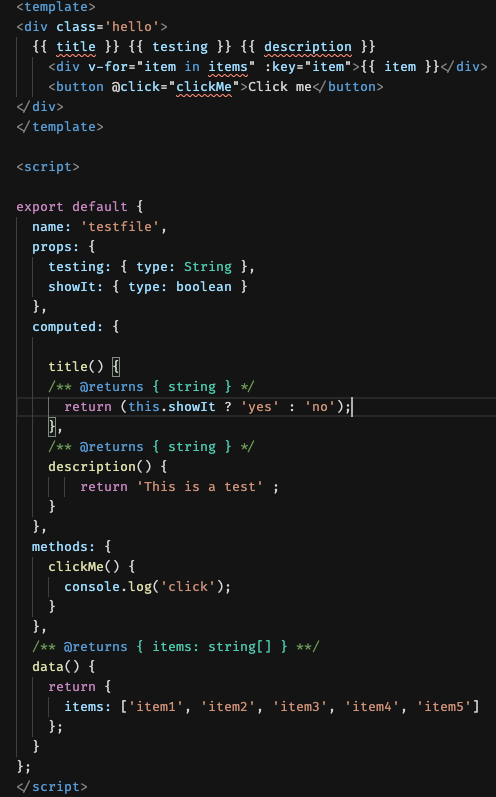
Fixing up the type annotations also makes the errors go away.
jtsom
on 7 Aug 2020
I think the solution is to have a config that controls templateInterpolationDiagnostics.
For completion/definition/reference/hover, people should still be able to use them without having to fully type their components.
I think it's time we move interpolation service out of experimental status and fix all remaining issues.
How about adding vetur.validation.interpolation, defaulted to false?
Completion/definition/reference/hover powered by template interpolation service can be turned on by default.
 octref
on 7 Aug 2020
octref
on 7 Aug 2020
I think we need to promote this PR on upsteam.
https://github.com/vuejs/vue/pull/11235
yoyo930021
on 7 Aug 2020
If either of those solutions will help eliminate those errors, especially if there aren't any type declarations, then I'm all for it. Adding type information to my existing project would be difficult to impossible - type declarations for Vuex store items (...mapGetters, etc.) is no simple task! Until then, I will keep this option turned off. (Vue / Vetur / VSCode / JS have never been the easiest environment to work with, I've come to deal with the quirks / difficulties, so...)
jtsom
on 7 Aug 2020
I've downgraded too to the
0.26.0version.
same, this worked for me
 yuchenliu15
on 7 Aug 2020
yuchenliu15
on 7 Aug 2020
I downgraded too. Only solution I could find. It seemed to want types in javascript and I can't change 1000's of lines of code just for this.
 DeannaBonds
on 10 Aug 2020
DeannaBonds
on 10 Aug 2020
I found in .vscode folder a file settings.json
{
"vetur.validation.template": false,
"eslint.validate": ["javascript", "javascriptreact", "typescript", "vue"],
"vetur.experimental.templateInterpolationService": true (change this to false. It worked for me)
}
 Pedroprt
on 14 Aug 2020
Pedroprt
on 14 Aug 2020
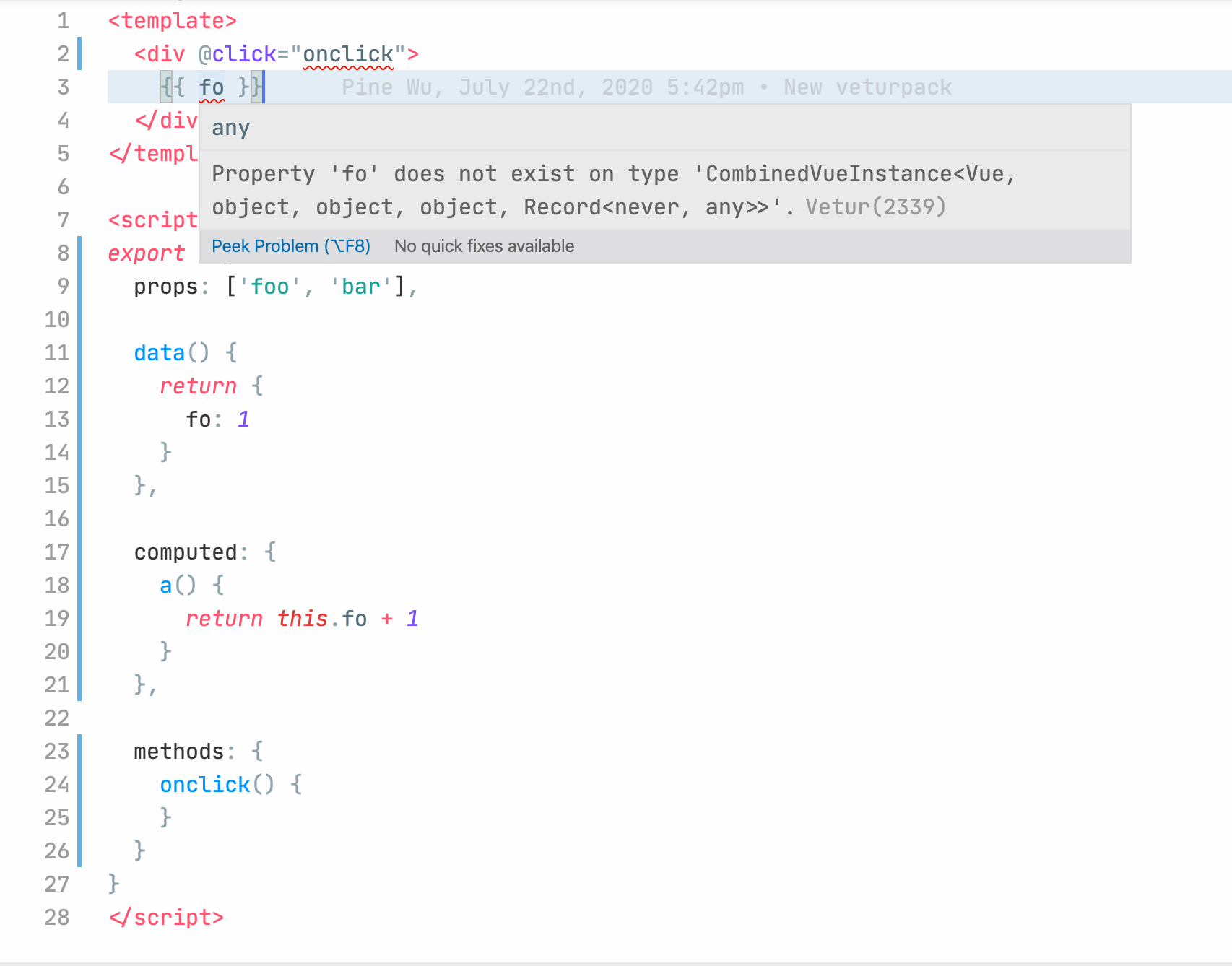
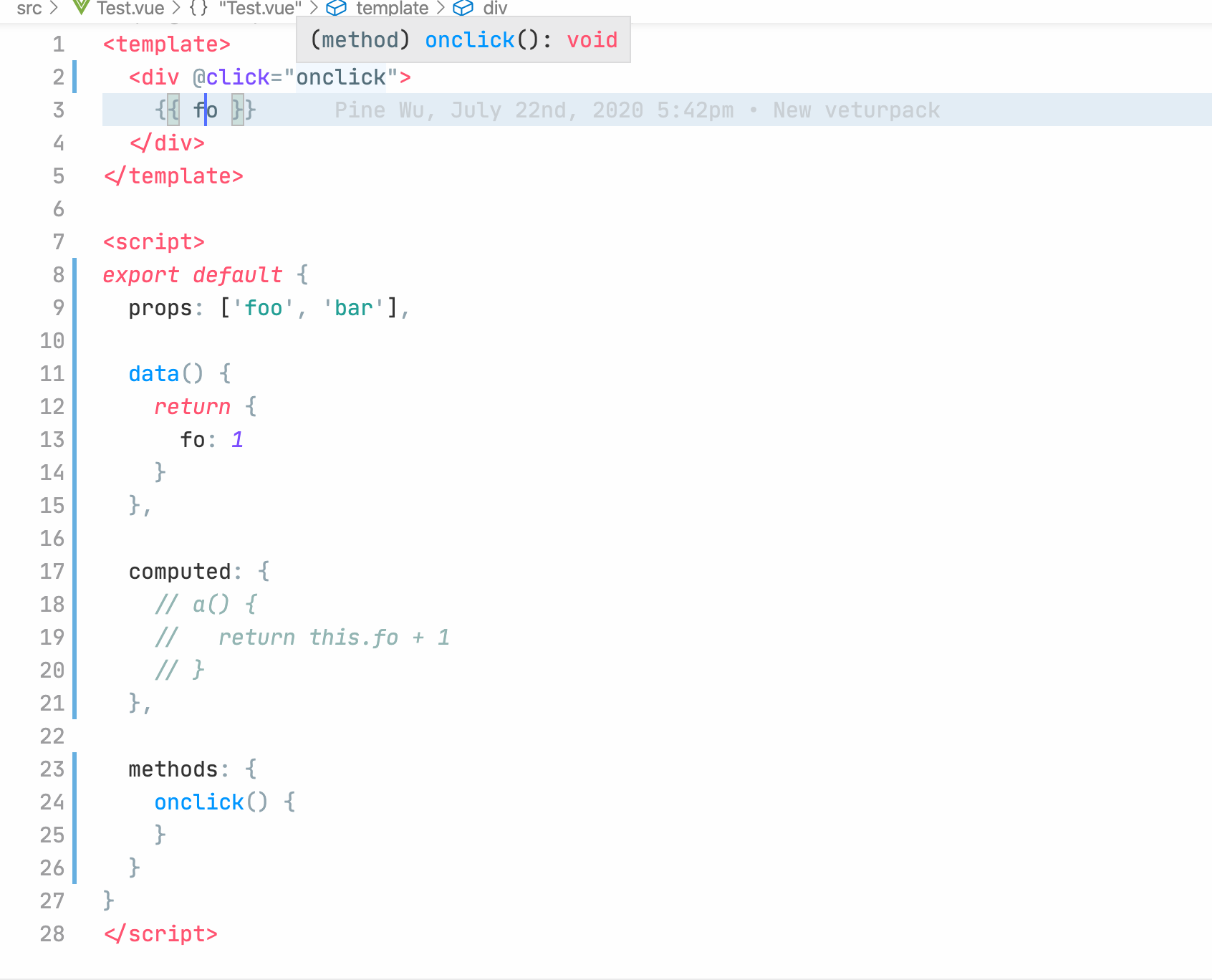
I found that this error is related to the _computed block_ . If i remove the computed block , i will not get this error. Once i have any computed properties, however, i get this error again. Below is an example:
has computed properties:
no computed properties:
 nicong622
on 20 Aug 2020
nicong622
on 20 Aug 2020
I found that this error is related to the _computed block_ . If i remove the computed block , i will not get this error. Once i have any computed properties, however, i get this error again. Below is an example:
has computed properties:
no computed properties:
Known Issues about #1707 or vuejs/vue#8721
And have a PR to fix it vuejs/vue#11235
I'll implement this temporary solution first.
https://github.com/vuejs/vetur/issues/2131#issuecomment-670606076
yoyo930021
on 20 Aug 2020
And that PR has been sitting there for 5 months... what's holding it up???
jtsom
on 20 Aug 2020
vuejs/vue#11235 does not seem to fix this case for me:
<template>
  <div>
    {{ fo }}
  </div>
</template>

<script>
import * as _ from 'lodash'

export default {
  props: ['foo', 'bar'],

  data() {
    return {
      fo: 1
    }
  },

  computed: {
    a() {
      return this.fo + 1
    }
  }
}
</script>
I added vetur.validation.interpolation. Default to true.
Other issues are all upstream and there's nothing I can do from Vetur side. Either TS need to fix circularity or you need to type computed property manually.
octref
on 26 Aug 2020
vuejs/vue#11235 does not seem to fix this case for me:
<template>
  <div>
    {{ fo }}
  </div>
</template>

<script>
import * as _ from 'lodash'

export default {
  props: ['foo', 'bar'],

  data() {
    return {
      fo: 1
    }
  },

  computed: {
    a() {
      return this.fo + 1
    }
  }
}
</script>
I study this case.
There are two type errors.
I find the only way when typescript 3.9. =_=
Code:
https://github.com/yoyo930021/vue/tree/fix-type-when-computed-return-this-3.9
I will study when I have time.
yoyo930021
on 26 Aug 2020
In case others arrive, here's a summary of the current problem, the minimal reproducible example, and what you can do to try and fix it: https://github.com/vuejs/vetur/issues/1707#issuecomment-686851677
 dyllandry
on 23 Sep 2020
dyllandry
on 23 Sep 2020
I've downgraded to the
0.26.0version and it works.
this worked for me
 krushndayshmookh
on 26 Sep 2020
krushndayshmookh
on 26 Sep 2020
I've downgraded to the
0.26.0version and it works.this worked for me
set vetur.validation.interpolation false in latest version.
yoyo930021
on 26 Sep 2020
I've downgraded to the
0.26.0version and it works.this worked for me
set
vetur.validation.interpolationfalse in latest version.
this solves everything. thanks
krushndayshmookh
on 28 Sep 2020
I've downgraded to the
0.26.0version and it works.this worked for me
set
vetur.validation.interpolationfalse in latest version.this solves everything. thanks
Was wondering where this is set but found it: Go to Settings and search for Vetur Validation.
 anubhavkamath
on 1 Oct 2020
anubhavkamath
on 1 Oct 2020
search for vetur.validation.interpolation

krushndayshmookh
on 1 Oct 2020
Well, I am not sure, it does work for JS validations.
 panamacheng
on 15 Oct 2020
panamacheng
on 15 Oct 2020
Vetur still works well while using class-style components. Because of a smoother transition to Vue 3, we wanted to migrate to options/composition API and having the above mentioned issues.
Interestingly - computed is fine, but adding components: { AppSidebar, AppFooter }, leads to the same error.
 janvorisek
on 23 Oct 2020
janvorisek
on 23 Oct 2020
Vetur still works well while using class-style components. Because of a smoother transition to Vue 3, we wanted to migrate to options/composition API and having the above mentioned issues.
Interestingly - computed is fine, but adding
components: { AppSidebar, AppFooter },leads to the same error.
If you use Vue3, there's no problem.
Because it is a type defined problem in vue2.
If you use composition API in vue2, almost no problem.
Just remember not to use computed in option API.
yoyo930021
on 23 Oct 2020
I don't use TS. I'd love to have completion in templates. JSDoc doesn't seem to do anything.
 thefoxie
on 24 Nov 2020
thefoxie
on 24 Nov 2020
I don't use TS. I'd love to have completion in templates. JSDoc doesn't seem to do anything.
JSDoc can help you.
We can't do anything in this project.
We have discussed this problem with core library maintainers.
yoyo930021
on 24 Nov 2020
@yoyo930021 can you guide me with the JSDoc? None of the annotations work and I still get the error.
/** @returns { {filteredTags: object} } **/
    data() {
        return {
            /** @type {object} **/
            filteredTags: {
                categories: new filterProperty(),
                media: new filterProperty(),
                orientation: new filterProperty(),
                camera: new filterProperty(),
            },
    }
Doesn't work on simple components with properly defined props.

thefoxie
on 24 Nov 2020
@yoyo930021 @octref Cloned veturpack to get better idea what's going on and to fiddle around. The repo worked even when I copied parts of the code like props and template but not when I copied all of it. Seems like it works when I get rid of emits: ["click"]. Does Vetur support emits option as it produces this bug?
thefoxie
on 24 Nov 2020
It appears even when I use beforeUnmount(). After a while, I figured out it's because I haven't updated to vue3 on this particular project yet but started to use newer eslint and hooks/options. Everything seems to work with vue3.
thefoxie
on 24 Nov 2020
@yoyo930021 @octref Cloned veturpack to get better idea what's going on and to fiddle around. The repo worked even when I copied parts of the code like props and template but not when I copied all of it. Seems like it works when I get rid of
emits: ["click"]. Does Vetur support emits option as it produces this bug?
https://github.com/vuejs/vetur/blob/master/docs/FAQ.md#property-xxx-does-not-exist-on-type-combinedvueinstance
yoyo930021
on 25 Nov 2020
Related issues
 sacki5
·
3Comments
octref
·
3Comments
sacki5
·
3Comments
octref
·
3Comments
 thibautguedou3
·
3Comments
octref
·
3Comments
thibautguedou3
·
3Comments
octref
·
3Comments
 13029852933
·
3Comments
13029852933
·
3Comments
Most helpful comment
I found in .vscode folder a file settings.json
{
"vetur.validation.template": false,
"eslint.validate": ["javascript", "javascriptreact", "typescript", "vue"],
"vetur.experimental.templateInterpolationService": true (change this to false. It worked for me)
}