Vetur: "Cannot find name" and other problems with TypeScript-SFC
Info
- Platform: Win 10
- Vetur version: 0.22.1
- VS Code version: 1.37.0
Problem
Vetur underlines everything and gives errors like Cannot find name all the time.

Reproducible Case
At the moment I'm not sure how to make a reproducible case. The project is closed source and I'm not the author of most of the code. I mostly hope, that someone has seen this behaviour before.
 jankal
All 28 comments
Are you enabling experimental template interpolation service? In that case what do you see when you execute Vetur: show corresponding virtual file and source map command?

 ktsn
on 15 Aug 2019
ktsn
on 15 Aug 2019
@ktsn vetur.experimental.templateInterpolationService: true is not used in my config. I didn't even know this existed yet.
This is the output of Vetur: Show corresponding virtual file and sourcemap:
====================
Virtual content of c:\Users\alexa\Projekte\xqweb\roma-etk\assets\node_modules\@enhavo\svg-editor\Components\ApplicationComponent.vue.template
Hover, semantic diagnostics, jump to definition and find references are run on this file.
====================


====================
SourceMap
from: c:\Users\alexa\Projekte\xqweb\roma-etk\assets\node_modules\@enhavo\svg-editor\Components\ApplicationComponent.vue
to  : c:\Users\alexa\Projekte\xqweb\roma-etk\assets\node_modules\@enhavo\svg-editor\Components\ApplicationComponent.vue.template
[VueFileStart, VueFileEnd, VueFileText] => [TSVirtualFileStart, TSVirtualFileEnd, TSVirtualFileText]
====================
That's strange because the errors looks only happens on template interpolation service. Could you try to produce it in available source code for us so that we can work on it? (e.g. extract culprit file, make the source code minimal to open etc.)
ktsn
on 19 Aug 2019
@jankal I'm just looking #1451 which is possibly related to this issue. Is your problematic file in node_modules?
ktsn
on 14 Oct 2019
@ktsn I hope this description will help you track down the error.
Same issue here. The way how I was able to make such error.
VSCode: version: 1.47.1
Vetur: 0.24.0
MacOS: 10.15.5
- Open VSCode and create new file with button in on left file tree:

- Name file with
anything.Vueimportant part is to start extension with a capital letter. - VSCode will start to produce single error on the closing character of
</template>tag:

- Rename file (inside VSCode) to small later extension
anything.vue - Fully close and open VSCode again
- Open file with small letter extension.

- Please notice that Vetur error still see file as
test.Vuenottest.vueas it is an actual name of the file. It looks like something somewhere is cached.
 msamsel
on 16 Jul 2020
msamsel
on 16 Jul 2020
@ktsn Sorry for not having responded yet. The file wasn't in node_modules. I've not experienced this behaviour in other projects since then. Maybe @msamsel is on the right track here.
jankal
on 16 Jul 2020
@msamsel's description is exactly what happened to me.
I tried deleting and recreating the file but still have the same error.
I've now switched to vscode-vue which seems to be working.
 Tehsurfer
on 28 Jul 2020
Tehsurfer
on 28 Jul 2020
Just encountered this issue as well, same situation as @msamsel
Steps taken to address:
- renamed File.Vue to File.vue (did not work)
- created NewFile.vue and copied code from File.vue over
- deleted File.vue
- renamed NewFile.vue to File.vue
 KVINTH
on 17 Aug 2020
KVINTH
on 17 Aug 2020
Yeah + 1 for @msamsel's description. Same for me. Renaming the file is fine - try to name it back, get smacked in the face with a wall of red (even though everything looks legit).
 legendarylion
on 18 Aug 2020
legendarylion
on 18 Aug 2020
@yoyo930021 do you think, provided description is sufficient to make a bug report from it?
msamsel
on 18 Aug 2020
@yoyo930021 do you think, provided description is sufficient to make a bug report from it?
It's ok. I will try to study it.
 yoyo930021
on 18 Aug 2020
yoyo930021
on 18 Aug 2020
solution

 shunyue1320
on 28 Aug 2020
shunyue1320
on 28 Aug 2020
solution
This works for me.
(_it's in file>preferences>settings>extensions>vuetr_ if you are wondering)
Will we lose any functionality by disabling the js/ts validation though?
Tehsurfer
on 28 Aug 2020
solution
This works for me.
(_it's in file>preferences>settings>extensions>vuetr_ if you are wondering)
Will we lose any functionality by disabling the js/ts validation though?
Syntax errors in
Stumbled upon the same problem @msamsel described, I also tried what @KVINTH suggested. Didn't work for me. Just renamed the file for now and will follow this issue.
 Alpakash
on 29 Aug 2020
Alpakash
on 29 Aug 2020
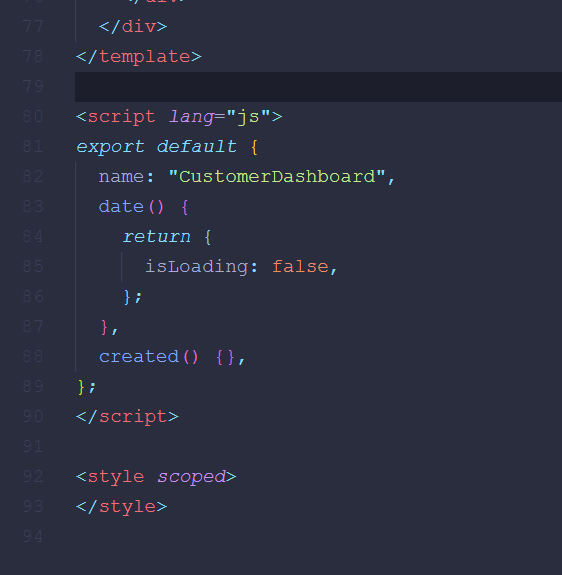
just add lang="js" and it will solve the issue :)
 shuvogoswamii
on 2 Sep 2020
shuvogoswamii
on 2 Sep 2020
Ran into the same issue that @msamsel described as well, seems like it might be an issue with vs code and not Vetur. I tried to run Vetur: Show corresponding virtual file and sourcemap but I got an error saying that it 'Failed to show virtual file. Make sure the current file is a .vue file.'
Debugging the extension it looks like vscode.window.activeTextEditor.document.fileName holds on to the old file name with the incorrect casing, seems like vs code is caching this somewhere and not letting go of it when you rename a file but only change character casing. Pretty lame solution, but I ended up copying the contents of the file, made sure I did not have the file open in my instance of vs code, then ran:
Clear Editor History
File: Clear Recently Opened
Search: Clear Search
Search: Clear Search History
Then pressed Ctrl+P and started typing the name of the file to ensure that all references to the old improperly cased file were gone. Somehow the file was still there so I ended up pressing the 'X' to the right of the result to manually remove it from my recently opened files. Closed VS Code, deleted the file, re-opened vscode, created a new file with the same name but correct casing, and copied in the contents of the old file.
 d18n
on 19 Sep 2020
d18n
on 19 Sep 2020
@d18n Thanks. This solution works for me.
 quroom
on 23 Sep 2020
quroom
on 23 Sep 2020
Not sure if this is related or not, but it feels related.
In a vue 2 project I am making some updates to I noticed that vetur will sometimes not find the correct method when I use '@' instead of 'v-on:'. It appears to be one character off on the name. Here is an example:

Now to make things even odder if you move it the line the tag starts on the issue goes away:

This seems a bit more specific then the original post, but I wasn't sure if it might be related or not.
After a bit more work on this project we noticed that this does not happen when the handler is passed by name. For example: @click="onClick" does not seem to trigger the issue at all.
 rahicks26
on 23 Sep 2020
rahicks26
on 23 Sep 2020
@rahicks26 #1319, it's fixed but not released yet.
 octref
on 31 Oct 2020
octref
on 31 Oct 2020
Hi,
I've created an app with vue, vuetify and typescript language but I get this error:
Cannot find name 'process'. Do you need to install type definitions for node? Trynpm i @types/node.
my package.json is below:
{
"name": "vue-test",
"version": "0.1.0",
"private": true,
"scripts": {
"serve": "vue-cli-service serve",
"build": "vue-cli-service build",
"lint": "vue-cli-service lint"
},
"dependencies": {
"@types/node": "^14.14.7",
"axios": "^0.21.0",
"core-js": "^3.6.5",
"vue": "^2.6.11",
"vue-class-component": "^7.2.3",
"vue-property-decorator": "^8.4.2",
"vue-router": "^3.2.0",
"vuetify": "^2.2.11",
"vuex": "^3.4.0"
},
"devDependencies": {
"@typescript-eslint/eslint-plugin": "^2.33.0",
"@typescript-eslint/parser": "^2.33.0",
"@vue/cli-plugin-babel": "~4.5.0",
"@vue/cli-plugin-eslint": "~4.5.0",
"@vue/cli-plugin-router": "~4.5.0",
"@vue/cli-plugin-typescript": "~4.5.0",
"@vue/cli-plugin-vuex": "~4.5.0",
"@vue/cli-service": "~4.5.0",
"@vue/eslint-config-airbnb": "^5.0.2",
"@vue/eslint-config-typescript": "^5.0.2",
"eslint": "^6.7.2",
"eslint-plugin-import": "^2.20.2",
"eslint-plugin-vue": "^7.1.0",
"node-sass": "^4.12.0",
"sass": "^1.19.0",
"sass-loader": "^8.0.2",
"typescript": "~3.9.3",
"vue-cli-plugin-vuetify": "~2.0.7",
"vue-template-compiler": "^2.6.11",
"vuetify-loader": "^1.3.0"
}
}
If I disable vetur js validation no problem is reported but I don't know if that can produce any collateral issue.
Can you help me?
 simone-baldini
on 13 Nov 2020
simone-baldini
on 13 Nov 2020
The same problem bothers me, I disable vetur js validation, but I think this is not a good solution.
 Red-Asuka
on 18 Dec 2020
Red-Asuka
on 18 Dec 2020
Same issue happening on Vetur 0.31.3
Solution by @d18n works.
 aimorris
on 11 Jan 2021
aimorris
on 11 Jan 2021
Can anyone provide repro operating system?
yoyo930021
on 11 Jan 2021
I already know the cause of the problem.
But it's hard to solve.
I need more time or refactoring.
yoyo930021
on 12 Jan 2021
Hello,
I was able to solve this problem by clearing vs cache in the following paths :
C:\Users\[UserName]\AppData\Roaming\Code\Cache
C:\Users\[UserName]\AppData\Roaming\Code\CacheData
It was a desperate action. May not be the correct thing to do but other given solutions did not work for me.
 Guinous
on 20 Jan 2021
Guinous
on 20 Jan 2021
Can anyone provide repro operating system?
Windows 10 Pro 19042.746
VSCode 1.52.1
aimorris
on 27 Jan 2021
Related issues
 sacki5
·
3Comments
sacki5
·
3Comments
 deangoku
·
3Comments
octref
·
3Comments
deangoku
·
3Comments
octref
·
3Comments
 LukeLin
·
3Comments
LukeLin
·
3Comments
 LawrenceQxy
·
3Comments
LawrenceQxy
·
3Comments
Most helpful comment
solution