Vetur: Both Emmet and Scaffold Snippets not working
Info
- Platform: Ubuntu 18.04
- Vetur version: 0.21.0
- VS Code version: 1.35.0 (vscodium)
Problem
Typing scaffold into a new Vue file does nothing. No IntelliSense, no expanding.
Also, Emmet is not working inside <template> unless this option is set:
"emmet.includeLanguages": {
  "vue": "html"
}
Reproducible Case
- Fresh installation of vscode/vscodium.
- Install Vetur.
- Create a new file, select type as Vue.
- Try some Snippets. In my case
scaffoldandh1inside<template>. - Both are not recognized.
Yes, not much of an info. Could I do anything to help debug this?
 carstev
All 35 comments
 yoyo930021
on 10 Jun 2019
yoyo930021
on 10 Jun 2019
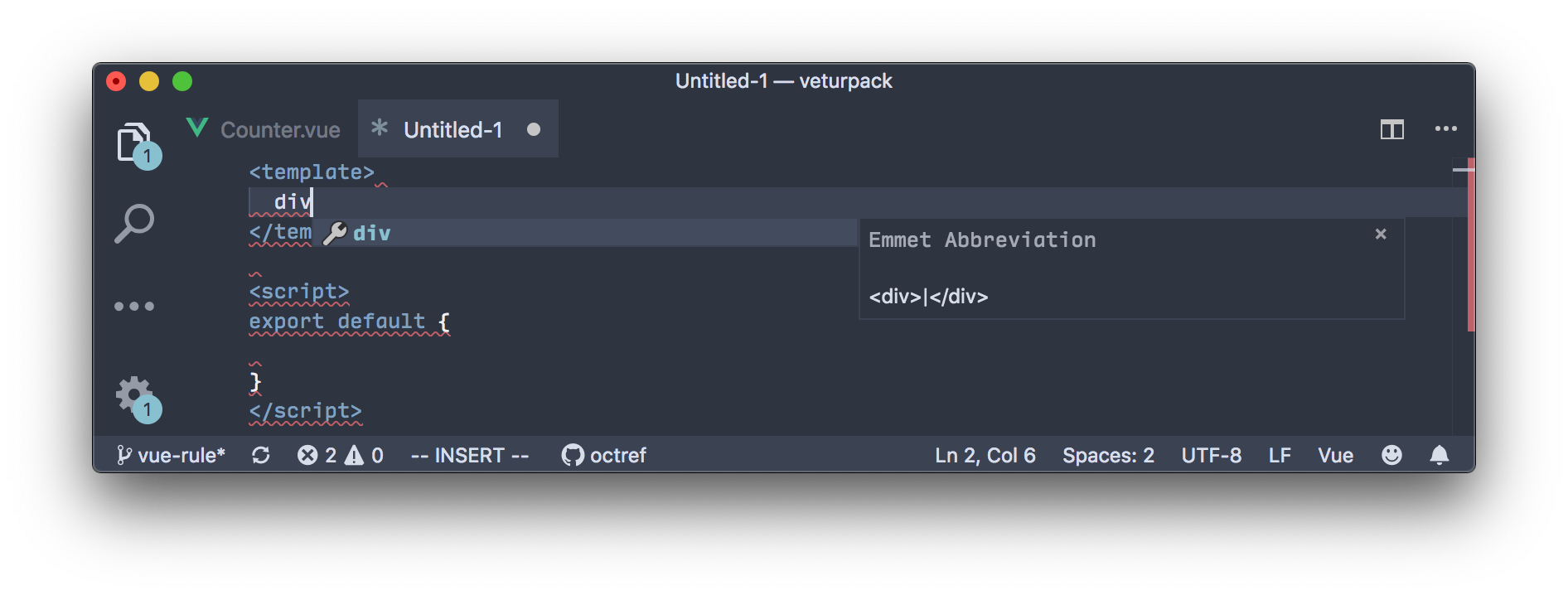
I cannot repro:

 octref
on 19 Jun 2019
octref
on 19 Jun 2019
@bdrtsky Vetur works just fine on Linux Mint for me.
 borekl
on 12 Jul 2019
borekl
on 12 Jul 2019
Then maybe it's Ubuntu-specific issue? This can't be coincidence, that on both - 18.04 and 16.04 it's not working (in my case even on fresh system). Only highlighting is working for me. I tried to migrate to VSCode, but without Vetur it doesn't make sense...
 bdrtsky
on 12 Jul 2019
bdrtsky
on 12 Jul 2019
@bdrtsky Are you using https://github.com/VSCodium/vscodium as well? I think it might be an issue from it.
Also see https://github.com/vuejs/vetur/blob/master/docs/FAQ.md#no-syntax-highlighting--no-language-features-working. Sometimes VS Code has corrupted installs of Vetur. The safest way is to download the VSIX, rm -rf ~/.vscode/extensions/octref.vetur-* and use code --install-extension <extension-id | path-to-vsix>.
octref
on 12 Jul 2019
@octref nope, I am using VSCode downloaded and installed from official Microsoft site.
Just tried to install from VSIX. No changes:

bdrtsky
on 12 Jul 2019
@bdrtsky Any error you see in Output -> Vue Language Server?

Do you have any vue related settings such as files.associations that mark Vue files as another type? Also, any other Vue extensions than Vetur?
octref
on 12 Jul 2019
I don't have any other extensions beside Vetur at all. My settings.json empty.
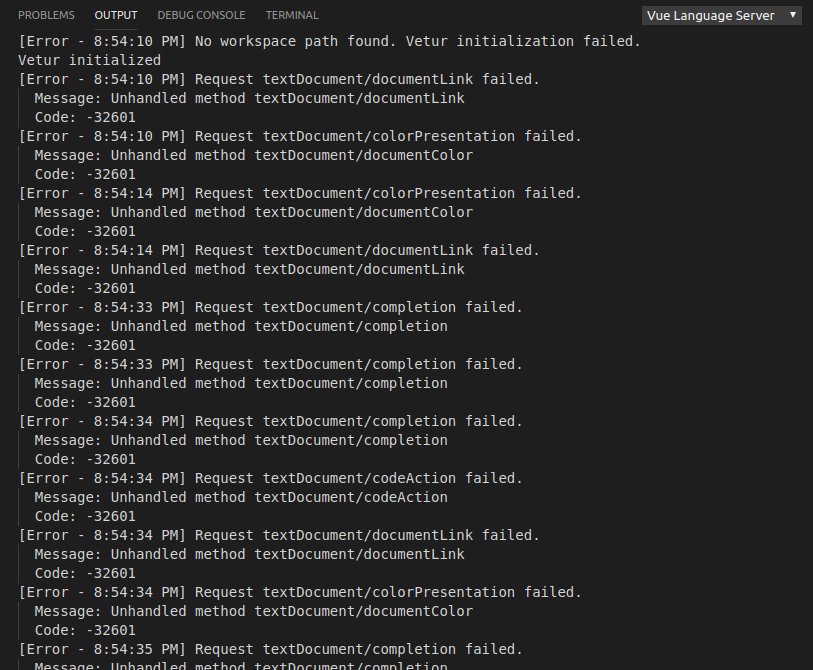
And yes, I have lot's of error in Output!
bdrtsky
on 12 Jul 2019
Any ideas what could cause those errors? I have absolutely clean installation, deb package downloaded from official site, the only extension installed is by your instructions, no settings modifications made. I didn't use VSCode before much, so I have no idea how to debug it. Didn't expect this could happen with official extension and most popular Linux distro.
bdrtsky
on 12 Jul 2019
@bdrtsky You need to open a folder for Vetur to work, as it resolves dependencies from local node_modules:

octref
on 13 Jul 2019
@octref yes, you right, thank you! It's working just fine, lol. I guess I worked with Sublime too much and didn't even expect such behavior. Sorry for disturbing.
bdrtsky
on 13 Jul 2019
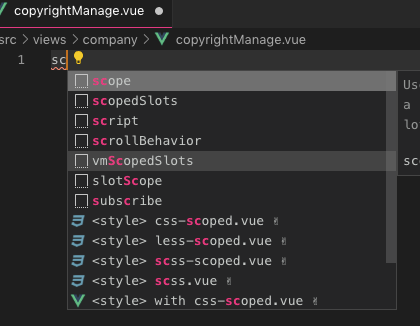
not work for me too
 Yuliang-Lee
on 13 Aug 2019
Yuliang-Lee
on 13 Aug 2019
Version 0.22.0 is not working for me also, rolled back to 0.21.1 any everything working as normal again.
 Dkenny101
on 13 Aug 2019
Dkenny101
on 13 Aug 2019
Same thing for me on Vetur 0.22.0 on macOS, using scaffold simple does not work anymore
 rochabianca
on 13 Aug 2019
rochabianca
on 13 Aug 2019
plus one on Vetur 0.22.0 - windows 10
 kkost9
on 13 Aug 2019
kkost9
on 13 Aug 2019
See https://github.com/vuejs/vetur/issues/1386#issuecomment-520881522.
octref
on 13 Aug 2019
+1 on the same issue and confirm that rolling back to 0.21.1 fixed the issue
 chadsparrow
on 15 Aug 2019
chadsparrow
on 15 Aug 2019
Apparently on the new versions you have to use "vue" instead of "scaffold"
rochabianca
on 15 Aug 2019
If I substitue and use "vue" it generates: var vm = new Vue({
el: "#replace"
})
instead of the usual <template>...</template><script>...</script><style>...</style>
Based on @octref comment above it seems scaffold is gone and the replacement is to individually use "template", "script" and "style".
 dave2k2
on 20 Aug 2019
dave2k2
on 20 Aug 2019
"vue" creates the template scaffold for me with Vetur 0.22.2 on Windows 10, vscode 1.37.1
 wmpedersen
on 20 Aug 2019
wmpedersen
on 20 Aug 2019
@dave2k2 If the "vue" command is not working for you, you can bring back the scaffold by creating a personal snippet for it. If you use vscode, go to Code>Preferences>User Snippets, type vue on the input that will show up and paste this code there:
https://gist.github.com/rochabianca/2c39f611b28dfb51f0fb3ff483afbf51
I made some minor changes, like init the template with a div with the name of the file and already put the name too on the script but you can remove this changes by removing the lines 6 and 11
rochabianca
on 20 Aug 2019
@rochabianca that's pretty awesome thanks...actually it's even better!
dave2k2
on 20 Aug 2019
@dave2k2 thank you :DD
rochabianca
on 20 Aug 2019
Type <vue> and it works
 davexpression
on 4 Oct 2019
davexpression
on 4 Oct 2019
as @davexpression and @rochabianca said scaffold was replaced by type
 zeroidentidad
on 8 Oct 2019
zeroidentidad
on 8 Oct 2019
According to the updated documentation @zeroidentidad @davexpression and @rochabianca are all correct <vue will work however, simply writing vue will not work without the < first. One other option is to start with the word default; def has done the trick for me.


 NicholasMunson
on 23 Dec 2019
NicholasMunson
on 23 Dec 2019
If you're on Debian Linux and using VS Code, you might not get Scoffold Snippets instead type <vue> and hit enter, and it all works.
 genialkartik
on 15 Apr 2020
genialkartik
on 15 Apr 2020
For those who are facing the Emmet problem in visual studio code, add this in your settings.json and it should work 😄
"emmet.includeLanguages": {
        "javascript": "javascriptreact",
        "vue-html": "html",
        "vue": "html",
    }
}

 lyqht
on 17 Apr 2020
lyqht
on 17 Apr 2020
Apparently on the new versions you have to use "vue" instead of "scaffold"
In my case, the intellisense for snippet is <vue> or .vue. Look this:

 PedroPauloML
on 17 Apr 2020
PedroPauloML
on 17 Apr 2020
Why is this issue closed?
I didn't see a real resolution to this issue?
 seanfarmar
on 21 Apr 2020
seanfarmar
on 21 Apr 2020
@seanfarmar It's because the scaffold changed its name for vue (don't know about the emmet problem through) so it shouldn't work if you type scaffold. But if you want that back, you can use my gist, here
rochabianca
on 22 Apr 2020
Try default
It will definitely work
 ncdorbi
on 14 May 2020
ncdorbi
on 14 May 2020
Type
<vue>and it works
you are a God, tks!!!
 marciofmjr
on 5 Jul 2020
marciofmjr
on 5 Jul 2020
Apparently on the new versions you have to use "vue" instead of "scaffold"
That was a great help.. thanks alot <3
 fadoo-dev
on 3 Nov 2020
fadoo-dev
on 3 Nov 2020
Apparently on the new versions you have to use "vue" instead of "scaffold"
"THE" answer!
 emfluenceindia
on 5 Nov 2020
emfluenceindia
on 5 Nov 2020
Related issues
 pdanpdan
·
3Comments
octref
·
3Comments
pdanpdan
·
3Comments
octref
·
3Comments
 KokoDoko
·
3Comments
KokoDoko
·
3Comments
 AnnAngela
·
3Comments
AnnAngela
·
3Comments
 OsterHuang
·
3Comments
OsterHuang
·
3Comments
Most helpful comment
Apparently on the new versions you have to use "vue" instead of "scaffold"