Vetur: How to stop Vuter from removing trailing (dangling) commas
Info
- Platform: macOS
- Vetur version: 0.21.0
- VS Code version: 1.34.0
Problem
When I save a .vue file all trailing commas will be removed.
[
I've tried multiple Vetur › Format › Default Formatter: HTML settings and js-beautify-html get the closest to how I like to write code. (please don't write comments telling me why trailing commas are bad)
Reproducible Case
- Get vscode
- install Vuter
- Save a
.vuefile with trailing commas
 mvaneijgen
All 13 comments
@mvaneijgen You need eslint with prettier.
 chanlito
on 4 Jun 2019
chanlito
on 4 Jun 2019
You can set VSCode setting.
"vetur.format.defaultFormatter.js": "prettier",
"vetur.format.defaultFormatter.ts": "prettier"
if use prettier, you can set prettier config.
.prettierrc at project root.
{
trailingComma: 'none'
}
 yoyo930021
on 9 Jun 2019
yoyo930021
on 9 Jun 2019
@yoyo930021 I've tried settings these options, but nothing helps. My trailing commas are still being removed.
mvaneijgen
on 14 Jun 2019
I am having this exact same issue. I use prettier+eslint (with .eslintrc) and prettier works just find on .js files and respects eslint rules. But for some reason vetur, even with the "vetur.format.defaultFormatter.js": "prettier-eslint", setting on, removes my trailing commas. The only fix I found is to manually set prettier config options. I do feel this is some sort of bug because the only thing vetur seems to get wrong is the trailing commas. Otherwise it seems to format just fine.
{
  "vetur.format.defaultFormatterOptions": {
    "prettier": {
      "trailingComma": "all"
    }
  }
}
 welenofsky
on 15 Jun 2019
welenofsky
on 15 Jun 2019
Vetur has Prettier 1.16.4 and this option is available in newer versions of Prettier. You can either use a locally installed prettier dev dependency, or wait until next release.
Actually this seems to work fine in current version:
- Clone https://github.com/octref/veturpack
- Add
"trailingComma": "all"to https://github.com/octref/veturpack/blob/master/.prettierrc - Format adds trailing comma for me
 octref
on 19 Jun 2019
octref
on 19 Jun 2019
@octref where should the .prettierrc be located?
mvaneijgen
on 19 Jun 2019
Root of your project, https://vuejs.github.io/vetur/formatting.html#settings
octref
on 19 Jun 2019
@octref
So my issue is different. I am trying to get prettier + eslint to work with vetur. I have created a repository to show what is happening. Prettier+Eslint seem to work well together outside vetur but when I configure vetur to use the formatter prettier-eslint for JS it does not seem to work for me. I may be doing it wrong but not 100%. I also uploaded a video/screen recording of the issue I am having and that is in the repo as well.
Video: https://youtu.be/feBJmA8B-Io (quality will improve as youtube is processing this file upload currently. There is also a raw .mov in repository though in case you see this before quality is improved on youtubes side)
welenofsky
on 19 Jun 2019
I can open a new issue if preferred as well. Just let me know.
welenofsky
on 19 Jun 2019
@welenofsky You can open a new issue, but it doesn't really repro for me...
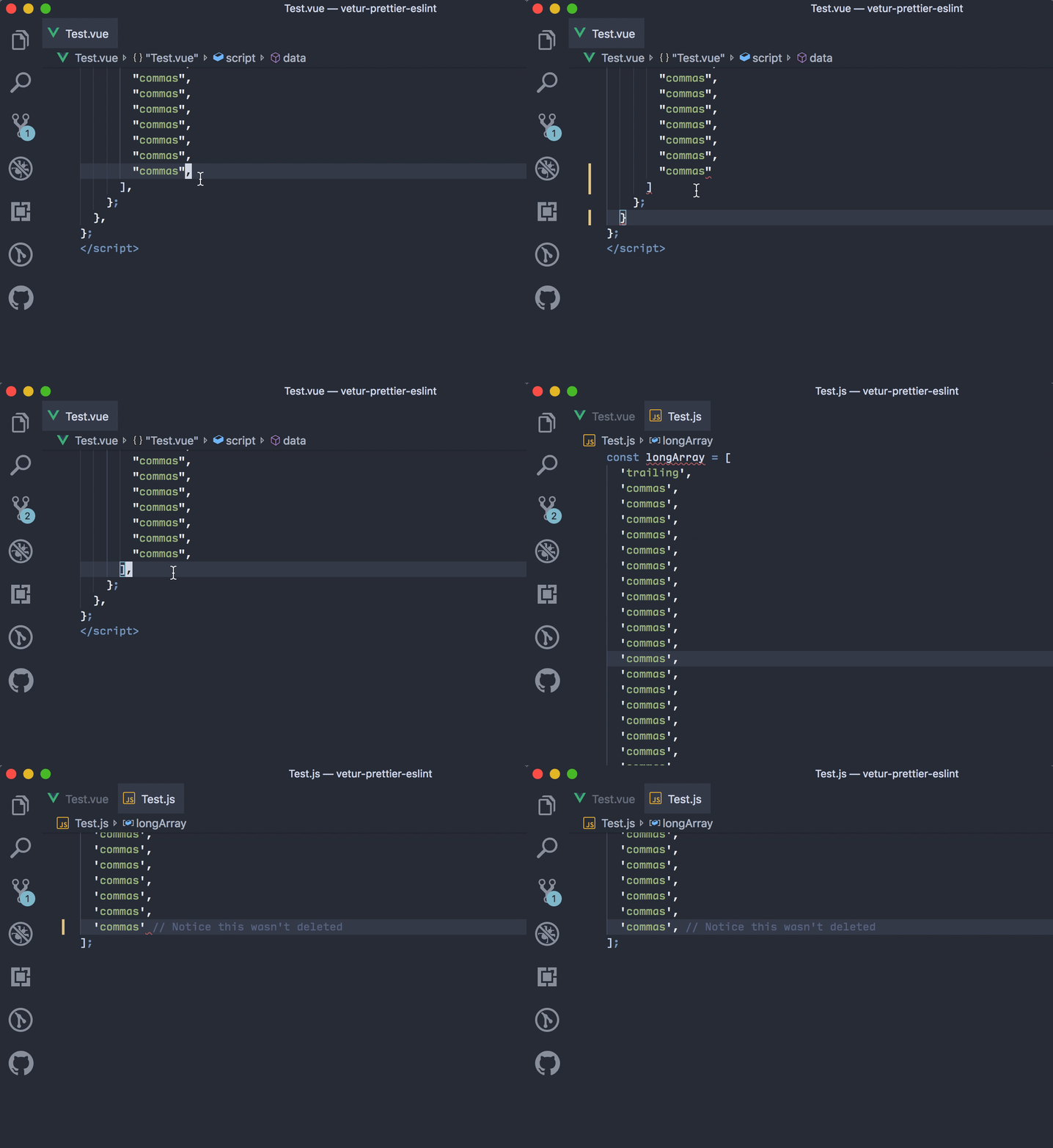
octref
on 20 Jun 2019
@octref I just fixed it on my laptop while trying to figure out what the issue was and am not sure exactly what I did to fix it. Going to try do the exact same steps I just went through while debugging the issue on my work computer tomorrow morning incrementally to figure out which step fixes the issue. I don't want to speculate at the moment because I am really not sure what it was that I did to fix the issue but I consider this issue resolved.
welenofsky
on 20 Jun 2019
@octref
TLDR: I had to install prettier-eslint locally for it to work.
Per my previous comment, this morning I came in to office and did all the same debugging steps. I found out what conditions this will work for me to fix this issue. This was a problem for both my Macbook and Mac at work. The fix is I have to install prettier-eslint locally. When I read the docs for vetur it made it seem that it will run prettier then eslint --fix when I chose prettier-eslint, so I assumed prettier-eslint as a package wasn't a thing. I have tried installing prettier, eslint and prettier-eslint, prettier-eslint-cli globally on my mac but it still doesn't fix this issue for me. The only way for me to fix this is to add prettier-eslint as a dev dependency to my project, then it works. IDK why the prettier-eslint package is unable to utilize the globally installed prettier-eslint/prettier-eslint-cli I had installed. If vetur couldn't find that prettier-eslint package on the computer it would be helpful imo to throw some sort of error saying linter not found. I am also wondering why it worked for you when you cloned my repo as I did not include prettier-eslint as a dev dependency.
IDK why vetur was unable to utilize my globally installed prettier-eslint fixer like it was able to do with prettier. Maybe this is the bug? Maybe a bug for the prettier-eslint author? I jabbered a lot but wanted to give you these details in case others have this bug report in future or if you were curious as to what fixed it for me.
welenofsky
on 20 Jun 2019
IDK why the prettier-eslint package is unable to utilize the globally installed prettier-eslint/prettier-eslint-cli
That's something you should ask prettier-eslint.
If vetur couldn't find that prettier-eslint package on the computer it would be helpful imo to throw some sort of error saying linter not found.
In that case it falls back to using bundled prettier-eslint. I can print a log though.
I'll close this issue. If you still run into problems open new issue with repro.
octref
on 21 Jun 2019
Related issues
 KokoDoko
·
3Comments
KokoDoko
·
3Comments
 pdanpdan
·
3Comments
pdanpdan
·
3Comments
 gabrielboliveira
·
3Comments
gabrielboliveira
·
3Comments
 LukeLin
·
3Comments
LukeLin
·
3Comments
 yoyoys
·
3Comments
yoyoys
·
3Comments
Most helpful comment
I am having this exact same issue. I use prettier+eslint (with .eslintrc) and prettier works just find on .js files and respects eslint rules. But for some reason vetur, even with the
"vetur.format.defaultFormatter.js": "prettier-eslint",setting on, removes my trailing commas. The only fix I found is to manually set prettier config options. I do feel this is some sort of bug because the only thing vetur seems to get wrong is the trailing commas. Otherwise it seems to format just fine.