Vetur: Error: Cannot find name 'directives'. Vetur(2304) [1, 1]
Info
- Platform: Linux
- Vetur version: 0.19.2
- VS Code version: 1.33.1
Problem
Several error messages like:
Cannot find name 'directives'. Vetur(2304) [1, 1]

Reproducible Case
- Checkout https://github.com/ndabAP/vue-command
- Open
Stdin.vue
need-more-info
 ndabAP
👍1
All 4 comments
Hmm, cannot reproduce. Are you sure you are using v0.19.2? Because we have fixed such problem just that version.
Also what do you see when you run a command "Vetur: Show corresponding virtual file and sourcemap" in that file?
 ktsn
on 26 Apr 2019
ktsn
on 26 Apr 2019
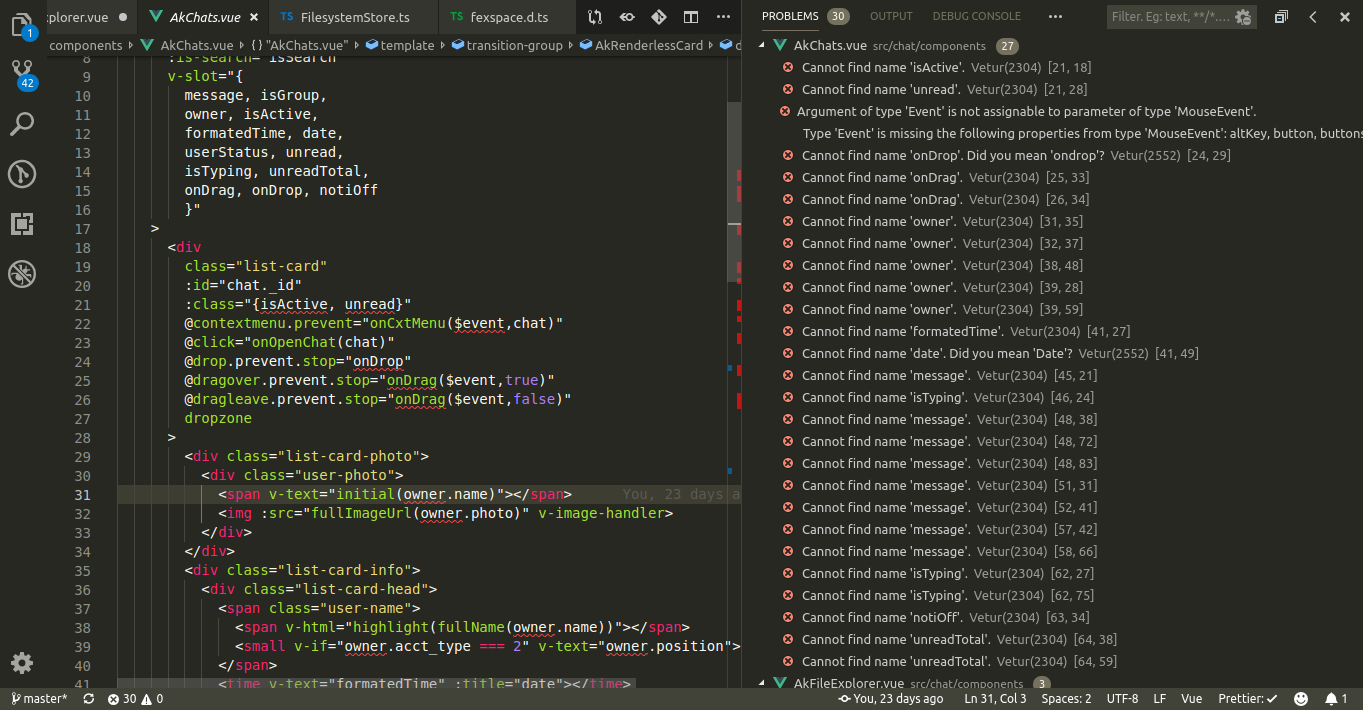
Am having the same issue but mine was caused v-slot is seems like vetur doesn't recognize scope-slot
 Akumzy
on 26 Apr 2019
Akumzy
on 26 Apr 2019
@Akumzy That's another issue #1203
ktsn
on 26 Apr 2019
👍1
I'm sorry, I updated and restarted Visual Studio Code but it seems I had to manually click on "Reload" at the extension. Everything is fine!
ndabAP
on 26 Apr 2019
🎉2
Was this page helpful?
0 / 5 - 0 ratings
Related issues
 muhajirdev
·
3Comments
muhajirdev
·
3Comments
 OsterHuang
·
3Comments
OsterHuang
·
3Comments
 LawrenceQxy
·
3Comments
LawrenceQxy
·
3Comments
 deangoku
·
3Comments
deangoku
·
3Comments
 Dealerpriest
·
3Comments
Dealerpriest
·
3Comments
Most helpful comment
I'm sorry, I updated and restarted Visual Studio Code but it seems I had to manually click on "Reload" at the extension. Everything is fine!