Vetur: Veture 0.19.0 throwing multiple error messages.
Info
- Platform: macOs
- Vetur version: 0.19.0
- VS Code version: 1.33.1
Problem
In code edit, error (red squiggle) on word 'template'
Seeing multiple error messages stating can't find xxx, as example:
Cannot find name 'drag'.
Cannot find global type 'BigInt'.
Expected 3 arguments, but got 7.
The left-hand side of an arithmetic operation must be of type 'any', 'number', 'bigint' or an enum type.
Have also seen message that my .vue file is not a module.
Changing
<template>
  <form v-on:submit.prevent class="toolbar grid5 drag-disabled">
    <slot></slot>
  </form>
</template>
to
<template lang="html">
  <form v-on:submit.prevent class="toolbar grid5 drag-disabled">
    <slot></slot>
  </form>
</template>
seems to solve the problem, at least not reporting any errors.
Here's my .vue file
<template lang="html">
  <form v-on:submit.prevent class="toolbar grid5 drag-disabled">
    <slot></slot>
  </form>
</template>

<script>
export default {

}
</script>

<style lang="less" scoped>
form.toolbar.grid5 {
  display: grid;
  grid-template-columns: repeat(5, 1fr);
  grid-gap: 0.3em 0.6em;
  grid-auto-flow: dense;
  align-items: center;
}

form.toolbar {
  padding: 5px;
  background-color: @soft-black;
  border-radius: 4px;
  position: absolute;
  width: calc(100% - 30px);
  bottom: 10px;
}
</style>
 colinbes
All 57 comments
Can confirm! 0.19 breaks EVERYTHING in VS code! this is a main issue!
I have VS Code Version 1.33.1.
Some of the error messages I get are:
- Cannot find global type 'BigInt'.
- The left-hand side of an arithmetic operation must be of type 'any', 'number', 'bigint' or an enum type.
The parser seems to be kaput...
 kinesias
on 25 Apr 2019
kinesias
on 25 Apr 2019
@kinesias You can either rollback, stop using Vetur, or create a repro case instead of ranting.
 octref
on 25 Apr 2019
octref
on 25 Apr 2019
Sorry, I didn’t mean to rant. Ventur is awesome, so much so I’m using it on a daily basis. I just wanted to point out it has nothing to do with OP‘s variables or code. Thanks for your great work! :)
kinesias
on 25 Apr 2019
Seems fixed in 0.19.1. Can you confirm?
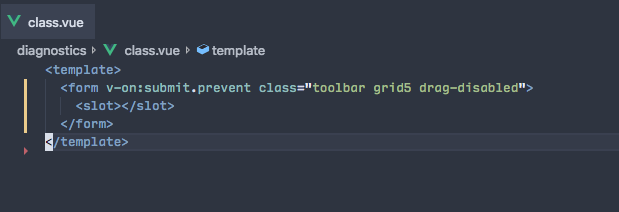
octref
on 25 Apr 2019
I'm sorry, I still get the same errors with 0.19.1. here's a screenshot.
the error messages eg "cannot find name 'emplate' seems weird...

kinesias
on 25 Apr 2019
I'm getting these errors on every .vue file

Argument of type '{}' is not assignable to parameter of type 'new (...args: any[]) => any'.
  Type '{}' provides no match for the signature 'new (...args: any[]): any'.
 skydiver
on 25 Apr 2019
skydiver
on 25 Apr 2019
@kinesias https://stackoverflow.com/help/mcve. https://github.com/octref/veturpack
Also once you found a minimal repro case, use the command "Vetur: Show corresponding virtual file and sourcemap" to get the info, and put them here too, thanks.
@skydiver You don't have Vue typing installed probably. yarn add vue.
octref
on 25 Apr 2019
I am having this issue as well with 0.19.1.
I am getting all kinds of errors in the problems tab of VS code, including the Argument of type '{}' is not assignable to parameter of type message mentioned above.
 joshtaylor0404
on 25 Apr 2019
joshtaylor0404
on 25 Apr 2019
A new Vue file with only the bare minimal tag:

Argument of type '{}' is not assignable to parameter of type 'new (...args: any[]) => any'.
  Type '{}' provides no match for the signature 'new (...args: any[]): any'.Vetur(2345)

Also getting these errors in older existing Vue files:
An object literal cannot have multiple properties with the same name in strict mode.Vetur(1117)
An object literal cannot have multiple properties with the same name in strict mode.Vetur(1117)
An object literal cannot have multiple properties with the same name in strict mode.Vetur(1117)
Expected 2 arguments, but got 5.Vetur(2554)
Expected 3 arguments, but got 2.Vetur(2554)
The left-hand side of an arithmetic operation must be of type 'any', 'number', 'bigint' or an enum type.Vetur(2362)
I understand you need more info to determine a fix, however, it seems that quite a few people are having issues so I would consider this a confirmed bug.
Thanks for you work on Vetur, it's an amazing extension! :)
 cyrrill
on 25 Apr 2019
cyrrill
on 25 Apr 2019
Same issue here

{
    "resource": "/c:/Users/Ken/Desktop/vue-demo/src/pages/stocks/index.vue",
    "owner": "_generated_diagnostic_collection_name_#1",
    "code": "2345",
    "severity": 8,
    "message": "Argument of type '{}' is not assignable to parameter of type 'new (...args: any[]) => any'.\n  Type '{}' provides no match for the signature 'new (...args: any[]): any'.",
    "source": "Vetur",
    "startLineNumber": 1,
    "startColumn": 1,
    "endLineNumber": 1,
    "endColumn": 1
}
 kenberkeley
on 25 Apr 2019
kenberkeley
on 25 Apr 2019
my workaround was to disable this option:
"vetur.experimental.templateInterpolationService": false
so, it must be related to that feature
skydiver
on 25 Apr 2019
Hi @octref , here is the virtual file you asked for:
(*only edit: hidden local path names for project privacy)
====================
Virtual content of /home/username/***/components/input/AddressInput.vue.template
Hover, semantic diagnostics, jump to definition and find references are run on this file.
====================

import __Component from "./AddressInput.vue";
import { __vlsRenderHelper, __vlsComponentHelper, __vlsIterationHelper, __vlsListenerHelper } from "vue-editor-bridge";
__vlsRenderHelper(__Component, function () {
    "\n    ";
    __vlsComponentHelper("div", { props: {}, on: {}, directives: [] }, ["\n\n    "]);
    "\n           \n\n        \n                \n\n \n         \n\n              \n\n        ";
});


====================
SourceMap
from: /home/username/***/components/input/AddressInput.vue
to  : /home/username/***/components/input/AddressInput.vue.template
[VueFileStart, VueFileEnd, VueFileText] => [TSVirtualFileStart, TSVirtualFileEnd, TSVirtualFileText]
====================
p.s.
In reference to your comment: "You don't have Vue typing installed probably" , this is a project I've been working on for over a month, and Vetur just started acting up today.
cyrrill
on 25 Apr 2019
Interesting note:
If I start with an empty file, and add
Got same issue this morning with:
- Mac OS v10.14.4
- VSCode v1.33.1
- Vetur v0.19.1
skydiver's solution works for me.
Thanks.
 ntnyq
on 25 Apr 2019
ntnyq
on 25 Apr 2019
my main app.vue doesn't need it. but adding lang="html" to my components fixes the issue for me as well. Thanks!
 lain-d
on 25 Apr 2019
lain-d
on 25 Apr 2019
After updating from 0.19.0 to 0.19.1, I got the error:
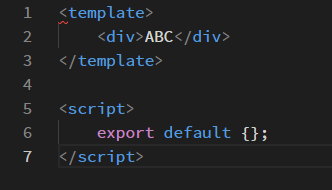
error message:
Argument of type '{}' is not assignable to parameter of type 'new (...args: any[]) => any'.
Type '{}' provides no match for the signature 'new (...args: any[]): any'.Vetur(2345)
They happened in every .vue files
 MarkSky
on 25 Apr 2019
MarkSky
on 25 Apr 2019
v0.19.1


 lincenying
on 25 Apr 2019
lincenying
on 25 Apr 2019
Interesting note:
If I start with an empty file, and add
I just rolled back to 0.18.1 and everything works perfectly again for me. 0.19.1 doesn't seem to be stable at the moment...
 peps
on 25 Apr 2019
peps
on 25 Apr 2019
19.1
[Error - 上午10:33:02] Request textDocument/definition failed.
  Message: Request textDocument/definition failed with message: Cannot read property 'Symbol(Symbol.iterator)' of undefined
  Code: -32603
 zhangenming
on 25 Apr 2019
zhangenming
on 25 Apr 2019

I also met
 yinxulai
on 25 Apr 2019
yinxulai
on 25 Apr 2019
Same issues here guys. Had to roll back to 0.18.1 and everything is back to working.
 bbbford
on 25 Apr 2019
bbbford
on 25 Apr 2019
i hava same problem in vetur 0.19.0, and vscode 1.33.1 。
when i set "vetur.validation.template": false , all good。

 Gyufei
on 25 Apr 2019
Gyufei
on 25 Apr 2019
The PR in #1222 doesn't fix @yinxulai https://github.com/vuejs/vetur/issues/1237#issuecomment-486497996 case
 chanlito
on 25 Apr 2019
chanlito
on 25 Apr 2019
I have the same: <templates> : An object literal cannot have multiple properties with the same name in strict mode.Vetur(1117)
 larsmars
on 25 Apr 2019
larsmars
on 25 Apr 2019
rolled back to 0.18.1
remove 0.19.1
download 0.18.1
https://marketplace.visualstudio.com/_apis/public/gallery/publishers/octref/vsextensions/vetur/0.18.1/vspackageinstall

lincenying
on 25 Apr 2019
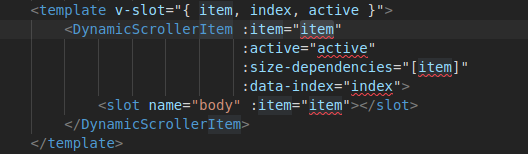
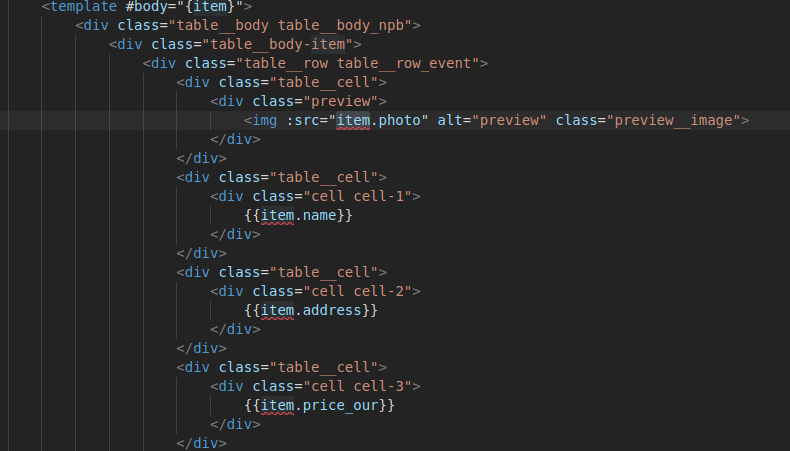
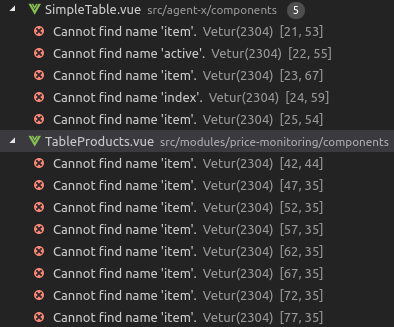
VSCode v1.33.1
Vetur v0.19.1
 vadimjoy
on 25 Apr 2019
vadimjoy
on 25 Apr 2019
@vadimjoy That's not related to this issue. -> #1203
 ktsn
on 25 Apr 2019
ktsn
on 25 Apr 2019
in the documentation is the solution:
https://vuejs.github.io/vetur/interpolation.html#generic-language-features
 diegootayza
on 25 Apr 2019
diegootayza
on 25 Apr 2019
I found the following cases generate number of weird errors in template (at Vetur 0.19.1):
- Using template literal (
:value="`foo: ${foo}`") -> #1230, #1244 - Using string literal for some object literal property name (
:class="{ 'literal-class': true }")
I'm fixing these cases now.
If there are other case which causes this kind of issue, please comment it with reproducible .vue file. Thanks for your cooperation!
ktsn
on 25 Apr 2019
The same problem in vetur 0.19.1

 LuvTian
on 25 Apr 2019
LuvTian
on 25 Apr 2019
Got the same issue with v0.19.1. File .... is not a module. If I add <template lang="html"> then all is ok, but this is not a good fix, because I need to modify all my files and in all my projects. Hope will be fixed soon.
 dodanex
on 25 Apr 2019
dodanex
on 25 Apr 2019
Same issue with 0.19.1. :(
 karl93rus
on 25 Apr 2019
karl93rus
on 25 Apr 2019
Same problem
 basilky
on 25 Apr 2019
basilky
on 25 Apr 2019
Hey Peeps,
I had the same issue as well.
I think for the moment we can switch to the version 0.18.1 of Vetur.
Do not forget to disable the plugins automatic update on VSCode.
It could be a temporary solution until version 0.19.1 is fixed.
 timo-jj
on 25 Apr 2019
timo-jj
on 25 Apr 2019
Same on Windows with vscode and Vetur. I downgraded but had to disable auto update for extensions because it just updated again the next restart... Hopefully it's fixed soon and can return to standard settings. I can confirm 0.18.1 works fine but update breaks.
 godarren
on 25 Apr 2019
godarren
on 25 Apr 2019
Hi all,
Earlier I mentioned that <template lang="html"> would sort the issue, that is so. However, I only mentioned that as a debugging clue for the maintainers. It was not meant to be a solution, and I personally have not done so in my code.
It is not a good idea to go and "pollute" all your code with unnecessary markup just to palliate this bug.
Additionally, it is not necessary to downgrade, or much less to disable auto-update in Code, that can cause other issues.
The best way to deal with this while the maintainers of the extension fix this, as noted by @skydiver, is to simply disable the experimental feature which got added in the latest release, by going into:
File > Preferences > (search for "vetur"), and then disable this checkbox:

@octref @ktsn in the future please do not enable "experimental" features by default. It's ok to ship it so we can test it, but ship it in an optional and disabled manner so that untested code doesn't wreak havoc as seen here.
Thanks!
cyrrill
on 25 Apr 2019
Please stop misleading people by saying adding lang="html" fixes the problem.
If you have read the docs you would find there's a setting to turn this off:

You can also use vetur.validation.template false to disable all template validation.
octref
on 25 Apr 2019
@octref No one is purposely misleading anyone. However, you do seem to have an accusative tone which is unproductive.
Instead of releasing broken software and expecting people to dig through the docs of an obscure extension in their IDE (who reads that?!), better test what you code, and if you decide to release "experimental" features, don't turn them on by default and expect everyone to figure out why it's broken.
cyrrill
on 25 Apr 2019
@cyrrill, I understand your frustration. I'm not a Vetur contributor, BUT keep in mind this is open source software. And the contributors have provided superb work that makes all of our lives easier, but bugs do happen especially when making significant changes to the foundation of an extension such as this one. Open source projects do not have infinite resources to test every permeation of every project and development environment. This is the price will all pay for fast release cycles and responsive releases and free software. In the end these features will eventually make our lives easier and more productive.
 outofmemoryagain
on 25 Apr 2019
outofmemoryagain
on 25 Apr 2019
Note to others, unchecking vetur.experimental.templateInterpolationService did not have an immediate effect. A restart of vscode after turning it off fixes all issues described above.
 alexcroox
on 25 Apr 2019
alexcroox
on 25 Apr 2019
@outofmemoryagain , I totally get that, my response comes to the developer's attitude, not the product. Besides, octref is not a random starving opensource developer, he's at Microsoft, where professionalism would be expected.
If you read:
https://github.com/vuejs/vetur/issues/1237#issuecomment-486460904
https://github.com/vuejs/vetur/issues/1237#issuecomment-486726769
You'll notice a dismissive and harsh tone, which is not productive at all in collaborative projects.
Anyways, this is veering way off-topic. It's clear what the bug is, and a solution is probably soon to come.
cyrrill
on 25 Apr 2019


rollback version to 0.18.1 but, when i reload my vscode, this package is updated. 😰
 tiagodurante
on 26 Apr 2019
tiagodurante
on 26 Apr 2019
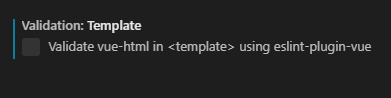
Change vetur settings
Uncheck the following
Validation: Template
Validate vue-html in using eslint-plugin-vue
 zhangkun95
on 26 Apr 2019
zhangkun95
on 26 Apr 2019
@zhangkun95 you will lose all of eslint-plugin-vue goodies, the solution is already mentioned above.
chanlito
on 26 Apr 2019
@ zhangkun95你将失去所有的eslint-plugin-vue好东西,上面已经提到了解决方案。
thank you for your reply
zhangkun95
on 26 Apr 2019
No one is purposely misleading anyone. However, you do seem to have an accusative tone which is unproductive.
I'm accusative because adding lang="html":
- Requires users to change their code (which they shouldn't, it's a Vetur bug)
- Disables all other Vetur feature for template region
I don't want to solve new issues that says "hey why emmet doesn't work in my region".
Instead of releasing broken software and expecting people to dig through the docs of an obscure extension in their IDE (who reads that?!)
Opening issue asks you to tick this box.

if you decide to release "experimental" features, don't turn them on by default and expect everyone to figure out why it's broken.
Then no one will find it and use it. You just said "no one would dig through the docs of an obscure extension in their IDE".
Once this feature matures it'll be a major differentiator for Vue over React (which relies on TypeScript for language features) or Angular (whose AOT is what many people want for their TS projects, but its language features aren't working well today). So I'd like to turn it on, iterate and improve. If you don't like it, there are multiple ways to opt-out.
Besides, octref is not a random starving opensource developer, he's at Microsoft, where professionalism would be expected.

If you aren't giving a repro and yelling at me "EVERYTHING IS BROKEN", there's nothing I can help so I'll be curt. I got limited time and hundreds of issues in my inbox. You should read https://nolanlawson.com/2017/03/05/what-it-feels-like-to-be-an-open-source-maintainer/ because that's how I feel.
In short:
- Yelling helps no one. Open non-duplicate issues with minimal reproducible case and I'll be able to help.
- I had to stop people from reading "oh adding
lang="htmlis the solution!" because clueless people might follow that and open even more invalid issues.
octref
on 26 Apr 2019
Open VsCode settings, search the key 'Auto Update' and uncheck it.
Search the extension Vetur, pick 'install another version'[0.18.1].
 GzhiYi
on 26 Apr 2019
GzhiYi
on 26 Apr 2019
The original issue is when attributes have - in it, Vetur compiles it to invalid TypeScript.
This should be fixed in 0.19.1. If you have new issues, open new issues.
octref
on 26 Apr 2019
No one is purposely misleading anyone. However, you do seem to have an accusative tone which is unproductive.
I'm accusative because adding
lang="html":
- Requires users to change their code (which they shouldn't, it's a Vetur bug)
- Disables all other Vetur feature for template region
I don't want to solve new issues that says "hey why emmet doesn't work in my region".
Instead of releasing broken software and expecting people to dig through the docs of an obscure extension in their IDE (who reads that?!)
Opening issue asks you to tick this box.
if you decide to release "experimental" features, don't turn them on by default and expect everyone to figure out why it's broken.
Then no one will find it and use it. You just said "no one would dig through the docs of an obscure extension in their IDE".
Once this feature matures it'll be a major differentiator for Vue over React (which relies on TypeScript for language features) or Angular (whose AOT is what many people want for their TS projects, but its language features aren't working well today). So I'd like to turn it on, iterate and improve. If you don't like it, there are multiple ways to opt-out.
Besides, octref is not a random starving opensource developer, he's at Microsoft, where professionalism would be expected.
If you aren't giving a repro and yelling at me "EVERYTHING IS BROKEN", there's nothing I can help so I'll be curt. I got limited time and hundreds of issues in my inbox. You should read https://nolanlawson.com/2017/03/05/what-it-feels-like-to-be-an-open-source-maintainer/ because that's how I feel.
In short:
- Yelling helps no one. Open non-duplicate issues with minimal reproducible case and I'll be able to help.
- I had to stop people from reading "oh adding
lang="htmlis the solution!" because clueless people might follow that and open even more invalid issues.
@octref The Vue community appreciates all the hard work you have done maintaining this plugin. It's the one we all use for Vue. No one is impervious to bugs or stress. The plugin speaks for itself of the level of professionalism you have and hope no one else doubts your integrity.
 fernandoagarcia
on 26 Apr 2019
fernandoagarcia
on 26 Apr 2019
Yelling helps no one.
Says the super polite guy who responds to a bug report:

I'm accusative because adding lang="html":
No has ever suggested to use lang="html", it was only mentioned as a debugging clue, the post immediately preceding your mentions this explicitly:

I don't see the point in saying people are "misleading", that's a strong term which implies dishonesty.
mislead: verb ˌmis-ˈlēd: to lead in a wrong direction or into a mistaken action or belief often by deliberate deceit
You can be busy, intelligent, and accomplished; it doesn't entitle you to be rude or accusative. You call it curt, I call that being a dick.
cyrrill
on 26 Apr 2019
@cyrrill Stop taking conversations out of their context, please? That was in response to @kinesias's comment, not to the OP.

I don't see the point in saying people are "misleading", that's a strong term which implies dishonesty.
I'm not aware of that implication. Maybe it's because I'm not a native speaker. I only meant "please don't lead people to wrong solution", in the spirit of not increasing invalid bugs reports. I was already getting 20+ issues and I didn't want more invalid ones.
I didn't imply dishonesty from you. If that's how you interpreted it, sorry. I could have used some words like "That's not the right solution", but I had many people coming into these issues and I had to stop them from following the wrong advice.
octref
on 26 Apr 2019
@octref, the context is quite clear for anyone reading the thread.
No one gets 40 :-1: on their comment without merit, so please don't pretend like you're so innocent and oblivious to your crassness.
You can write the most amazing software, but if you treat people dismissively and rudely, nothing has been gained.
The basic point here is: treat people with respect, and your life as a maintainer (and in general) will be much easier.
.
cyrrill
on 26 Apr 2019
I treat @colinbes's bug report with respect.
@kinesias's first response is:
- Not related to original issue
- Doesn't contain repro case
- Has all caps yelling
- Adds nothing to OP's bug report and dilutes content
So I was being curt. Imagine you are a doctor in the middle of diagnosing a patient and another patient blazing in yelling to you "I have problems too!", what would you do? I'd get him out of my office and send him to front desk to make an proper appointment for diagnosis. I don't think this is disrespect.
I did follow up with this, when he tries to create a repro case.
The basic point here is: treat people with respect, and your life as a maintainer (and in general) will be much easier.
I treat all issues this way:
- Have repro? Fix
- No repro? Ask for repro
- Still no repro? Close or ignore
You can read https://nolanlawson.com/2017/03/05/what-it-feels-like-to-be-an-open-source-maintainer/ to learn more about what the real life of a maintainer is like. Before you start to have 200 notifications in your GitHub inbox, please don't try to lecture to others how to be a maintainer.
octref
on 26 Apr 2019
Locking since neither me nor any more commenters add anything meaningful to the original issue, which has been fixed and released in 0.19.1.
If you have issues open new issues with valid reproducible case.
octref
on 26 Apr 2019
Related issues
 pdanpdan
·
3Comments
pdanpdan
·
3Comments
 thibautguedou3
·
3Comments
thibautguedou3
·
3Comments
 13029852933
·
3Comments
13029852933
·
3Comments
 LukeLin
·
3Comments
LukeLin
·
3Comments
 muhajirdev
·
3Comments
muhajirdev
·
3Comments
Most helpful comment
my workaround was to disable this option:
"vetur.experimental.templateInterpolationService": falseso, it must be related to that feature