Vetur: Template literal strings within the SFC template section show error "cannot find name tem*insert various characters here*. Vetur (2304)".
Info
- Platform: macOS
- Vetur version: 0.19.0
- VS Code version: 1.33.1
Problem
Template literal strings within the SFC template section show error "cannot find name teminsert various characters here. Vetur (2304)".
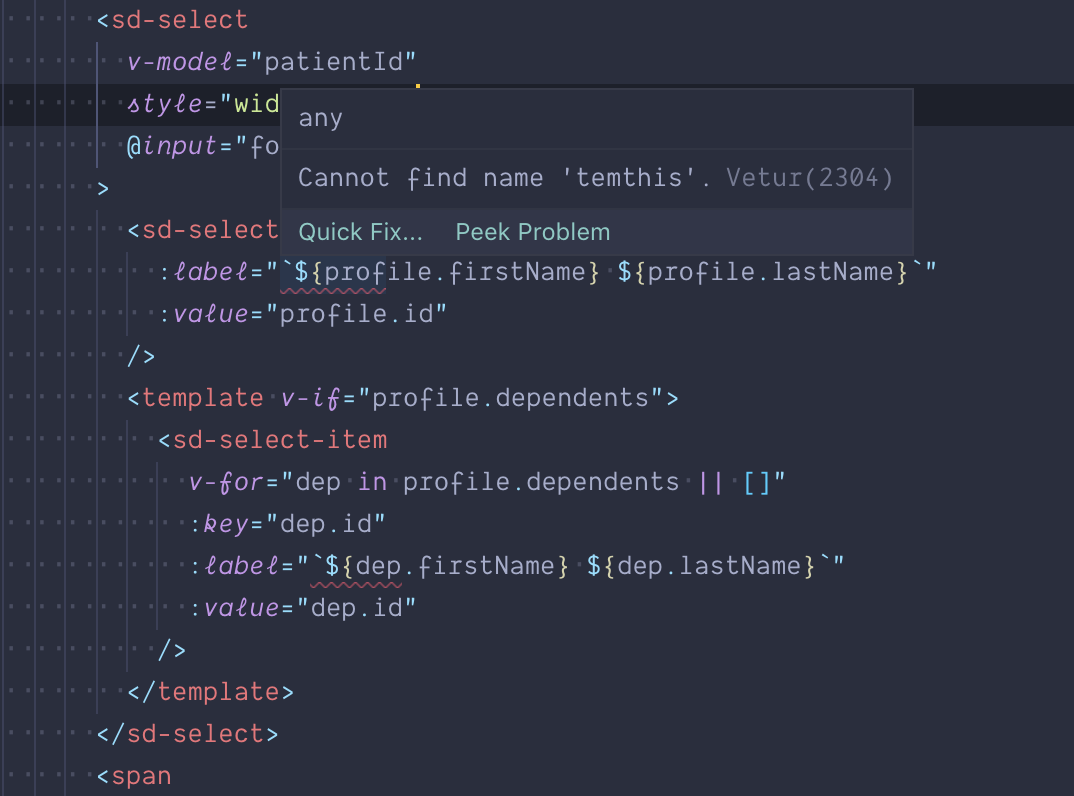
Reproducible Case
- Pull down https://github.com/dombavetta/vetur-template-interpolation-issues
- Lines 12 and 19 will present errors. https://github.com/dombavetta/vetur-template-interpolation-issues/blob/master/pages/test.vue
 dombavetta
>All comments
Thanks for opening this issue!
Here is simplified repro.
<template>
  <div :title="`${test}`" />
</template>

<script lang="ts">
import Vue from 'vue'

export default Vue.extend({
  data() {
    return {
      test: 'hi'
    }
  }
})
</script>
 ktsn
on 25 Apr 2019
ktsn
on 25 Apr 2019
👍2
Was this page helpful?
0 / 5 - 0 ratings
Related issues
 KokoDoko
·
3Comments
KokoDoko
·
3Comments
 sacki5
·
3Comments
sacki5
·
3Comments
 thibautguedou3
·
3Comments
thibautguedou3
·
3Comments
 muhajirdev
·
3Comments
muhajirdev
·
3Comments
 tczhangzhi
·
3Comments
tczhangzhi
·
3Comments
Most helpful comment
Thanks for opening this issue!
Here is simplified repro.