Vetur: Vetur fail to start => vOnExp.body.map is not a function
Info
- Platform: Win
- Vetur version: 0.19.0
- VS Code version: 1.33.1
Problem
Vetur fail to start. Output: https://justpaste.it/6n1ik
Reproducible Case
 ondrej-janosik
All 10 comments
@ondrej-janosik Thanks for reporting this issue. Could you provide minimal reproduction which generate this error by cloning and editing https://github.com/octref/veturpack?
 ktsn
on 24 Apr 2019
ktsn
on 24 Apr 2019
Unfortunately, I can not. We found this bug in one pretty big project that I can not share with you. Can you help me where to look? I can send you just the broken .vue file. But I dont know how to find that one.
ondrej-janosik
on 24 Apr 2019
No worries. I just figured out the cause.
If we have an arrow function in some v-on value, this error happens.
<template>
  <button @click="() => test = 123">click</button>
</template>
This started happening in my project as of yesterday. I stopped getting syntax highlighting for the script and style sections of one of my vue files. I lose all language support for the rest of my vue files too, syntax highlighting seems to be intact in all other vue files though.
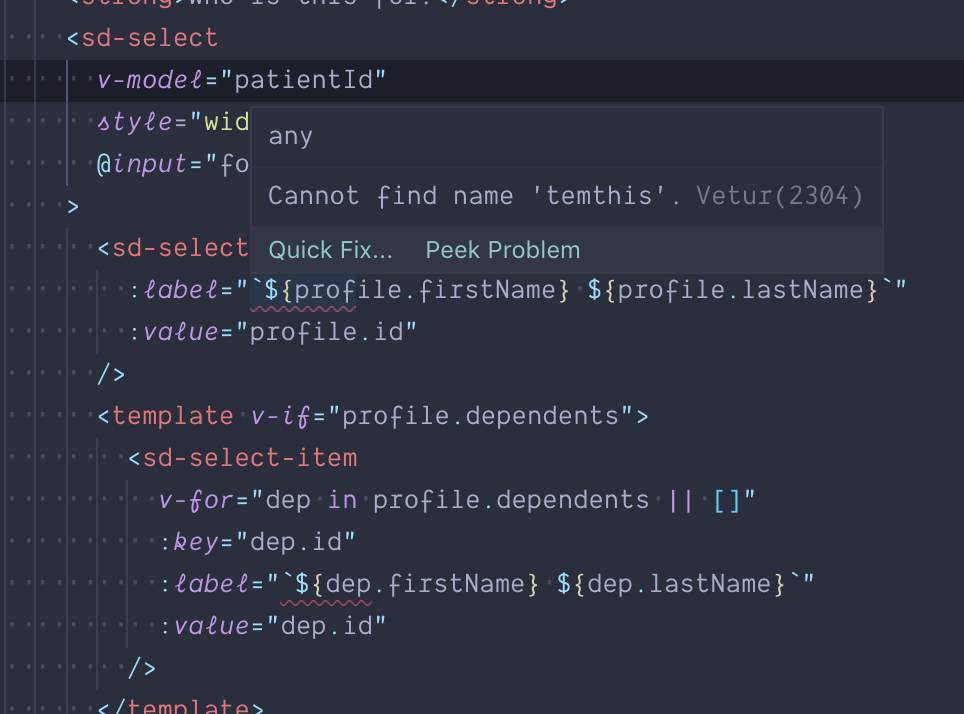
Edit: removing all arrow functions from the template stopped the language server from crashing but the syntax highlighting is still broken. I also get a strange error when trying to use format strings within the template. "Cannot find name 'temthis'." for each instance. Note: I just removed and reinstalled vetur which is when this started happening.
 dombavetta
on 24 Apr 2019
dombavetta
on 24 Apr 2019
@dombavetta Syntax highlighting issue is probably a separated problem. Could you create a new issue for that with reproduction?
ktsn
on 24 Apr 2019
Made a PR #1228
ktsn
on 24 Apr 2019
@ktsn Yeah I figured, I actually was just looking through the issues for users experiencing something similar and it appears theres already an issue created. I will try and get a reproducible project up but no promises, this comes from a very large project at work so I will try to strip out what I can and see if the issue is still present.
1211
dombavetta
on 24 Apr 2019
@dombavetta Thank you for your help!
ktsn
on 24 Apr 2019
@dombavetta
"Cannot find name 'temthis'."
Oh, I missed this problem. This would be also individual problem. It would be appreciated if you create an issue for that also 🙏
ktsn
on 24 Apr 2019
Thanks for such a quick help! You were right. When I delete all arrow functions in v-on, VETUR works as expected
ondrej-janosik
on 25 Apr 2019
Related issues
 pdanpdan
·
3Comments
pdanpdan
·
3Comments
 Dealerpriest
·
3Comments
Dealerpriest
·
3Comments
 KokoDoko
·
3Comments
KokoDoko
·
3Comments
 LawrenceQxy
·
3Comments
LawrenceQxy
·
3Comments
 deangoku
·
3Comments
deangoku
·
3Comments
Most helpful comment
No worries. I just figured out the cause.
If we have an arrow function in some
v-onvalue, this error happens.