Vetur: Syntax highlighting is broken since yesterday
Hello, I don't know if it's related to one of the recent updates but syntax highlighting is broken since yesterday. I am using pug.

Here is the code if you want to try it out by yourself
<template lang="pug">
div(
  @mouseenter="showTooltip = true"
  @mouseleave="showTooltip = false"
  :class=`[
    "c-conversation-box-content-message-bubble",
    "c-conversation-box-content-message-bubble--" + from,
    "c-conversation-box-content-message-bubble--" + type
  ]`
)
</template>
 LeCoupa
All 6 comments
Before the yesterday update 0.15.0 there was no syntax highlighting for vue in pug.
Now the content between the " " gets highlighted in javascript.
Because in your code you are using the multiline string with the `` the js can't be highlighted correctly.
For a workaround, please put it in one line:
div(
  @mouseenter="console.log(true)"
  @mouseleave="console.log(false)"
  :class="['c-conversation-box-content-message-bubble', 'c-conversation-box-content-message-bubble--' + 'x', 'c-conversation-box-content-message-bubble--' + 'y']"
)
 p-kuen
on 8 Feb 2019
p-kuen
on 8 Feb 2019
Thank you for your answer. That's strange, it was highlighted perfectly last week. I am not a fan of the one-line syntax. It makes things harder to read.
LeCoupa
on 8 Feb 2019
I can confirm this is happening. Pug syntax highlighting works well with v0.14.5 but with v0.15.0 is broken.
v0.14.5:
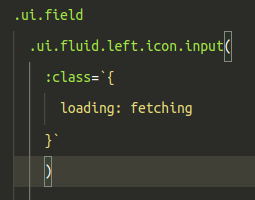
v0.15.0:

This bug causes all the code inside a Vue component to be wrongly colored. Even the <script> tags after it:
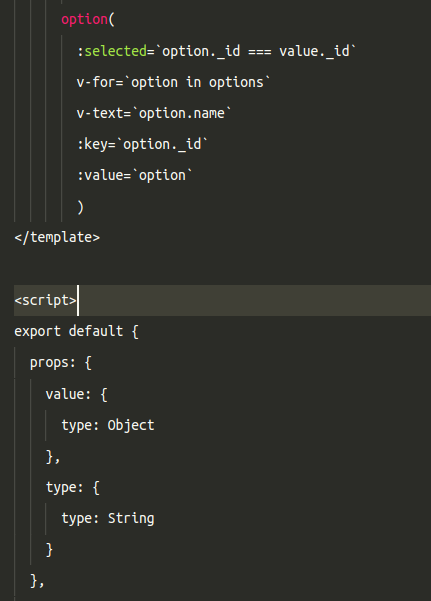
It might be related to the last VSCode update and maybe some change to the Pug syntax highlighter.
 stgogm
on 8 Feb 2019
stgogm
on 8 Feb 2019
I already created a pull request to fix that problem with multi line strings.. (should be happening with vue-html too)
The thing is, that with the 0.14.5 version there was no real syntax highlighting for vue in pug. (every statement is colored like a string), with 0.15.0 the code inside vue directives (e.g. v-if, :class) and vue-interpolations ({{ }}) is syntax highlighted in javascript.
Anyway with the latest commit in my pull request multi line strings created with the ` character should be formatted right. Until then just use one-liners and mind the ` char
p-kuen
on 8 Feb 2019
This is fixed, thanks to the PR from @Patcher56. I'll publish a version later today.
 octref
on 13 Feb 2019
octref
on 13 Feb 2019
Published the change in 0.15.1.
octref
on 14 Feb 2019
Related issues
 ghost
·
3Comments
ghost
·
3Comments
 tczhangzhi
·
3Comments
tczhangzhi
·
3Comments
 LukeLin
·
3Comments
LukeLin
·
3Comments
 muhajirdev
·
3Comments
muhajirdev
·
3Comments
 Dealerpriest
·
3Comments
Dealerpriest
·
3Comments
Most helpful comment
I already created a pull request to fix that problem with multi line strings.. (should be happening with vue-html too)
The thing is, that with the 0.14.5 version there was no real syntax highlighting for vue in pug. (every statement is colored like a string), with 0.15.0 the code inside vue directives (e.g. v-if, :class) and vue-interpolations ({{ }}) is syntax highlighted in javascript.
Anyway with the latest commit in my pull request multi line strings created with the ` character should be formatted right. Until then just use one-liners and mind the ` char