Info
- Platform: macOS 10.14.1 (18B45d)
- Vetur version: 0.14.5 from Marketplace
- VS Code version: 1.31.0-insider
{
  ...
  "files.watcherExclude": {
    "**/node_modules": true,
    "**/platforms": true,
    "**/plugins": true
  },
  ...
  "vetur.format.defaultFormatter.html": "none",
  "vetur.format.defaultFormatter.js": "vscode-typescript",
  "vetur.format.defaultFormatterOptions": {
    "prettier": {
      "singleQuote": true,
      "trailingComma": "all"
    }
  },
  "vetur.format.scriptInitialIndent": true,
  "vetur.format.styleInitialIndent": true
  ...
}
Problem

Reproducible Case
 qkdreyer
All 68 comments
The Vetur extension is making VS Code nearly unusable for me.
 mvolkmann
on 7 Feb 2019
mvolkmann
on 7 Feb 2019
Using the latest version of vetur and vscode (not insiders version)
Everything works fine here. (windows)

checking on ubuntu tomorrow
 p-kuen
on 7 Feb 2019
p-kuen
on 7 Feb 2019
Running VS Code with Vetur is now a sure-fire way to get my laptop fans spinning non-stop. Something must have changed in the past couple of weeks to trigger this. If I disable Vetur, my CPU usage goes back to normal.
mvolkmann
on 8 Feb 2019
The VS Code Process Explorer shows that "electron_node vueServerMain.js" is consuming 100% CPU!
This happens in both the regular VS Code release and the Insiders build.
mvolkmann
on 10 Feb 2019
BTW, I'm running it on a Mac. I really hope this can get some attention soon. I love using VS Code, but it's completely unusable as soon as I install Vetur and open a .vue file.
mvolkmann
on 10 Feb 2019
I have same issue.
Intelisense works slow in .vue file, and works fine in .ts.
- VSCode 1.31.1, Win7 x64
- Vetur 0.15.1
- TypeScript 3.3.3
The project is not very lagre (~ 450 files).
tsconfig.json has:
{
    "compilerOptions": {
        "baseUrl": ".",
        "paths": {
            "@/*": ["src/*"]
        },
    },
    "include": [
        "src/**/*.ts",
        "src/**/*.tsx",
        "src/**/*.vue",
        "tests/**/*.ts",
        "tests/**/*.tsx"
    ],
}
But if I remove baseUrl everything works fine.
 a-bondarenko
on 14 Feb 2019
a-bondarenko
on 14 Feb 2019
I'm not using TypeScript, so I think the issue goes beyond that.
Could this be a Mac-specific issue? Is anyone seeing this on Windows?
I know there are lots of people that use VS Code on a Mac to edit Vue projects. It's hard to believe this isn't affecting a lot of people now. Really serious!
mvolkmann
on 14 Feb 2019
@mvolkmann Does this happen for https://github.com/octref/veturpack or only large projects?
 octref
on 14 Feb 2019
octref
on 14 Feb 2019
Interesting. I can't reproduce the problem if I clone the veturpack repo, quit out of VS Code, start it again, only open the veturpack project, and open a bunch of .vue files inside it. But if I do the same with my project, the CPU usage jumps quickly after just opening a single .vue file. My project only contains about 25 source files. So I need to figure out what it is about my project that could trigger this behavior. I'm open to suggestions for what to try.
mvolkmann
on 14 Feb 2019
The "Process Explorer" in VS Code shows that "electron_node vueServerMain.js is consuming 100% of a CPU.
mvolkmann
on 14 Feb 2019
@mvolkmann Try this one https://github.com/vuejs/vetur/issues/1054, upgrade your TS version in ~/.vscode/extensions/octref.vetur.../server.
We are still using TS 2.8, I'm working on allowing workspace version of TS: https://github.com/vuejs/vetur/issues/682.
The TypeScript Language Server (which powers the smart editing features for TS, and which Vetur builds upon) shipped with 2.8 probably received numerous fixes since then, so try a more recent version.
octref
on 14 Feb 2019
I'm looking at ~/.vscode/extensions/octref.vetur-0.15.0/server/package.json and I see this:
"typescript": "2.8.4",
Are you suggesting that I should change that version and run "npm install" in that directory?
If so, what version should I try? It looks like 2.9.2 is the newest version below version 3.
mvolkmann
on 14 Feb 2019
Yeah, try a few different versions, for example yarn add [email protected] or yarn add [email protected]. If this fixes the issue for you #682 would likely solve your problem.
octref
on 14 Feb 2019
I tried typescript 2.9.2 and 3.3.1. In both cases I can start VS Code from scratch, open a Vue project, open a single .vue file, and see the CPU usage spike. If I open another kind of file like a .md or .js file and have no .vue files open, the CPU usage does not spike. So it definitely seems related to processing of .vue files.
mvolkmann
on 14 Feb 2019
Do you have a github link or somewhat to your .vue files for reproducing?
p-kuen
on 15 Feb 2019
I created this: https://github.com/mvolkmann/vetur-cpu-issue. All I did was use the latest version of the Vue CLI to create a new application. I didn't modify any of the code.
All I need to do to trigger a CPU spike is open this project directory in VS Code, open src/App.vue, and enable Vetur. If Vetur is not enabled, I do not get a CPU spike.
mvolkmann
on 15 Feb 2019
Hmm. Everything is fine for me if I'm opening App.vue with activated Vetur extension.

p-kuen
on 16 Feb 2019
Do you suppose I could have some VS Code setting that is causing the problem? Maybe something related to TypeScript? I don't currently have TypeScript installed globally.
mvolkmann
on 16 Feb 2019
Can you tell us which extensions are installed and show us your settings.json. Maybe this can help us.
p-kuen
on 16 Feb 2019
Thanks so much for taking a look at this!
The extensions I have installed are:
- Auto Close Tag
- Bracket Pair Colorizer
- Code Spell Checker
- ESLint
- GitLens
- Go
- LintLens
- markdownlint
- Prettier
- PrintCode
- Settings Cycler
- Sort Lines
- TODO Highlight
- Version Lens
- Vetur
- Vim
- vscode-go-to-file
- vscode-icons
A zipped version of my settings.json is attached.
settings.json.zip
mvolkmann
on 16 Feb 2019
Oh, you've got lots of extensions and lots of settings. Try to deactivate all extensions and clear your settings.json (make a backup before) and try again. If the cpu-usage got better, try to re-activate one by one your extension.
Tell us your results here afterwords please!
p-kuen
on 17 Feb 2019
Some initial results ... Disabling all extensions except Vetur and restarting VS Code did not fix the problem. The CPU usage is still high. Now I'll try removing all my custom settings.
mvolkmann
on 17 Feb 2019
My settings.json file now contains just { }.
Vetur is the only extension that is enabled.
I restarted VS Code, opened the local copy of my project at https://github.com/mvolkmann/vetur-cpu-issue, and still see the issue.
See the attached screenshot that shows the extensions enabled, my settings, and the CPU usage of vueServerMain.js.

mvolkmann
on 17 Feb 2019
I understand this is a tough issue to track down. It is possible this only affects a small number of users?
Every few days I decide to try using Vetur again and every time the CPU usage spikes and my cooling fans go crazy. I end up having to uninstall it again.
mvolkmann
on 26 Feb 2019
1126 may provide more info.
mvolkmann
on 1 Mar 2019
Same issue here on Linux. Vetur used to be slow, which is OK but now it's eating my CPU like crazy, even for a simple .vue file. Vetur version is 0.16.2, which apparently uses TS3.
EDIT: heck, the Vetur process even got stuck after closing VSCode. Had to kill it manually.
EDIT2: happens in Code Insiders, too, with only Vetur installed as an extension. :sob:
Have to switch to this until it's fixed.
 gombosg
on 4 Mar 2019
gombosg
on 4 Mar 2019
I'm pretty sure this is not a vscode issue but an issue with this extension itself. It's agonizingly slow when I use Vetur with VIM + a LanguageServer plugin. Autocomplete lags behind while typing, dot completion takes forever, etc.
 jkehler
on 7 Mar 2019
jkehler
on 7 Mar 2019
Actually this issue is not directly slow performance issue. It is caused when you try to save file with improper tags (invalid html). vetur crashes and causes the extensions host to hang. Only way is to manually restart extensions host.
 mubaidr
on 7 Mar 2019
mubaidr
on 7 Mar 2019
I don’t believe this is only caused by saving files. I can reproduce the issue simply by installing Vetur and opening a single .vue file.
mvolkmann
on 7 Mar 2019
High CPU use disappeared in the latest version.
For reference, VSCode 1.32.3 (OSS build), Vetur 0.17.1
gombosg
on 26 Mar 2019
I don't think it is fixed. I just saw a Code process using 368% CPU using the latest versions of Code and Vetur!
mvolkmann
on 26 Mar 2019
Still not fixed even with TypeScript 3.3
 superheri
on 2 Apr 2019
superheri
on 2 Apr 2019
Same here, after opening a Vue project it immediately goes to >300% CPU.
 bramkoot
on 3 Apr 2019
bramkoot
on 3 Apr 2019
Same issue for me. Intelisense and Code Formating work very slow in .vue file, but works fine in .ts.
- VSCode 1.33.0, macOS 10.14.4
- Vetur 0.18.1
- TypeScript 3.3.3333
 NickeyLin
on 7 Apr 2019
NickeyLin
on 7 Apr 2019
I have the same issue unfortunately.
.vue files intellisence and formatting is so slow. Also error checking of extension is slow too.
I hope , it will be resolved soon.
 sabasayer
on 8 Apr 2019
sabasayer
on 8 Apr 2019
If @octref helps out with some instructions, I'm happy to help with debugging.
EDIT: now it seems to be better with VSCODE1.33/ TS3.4, but we better make this debugging happen.
gombosg
on 8 Apr 2019
Also on mac, was running into this issue as well and seemed to be specifically triggered after typing a non-standard tag (like component tag) in the .vue component template. Was able to stop this from happening by disabling the Auto Close Tag extension. For some reason Vetur and Auto Close Tag don't seem to play well together. Adding this in case it helps anyone track down bugs.
 jmhmd
on 11 Apr 2019
jmhmd
on 11 Apr 2019
I as well uninstalled auto close tag extension. Fixed all my problems but I do miss the autocomplete.
 ericcirone
on 11 Apr 2019
ericcirone
on 11 Apr 2019
I really wish the fix was this simple ... just uninstalling a different
extension. This didn't work for me. My CPU usage still went as high as
99.9%.
On Thu, Apr 11, 2019 at 11:25 AM ericcirone notifications@github.com
wrote:
I as well uninstalled auto close tag extension. Fixed all my problems but
I do miss the autocomplete.—
You are receiving this because you were mentioned.
Reply to this email directly, view it on GitHub
https://github.com/vuejs/vetur/issues/1051#issuecomment-482185903, or mute
the thread
https://github.com/notifications/unsubscribe-auth/AAE10B4a-BAGTXCfWdPxYyATizWwPwoYks5vf2HrgaJpZM4Z3HmX
.
--
R. Mark Volkmann
Object Computing, Inc.
mvolkmann
on 11 Apr 2019
@mvolkmann I'm wondering if using "vetur.validation.script": false make any difference for you. I'm looking into https://github.com/vuejs/vetur/pull/1141 and diagnostics (error checking) from TypeScript could be a source of huge cpu/memory consumption.
octref
on 11 Apr 2019
@mvolkmann Does this happen for https://github.com/octref/veturpack or only large projects?
only big projects
 dingcang
on 13 Apr 2019
dingcang
on 13 Apr 2019
@dingcang Does setting "vetur.validation.script": false make any difference?
octref
on 14 Apr 2019
@octref By disabling vetur.validation.script, Intelisense works fine for me.
 7c78
on 16 Apr 2019
7c78
on 16 Apr 2019
vetur.validation.script
work fine for me too. But also case the high CPU usage in second.
dingcang
on 16 Apr 2019
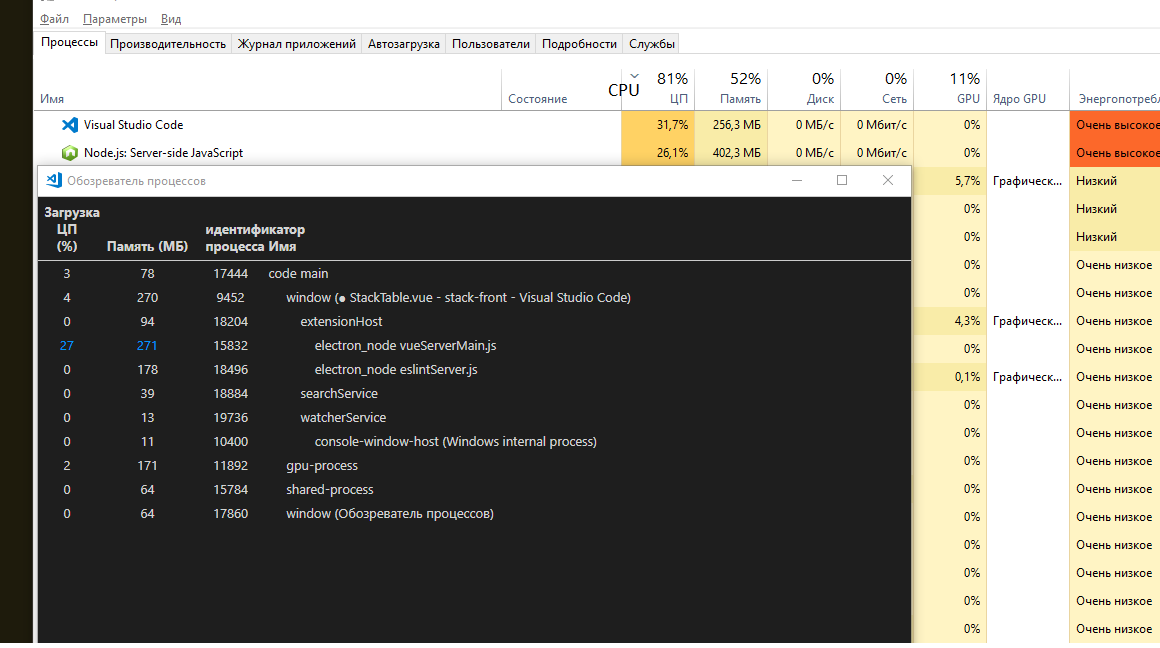
On my project CPU is burning too. (more then 1000 *.vue files, objectstyle typescript )
Аfter changes in the file everything slows down 5-15 seconds.
*.ts files is ok.
 buzzzzer
on 18 Apr 2019
buzzzzer
on 18 Apr 2019
We are also facing the same issues with high cpu usage and poor performance in Vetur. It is actually so slow that we cannot use the extension.
It is a pretty large project with a combination of ts files as well as vue files. The big performance problems started when upgrading to 0.18 of vetur
Did some profile of the extension and it looks like the extension is spending a lot of time in "string.replace".

According to the picture above, 16 seconds is spend in string.replace.
The above profile was triggered by writing and deleting a character in a vue file several times.
 petternordholm
on 26 Apr 2019
petternordholm
on 26 Apr 2019
A did some debugging and it looks like getSingleTypeDocument method is triggered for every vue file in our project for every single change / hover. The same files seems to be triggered several times (up to 6 times). Since we have around 400 files in our project, this causes a single change / hover to call this method 6*400 times = 2400 times
petternordholm
on 26 Apr 2019
I have the same problem.
win10
vscode 1.33.1
vetur 0.18.1
My project is a old and large vue project, contents large amount vue and js files.
When i'm coding or scrolling a large vue file, the VSCODE status is:

My solution is disable amost all catalogue in vscode jsconfig.json:

In the end, the problem was solved temporarily.
The CPU and memory usage goes down, but the vscode reaction speed is slow still
 wfzong
on 29 Apr 2019
wfzong
on 29 Apr 2019
@petternordholm Do you mind sending me a copy of the profile?
The perf problem might be caused by either https://github.com/vuejs/vetur/pull/1174, TypeScript, or Vetur's template interpolation support.
For those of you running into the problem, can you try if the perf problem still reproduces in the following scenarios? (Don't do 3 together. Do them one by one to find the factor.)
- Set
"vetur.experimental.templateInterpolationService": false. - Set
"vetur.useWorkspaceDependencies": true.yarn add [email protected]in your project root. Reload VS Code. Open.vuefile. Install 0.18.0:

octref
on 30 Apr 2019
Also here's a guide to profiling VLS: https://github.com/vuejs/vetur/blob/master/.github/PERF_ISSUE.md#profiling. It would help a lot if anyone else could attach their profile to this issue.
octref
on 1 May 2019
@octref Kudos for great work with the extension!!. Please find attached the profiling from 0.19.2
An easy way to improve performance is to use the following replace function instead, https://jsperf.com/optimized-replace/1 (in getSingleLanguageDocument & getSingleTypeDocument). According to jspref, it performs a lot faster than plain string replace. It should work with both windows and unix line endings.
We are currently using a locally patched version of vetur and the optimized replace makes the extension usable for us again.
Profiling with standard string.replace
CPU-vetur-0.19.2.cpuprofile.gz
And profiling with optimized replace:
CPU-vetur-0.19.2-optimized-replace.cpuprofile.gz
petternordholm
on 1 May 2019
Code completion without our optimization:

Code completion with our optimizations:

Since I am a total n00b when it comes to vscode, extensions and language server, my changes are probably breaking lots of things.
https://github.com/petternordholm/vetur/commit/4a55c28346b94ca4cdc72a505783fcb1b8bef540
What I dont really understand is why the language server is initialized with all .vue files in the project. With my change, only the currently edited file will be processed. Typescript itself will pull in all imports from the file and verify those as well.
petternordholm
on 1 May 2019
@petternordholm Nice work! I created https://github.com/vuejs/vetur/issues/1264. Do you want to send a PR to just fix that? This issue is too overloaded.
For files, I don't think you can do that. After checking with TS team, getScriptFileNames should be a list of file paths as expanded from jsconfig.json/tsconfig.json, using ts.parseJsonConfigFileContent. However, that function only looks for js/ts files, not .vue files. So we need to manually add it. Same for .vue.template files.
All accesses to those files are cached so it should be fine returning a large list.
However, does that files change yield any perceivable difference to you? (It did fail the integration tests)
One thing I realized is I might be returning files with duplicates, so I switched to using a Set. You can try it in https://github.com/vuejs/vetur/tree/scriptFileNames-perf, but I doubt there'd be a large difference of performance. Yesterday I was looking into https://github.com/vuejs/vetur/issues/784#issuecomment-488139211, and I found TSServer accesses a lot of files, same as VLS does 🤷♂
octref
on 1 May 2019
I fixed #1264 and will publish a new version to benefit others.
I added instructions for https://github.com/vuejs/vetur/blob/master/.github/PERF_ISSUE.md. If you still have perf issues with Vetur, please open new issues with profiles.
@petternordholm Thanks again for your help. One last question: Does your change in getScriptFileNames make any difference in performance for you?
octref
on 2 May 2019
@octref Great!! My change in getScriptFileNames makes a quite big difference. Discovered that excluding all files except for the vue file currently being edited broke "import auto completion" since typescript does not know anything about the other files in the project (except for the one being edited and its' dependencies).
So, in our current patched version I've added back all ts files but excluded test files since we never want to include those in vue files. Code completion is still fluent but I haven't compared to the latest version in master.
https://github.com/petternordholm/vetur/commit/e2048db9de4f2027557614e8411ecf4c1bea5335
I will rebase my "fork" to the latest and investigate this further during the weekend and get back to you!
BTW! There might be a bug in serviceHost.ts:getParsedConfig . The exclude defined in tsconfig.json will be overwritten by defaultIgnorePatterns
petternordholm
on 3 May 2019
If your current change does make things good for you, how about adding a exclude pattern like src/**/*.test.ts in your top level tsconfig?
I see where all this problems might come from...In https://vuejs.github.io/vetur/setup.html#project-setup I suggested using
  {
    "include": [
      "./src/**/*"
    ]
  }
Which I certainly shouldn't have done...
octref
on 3 May 2019
I think I have found a good fix. Can you try the VSIX linked here? https://github.com/vuejs/vetur/issues/1277#issuecomment-489456369
octref
on 5 May 2019
@octref I have same problem
- Platform: macOS 10.14.1
- Vetur version: 0.21.1
- VS Code version: 1.36.1
when I scroll up and down, the cpu usage would up tp 100%
uninstall vetur will be normal

here is the cpu profile
CPU-20190807T162515.cpuprofile.zip
 yaoguoli
on 7 Aug 2019
yaoguoli
on 7 Aug 2019
@yaoguoli Please open new issues instead of attaching to old ones that was fixed.
octref
on 7 Aug 2019
@octref Isn't better to re-open the issue (as it's the same), so people following it doesn't lose any update?
 sirikon
on 7 Aug 2019
sirikon
on 7 Aug 2019
@sirikon Not really, from the cpuprofile it's another perf issue. Opening new issues makes it easier for me to see which perf issues I fixed and which are not.
octref
on 7 Aug 2019
same issues, high cpu, can't lint js/ts in .vue file, it work just disable vetur
i can't find a solution to the problem
so i have replaced it with another plugin vscode-vue-snippets
at least it doesn't have the same problem
 lisonge
on 25 Feb 2020
lisonge
on 25 Feb 2020
@lisonge I rewritten the Vue TypeScript Language Service to solve the performance problem, combined with the syntax highlighting of the package you suggested (syntax highlighting is include now), and can now handle the work smoothly.
It is worth mentioning that it supports Pug, and built-in html to pug conversion tool.
 johnsoncodehk
on 2 May 2020
johnsoncodehk
on 2 May 2020
@johnsoncodehk
thanks
but i do nothing or maybe i upgrade vscode or something unknown
i still use vetur and my project in vscode is not higt cpu
lisonge
on 2 May 2020
I hit this problem too (MacOS 15.5.6, VS Code 1.48.2, Vetur 0.26.1). It appears there was something wrong with my settings.json/.eslintrc/.pretterrc/.editorconfig that was causing the problem.
I have installed Vetur using Vue Extension Pack (0.1.3). By changing the settings files to the values shown in the readme config section and restarting VS Code the high CPU usage problem disappeared.
 dgethings
on 3 Sep 2020
dgethings
on 3 Sep 2020
@dgethings I don't think those are related to Vetur. If you really find a perf bug, please turn off all other extensions and record a profile: https://github.com/vuejs/vetur/blob/master/.github/PERF_ISSUE.md
By a rough look I think it's the auto close/rename tags extensions being slow. Check their marketplace reviews.
octref
on 3 Sep 2020
Same issue on neovim 0.4.4 with latest coc-vetur......... takes forever to parse 670 lines vue file, and then even scrolling is slow as hell...
 Herz3h
on 2 Feb 2021
Herz3h
on 2 Feb 2021
Same issue on neovim 0.4.4 with latest coc-vetur......... takes forever to parse 670 lines vue file, and then even scrolling is slow as hell...
Please open a new issue.
 yoyo930021
on 2 Feb 2021
yoyo930021
on 2 Feb 2021
Related issues
octref
·
3Comments
 KokoDoko
·
3Comments
KokoDoko
·
3Comments
 shaunc
·
3Comments
shaunc
·
3Comments
 thibautguedou3
·
3Comments
thibautguedou3
·
3Comments
 Dealerpriest
·
3Comments
Dealerpriest
·
3Comments
Most helpful comment
The Vetur extension is making VS Code nearly unusable for me.