Vetur: There is no selection formatter for 'vue'-files installed.
Info
- Platform: Win 10
- Vetur version: 0.12.5
- VS Code version: 1.24.1
Problem
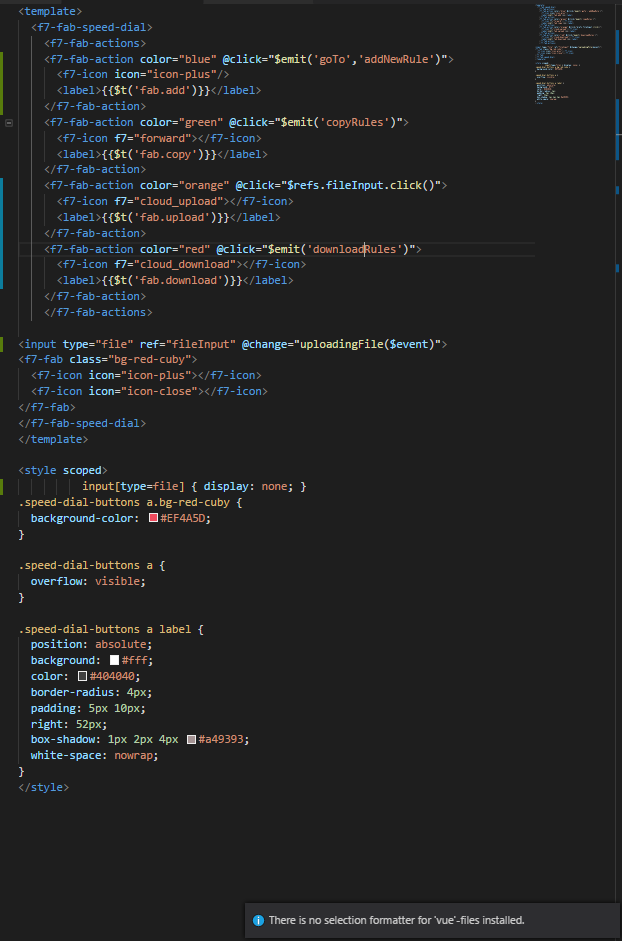
Can't format .vue files. I'm trying to format .vue files from a Vue project made using CLI.
Error "There is no selection formatter for 'vue'-files installed." appears.
It does not work when you save the file either
Vue file
Extensions

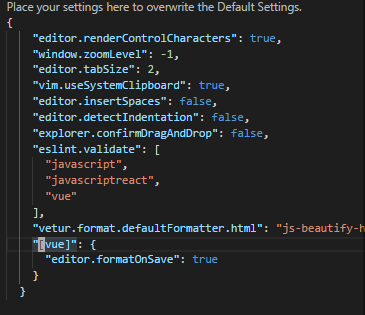
My settings
 karyhm
All 8 comments
Sam problem on Win 10.
 isaumya
on 11 Jul 2018
isaumya
on 11 Jul 2018
We only have a whole document formatter, no range formatter.
 octref
on 12 Jul 2018
octref
on 12 Jul 2018
octref
on 12 Jul 2018
octref
on 12 Jul 2018
Added this line to get html formatting to work
{
  // Default formatter for <template> region
  "vetur.format.defaultFormatter.html": "prettier",
}
 martinnaughton
on 19 Jul 2018
martinnaughton
on 19 Jul 2018
@martinnaughton I get "value is not accepted"; I can only choose None and js-beautify-html. (prettier installed)
 stefandevo
on 20 Aug 2018
stefandevo
on 20 Aug 2018
I resolved my problem with the followed code in the Visual studio code setting
{
"vetur.format.defaultFormatter.html": "js-beautify-html"
}
 alirezajs
on 4 Dec 2018
alirezajs
on 4 Dec 2018
document formatting works with the vetur pack. Lock at your shortcuts
 lukasjoc
on 20 Dec 2018
lukasjoc
on 20 Dec 2018
Specifying formatter for only SCSS should be an option. It works when I set
"vetur.format.defaultFormatter.html": "js-beautify-html"
even though I don't have it installed.
 hyvyys
on 25 Aug 2019
hyvyys
on 25 Aug 2019
Related issues
 shaunc
·
3Comments
shaunc
·
3Comments
 thibautguedou3
·
3Comments
thibautguedou3
·
3Comments
 AnnAngela
·
3Comments
AnnAngela
·
3Comments
 muhajirdev
·
3Comments
muhajirdev
·
3Comments
 tczhangzhi
·
3Comments
tczhangzhi
·
3Comments
Most helpful comment
Added this line to get html formatting to work